
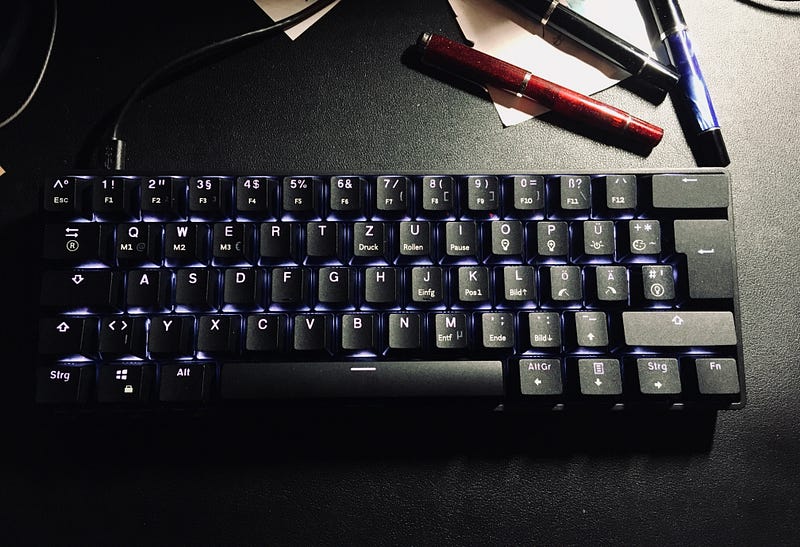
The Best ISO-DE Hotswap Mechanical Keyboard in 2021
Yes, there is a thing like that.
When it comes to mechanical keyboards, ANSI-US users have it best, hands down. They benefit from the widest available selection of prebuilt mechanical keyboards, switches, keycaps and a plethora of additional modding options.
When it comes to other layouts, especially the ISO-layouts and the DE in particular (german, as used in Austria and Germany for example), the outlook is rather bleak. Last year I urged you to at least once try a mechanical keyboard, to improve your writing speed, accuracy and overall experience typing. Nothing about that statement has changed in 2021. I still think everyone who writes as a hobby, job or whole career at least needs to give it a try once.
After a while you will have exhausted the possibilities with pre-built keyboards and want to venture into modding-territory and/or try out other switches besides the classic trio of Cherry MX Red, Blue and Brown. For that you need a mechanical keyboard with hot-swappable key switches. They are not soldered in and usually easily pulled off the PCB with a special switch puller.
A surprisingly competent mechanical keyboard
As stated earlier, the options for keyboards with a german layout are limited, but fear not, an unassuming underdog from China is here to save your day.
The MIZAR MZ60 is a mini style (60%) mechanical keyboard made from ABS plastics, with full RGB LED lights. It’s cable bound (USB-C to USB-A) and does not sport any flipable feet, but sits at a comfortable angle as is. It’s available in white and black at the time of writing.
You can choose between different Gateron switches. Clickies, tactiles or linear ones, as you’d expect. I went with the Gateron Browns, which are basically clones of the (terrible) Cherry MX Browns, which I lament over as being especially sub par and scratchy in this article.
Surprisingly though, I do enjoy the Gaterons. And besides that, I enjoy this keyboard, as a whole. I mainly got it to have a hot-swappable mechanical keyboard to try out other switches (like the very promising feeling, tactile Zealio™ V2 Switches). I didn’t expect much. But I was pleasantly surprised.
Usually I don’t like the mini-layout, because of the lacking arrow-keys. But here you can make easy use of the arrow keys, using the FN key, which cleverly is just located next to the arrow-cluster. Nice.
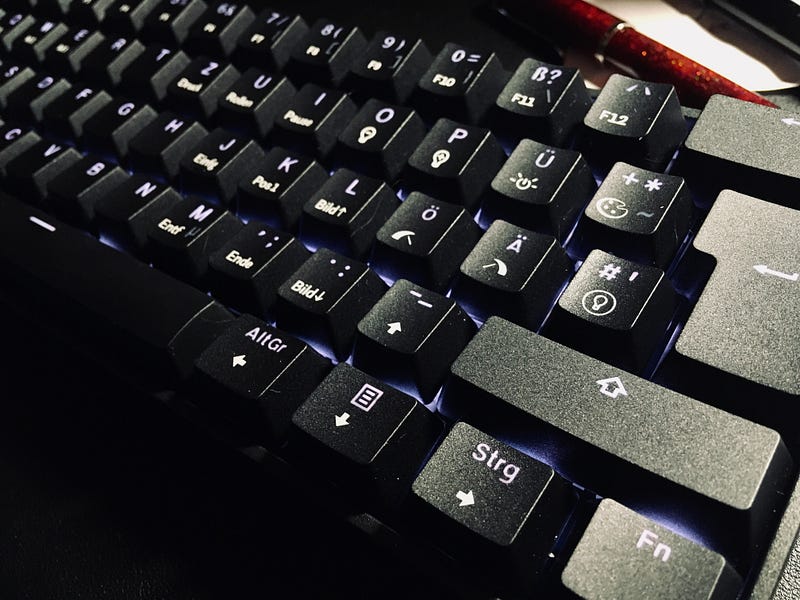
Another welcome feature is the ability to change the RGB lights on the fly with key commands. The keys are labeled and easily recognizable, so you don’t even need to peek into the manual. I run with a boring, low brightness white to not irritate my eyes, but you can go full reactive, trippy rainbow if you so want.
To me not of interest, but a nice bonus are the typical gaming features like N-key rollover and the ability to program macros straight on the keyboard itself.
Conclusion
Coming from a Ducky One 2 SF with O-rings and Cherry MX Blue clicky switches, I enjoy this board so much, that I swapped it out for being my daily driver for a week now. I can only highly recommend you give this board a whirl. It doesn’t matter, if it’s your first ever keyboard, or just another one in your collection. If you’re rocking an ISO-layout (especially DE) and want to try out other switches, without soldering or investing heavily in this hobby, this is your go-to-board. It has all the features you could want, is really economically priced and has a 60% layout that actually makes sense, even if you want to do serious work with it, besides pretending to be a hacker.
I really do like the “stock sound” of this mecha keyboard too. I actually planned to test plenty different switches with this keyboard, but so far I am enjoying the Gateron Browns (yes, I know, put the pitchforks down) so much, I’ll keep rocking them for a while.
So, for the sub 75 US $/68 € range, this is a top contender, especially for ISO-DE users.
The only two downsides that I could think of are the lack of feet on the underside of the keyboard and the need to use the somewhat awkwardly placed “delete” key (it’s on the “M”) with the FN key to make it work. But if this is an issue or not, highly depends on your workflow and usecase, of course.
If you enjoy mechanical keyboards, or if you’re just starting out, make sure to check out my tongue-in-cheek article “10 Unpopular Truths About Mechanical Keyboards”.
Thank you for reading this far. Please note, that this is an unsponsored article about a product that I bought myself. Also, this article does not contain any affiliate links and reflects my open and authentic opinion. I hope this was helpful to you. Stay safe, stay smart!