avatarCasey Cheng

Free AI web copilot to create summaries, insights and extended knowledge, download it at here

10168

Abstract

</div><p id="f519">Since row loop returns both row index <i>and</i> row data, this gives us an extra superpower — the ability to rename our row data. As per the example above, we can lump the row data into a <code>row</code> variable and access it through <code>row['col_name']</code>.</p><p id="c9c0">Instead of the usual <code>df.loc[idx, 'col_name']</code> that we use in index looping, now the code reads, well, maybe a little bit more concise. But the real improvement kicks in when we unpack and rename each individual column, like so…</p><div id="6878"><pre><span class="hljs-comment"># Better</span> <span class="hljs-attribute">res</span> = <span class="hljs-number">0</span> for idx, row in df.iterrows(): res += row[<span class="hljs-string">'col3'</span>]</pre></div><div id="c966"><pre><span class="hljs-comment"># Even better</span> %%timeit res = 0 for idx, (col1, col2, col3) in df.iterrows(): res += col3</pre></div><div id="0c0f"><pre>&gt;&gt; <span class="hljs-number">4.86</span> s ± <span class="hljs-number">28.4</span> ms per <span class="hljs-keyword">loop</span> (mean ± <span class="hljs-keyword">std</span>. dev. of <span class="hljs-number">7</span> runs, <span class="hljs-number">1</span> <span class="hljs-keyword">loop</span> <span class="hljs-number">each</span>)</pre></div><p id="0fa1">Much cleaner, right?</p><p id="85fe">However, Row Loops are lagging behind Index Loops in terms of performance. We executed the same logic, but…</p><ul><li><code>np.arange()</code> took 0.0000603 seconds to run.</li><li><code>range()</code> took 0.486 seconds to run.</li><li><code>DataFrame.iterrows()</code> took 4.86 seconds to run.</li></ul><p id="9f52">The good news is — just like Index Loop — we can optimize it with just a simple change. Instead of <code>iterrows()</code>, use <code>itertuples()</code>.</p><div id="7fef"><pre>%%timeit res = <span class="hljs-number">0</span> for <span class="hljs-built_in">row</span> in df.itertuples()<span class="hljs-symbol">:</span> res += getattr(<span class="hljs-built_in">row</span>, '<span class="hljs-built_in">int</span>')</pre></div><div id="5708"><pre>&gt;&gt; <span class="hljs-number">160</span> <span class="hljs-keyword">ms</span> <span class="hljs-title">± 13</span>.<span class="hljs-number">4</span> <span class="hljs-keyword">ms</span> <span class="hljs-title">per</span> loop (mean ± std. dev. of <span class="hljs-number">7</span> runs, <span class="hljs-number">10</span> loops each)</pre></div><p id="1213">On the surface, we can see that <code>itertuples()</code> is <b>30x</b> faster than <code>iterrows()</code>. But why? What’s the difference between <code>iterrows()</code> and <code>itertuples()</code>?</p><p id="2f32">For the curious souls, here’s a great <a href="https://readmedium.com/why-pandas-itertuples-is-faster-than-iterrows-and-how-to-make-it-even-faster-bc50c0edd30d">article</a> that explains it in detail. The TLDR version…</p><ul><li><code>iterrows()</code> returns row data in a <code>Series</code> object. It does not preserve data types so it has to execute a lot of type-checking when looping. More checking = slower looping.</li><li><code>itertuples()</code> returns row data in a <code>tuple</code>. It preserves data types so minimal type checking is required. Less checking = faster looping, a lot faster. <code>itertuples()</code> is <b>~30 times faster</b> than <code>iterrows()</code> in our example.</li></ul><blockquote id="c6e2"><p>If we need access to row data, it’s preferred to use Row Loop rather than Index Loop. Also, prioritise <code>itertuples()</code> over <code>iterrows()</code> because it’s much faster.</p></blockquote><h1 id="c6eb">List Comprehension</h1><p id="ce71">Python List Comprehension is a short and sweet way to create a <code>list</code> object based on the values of an existing list. It has the following general expression.</p><div id="eb28"><pre><span class="hljs-attribute">List</span> <span class="hljs-operator">=</span> [expression(i) for i in another_list if filter(i)]</pre></div><p id="5ba8">So, instead of…</p><div id="8043"><pre>%%timeit <span class="hljs-keyword">for</span> (idx, animal, animal_type, _) <span class="hljs-keyword">in</span> df.itertuples(): <span class="hljs-keyword">if</span> animal == <span class="hljs-string">'dog'</span>: animal_type = <span class="hljs-string">'mammals'</span> <span class="hljs-keyword">elif</span> animal == <span class="hljs-string">'frog'</span>: animal_type = <span class="hljs-string">'amphibians'</span> <span class="hljs-keyword">elif</span> animal == <span class="hljs-string">'goldfish'</span>: animal_type = <span class="hljs-string">'fish'</span> <span class="hljs-keyword">else</span>: animal_type = <span class="hljs-string">'others'</span></pre></div><div id="126f"><pre>df<span class="hljs-selector-class">.loc</span><span class="hljs-selector-attr">[idx, <span class="hljs-string">'animal_type'</span>]</span> = animal_type</pre></div><div id="0ff9"><pre>&gt;&gt; 1min 41s ± <span class="hljs-number">393</span> ms per <span class="hljs-keyword">loop</span> (mean ± <span class="hljs-keyword">std</span>. dev. of <span class="hljs-number">7</span> runs, <span class="hljs-number">1</span> <span class="hljs-keyword">loop</span> <span class="hljs-number">each</span>)</pre></div><p id="8ed1">We can condense all that nonsense into just a few lines of code.</p><div id="582b"><pre>%%timeit <span class="hljs-built_in">df</span>[<span class="hljs-string">'animal_type'</span>] = [<span class="hljs-string">'mammals'</span> <span class="hljs-keyword">if</span> animal == <span class="hljs-string">'dog'</span> <span class="hljs-keyword">else</span> <span class="hljs-string">'amphibians'</span> <span class="hljs-keyword">if</span> animal == <span class="hljs-string">'frog'</span> <span class="hljs-keyword">else</span> <span class="hljs-string">'fish'</span> <span class="hljs-keyword">if</span> animal == <span class="hljs-string">'goldfish'</span> <span class="hljs-keyword">else</span> <span class="hljs-string">'others'</span> <span class="hljs-keyword">for</span> animal <span class="hljs-keyword">in</span> <span class="hljs-built_in">df</span>[<span class="hljs-string">'animal'</span>]]</pre></div><div id="f21f"><pre>&gt;&gt; <span class="hljs-number">16.7</span> <span class="hljs-keyword">ms</span> <span class="hljs-title">± 92</span>.<span class="hljs-number">3</span> µs per loop (mean ± std. dev. of <span class="hljs-number">7</span> runs, <span class="hljs-number">100</span> loops each)</pre></div><p id="90c1">List comprehension is not just more compact and easier to grasp, it also iterates faster than normal loops. In this case, list comprehension is ~<b>6048 times faster</b> than row loops!</p><p id="4791">Sadly, there is one limitation.</p><p id="b3ad">Notice how I didn’t use the same example as the other sections (where we benchmark performance based on the sum of <code>int</code> column)?</p><p id="3524">I can’t.</p><p id="1a06">List comprehension’s syntax is simple, but the intention to keep it simple also restricts what it can do. For example, we can’t have a variable that stores the current sum of values when iterating. Even if I try a hack-ish way by specifying <code>current_sum</code> in a function outside of the list comprehension, it still uses the initial value of <code>current_sum</code> instead of updating on every iteration.</p><div id="3f27"><pre>old_list = <span class="hljs-selector-attr">[10, 20, 30, 40, 50]</span> <span class="hljs-function"><span class="hljs-title">print</span><span class="hljs-params">(f<span class="hljs-string">'old_list is... {old_list}'</span>)</span></span></pre></div><div id="ffc7"><pre>current_sum = <span class="hljs-number">0</span> <span class="hljs-keyword">def</span> <span class="hljs-title function_">get_cumulative_sum</span>(<span class="hljs-params">x, current_sum</span>): current_sum += x <span class="hljs-keyword">return</span> current_sum</pre></div><div id="54dc"><pre>new_list = <span class="hljs-selector-attr">[get_cumulative_sum(x, current_sum) for x in old_list]</span> <span class="hljs-function"><span class="hljs-title">print</span><span class="hljs-params">(f<span class="hljs-string">'new_list is... {new_list}'</span>)</span></span></pre></div><div id="86bd"><pre><span class="hljs-meta prompt_">&gt;&gt;</span> old_list is... [<span class="hljs-number">10</span>, <span class="hljs-number">20</span>, <span class="hljs-number">30</span>, <span class="hljs-number">40</span>, <span class="hljs-number">50</span>] <span class="hljs-meta prompt_">&gt;&gt;</span> new_list is... [<span class="hljs-number">10</span>, <span class="hljs-number">20</span>, <span class="hljs-number">30</span>, <span class="hljs-number">40</span>, <span class="hljs-number">50</span>]</pre></div><p id="9307">The big picture is that every list comprehension can be rewritten in for loop, but not every for loop can be rewritten in list comprehension. If you’re writing some complicated logic, avoid list comprehension.</p><blockquote id="896c"><p>All in all, list comprehension is just a syntactic sugar for iterations. It’s generally faster than normal loops but should only be used for simple code logic to remain readable.</p></blockquote><h1 id="605c">Lambda Function</h1><p id="aeac">When defining a function in Python (the usual way), we need to name the function. Lambda is an alternative way that allows us to create function, but without a name.</p><div id="70c1"><pre><span class="hljs-comment"># The usual way</span> <span class="hljs-keyword">def</span> <span class="hljs-title function_">multiply_two</span>(<span class="hljs-params">x</span>): <span class="hljs-keyword">return</span> x * <span class="hljs-number">2</span></pre></div><div id="63fc"><pre><span class="hljs-comment"># Lambda function</span> <span class="hljs-attr">multiply_two</span> = lambda x: x * <span class="hljs-number">2</span></pre></div><p id="bce1">This type of “nameless” functions are called Immediately Invoked Function Expressions (II # Options FE). They are executed as soon as they are created and require no explicit call to invoke the function.</p><p id="fc6e">In layman’s term, IIFE runs faster.</p><p id="0174">But Lambda only <i>creates</i> the IIFE function, it doesn’t execute the function — which is why we usually see lambda function used together with Panda’s <code>DataFrame.apply()</code>. It takes a function (lambda or not) as argument and apply it to every rows (or columns).</p><div id="ea30"><pre><span class="hljs-comment"># Apply the function to each column.</span> output = df.apply(lambda x: x<span class="hljs-number">*2</span>, <span class="hljs-attribute">axis</span>=0)</pre></div><div id="baa2"><pre><span class="hljs-comment"># Apply the function to each row.</span> output = df.apply(lambda x: x<span class="hljs-number">*2</span>, <span class="hljs-attribute">axis</span>=1)</pre></div><p id="05df">But just how fast are these functions? Let’s compare list comprehension and lambda functions.</p><div id="bee8"><pre>%%timeit <span class="hljs-keyword">def</span> <span class="hljs-title function_">get_type</span>(<span class="hljs-params">animal</span>): <span class="hljs-keyword">if</span> animal == <span class="hljs-string">'dog'</span>: animal_type = <span class="hljs-string">'mammals'</span> <span class="hljs-keyword">elif</span> animal == <span class="hljs-string">'frog'</span>: animal_type = <span class="hljs-string">'amphibians'</span> <span class="hljs-keyword">elif</span> animal == <span class="hljs-string">'goldfish'</span>: animal_type = <span class="hljs-string">'fish'</span> <span class="hljs-keyword">else</span>: animal_type = <span class="hljs-string">'others'</span> <span class="hljs-keyword">return</span> animal_type</pre></div><div id="40c1"><pre><span class="hljs-comment"># List comprehension</span> <span class="hljs-built_in">df</span>[<span class="hljs-string">'animal_type'</span>] = [get_type(x) <span class="hljs-keyword">for</span> x <span class="hljs-keyword">in</span> <span class="hljs-built_in">df</span>[<span class="hljs-string">'animal'</span>]] &gt;&gt; 21.7 ms ± 140 µs per loop (mean ± std. dev. of 7 runs, 10 loops each)</pre></div><div id="a5cc"><pre><span class="hljs-comment"># Lambda function</span> df[<span class="hljs-string">'animal_type'</span>] = df[<span class="hljs-string">'animal'</span>].apply(<span class="hljs-built_in">lambda</span> <span class="hljs-symbol">x:</span> get_type(x)) <span class="hljs-meta prompt_">&gt;&gt;</span> <span class="hljs-number">24.6</span> ms ± <span class="hljs-number">187</span> µs per loop (mean ± std. dev. of <span class="hljs-number">7</span> runs, <span class="hljs-number">10</span> loops each)</pre></div><p id="6252">Although both list comprehension and lambda function are fundamentally different concepts, they have very similar characteristics…</p><ul><li>Performance — same.</li><li>Flexibility — Both are more suited for simple code logic. We can’t create variable that tracks the output of previous iterations.</li></ul><blockquote id="eb2b"><p>To summarise, lambda function and list comprehension are po-tae-toe and po-tah-toh. Use whichever syntax you are more comfortable with. Personally, I prefer list comprehension because they are more intuitive to read.</p></blockquote><h1 id="37b9">Vectorised Operation</h1><p id="4c96">Vectorised operation is like moving a house. Would you rather…</p><ul><li>load one furniture, drive to your new house, unload, then repeat?</li><li>load everything, drive to your new house and unload all at once?</li></ul><p id="236c">The latter is definitely more efficient and it closely resembles how vectorised operations works.</p><p id="2310">On non-vectorised operation, the CPU loads a single value into its memory, perform computation and then return one output. It repeats this step for every loop iteration. But the kicker is that a CPU’s memory can store more than just a single value — meaning most of the CPU capacity are just idling.</p><p id="3561">On a vectorised operation, the CPU loads as much as it can fit into its memory so that we can perform computation, <i>all at once</i>. The savings in overhead helps to speed up the performance massively.</p><figure id="f9c8"><img src="https://cdn-images-1.readmedium.com/v2/resize:fit:800/1*B-_Uslu_7eqYJPFpvA6w3A.jpeg"><figcaption>Non-vectorised operations do not maximise the use of CPU resources. Image by the author.</figcaption></figure><p id="c479">In addition to maximising CPU capacity, vectorised operation are often implemented in optimised, pre-compiled code written in low-level language (e.g: C). These languages are more performant than Python by nature, and they also avoid overheads such as data type checking etc.</p><p id="9084">Enough theory — here’s a simple vectorised operation in practice.</p><div id="b7a0"><pre># Non-vectorised operation def calc_result(<span class="hljs-keyword">row</span>): <span class="hljs-keyword">return</span> <span class="hljs-keyword">row</span>[<span class="hljs-string">'col1'</span>] +(<span class="hljs-keyword">row</span>[<span class="hljs-string">'col2'</span>] * <span class="hljs-keyword">row</span>[<span class="hljs-string">'col3'</span>]) df[<span class="hljs-string">'result'</span>] = df.apply(calc_result, axis=<span class="hljs-number">1</span>) &gt;&gt; <span class="hljs-number">984</span> ms ± <span class="hljs-number">16.3</span> ms per <span class="hljs-keyword">loop</span> (mean ± std. dev. <span class="hljs-keyword">of</span> <span class="hljs-number">7</span> runs, <span class="hljs-number">1</span> <span class="hljs-keyword">loop</span> <span class="hljs-keyword">each</span>)</pre></div><div id="b928"><pre><span class="hljs-comment"># Vectorised operation</span> <span class="hljs-built_in">df</span>[<span class="hljs-string">'result'</span>] = <span class="hljs-built_in">df</span>[<span class="hljs-string">'col1'</span>] + (<span class="hljs-built_in">df</span>[<span class="hljs-string">'col2'</span>] * <span class="hljs-built_in">df</span>[<span class="hljs-string">'col3'</span>]) &gt;&gt; 227 µs ± 1.39 µs per loop (mean ± std. dev. of 7 runs, 1000 loops each)</pre></div><p id="b933">Vectorised operation performed <b>~4350 times faster</b> than non-vectorised operation. The code is intuitive and cleaner to read, too.</p><p id="d1ac">Other than executing mathematical operations for numbers, vectorised operations can perform non-compute operations, and for other data types too. Here’s a <a href="https://jakevdp.github.io/PythonDataScienceHandbook/03.10-working-with-strings.html">good reference</a> of the possible string-type vectorised operations shared by Jake VanderPlas in his Python Data Science Handbook.</p><div id="90b1"><pre><span class="hljs-comment"># Two examples of Vectorised Operation for String-type</span> <span class="hljs-built_in">df</span>[<span class="hljs-string">'result'</span>] = <span class="hljs-built_in">df</span>[<span class="hljs-string">'String'</span>].str.extract(<span class="hljs-string">'([A-Za-z]+)'</span>, <span class="hljs-built_in">expand</span>=False) <span class="hljs-built_in">df</span>[<span class="hljs-string">'result'</span>] = <span class="hljs-built_in">df</span>[<span class="hljs-string">'String'</span>].str.split(<span class="hljs-string">'T'</span>).str[0]</pre></div><div id="abae"><pre><span class="hljs-comment"># Two examples of Vectorised Operation for DateTime-type</span> <span class="hljs-built_in">df</span>[<span class="hljs-string">'result'</span>] = <span class="hljs-built_in">df</span>[<span class="hljs-string">'Date'</span>].dt.day_name() <span class="hljs-built_in">df</span>[<span class="hljs-string">'result'</span>] = <span class="hljs-built_in">df</span>[<span class="hljs-string">'Date'</span>].dt.year</pre></div><p id="0b2c">But, the very fact that vectorised operations loads and run everything simultaneously also means that it can only perform the same operation for every input value. If we want to divide a column by 2, it has to divide all the values in the column by 2, with no exceptions.</p><blockquote id="6cbe"><p>In other words, vectorised operations is one of the fastest way to iterate and has the cleanest syntax. They are great for applying simple and uniform operations across the entire sequence of data. But if we are trying to apply conditional logic (e.g; if-then), use Lambda functions or List Comprehension instead.</p></blockquote><h1 id="e836">Concluding Remarks</h1><p id="97dc">I hope this helps you see the benefits and limitations of each looping technique. The “best” looping technique will always depends on the type of logic you are implementing.</p><p id="9336">One final remark — this comparison is not exhaustive. Some small details are left out intentionally for simplicity reasons. The information here are <i>generally</i> correct, but you may run into slightly different performance for different use cases (e.g: vectorised operation are slower on strings). I recommend timing the loop yourself, and using <a href="https://stackoverflow.com/questions/23885147/how-do-i-use-line-profiler-from-robert-kern">line profiler</a> if you really want to squeeze that optimisation juice.</p><p id="f45f">Until then, good luck and godspeed.</p><p id="e0ce"><i>Enjoyed the article? Consider becoming a <a href="https://casey-cheng.medium.com/membership">Medium member</a> to get full access to every story and support content creators like me.</i></p><div id="31bc" class="link-block"> <a href="https://medium.com/@casey-cheng/membership"> <div> <div> <h2>Join Medium with my referral link — Casey Cheng</h2> <div><h3>Read every story from Casey Cheng (and thousands of other writers on Medium). Your membership fee directly supports…</h3></div> <div><p>medium.com</p></div> </div> <div> <div style="background-image: url(https://miro.readmedium.com/v2/resize:fit:320/0*_jjW-ogu21E7hJhO)"></div> </div> </div> </a> </div></article></body>

The Art of Speeding Up Python Loop

There is no “best” looping technique in Python, only the most suitable

Image by Chris Liverani from Unsplash.

“What is the fastest looping technique in Python?”

It’s a valid question, but often over-simplified. If there is a single looping method that is league above the rest, then the other techniques would have been deprecated.

Fact is, there is no “best”.

As with most things in life, there will be situations where one significantly outperforms the others, and in some other cases, it’s absolute garbage. They’re situational. A better way to think of looping optimisation in Python should look like this.
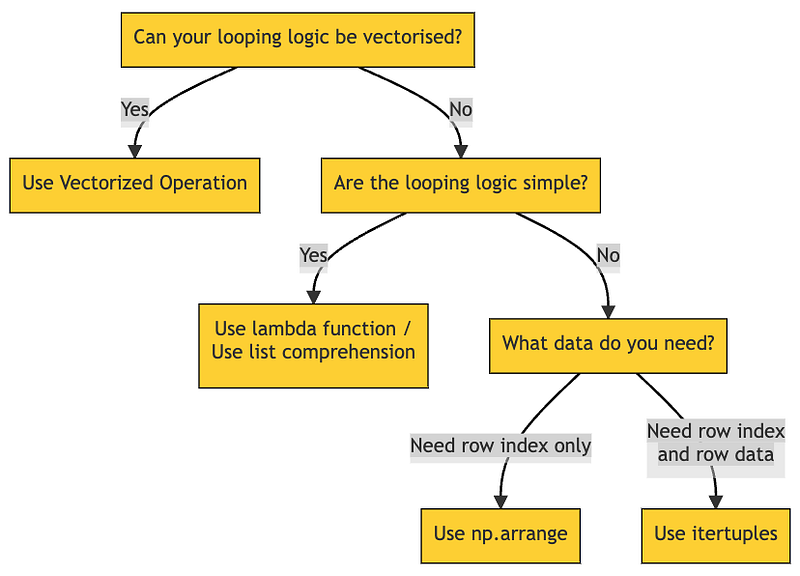
The best looping technique for your use case depends on a series of decisions. Image by the author.

Each of them are useful in their own right. Rather than creating yet another speed test article, I’d like to highlight what makes them unique, when to use them, and how to make them better? You’ll be surprised that with a simple syntax tweak, we can improve their performance by up to 8000 times faster.

Types of Looping Techniques:

  • Loop Iteration
  • List Comprehension
  • Lambda Function
  • Vectorised Operation

Loop Iteration

For-loops are the entry level looping technique taught to Python beginners because they are easy to read and extremely versatile.

items = ['bat', 'cat', 'dog']
for item in items:
  print(item)
>> bat
>> cat
>> dog

However, many consider for-loops as the antithesis of efficient programming. They’re slow because Python’s implementation of for-loops have very heavy overheads (e.g: type checking, etc — to be discussed later) that is executed every time it iterates.

There are two main types of for-loops, namely (i) Index Loop and (ii) Row Loop.

Index Loop

An Index Loop takes a sequence of numbers (e.g: [0, 1, 2, …]) and runs your code logic for every element within the sequence.

On the first iteration, Python assigns the variable idx to the sequence’s first element (in this case, 0) before executing the code within the loop. Then, idx gets re-assigned to the second, third, … element, and the cycle repeats until the end of the sequence.

for idx in ['bat', 'cat', 'dog']:
  print(f'Hello, I am index {idx}.')
>> Hello, I am index bat.
>> Hello, I am index cat.
>> Hello, I am index dog.

An index loop is useful when we need control over the starting index, ending index, and step size of the sequence.

For example, if you want to loop from the 1000th to 2000th row…

res = 0
for idx in range(1000, 2000):
  res += df.loc[idx, 'int']

If you only need every 5th element from the 1000th to 2000th row…

res = 0
for idx in range(1000, 2000, 5):
  res += df.loc[idx, 'int']

Index loops are incredibly flexible, but they are generally perceived as slow looping techniques. While true to some extent, it doesn’t have to be! For benchmarking purposes, here’s a simple loop that returns the summation of the int column.

%%timeit
res = 0
for idx in range(0, 100000):
  res += df.loc[idx, 'int']
>> 486 ms ± 4.28 ms per loop (mean ± std. dev. of 7 runs, 1 loop each)

We can achieve the same functionality, but with much better performance with a simple optimization trick — np.arange().

%%timeit
res = 0
for idx in np.arange(0, 100000):
  res += df.loc[idx, 'int']
>> 60.3 µs ± 355 ns per loop (mean ± std. dev. of 7 runs, 10000 loops each)

The same code, but np.arange() ran 8000 times faster than range().

Here’s why.

range() is a built-in Python class range that stores only the starting point, ending point, and step size of your desired sequence of numbers. The list of numbers gets generated iteratively under the hood only when we start to loop over the sequence. This saves memory because we don’t need to store the entire sequence all the time, but it hurts performance due to the overhead of generating the numbers.

np.arange(), on the other hand, is a third-party library (Numpy) function. Functionally, they are similar to range(), but NumPy implementation performs many operations, including looping, on the C-level which is much more performant compared to Python. They are optimized for working with vectors and avoid much Python-related overhead.

Since range() and np.arange() do the same thing, I recommend to always use np.arange() when you need index loops.

Row Loop

A Row Loop iterates over the rows of Pandas DataFrame — 1st row, 2nd row, …, Nth row. Every time it iterates, it returns the row index and row data of that specific iteration. The most common implementation for row looping is the DataFrame.iterrows() function.

for idx, row in df.iterrows():
  print(f'row_idx: {idx}, row_data: {row}')
>> row_idx: 0, row_data:
animal             bat
animal_type        mammals
Name: 0, dtype: object
>> row_idx: 1, row_data: 
animal             dog
animal_type        mammals
Name: 1, dtype: object
>> ...

Since row loop returns both row index and row data, this gives us an extra superpower — the ability to rename our row data. As per the example above, we can lump the row data into a row variable and access it through row['col_name'].

Instead of the usual df.loc[idx, 'col_name'] that we use in index looping, now the code reads, well, maybe a little bit more concise. But the real improvement kicks in when we unpack and rename each individual column, like so…

# Better
res = 0
for idx, row in df.iterrows():
  res += row['col3']
# Even better
%%timeit
res = 0
for idx, (col1, col2, col3) in df.iterrows():
  res += col3
>> 4.86 s ± 28.4 ms per loop (mean ± std. dev. of 7 runs, 1 loop each)

Much cleaner, right?

However, Row Loops are lagging behind Index Loops in terms of performance. We executed the same logic, but…

  • np.arange() took 0.0000603 seconds to run.
  • range() took 0.486 seconds to run.
  • DataFrame.iterrows() took 4.86 seconds to run.

The good news is — just like Index Loop — we can optimize it with just a simple change. Instead of iterrows(), use itertuples().

%%timeit
res = 0
for row in df.itertuples():
  res += getattr(row, 'int')
>> 160 ms ± 13.4 ms per loop (mean ± std. dev. of 7 runs, 10 loops each)

On the surface, we can see that itertuples() is 30x faster than iterrows(). But why? What’s the difference between iterrows() and itertuples()?

For the curious souls, here’s a great article that explains it in detail. The TLDR version…

  • iterrows() returns row data in a Series object. It does not preserve data types so it has to execute a lot of type-checking when looping. More checking = slower looping.
  • itertuples() returns row data in a tuple. It preserves data types so minimal type checking is required. Less checking = faster looping, a lot faster. itertuples() is ~30 times faster than iterrows() in our example.

If we need access to row data, it’s preferred to use Row Loop rather than Index Loop. Also, prioritise itertuples() over iterrows() because it’s much faster.

List Comprehension

Python List Comprehension is a short and sweet way to create a list object based on the values of an existing list. It has the following general expression.

List = [expression(i) for i in another_list if filter(i)]

So, instead of…

%%timeit
for (idx, animal, animal_type, _) in df.itertuples():
    if animal == 'dog':
        animal_type = 'mammals'
    elif animal == 'frog':
        animal_type = 'amphibians'
    elif animal == 'goldfish':
        animal_type = 'fish'
    else:
        animal_type = 'others'
df.loc[idx, 'animal_type'] = animal_type
>> 1min 41s ± 393 ms per loop (mean ± std. dev. of 7 runs, 1 loop each)

We can condense all that nonsense into just a few lines of code.

%%timeit
df['animal_type'] = ['mammals' if animal == 'dog' else
                     'amphibians' if animal == 'frog' else
                     'fish' if animal == 'goldfish' else
                     'others' for animal in df['animal']]
>> 16.7 ms ± 92.3 µs per loop (mean ± std. dev. of 7 runs, 100 loops each)

List comprehension is not just more compact and easier to grasp, it also iterates faster than normal loops. In this case, list comprehension is ~6048 times faster than row loops!

Sadly, there is one limitation.

Notice how I didn’t use the same example as the other sections (where we benchmark performance based on the sum of int column)?

I can’t.

List comprehension’s syntax is simple, but the intention to keep it simple also restricts what it can do. For example, we can’t have a variable that stores the current sum of values when iterating. Even if I try a hack-ish way by specifying current_sum in a function outside of the list comprehension, it still uses the initial value of current_sum instead of updating on every iteration.

old_list = [10, 20, 30, 40, 50]
print(f'old_list is... {old_list}')
current_sum = 0
def get_cumulative_sum(x, current_sum):
    current_sum += x
    return current_sum
new_list = [get_cumulative_sum(x, current_sum) for x in old_list]
print(f'new_list is... {new_list}')
>> old_list is... [10, 20, 30, 40, 50]
>> new_list is... [10, 20, 30, 40, 50]

The big picture is that every list comprehension can be rewritten in for loop, but not every for loop can be rewritten in list comprehension. If you’re writing some complicated logic, avoid list comprehension.

All in all, list comprehension is just a syntactic sugar for iterations. It’s generally faster than normal loops but should only be used for simple code logic to remain readable.

Lambda Function

When defining a function in Python (the usual way), we need to name the function. Lambda is an alternative way that allows us to create function, but without a name.

# The usual way
def multiply_two(x):
  return x * 2
# Lambda function
multiply_two = lambda x: x * 2

This type of “nameless” functions are called Immediately Invoked Function Expressions (IIFE). They are executed as soon as they are created and require no explicit call to invoke the function.

In layman’s term, IIFE runs faster.

But Lambda only creates the IIFE function, it doesn’t execute the function — which is why we usually see lambda function used together with Panda’s DataFrame.apply(). It takes a function (lambda or not) as argument and apply it to every rows (or columns).

# Apply the function to each column.
output = df.apply(lambda x: x*2, axis=0)
# Apply the function to each row.
output = df.apply(lambda x: x*2, axis=1)

But just how fast are these functions? Let’s compare list comprehension and lambda functions.

%%timeit
def get_type(animal):
    if animal == 'dog':
        animal_type = 'mammals'
    elif animal == 'frog':
        animal_type = 'amphibians'
    elif animal == 'goldfish':
        animal_type = 'fish'
    else:
        animal_type = 'others'
    return animal_type
# List comprehension
df['animal_type'] = [get_type(x) for x in df['animal']]
>> 21.7 ms ± 140 µs per loop (mean ± std. dev. of 7 runs, 10 loops each)
# Lambda function
df['animal_type'] = df['animal'].apply(lambda x: get_type(x))
>> 24.6 ms ± 187 µs per loop (mean ± std. dev. of 7 runs, 10 loops each)

Although both list comprehension and lambda function are fundamentally different concepts, they have very similar characteristics…

  • Performance — same.
  • Flexibility — Both are more suited for simple code logic. We can’t create variable that tracks the output of previous iterations.

To summarise, lambda function and list comprehension are po-tae-toe and po-tah-toh. Use whichever syntax you are more comfortable with. Personally, I prefer list comprehension because they are more intuitive to read.

Vectorised Operation

Vectorised operation is like moving a house. Would you rather…

  • load one furniture, drive to your new house, unload, then repeat?
  • load everything, drive to your new house and unload all at once?

The latter is definitely more efficient and it closely resembles how vectorised operations works.

On non-vectorised operation, the CPU loads a single value into its memory, perform computation and then return one output. It repeats this step for every loop iteration. But the kicker is that a CPU’s memory can store more than just a single value — meaning most of the CPU capacity are just idling.

On a vectorised operation, the CPU loads as much as it can fit into its memory so that we can perform computation, all at once. The savings in overhead helps to speed up the performance massively.
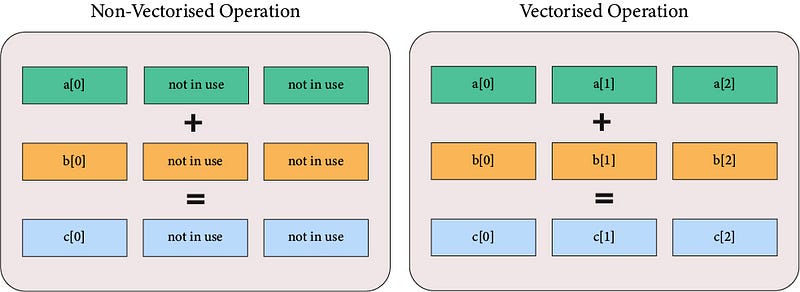
Non-vectorised operations do not maximise the use of CPU resources. Image by the author.

In addition to maximising CPU capacity, vectorised operation are often implemented in optimised, pre-compiled code written in low-level language (e.g: C). These languages are more performant than Python by nature, and they also avoid overheads such as data type checking etc.

Enough theory — here’s a simple vectorised operation in practice.

# Non-vectorised operation
def calc_result(row):
    return row['col1'] +(row['col2'] * row['col3'])
df['result'] = df.apply(calc_result, axis=1)
>> 984 ms ± 16.3 ms per loop (mean ± std. dev. of 7 runs, 1 loop each)
# Vectorised operation
df['result'] = df['col1'] + (df['col2'] * df['col3'])
>> 227 µs ± 1.39 µs per loop (mean ± std. dev. of 7 runs, 1000 loops each)

Vectorised operation performed ~4350 times faster than non-vectorised operation. The code is intuitive and cleaner to read, too.

Other than executing mathematical operations for numbers, vectorised operations can perform non-compute operations, and for other data types too. Here’s a good reference of the possible string-type vectorised operations shared by Jake VanderPlas in his Python Data Science Handbook.

# Two examples of Vectorised Operation for String-type
df['result'] = df['String'].str.extract('([A-Za-z]+)', expand=False)
df['result'] = df['String'].str.split('T').str[0]
# Two examples of Vectorised Operation for DateTime-type
df['result'] = df['Date'].dt.day_name()
df['result'] = df['Date'].dt.year

But, the very fact that vectorised operations loads and run everything simultaneously also means that it can only perform the same operation for every input value. If we want to divide a column by 2, it has to divide all the values in the column by 2, with no exceptions.

In other words, vectorised operations is one of the fastest way to iterate and has the cleanest syntax. They are great for applying simple and uniform operations across the entire sequence of data. But if we are trying to apply conditional logic (e.g; if-then), use Lambda functions or List Comprehension instead.

Concluding Remarks

I hope this helps you see the benefits and limitations of each looping technique. The “best” looping technique will always depends on the type of logic you are implementing.

One final remark — this comparison is not exhaustive. Some small details are left out intentionally for simplicity reasons. The information here are generally correct, but you may run into slightly different performance for different use cases (e.g: vectorised operation are slower on strings). I recommend timing the loop yourself, and using line profiler if you really want to squeeze that optimisation juice.

Until then, good luck and godspeed.

Enjoyed the article? Consider becoming a Medium member to get full access to every story and support content creators like me.

Python
Programming
Data Engineering
Computer Science
Hands On Tutorials
Recommended from ReadMedium