
SEO Writing
The 7 Essentials of Image Optimization to Improve SEO
You should add image optimization to your SEO strategy.

Search Engine Optimization (SEO) can be very tiring…
Do you feel me?
So far, I’ve written two SEO-related blog posts on Medium about keyword research and link building.
But wait!
It’s not over yet!
What if I tell you there’s more…
Yes. There’s…more.
Now, I know you may be stoked to learn more about SEO. And you should! But honestly, I was so sick of trying to get a grasp of it that I just wanted to give up.
I supposed my pea-sized brain just finds it difficult to compute such alien information. That’s why I try to write about SEO-related content that won’t burn your brain to crisps. Hopefully…
So in this post, you’ll walk through the necessary elements to improve Image SEO.
Whaaat…images affect SEO too?
Yes, and it’s one heck of a headache!
But it’s necessary to learn in order to survive the overly-saturated world of the interwebs.
So before we get down to the nitty-gritty of image optimization, it would be more impactful to know its importance first.
Why is Image SEO Important?
To start with, 22.6 percent of internet searches are Google Images. That’s an opportunity you shouldn’t miss out on to increase traffic.
It’s also worth mentioning that Google prioritizes user experience.
So what does this means?
Google has a set of signals that measure users’ interaction with a web page on mobile and desktop called Page Experience. And the metrics are included in the ranking criteria for the Top Stories on mobile search.
But what does this has to do with Images?
Simple. Image optimization is one of the essentials for On-page SEO.
That means well-optimized visuals would enhance the user experience, which improves visibility for better ranking.
Good User experience = Improved visibility = Better ranking
Got it?
Okay. Now let’s explore each necessary element for good Image SEO.
1. Types of Images
Nothing beats original images.
Why?
Well, how many times have you seen the same Unsplash photo used as a cover image in Medium? And what about stock photos on different articles across the internet?
Using the same photos as other writers for your blog post doesn’t really show originality, don’t you think? And overly used images tend to look less desirable, which affects user experience.
There’s nothing wrong with using copyright-free images. Many big sites often use stock photos and are still able to rank on the search results.
But what if you write for a smaller business or blog? Using personalized visuals instead has a better chance to stand out more.
2. File Name
Notice when you download images from Unsplash or Pexels, the file name often looks like this:
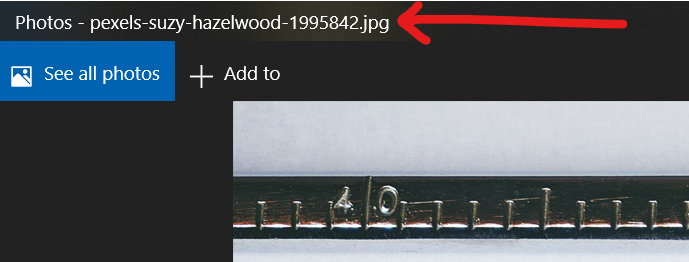
That’s because, according to the Google documentation style guide, file names should be in lowercase and dashes as word separators.
So let’s take the photo below as an example:
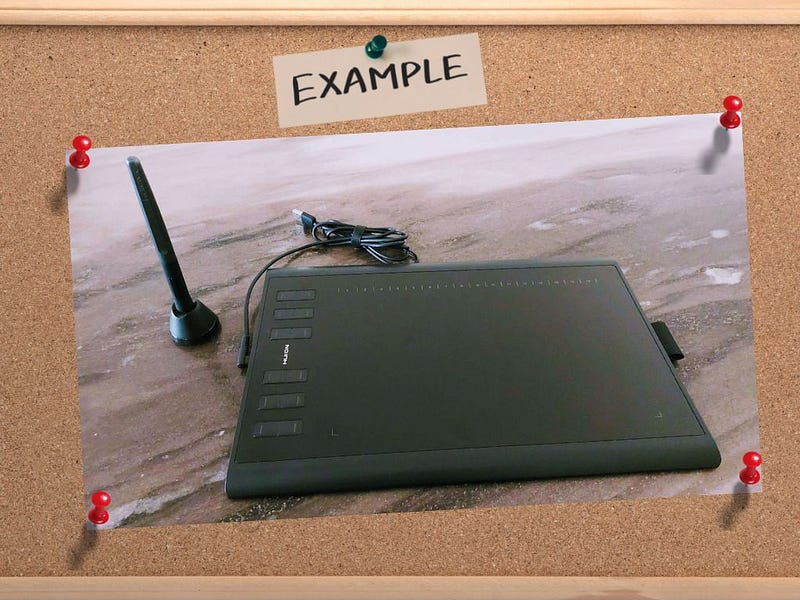
Let’s say this picture is from your phone or camera, and you’d like to add it to your article.
Be sure to change the default file name before uploading — for example, IMG_12345.jpg, to huion-h1060p-drawing-tablet.jpg.
Doing so is crucial because it gives Google more context about the image and its relevance to the web page.
3. Format
The image formats that are supported by Google are:
- JPG/JPEG
- PNG
- WebP
- SVG
- GIF
I’ve mostly only used JPG, PNG, and GIF.
But when it comes to picture format, it really depends on what you use the image for.
For instance, if you want to share a picture with high clarity or an infographic, PNG is the better option.
Whereas JPG has a lower resolution, so it’s more suitable as your profile photo on your website or preview photos of a product.
Simply put, choose your image format based on your readers’ needs.
4. Size
The choice of image format is closely related to the file size. For example, PNG has a higher definition image, so the size is much bigger than a lower resolution file like JPG.
That’s why you shouldn’t use the same formats throughout your blog post.
The image size matters more than you think because it could affect page speed. Large picture file sizes are one of the top reasons a webpage takes longer to load. And slow loading speed increases bounce rate.
In case you’re unfamiliar with the term, bounce rate means the percentage of visitors entering a web page then leaving sooner without continuing to browse for more.
Be honest with me. How many times have you given up on a page to load because it took more than 5 seconds?
I know I’ve done it way too many times.
A high bounce rate doesn’t affect SEO directly, but it could impact user experience critically. And what have we learned in this post so far?
Google favors user experience.
So when a blog post has a poor user experience, your chances of ranking are much lower.
Here are some tools you may need:
1. PageSpeed Insights is a fantastic tool to check how images affect your page speed.
2. Optimizilla to compress JPG, PNG, and GIF image files.
5. Captions
Captions are the words you’d typically see below images in articles and blog posts.
On average, captions beneath pictures are viewed 300 percent more often than the main article content.
So by now, I’m sure you know what this means.
Adding image captions improves… Say it with me, guys.
USER EXPERIENCE!
Besides that, according to Google, captions are necessary as results are more beneficial when adding further context to your images.
6. Alt Text
You’ll see it on Medium when you hover your mouse over your uploaded image. Of course, if you’re new to this, you’d most likely ignore it.
I mean, why would you do the extra work when the body copy is more important, right? But the internet is a little more complex than that.
Alt Text plays a significant role by informing Google what the image shows, which could rank on Google Images.
Also, Alt Text is vital as a description for when your image doesn’t load and makes your content more accessible for those who are visually impaired.
But an Alt Text could also be a bad user experience when it isn’t phrased precisely.
I used to be overly descriptive when writing an Alt Text. I thought I needed to describe every single object and color in a photo. So I would even describe the wall paint and curtain patterns!
Yep, I did that…
If you look online for the best Alt Text length, you’ll find various suggestions from different articles. There’s no fixed answer, so it can be very confusing.
But the whole point of Alt Text is for a better user experience. So the easiest way is by picturing yourself explaining a photo briefly to a friend—just a straight explanation without being too descriptive.
You can also add a targeted keyword but make sure it still makes sense. No keyword stuffing!
7. Title Text
Title Text is the image title. Don’t get it confused with file name, by the way. It doesn’t affect SEO much, but I thought it’s worth mentioning just for your knowledge.
You’d normally see this when uploading pictures to content management systems (CMS) like WordPress.
Title Text isn’t visible after publication unless you customize it to appear when a user hovers over an image.
But this isn’t really necessary, especially if you’re only writing on Medium or other similar writing platforms.
If you do have the option to add Title Text, just make sure it makes sense with your Alt Text.
To Recap
1. Well-optimized Images enhance user experience, which will then improve ranking.
2. Try not to use the same free photos as other sites and blogs.
3. Use lowercase letters and dashes as spaces for image file names.
4. Choose the image format according to the function of the picture to your readers.
5. Smaller image size improves a webpage’s loading speed.
6. Image captions add more value to users.
7. Alt text is essential for visually impaired users and provides Google with more information.
8. Title text is not the same as file name, and you’d typically have the option to do so when uploading images on content management software (CMS).
So there you have it, folks! Now I have a few questions for you.
Are you still alive after all of this information? Is your brain still in one piece? But in all seriousness, do you add image optimization to your SEO strategy?
I wrote Keyword Research Made Easy for Beginners to simplify what keywords are all about in SEO:
I also mentioned Alt Text used as Image Anchor Text in one of my less popular SEO posts 😂. To learn more about link building, check out You Need to Know About These 3 Links to Improve SEO:
Perhaps you’re interested in creating customized visual aids for your blog post. Then take a look at 5 Ways How Canva Add Color to Your Blog Post:
🕖 Follow and be a writer for Time To Write The Next Article, a Medium publication founded by Don Sabado.
🖋 Time To Write The Next Article welcomes pieces about writing, travels, teaching, and making money online!
📋 You can read the recently updated guideline here, and start writing the next article! 😊


