
The #1 Cure For Medium’s New Change Will Blow Your Mind
The first report you read is never accurate

From my days in the military, I learned that the first report you hear about is only half true. The information you hear is incorrect until the real story emerges hours to days later. This is the case with Medium’s new platform change that many people agonized over and people still missed this little secret. My one little secret will brighten your day as soon as you read this. Are you ready?
Let’s begin. I don’t like to keep you waiting. I like to get right to the point. That’s my style. No fluff. No fake news. Real information.
This morning I was updating an article that I submitted to Data Driven Investor. They have another platform outside of Medium in addition to their original site that is on Medium. As I working to import an article I wrote, I noticed something that made me very happy.
As other writers have mentioned, from the new and experienced writers, they all missed this one change. The writers criticized the good and bad about Medium’s new change. Many writers missed this one benefit.
With the new change, writers thought they could no longer pin their top articles on their homepage. Surprise, surprise, surprise… that option is still available. A little more research would have revealed that.
To pin your article, this is what you need to do:
Step 1
Located the article you want to pin to your homepage. The article could be your money-making article. Maybe it’s the most viewed article you wrote. Or the article could be a recent article that you recently published. Whatever article you want to pin, that is your choice.
Step 2
You need to edit the story you want to pin to your homepage. If you’re new to Medium, from the article you want to pin, you need to click on the three dots on the top right of your screen. This gives you different options to edit your article.
Step 3
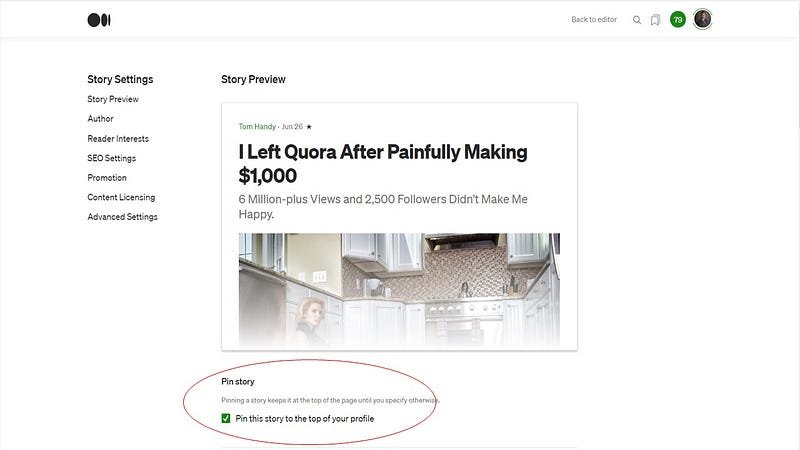
Click on more settings. As soon as you do this, you’ll see your story’s back office where you can make changes such as the story’s tag, SEO settings, title preview, and the friend link for non-paying Medium readers. The one option to pin your story is also located on this page.
Step 4
Immediately below the image of your story’s photo, you can pin this story to your homepage. Once you click on the box to pin your story, the story will be the first article viewers see on your homepage. This is the goldmine writers have missed.
As I said, I get right to the point in my article. I don’t give you a lot of fluff. I try to provide you exactly what you need.
What story do you plan to pin to your homepage?
Tom Handy is a top writer on Medium, former Quora writer, and father of two kids. He retired from the Army and sits on several non-profit boards. You can find him on Twitter @tomhandy1 and his publication Life is Like a Game.