
Testing the data layer with Testcontainers
Using the Testcontainers is one of the ways to test your app’s data layer. Let’s see a basic example.
Before starting, let’s clear out two assumptions:
- You are using a supported runtime (I’ll use Kotlin).
- You have Docker installed in your local environment. Ideally, you have it also in the deployment environment, to run the same exact tests that run locally.

There are multiple techniques available to test your app’s data layer that I covered before:
Let’s focus on testing the data layer with a real database. To achieve it, we could launch the database outside of the testing environment, but that requires external setup and deployment, whether by manually creating a database or by using a Docker container. Additionally, having a database that’s managed in test code promotes better data isolation.
Also notice that we’ll just unit-test the data layer, which means we won’t launch the whole app. Instead, we’ll isolate the data layer part so the example is simpler, but this technique can be used regardless.
Let’s start by including the Testcontainers library in the build file:
testImplementation("org.testcontainers:testcontainers:1.+")Let’s say we needed wanted to test with MySQL Go to the homepage, and pick “MySQL Module” under the following menu option:
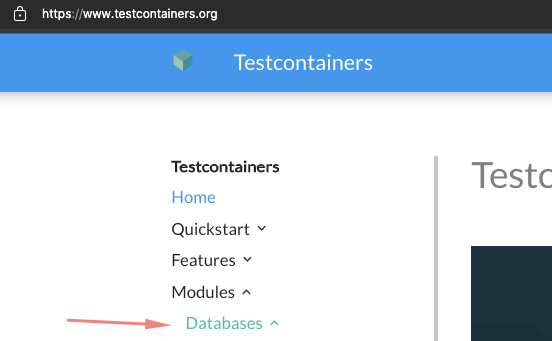
Copy the library declaration to your project’s build file:
testImplementation("org.testcontainers:mysql:1.+")We could have made it without this, by building a generic container. The benefit is that now we’ll have a dedicated utility class tailored to our needs:
val dbServer = MySQLContainer<Nothing>("mysql")
dbServer.start()
This will spin up a MySQL instance in Docker, so make sure the Docker server is running or you’ll get a “Could not find a valid Docker environment” error.
📝 We could use JUnit annotations to have this container running, but I prefer making it explicit, as it’s almost the same amount of lines of code.
Now, you can connect to the container running (here using the Exposed library):
val database = Database.connect(
    url = dbServer.jdbcUrl,
    user = dbServer.username,
    password = dbServer.password,
    driver = dbServer.driverClassName,
)
val userRepository = MySqlUserRepository(database)
You’re now free to use that repository. Just creating some tests with some assertions. You can assert using the SUT’s methods or by peeking directly into the database, but that depends on your testing strategy.
At the end of the tests, don’t forget to stop the container:
dbServer.stop()
Let’s see the full example:
Also, check out an example of a full-stack test.
My advice is to don’t add more tests or complicate things more before having this example running in your CI/CD.
There’s much more to explore in Testcontainers, like using a generic container and relying on docker-compose.yml files. You can even use it to make web acceptance tests, something I’ll explore in a future article.


