avatarTeri Radichel

Free AI web copilot to create summaries, insights and extended knowledge, download it at here

5551

Abstract

"3d2a"><img src="https://cdn-images-1.readmedium.com/v2/resize:fit:800/1*Gkdcevp8097DIjMOaNMKzA.png"><figcaption></figcaption></figure><p id="e7dc">I’m going to create new security credentials for this test.</p><p id="7d4c">Scroll down and click Create access key.</p><figure id="0c3c"><img src="https://cdn-images-1.readmedium.com/v2/resize:fit:800/1*BmotxmVb7OAuBAodTDdFuQ.png"><figcaption></figcaption></figure><p id="cc6d">Now you get this way too complicated screen. Click the first option.</p><figure id="ccaf"><img src="https://cdn-images-1.readmedium.com/v2/resize:fit:800/1*NcDL4xOSFBh_LxrMZgkU-Q.png"><figcaption></figcaption></figure><p id="85e5">Now you get this warning, and I’ve explained a number of times why I am not using these other options. Unless something changed since the last time I used AWS SSO / Identity Center, these are the reasons I’m not using it.</p><figure id="38d9"><img src="https://cdn-images-1.readmedium.com/v2/resize:fit:800/1*keslOPNZmx-zerDLR4i-GQ.png"><figcaption></figcaption></figure><p id="b0e8">You can find more details and how to work around some of the limitations in these posts, like creating separate users for MFA enforcement across roles.</p><div id="9841" class="link-block"> <a href="https://readmedium.com/aws-iam-932d6a043b7"> <div> <div> <h2>AWS IAM</h2> <div><h3>Stories on AWS IAM by Teri Radichel. The Code.</h3></div> <div><p>medium.com</p></div> </div> <div> <div style="background-image: url(https://miro.readmedium.com/v2/resize:fit:320/1*CcF9nyBH9vzZbcHC3bhViA.png)"></div> </div> </div> </a> </div><p id="06dc">Note that I don’t know if some of the above has been fixed since I last used the service, but it seems like they are pretty set on using the browser which is not ideal from a security perspective or leveraging automation the way I’m doing in my architecture.</p><p id="6fac">Developer credentials are generally risky — but in our case, we are enforcing MFA for all actions (hopefully — if our SCP works as advertised). With the design in this blog series:</p><ul><li>An attacker cannot use credentials exposed or checked into GitHub without MFA.</li><li>Credentials in developer workstations can only assume roles, with MFA.</li><li>Credentials used in containers on EC2 instances (which will be our primary use case long term) are only ever stored in Secrets Manager, not in EC2 instances or on developer workstations where code they are developing exists.</li></ul><p id="b02c">Ok so now that you understand <i>under what circumstances</i> I use developer access keys let’s proceed.</p><p id="b227">Now my long term plan is to store all credentials in Secrets Manager and access the credentials from an EC2 instance combined with a token to assume a short term session and run a specific job from a private network. But for this test I’m going to configure an AWS CLI profile as per usual so we can test our SCP.</p><p id="b614">Using my new credentials I run:</p><div id="216e"><pre>aws configure <span class="hljs-comment">--profile nomfa-rootadmin</span></pre></div><p id="032e">I’m going to enter my credentials, region, and json for the output type.</p><figure id="4398"><img src="https://cdn-images-1.readmedium.com/v2/resize:fit:800/1*8T0XuAF7uAMYSqwNEui_qg.png"><figcaption></figcaption></figure><p id="669d">What happens if I try to run the assume role command with those credentials?</p><div id="8927" class="link-block"> <a href="https://awscli.amazonaws.com/v2/documentation/api/latest/reference/sts/assume-role.html?src=radichel"> <div> <div> <h2>assume-role - AWS CLI 2.13.38 Command Reference</h2> <div><h3>undefined</h3></div> <div><p>undefined</p></div> </div> <div> <div style="background-image: url(https://miro.readmedium.com/v2/resize:fit:320/)"></div> </div> </div> </a> </div><p id="f6bb">I put my assume role command in a script and execute it.</p><div id="d067"><pre>aws sts assume-role <span class="hljs-string"></span> --role-arn arn:aws:iam::xxxxxxxxxxxx:role/[org-cross-account-role] <span class="hljs-string"></span> --role-session-name test-<span class="hljs-literal">no</span>-mfa <span class="hljs-string"></span> --profile nomfa-rootadmin</pre></div><p id="5b65">Here’s the result:</p><figure id="9d0f"><img src="https://cdn-images-1.readmedium.com/v2/resize:fit:800/1*NXEKTcqZgwcT9ge2DYtm4Q.png"><figcaption></figcaption></figure><p id="d18d">Nope. Not allowed.</p><p id="8625">What if we assume the role with MFA? How can I do that?</p><p id="5cac">Recall that’s what I’m doing in my container that assumes a role with MFA:</p><div id="95bd" class="link-block"> <a href="https://readmedium.com/creating-a-common-deployment-container-that-requires-mfa-768f02856e41"> <div> <div> <h2>Creating a Common Deployment Container That Requires MFA</h2> <div><h3>ACM.377 Leveraging a container and my new directory structure for running deployment jobs</h3></div> <div><p>medium.com</p></div> </div> <div> <div style="background-image: url(https://miro.readmedium.com/v2/resize:fit:320/1*ZBD_oKAamWiau6mPObh5pQ.png)"></div> </div>

Options

</div> </a> </div><p id="638d">In the above, I’m obtaining temporary credentials and using them to execute a job with a short term session. As I explained in other posts, there are a number of ways to assume roles.</p><p id="d4ab">In this post, I’m going to configure a role manually because it’s simpler for this test. I’m going to test without and with MFA.</p><p id="bf29"><b>Test without MFA:</b></p><p id="e4c4">Define your profile name:</p><div id="9b7d"><pre><span class="hljs-string">[profile nomfa-orgadmin]</span></pre></div><p id="2f01">Define the role you want to assume:</p><div id="7e13"><pre>role_arn = arn:aws:iam::xxxxxxxxxx:<span class="hljs-keyword">role</span>/[org-<span class="hljs-keyword">cross</span>-account-<span class="hljs-keyword">role</span>] </pre></div><p id="4aac">Set the source_profile to the profile above that has the credentials:</p><div id="29c4"><pre><span class="hljs-attr">source_profile</span> = nomfa-rootadmin</pre></div><p id="363f">Define your region and output:</p><div id="3420"><pre><span class="hljs-attribute">region</span> <span class="hljs-operator">=</span> us-east-<span class="hljs-number">2</span> <span class="hljs-attribute">output</span> <span class="hljs-operator">=</span> json</pre></div><p id="516e">Here’s the full profile:</p><div id="2cec"><pre><span class="hljs-section">[profile nomfa-orgadmin]</span> <span class="hljs-attr">role_arn</span> = arn:aws:iam::xxxxxxxxxx:role/[org-cross-account-role] <span class="hljs-attr">source_profile</span> = nomfa-rootadmin <span class="hljs-attr">region</span> = us-east-<span class="hljs-number">2</span> <span class="hljs-attr">output</span> = json</pre></div><p id="969a">Try listing the roles in the orgadmin account.</p><figure id="092b"><img src="https://cdn-images-1.readmedium.com/v2/resize:fit:800/1*xB60b9J9ALwiK3BXV7YnrQ.png"><figcaption></figcaption></figure><p id="34cc">Nope.</p><h2 id="180d">Test a role profile that includes MFA to assume the organization role</h2><p id="1a36">Add the name of the MFA device to the profile.</p><p id="bee6"><i>Recall that in my architecture I am forcing the virtual MFA device name to match the username for security reasons. See prior posts on a missing user resource in virtual MFA actions and this is my work around solution to prevent user MFA devices from being removed or altered by other users.</i></p><div id="a476"><pre><span class="hljs-attr">mfa_serial</span> = arn:aws:iam::xxxxxxxxxx:mfa/rootadmin</pre></div><p id="af7a">Here’s the full profile.</p><div id="8773"><pre><span class="hljs-section">[profile mfa-orgadmin]</span> <span class="hljs-attr">role_arn</span> = arn:aws:iam::xxxxxxxxxx:role/[org-cross-account-role] <span class="hljs-attr">source_profile</span> = nomfa-rootadmin <span class="hljs-attr">mfa_serial</span> = arn:aws:iam::xxxxxxxxxx:mfa/rootadmin <span class="hljs-attr">region</span> = us-east-<span class="hljs-number">2</span> <span class="hljs-attr">output</span> = json</pre></div><p id="821a">Now I can use that profile to try to assume the cross account role and list all the profiles in the other account.</p><p id="f449">When I use that profile, it asks me for an MFA token for the rootadmin user virtual MFA device:</p><figure id="2cd0"><img src="https://cdn-images-1.readmedium.com/v2/resize:fit:800/1*M_761_aHY_AHM5-irb4pNA.png"><figcaption></figcaption></figure><p id="8267">And it works!</p><figure id="a21a"><img src="https://cdn-images-1.readmedium.com/v2/resize:fit:800/1*xk3GbEwfnC2ZRymhaSnjFA.png"><figcaption></figcaption></figure><p id="a085">By adding a service control policy as I did in the last post that enforces MFA properly (without <i>ifexists</i>!) we can require MFA to assume the AWS Organizations role in any account, both in the console and programmatically.</p><p id="9aea"><b><i>Without updating every AWS Organizations role in every account.</i></b></p><p id="b87a">Pretty cool.</p><p id="2557">Follow for updates.</p><p id="4a3a">Teri Radichel | <i>© <a href="https://2ndsightlab.com/?source=post_page---------------------------">2nd Sight Lab</a> 2023</i></p><div id="8b5f"><pre><span class="hljs-section">About Teri Radichel: ~~~~~~~~~~~~~~~~~~~~</span> ⭐️ Author: Cybersecurity Books ⭐️ Presentations: Presentations by Teri Radichel ⭐️ Recognition: SANS Award, AWS Security Hero, IANS Faculty ⭐️ Certifications: SANS ~ GSE 240 ⭐️ Education: BA Business, Master of Software Engineering, Master of Infosec ⭐️ Company: Penetration Tests, Assessments, Phone Consulting ~ 2nd Sight Lab</pre></div><div id="caae"><pre><span class="hljs-section">Need Help With Cybersecurity, Cloud, or Application Security? ~~~~~~~~~~~~~~~~~~~~~~~~~~~~~~~~~~~~~~~~~~~~~~~~~~~~~~~~~~~~~</span> 🔒 Request a penetration test or security assessment 🔒 Schedule a consulting call 🔒 Cybersecurity Speaker for Presentation</pre></div><div id="1e17"><pre>Follow <span class="hljs-keyword">for</span> more stories like <span class="hljs-keyword">this</span>: ~~~~~~~~~~~~~~~~~~~~~~~~~~~~~~~~~~~~~~~~~~~~~~~~~~~~~~~~~~~~~ ❤️ Sign Up my Medium Email List ❤️ Twitter: <span class="hljs-meta">@teriradichel</span> ❤️ LinkedIn: https:<span class="hljs-comment">//www.linkedin.com/in/teriradichel</span> ❤️ Mastodon: <span class="hljs-meta">@teriradichel</span><span class="hljs-meta">@infosec</span>.exchange ❤️ Facebook: 2nd Sight Lab ❤️ YouTube: @2ndsightlab</pre></div><figure id="843d"><img src="https://cdn-images-1.readmedium.com/v2/resize:fit:800/0*H9Ew1KCl-29nZiPR.jpeg"><figcaption></figcaption></figure></article></body>

Testing the AWS Organizations Role With an SCP That Enforces MFA

ACM.404 After applying an SCP that requires MFA for all non-role actions, how does the AWS Organizations cross-account role work?

~~~~~~~~~~~~~~~~~~~~~~~~~~~~~~~~~~~~~~~~~~~~~~~~~~~~~~~

⚙️ Check out my series on Automating Cybersecurity Metrics | Code.

🔒 Related Stories: Bugs | AWS Security | Secure Code

💻 Free Content on Jobs in Cybersecurity | ✉️ Sign up for the Email List

~~~~~~~~~~~~~~~~~~~~~~~~~~~~~~~~~~~~~~~~~~~~~~~~~~~~~~~

In the last post I added a service control policy (SCP) that enforces MFA for all actions except those taken by roles (hopefully). I still need to test it out.

In this post, I want to test accessing the AWS Organizations role deployed with my orgadmin account. I explain what that account is and how I’m using it here:

The AWS Organizations role gets automatically deployed when you add a new account to an AWS Organization. You can define the name of the role, which I did in my CloudFormation template. Then I set the name of the role in the stack outputs so it’s easy to see the AWS Organizations role for any account.
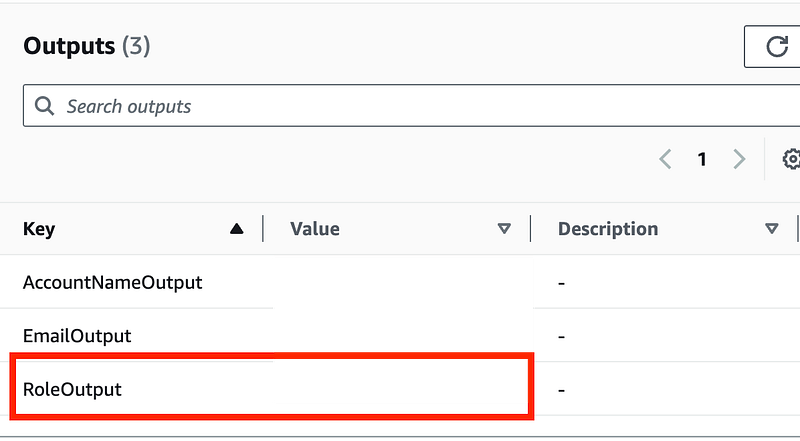
Here’s what I don’t know for sure based on the AWS documentation. It says (at the the time of this writing) that the management account is not affected by AWS SCPs.

The role we are going to assume is not in the management account. It is in a child account. But the user that will assume the role is in the management account.

  • So does the MFA policy apply because the assume role action happens in the child account?
  • Or does the MFA policy not apply because the user taking the action is in the management account?

First I will try to switch roles using the AWS console. That should work because my AWS Console requests should include MFA.
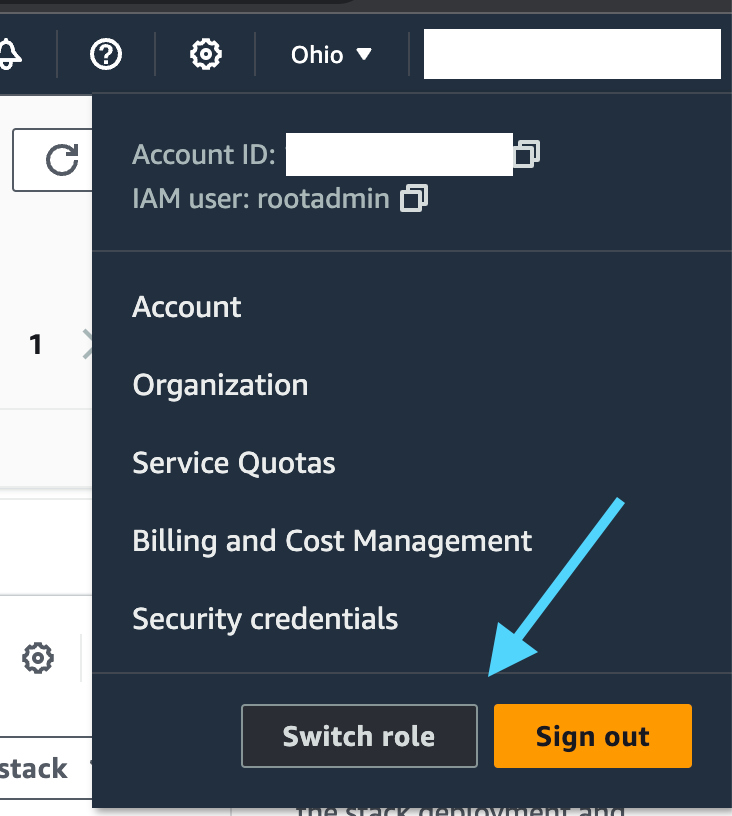
I explained how to switch roles in the AWS console here:

That works.

Now I’m going to switch back and try to use credentials without MFA for the AWS CLI. I’ve explained these things many times but I’m going to explicitly show what I’m doing again here so you can see the difference.

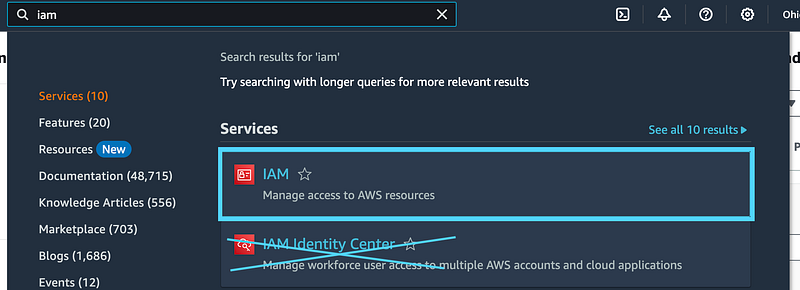
I am going to use developer credentials for my rootadmin user to configure an AWS profile. I head over to the IAM dashboard (not to be confused with AWS SSO or AWS Identity Center).
I click in my IAM user, and then Security credentials.
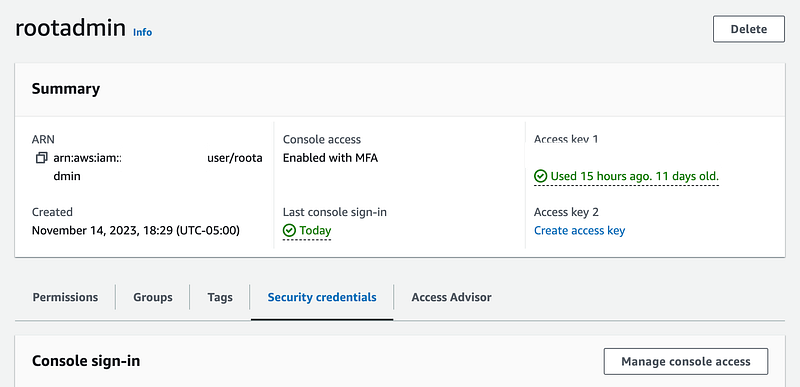
I’m going to create new security credentials for this test.

Scroll down and click Create access key.

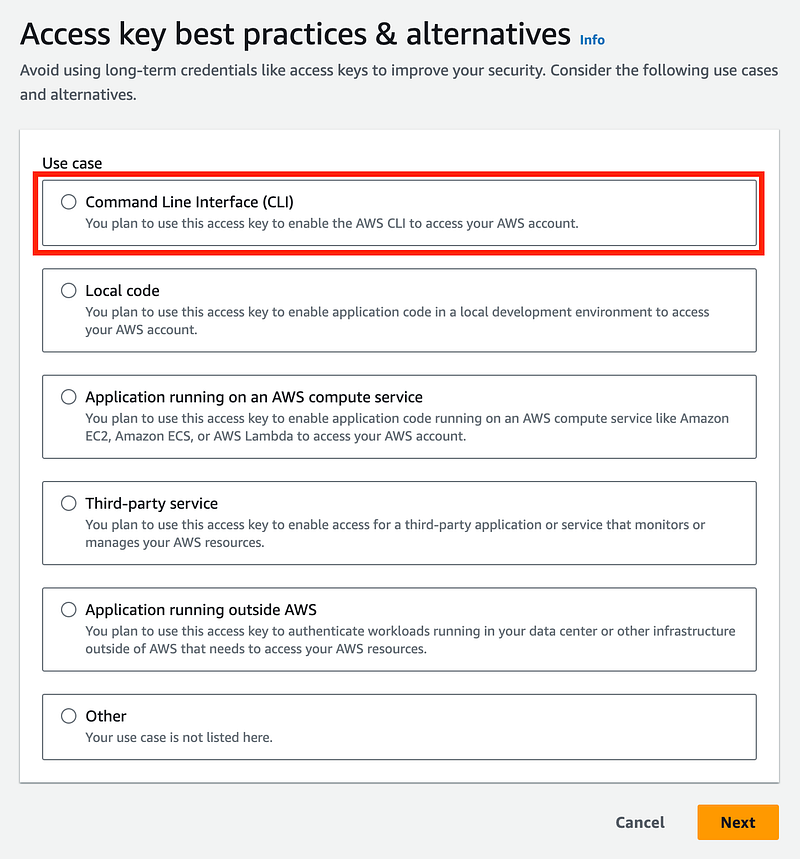
Now you get this way too complicated screen. Click the first option.
Now you get this warning, and I’ve explained a number of times why I am not using these other options. Unless something changed since the last time I used AWS SSO / Identity Center, these are the reasons I’m not using it.
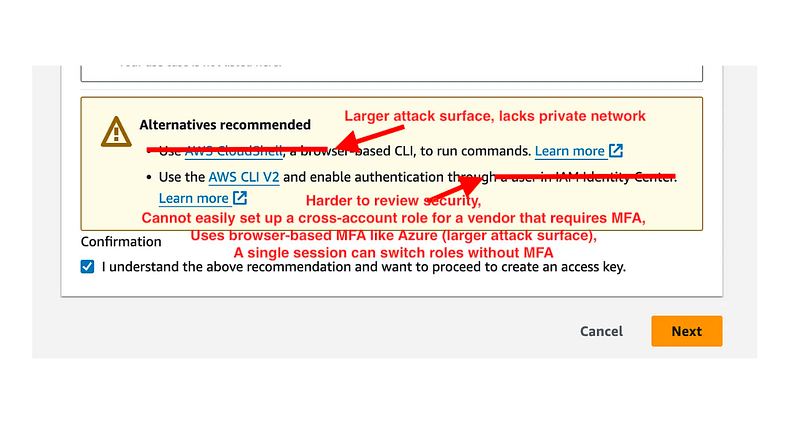
You can find more details and how to work around some of the limitations in these posts, like creating separate users for MFA enforcement across roles.

Note that I don’t know if some of the above has been fixed since I last used the service, but it seems like they are pretty set on using the browser which is not ideal from a security perspective or leveraging automation the way I’m doing in my architecture.

Developer credentials are generally risky — but in our case, we are enforcing MFA for all actions (hopefully — if our SCP works as advertised). With the design in this blog series:

  • An attacker cannot use credentials exposed or checked into GitHub without MFA.
  • Credentials in developer workstations can only assume roles, with MFA.
  • Credentials used in containers on EC2 instances (which will be our primary use case long term) are only ever stored in Secrets Manager, not in EC2 instances or on developer workstations where code they are developing exists.

Ok so now that you understand under what circumstances I use developer access keys let’s proceed.

Now my long term plan is to store all credentials in Secrets Manager and access the credentials from an EC2 instance combined with a token to assume a short term session and run a specific job from a private network. But for this test I’m going to configure an AWS CLI profile as per usual so we can test our SCP.

Using my new credentials I run:

aws configure --profile nomfa-rootadmin

I’m going to enter my credentials, region, and json for the output type.

What happens if I try to run the assume role command with those credentials?

I put my assume role command in a script and execute it.

aws sts assume-role \
    --role-arn arn:aws:iam::xxxxxxxxxxxx:role/[org-cross-account-role] \
    --role-session-name test-no-mfa \
    --profile nomfa-rootadmin

Here’s the result:

Nope. Not allowed.

What if we assume the role with MFA? How can I do that?

Recall that’s what I’m doing in my container that assumes a role with MFA:

In the above, I’m obtaining temporary credentials and using them to execute a job with a short term session. As I explained in other posts, there are a number of ways to assume roles.

In this post, I’m going to configure a role manually because it’s simpler for this test. I’m going to test without and with MFA.

Test without MFA:

Define your profile name:

[profile nomfa-orgadmin]

Define the role you want to assume:

role_arn = arn:aws:iam::xxxxxxxxxx:role/[org-cross-account-role] 

Set the source_profile to the profile above that has the credentials:

source_profile = nomfa-rootadmin

Define your region and output:

region = us-east-2
output = json

Here’s the full profile:

[profile nomfa-orgadmin]
role_arn = arn:aws:iam::xxxxxxxxxx:role/[org-cross-account-role]
source_profile = nomfa-rootadmin
region = us-east-2
output = json

Try listing the roles in the orgadmin account.

Nope.

Test a role profile that includes MFA to assume the organization role

Add the name of the MFA device to the profile.

Recall that in my architecture I am forcing the virtual MFA device name to match the username for security reasons. See prior posts on a missing user resource in virtual MFA actions and this is my work around solution to prevent user MFA devices from being removed or altered by other users.

mfa_serial = arn:aws:iam::xxxxxxxxxx:mfa/rootadmin

Here’s the full profile.

[profile mfa-orgadmin]
role_arn = arn:aws:iam::xxxxxxxxxx:role/[org-cross-account-role]
source_profile = nomfa-rootadmin
mfa_serial = arn:aws:iam::xxxxxxxxxx:mfa/rootadmin
region = us-east-2
output = json

Now I can use that profile to try to assume the cross account role and list all the profiles in the other account.

When I use that profile, it asks me for an MFA token for the rootadmin user virtual MFA device:

And it works!

By adding a service control policy as I did in the last post that enforces MFA properly (without ifexists!) we can require MFA to assume the AWS Organizations role in any account, both in the console and programmatically.

Without updating every AWS Organizations role in every account.

Pretty cool.

Follow for updates.

Teri Radichel | © 2nd Sight Lab 2023

About Teri Radichel:
~~~~~~~~~~~~~~~~~~~~
⭐️ Author: Cybersecurity Books
⭐️ Presentations: Presentations by Teri Radichel
⭐️ Recognition: SANS Award, AWS Security Hero, IANS Faculty
⭐️ Certifications: SANS ~ GSE 240
⭐️ Education: BA Business, Master of Software Engineering, Master of Infosec
⭐️ Company: Penetration Tests, Assessments, Phone Consulting ~ 2nd Sight Lab
Need Help With Cybersecurity, Cloud, or Application Security?
~~~~~~~~~~~~~~~~~~~~~~~~~~~~~~~~~~~~~~~~~~~~~~~~~~~~~~~~~~~~~
🔒 Request a penetration test or security assessment
🔒 Schedule a consulting call
🔒 Cybersecurity Speaker for Presentation
Follow for more stories like this:
~~~~~~~~~~~~~~~~~~~~~~~~~~~~~~~~~~~~~~~~~~~~~~~~~~~~~~~~~~~~~ 
❤️ Sign Up my Medium Email List
❤️ Twitter: @teriradichel
❤️ LinkedIn: https://www.linkedin.com/in/teriradichel
❤️ Mastodon: @teriradichel@infosec.exchange
❤️ Facebook: 2nd Sight Lab
❤️ YouTube: @2ndsightlab

AWS
Organizations
Role
MFA
Scp
Recommended from ReadMedium