
Test Script For Cross-Account Roles
ACM.230 Troubleshooting why a cross account role is not working
~~~~~~~~~~~~~~~~~~~~~~~~~~~~~~~~~~~~~~~~~~~~~~~~~~~~~~~
⚙️ Check out my series on Automating Cybersecurity Metrics | Code.
🔒 Related Stories: AWS Security | IAM | Cloud Governance
💻 Free Content on Jobs in Cybersecurity | ✉️ Sign up for the Email List
~~~~~~~~~~~~~~~~~~~~~~~~~~~~~~~~~~~~~~~~~~~~~~~~~~~~~~~
I’ve been working through creating some reusable functions to create and assume cross-account IAM roles. Let’s just say they can be tricky.
😳
I initially created the functions here as an initial test:
I tried to use the functions again here to create a user that can remotely administer website resources in another account.
That’s when I discovered a few errors which I fix below.
The cross-account role test script
Here’s the script I wrote to help me test and find problems with cross-account roles. I’m going to walk through the script one step at a time and show you what I did. I’ll likely revise and improve this script in the future.
Note: This code presumes that you’re using my codebase in the GitHub repository above with an AWS Organization created by my code that has an SSM Parameter containing the OrgPrefix used in the default AWS Organizations role names and a CLI profile named OrgRoot with permissions in the Organizations Root account to query the parameter and assume the default cross account organization role with the expected name. It also uses my functions to create role profiles and assume roles.
Warning: This is long! Jump to the end to see the full script.
I modified the accounts in the output:
- Account with the cross-account role: 111111111111
- Account with the user and group: 22222222222
First I source the files that have the functions I need.
source shared_functions.sh
source assume_role.sh
I get the base path for my code as I use it to switch directories to call functions in other directories.
#get the root directory for this code base
cd ../
base_path=$(pwd)
I set the other variables used by the script. You can change these to your own test values.
#role that has permission to assume cross account roles
#and query IAM
profile="OrgRoot"
targetaccountname='Sandbox-Web'
rolename="XacctWebAdminGroup"
userToAssumeRole="WebAdmin"
useraccountname='Sandbox'
groupname='XacctWebAdmin'
m="\nCtrl-C to exit. Enter to continue."

#name of the role profile you want to create in your AWS CLI configuration.
#I'm using the role name as the AWS CLI profile name here
#Once created run commands like this: aws s3 ls --profile $roleprofile
Change to the Organizations directory and set the profile variable to the OrgRoot profile so we can run some code that requires permissions the role that profile assumes has.
echo "Change to Organization directory and use OrgRoot AWS CLI profile"
change_dir "Organization" $base_path "OrgRoot"
echo ""
Output:
Change to Organization directory and use OrgRoot AWS CLI profile
change dir Organization
Get the account number for the account with the Cross-Account Role.
echo "Get the account number of the account where the role exists"
acctnum=$(get_account_number $targetaccountname)
echo -e "The target account number is $acctnum.$m"
read ok
Output:
Get the account number of the account where the role exists
The target account number is 111111111111.
Ctrl-C to exit. Enter to continue.
Create a role profile for the AWS CLI for that account number.
echo "Create an AWS CLI Profile for the default Organization role in $targetaccountname"
echo "Please wait..."
remoteprofile=$(create_org_admin_role_profile $targetaccountname)
cliprofile=$(cat ~/.aws/config | grep -i $remoteprofile -A2)
echo -e $cliprofile
echo -e "CLI profile created.$m"
read ok
Output:
Create an AWS CLI Profile for the default Organization role in Sandbox-Web
Please wait...
[profile xxxxxx-Sandbox-Web] region = xxxxxxx output = json
CLI profile created.
Ctrl-C to exit. Enter to continue.
List the roles and make sure the Cross Account role exists.
echo "List the roles in the target account using profile: $remoteprofile"
role=$(aws iam list-roles --profile $remoteprofile --output text | grep $rolename | cut -f2)
if [ "$role" != "" ]; then
  echo -e "Role exists: $role.$m"
else
  echo -e "Role does not exist.$m"
fi
read ok
Output:
List the roles in the target account using profile: xxxxxxx-Sandbox-Web
Role exists: arn:aws:iam::111111111111:role/XacctWebAdminGroup.
Ctrl-C to exit. Enter to continue.
Evaluate the trust policy. We need to make sure the user ARN that is allowed to assume the role is correct.
echo "Evalute the role trust policy"
aws iam get-role --role-name $rolename --profile $remoteprofile
echo -e "Does the assume role document (trust policy) contain the ARN for the user that is allowed to assume the role?$m"
read ok
Output:
Evalute the role trust policy
{
    "Role": {
        "Path": "/",
        "RoleName": "XacctWebAdminGroup",
        "RoleId": "AROAXW4B4T5FZFYHIOBHN",
        "Arn": "arn:aws:iam::222222222222:role/XacctWebAdminGroup",
        "CreateDate": "2023-06-07T03:56:05+00:00",
        "AssumeRolePolicyDocument": {
            "Version": "2012-10-17",
            "Statement": [
                {
                    "Effect": "Allow",
                    "Principal": {
                        "AWS": "arn:aws:iam::222222222222:user/WebAdmin"
                    },
                    "Action": "sts:AssumeRole",
                    "Condition": {
                        "Bool": {
                            "aws:MultiFactorAuthPresent": "true"
                        }
                    }
                }
            ]
        },
        "Description": "",
        "MaxSessionDuration": 3600,
        "RoleLastUsed": {}
    }
}
Does the assume role document (trust policy) contain the ARN for the user that is allowed to assume the role?
Ctrl-C to exit. Enter to continue.
Note: I should change the above to grep for the correct user but I’d have to switch to the user account role and then back to the account profile with the cross-account role. Maybe later. For now, you can see the ARN for the user in the user account above.
Get the account number where the user and group exists that can assume the cross account role.
echo "Get the account number of the account where the user and group exists"
useracctnum=$(get_account_number $useraccountname)
echo -e "The user account number is $useracctnum.$m"
read ok
Output:
Get the account number of the account where the user and group exists
The user account number is 222222222222.
Ctrl-C to exit. Enter to continue.
Create a CLI Profile for that account that leverages the default AWS Organizations role.
echo "Create an AWS CLI Profile for the default Organization role in $useraccountname"
echo "Please wait..."
useracctprofile=$(create_org_admin_role_profile $useraccountname)
cliprofile=$(cat ~/.aws/config | grep -i $useracctprofile -A2)
echo -e $cliprofile
echo -e "CLI profile created.$m"
read ok
Output:
Create an AWS CLI Profile for the default Organization role in Sandbox
Please wait...
[profile xxxxxx-Sandbox] region = xxxxxxxx output = json
CLI profile created.
Ctrl-C to exit. Enter to continue.
Check that the user name exists which we are trying to use to assume the role.
echo "Check that user exists in the user account."
testuser=$(aws iam list-users --profile $useracctprofile --output text | grep $userToAssumeRole | cut -f2)
if [ "$testuser" == "" ]; then
  echo -e "$userToAssumeRole does not exist.$m"
else
  echo -e "$testuser exists.$m"
fi
read ok
Output:
Check that user exists in the user account.
arn:aws:iam::222222222222:user/WebAdmin exists.
Ctrl-C to exit. Enter to continue.
Check that the group exists that has permission to assume the role.
echo "Check that the group exits."
testgroup=$(aws iam list-groups --profile $useracctprofile --output text | grep $groupname | cut -f2)
if [ "$testgroup" == "" ]; then
  echo -e "Group: $groupname does not exist in $useraccountname.$m"
else
  echo -e "Group: $testgroup exists in $useraccountname.$m"
fi
read ok
Output:
Check that the group exits.
Group: arn:aws:iam::222222222222:group/XacctWebAdmin exists in Sandbox.
Ctrl-C to exit. Enter to continue.
Check that the user is in the group.
echo "Check that the user is in the group"
group=$(aws iam list-groups-for-user --profile $useracctprofile --user-name $userToAssumeRole --output text | grep $groupname | cut -f2)
if [ "$group" == "" ]; then
  echo -e "Group not found for user.$m"
else
  echo -e "User is in group: $group.$m"
fi
read ok
Output:
Check that the user is in the group
User is in group: arn:aws:iam::222222222222:group/XacctWebAdmin.
Ctrl-C to exit. Enter to continue.
Check the policy with the expected name exists.
policyname=$groupname'GroupPolicy'
echo "Check that the group policy $policyname exists."
echo "Group policies:"
aws iam list-group-policies --profile $useracctprofile --group-name $groupname --output text
#this code should really loop through all policies but I know I only add one policy to groups in this codebase
testpolicy=$(aws iam list-group-policies --profile $useracctprofile --group-name $groupname --output json --query 'PolicyNames[0]')
if [ "$testpolicy" == "null" ]; then
  echo -e "Policy $policyname does not exist for group: $groupname.$m"
else
  echo -e "Policy $testpolicy exists for group $groupname.$m"
fi
read ok
Output:
Check that the group policy XacctWebAdminGroupPolicy exists.
Group policies:
POLICYNAMES     XacctWebAdminGroupPolicy
Policy "XacctWebAdminGroupPolicy" exists for group XacctWebAdmin.
Ctrl-C to exit. Enter to continue.
Check that the policy has the expect role ARN in the policy.
echo "Evaluate the policy"
aws iam get-group-policy --profile $useracctprofile --policy-name $policyname --group-name $groupname
testpolicy=$(aws iam get-group-policy --profile $useracctprofile --policy-name $policyname --group-name $groupname | grep $rolename)
if [ "$testpolicyrole" == "" ]; then
  echo -e "Role name $rolename not found in policy.$m"
else
  echo -e "Role name $rolename found in policy.$m"
fi
read ok
This is where I found my error. The ARN in my group policy was not correct.
❌ ❗ ️‼️ ⚠️
Incorrect Output ~ it shows that the ARN in this policy does not have the correct group name. I had to modify the code that creates the GroupPolicy or more accurately the code that passes the role name to the GroupPolicy CloudFormation Template.
Evaluate the policy
{
    "GroupName": "XacctWebAdmin",
    "PolicyName": "XacctWebAdminGroupPolicy",
    "PolicyDocument": {
        "Version": "2012-10-17",
        "Statement": [
            {
                "Condition": {
                    "Bool": {
                        "aws:MultiFactorAuthPresent": "true"
                    }
                },
                "Action": "sts:AssumeRole",
                "Resource": "arn:aws:iam::222222222222:role/XacctWebAdmin",
                "Effect": "Allow"
            }
        ]
    }
}
Role name XacctWebAdminGroup not found in policy.
Ctrl-C to exit. Enter to continue.
The first thing I did was create an init_vars.sh file and moved all the variables used by different scripts to one place to a.) reduce code and b.) ensure the assignments were consistent.
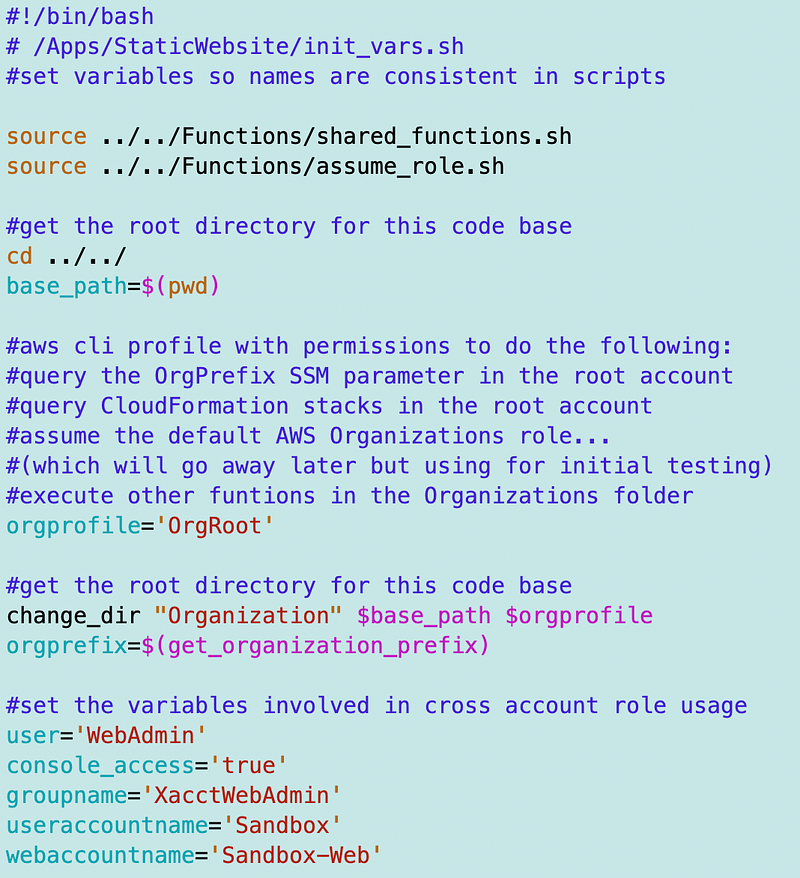
That simplified my two scripts that create the IAM user, group, and cross-account role.
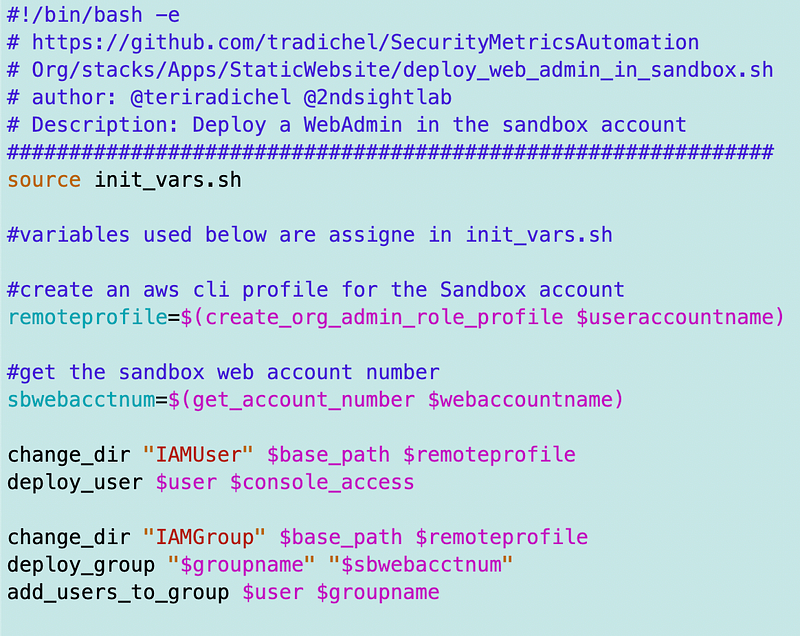
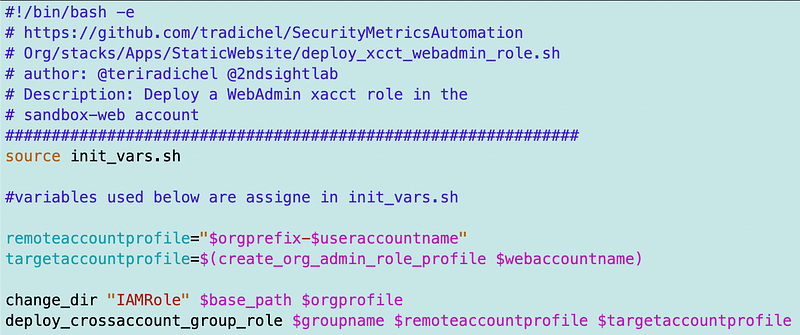
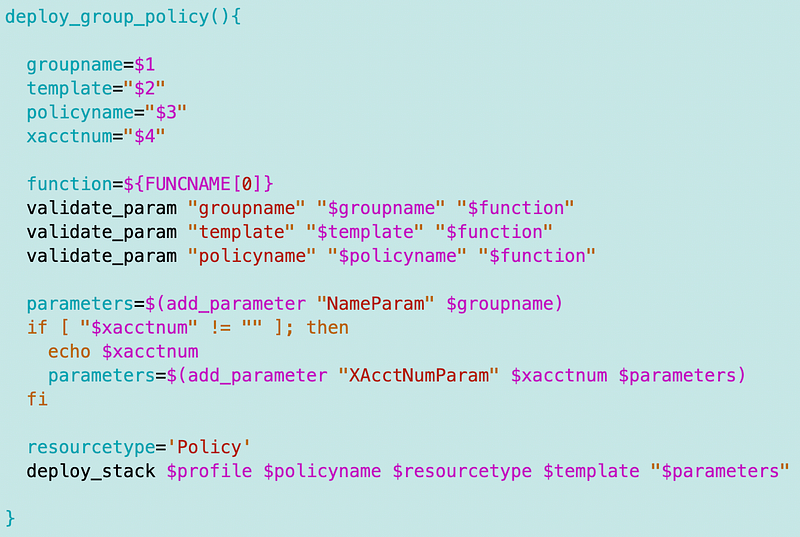
I modified the deploy_group function to pass in an account number if deploying cross-account role and pass it through when deploying the policy.
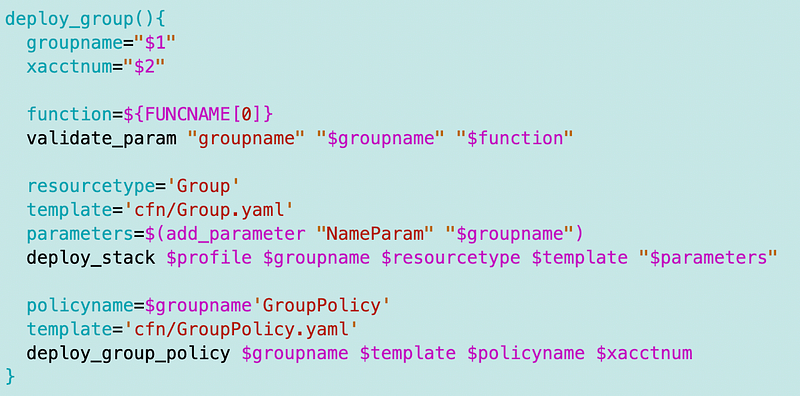
The group policy function passes the account number, if it exists, as a parameter to the template.
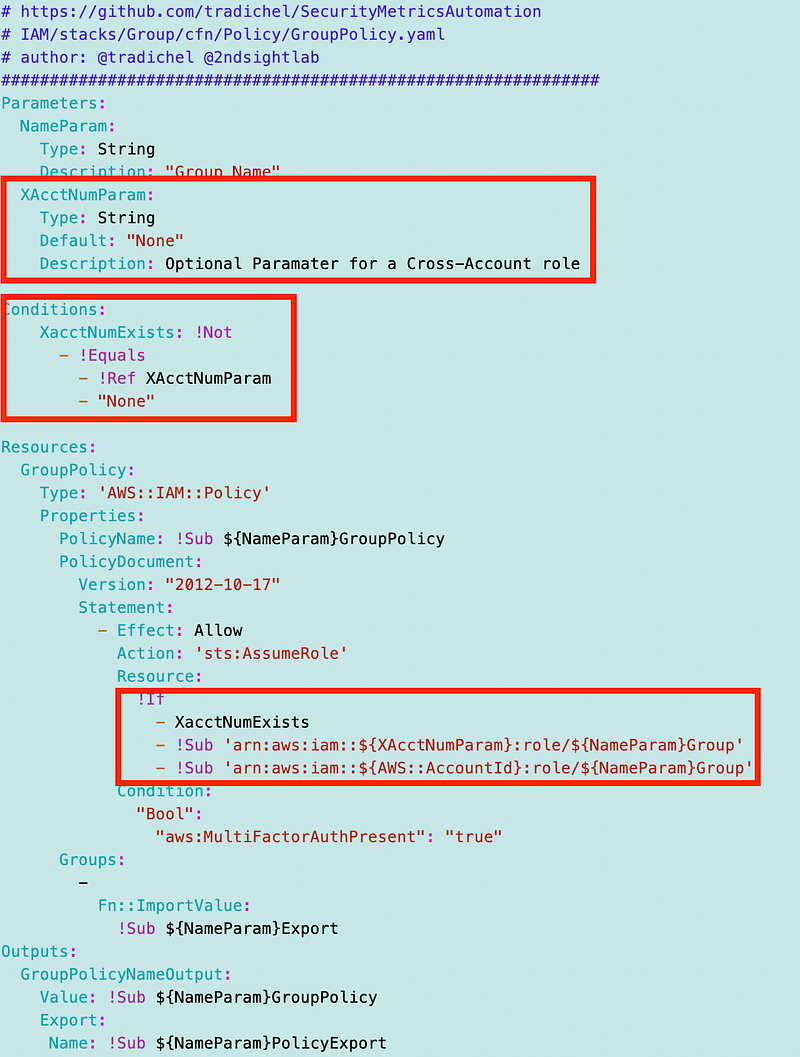
The group policy template now users the remote account number in the ARN if it is provided.
Along the way I spent way too long on this:
After getting that working, I ran my test again.
Output:
OK: Role name XacctWebAdminGroup found in policy.
Ctrl-C to exit. Enter to continue.

Check for acctnum in policy
OK: Correct account number found in policy.
Ctrl-C to exit. Enter to continue.

Check for ARN in policy.
OK: Policy contains correct ARN.
Ctrl-C to exit. Enter to continue.
The policy passes validation.
Now I can run the code that has the WebAdmin assume the new cross account role in SandBox-Web and creates a CLI profile.
echo "Create a cross account CLI Profile for $rolename"
create_cross_account_role_profile $targetacctnum $rolename $roleprofile
cliprofile=$(cat ~/.aws/config | grep -i $roleprofile -A2)
echo -e $cliprofile
echo -e "CLI profile created.$m"
read ok

#TODO: need a mechanism to remove the role profile
Output:
Create a cross account CLI Profile for XacctWebAdminGroup
Enter mfa token
XXXXXX
XacctWebAdminGroup
[profile XacctWebAdminGroup] region = xxxxxx output = json
CLI profile created.
Ctrl-C to exit. Enter to continue.
I have two other functions to test but this took long enough. These functions add the credentials to environment variables instead of a role profile. The second function removes the environment variables so those credentials don’t override others when the user is done using a particular role.
### TEST ASSUME ROLE WITH ENVIRONMENT VARS ###
#assume a role and add the credentials as environment vars
assume_cross_account_role $accountname $roleprofile
echo "Assume role and add credentials to environent vars ok? Ctrl-C to exit."
read ok
#remove credentials from env vars or they will override other auth methods
stop_assume_cross_account_role
echo "Have the credentials been removed from environment variables?"
echo "Done."Output: I still need to thest this one.
Phew!
Here’s the whole script as it stands at the time of this writing.
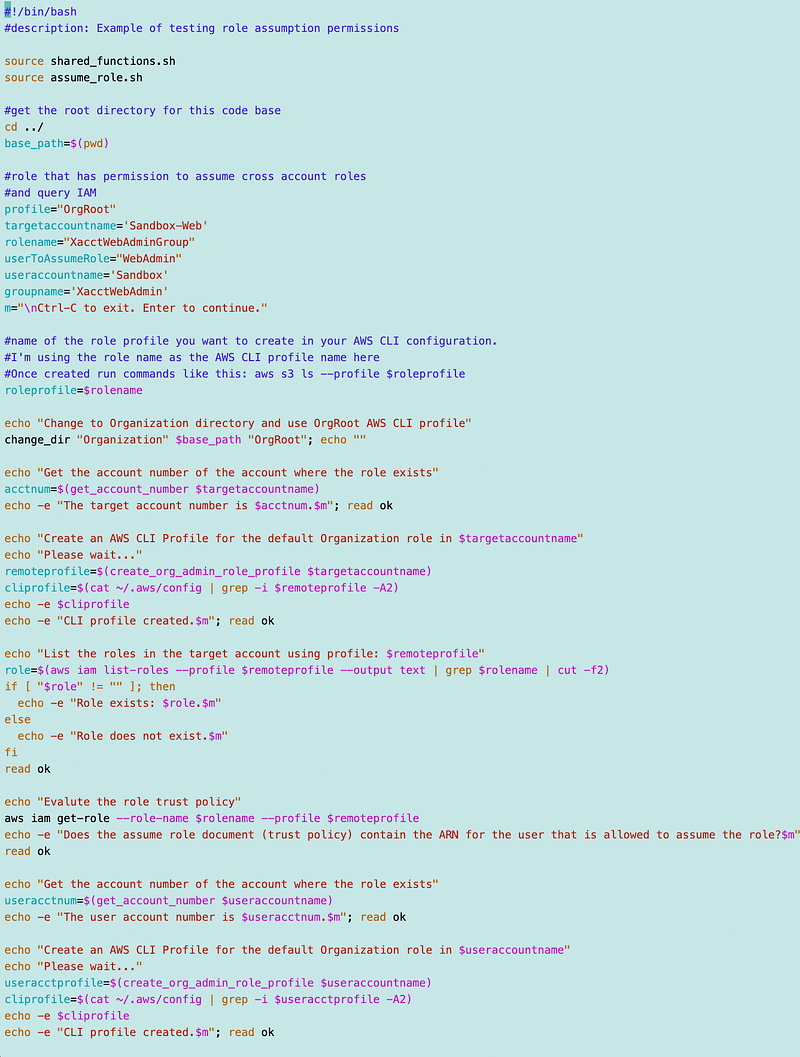
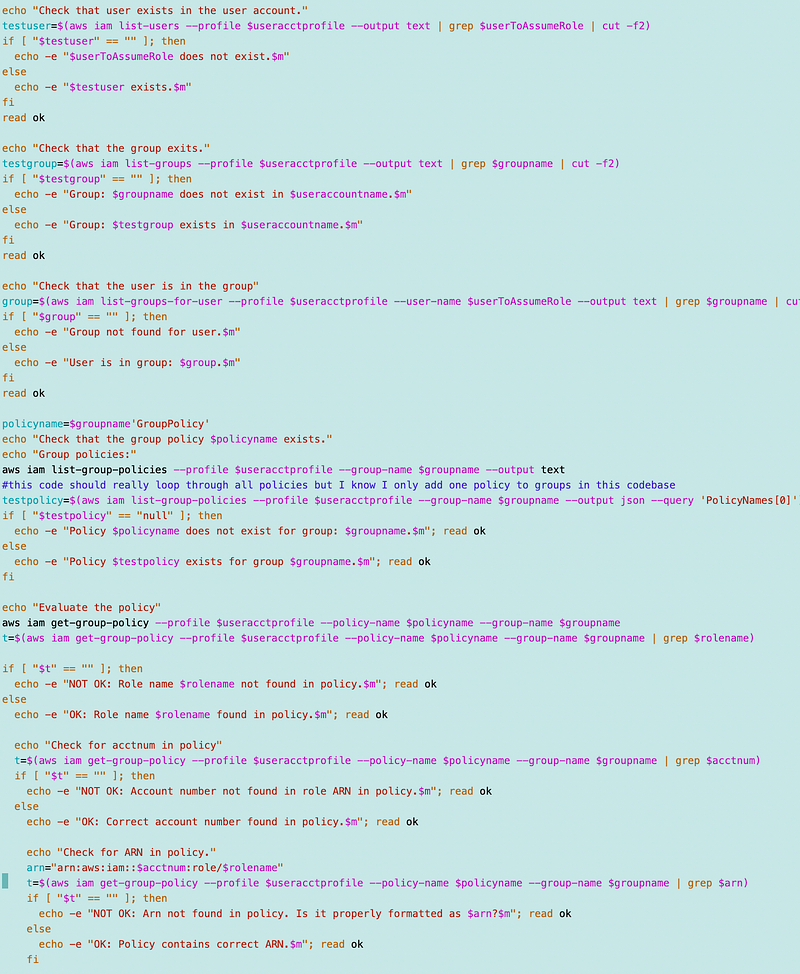
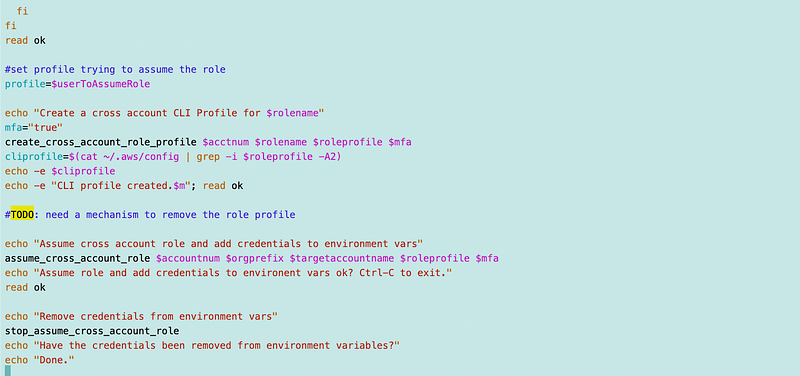
I’ll check it in after I finish testing those last two role assumption functions.
Follow for updates.
Teri Radichel | © 2nd Sight Lab 2023
About Teri Radichel:
~~~~~~~~~~~~~~~~~~~~
⭐️ Author: Cybersecurity Books
⭐️ Presentations: Presentations by Teri Radichel
⭐️ Recognition: SANS Award, AWS Security Hero, IANS Faculty
⭐️ Certifications: SANS ~ GSE 240
⭐️ Education: BA Business, Master of Software Engineering, Master of Infosec
⭐️ Company: Penetration Tests, Assessments, Phone Consulting ~ 2nd Sight Lab
Need Help With Cybersecurity, Cloud, or Application Security?
~~~~~~~~~~~~~~~~~~~~~~~~~~~~~~~~~~~~~~~~~~~~~~~~~~~~~~~~~~~~~
🔒 Request a penetration test or security assessment
🔒 Schedule a consulting call
🔒 Cybersecurity Speaker for PresentationFollow for more stories like this:
~~~~~~~~~~~~~~~~~~~~~~~~~~~~~~~~~~~~~~~~~~~~~~~~~~~~~~~~~~~~~
❤️ Sign Up my Medium Email List
❤️ Twitter: @teriradichel
❤️ LinkedIn: https://www.linkedin.com/in/teriradichel
❤️ Mastodon: @teriradichel@infosec.exchange
❤️ Facebook: 2nd Sight Lab
❤️ YouTube: @2ndsightlab