avatarBob Code

Free AI web copilot to create summaries, insights and extended knowledge, download it at here

12691

Abstract

erently and only if pushing to production?</h1><p id="8742">- By adding an if statement: {{ if eq(variables[‘Build.SourceBranch’], ‘refs/heads/master’)}}</p><p id="aafb">- This will run this step only if the branch is named master (in this case)</p><h1 id="7c91">How to ensure that a pipeline runs only if the previous step worked?</h1><p id="466b">- By adding condition: succeeded(‘validate_terraform’)</p><h1 id="cb50">How to use separate files in a pipeline</h1><p id="1e07">- In order to use another file (here plan.yml and deploy.yml) you can use template</p><p id="bc34">- E.g. template: Terraform/plan.yml (Terraform is the name of the folder in the directory)</p><h1 id="ea2e">Now we can build our terraform plan.yml</h1><p id="f59e">- pass-on the parameters dev or prd using parameters</p><p id="d2d6">- first: install terraform (every terraform yml file needs to do so)</p><p id="b9f3">- second: initialise terraform (see init command)</p><p id="18e4">- third: validate terraform (optional): checks if tf code is correct</p><p id="8907">- fourth: run plan (see plan command)</p><p id="dd38">- fith: move plan.tf to artifact directory</p><p id="7b56">- finally: publish plan.tf as an artifact</p><p id="c7ae">init command:</p><p id="8da4">- Add the working directory where the main.tf is at (e.g. ‘(System.DefaultWorkingDirectory)/Infrastructure’)</p><p id="3099">- Add the backend configuration</p><p id="7a29">plan command:</p><p id="95b6">- Add the working directory where the main.tf is at (e.g. ‘(System.DefaultWorkingDirectory)/Infrastructure’)</p><p id="9824">- Add the name of the service connection</p><p id="179a">- command options: see command options plan</p><p id="c7d2">command options plan:</p><p id="49f8">- -lock=false (so the agent running this tage doesn’t lock the backend)</p><p id="0c64">- -var-file=”vars/{{parameters.env}}.tfvars” to provide the tfvars file, without it the pipeline won’t proceed if you’re using variables</p><p id="7dbf">- -out=$(System.DefaultWorkingDirectory)/Infrastructure/terraform.tfplan’ to create the plan.tf file that will be saved to artifacts and used by the deploy stage</p><p id="4d18">save artifact:</p><ul><li>After plan completes, archive the entire working directory, including the .terraform subdirectory created during init, and save it somewhere where it will be available to the apply step. A common choice is as a “build artifact” within the chosen orchestration tool.</li></ul><div id="68b2"><pre><span class="hljs-attr">parameters:</span> <span class="hljs-attr">env:</span> <span class="hljs-string">''</span>

<span class="hljs-attr">jobs:</span> <span class="hljs-bullet">-</span> <span class="hljs-attr">job:</span> <span class="hljs-string">{{parameters.env}}_validate_tf</span> <span class="hljs-attr">displayName:</span> <span class="hljs-string">'Validate <span class="hljs-template-variable">{{parameters.env}}</span> terraform scripts'</span> <span class="hljs-attr">pool:</span> <span class="hljs-attr">vmImage:</span> <span class="hljs-string">windows-latest</span>

<span class="hljs-attr">steps:</span>
<span class="hljs-bullet">-</span> <span class="hljs-attr">task:</span> <span class="hljs-string">TerraformInstaller@1</span> <span class="hljs-comment"># 1st/ install terraform</span>
  <span class="hljs-attr">displayName:</span> <span class="hljs-string">'Install Terraform'</span> <span class="hljs-comment"># install always need to be installed at every stage</span>
  <span class="hljs-attr">inputs:</span>
    <span class="hljs-attr">terraformVersion:</span> <span class="hljs-string">'latest'</span>

<span class="hljs-bullet">-</span> <span class="hljs-attr">task:</span> <span class="hljs-string">TerraformTaskV4@4</span>
  <span class="hljs-attr">displayName:</span> <span class="hljs-string">'Initialise Terraform'</span> <span class="hljs-comment"># init needs to be installed at every stage</span>
  <span class="hljs-attr">inputs:</span>
    <span class="hljs-attr">provider:</span> <span class="hljs-string">'azurerm'</span>
    <span class="hljs-attr">command:</span> <span class="hljs-string">init</span>
    <span class="hljs-attr">workingDirectory:</span> <span class="hljs-string">'$(System.DefaultWorkingDirectory)/Infrastructure'</span> <span class="hljs-comment"># where the Terraform code is at</span>
    <span class="hljs-comment"># fetched from variables (azure-pipeline.yml)</span>
    <span class="hljs-attr">backendServiceArm:</span> <span class="hljs-string">$(ServiceConnectionName)</span>
    <span class="hljs-attr">backendAzureRmResourceGroupName:</span> <span class="hljs-string">'$(bk-rg-name)-$<span class="hljs-template-variable">{{parameters.env}}</span>'</span>  
    <span class="hljs-attr">backendAzureRmStorageAccountName:</span> <span class="hljs-string">'$(bk-str-account-name)$<span class="hljs-template-variable">{{parameters.env}}</span>'</span>  
    <span class="hljs-attr">backendAzureRmContainerName:</span> <span class="hljs-string">'$(bk-container-name)-$<span class="hljs-template-variable">{{parameters.env}}</span>'</span>  
    <span class="hljs-attr">backendAzureRmKey:</span> <span class="hljs-string">'$<span class="hljs-template-variable">{{parameters.env}}</span>$(bk-key)'</span>  

<span class="hljs-bullet">-</span> <span class="hljs-attr">task:</span> <span class="hljs-string">TerraformTaskV4@4</span>
  <span class="hljs-attr">displayName:</span> <span class="hljs-string">'Validate Terraform'</span>
  <span class="hljs-attr">inputs:</span>
    <span class="hljs-attr">provider:</span> <span class="hljs-string">'azurerm'</span>
    <span class="hljs-attr">command:</span> <span class="hljs-string">'validate'</span>   

<span class="hljs-bullet">-</span> <span class="hljs-attr">task:</span> <span class="hljs-string">TerraformTaskV4@4</span>
  <span class="hljs-attr">displayName:</span> <span class="hljs-string">'Plan Terraform'</span>
  <span class="hljs-attr">inputs:</span>
    <span class="hljs-attr">provider:</span> <span class="hljs-string">'azurerm'</span>
    <span class="hljs-attr">command:</span> <span class="hljs-string">'plan'</span>
    <span class="hljs-attr">workingDirectory:</span> <span class="hljs-string">'$(System.DefaultWorkingDirectory)/Infrastructure'</span>
    <span class="hljs-attr">environmentServiceNameAzureRM:</span> <span class="hljs-string">$(ServiceConnectionName)</span>
    <span class="hljs-attr">commandOptions:</span> <span class="hljs-string">'-lock=false -var-file="vars/$<span class="hljs-template-variable">{{parameters.env}}</span>.tfvars" -out=$(System.DefaultWorkingDirectory)/Infrastructure/terraform.tfplan'</span>
    <span class="hljs-comment"># var file = selecting the tfvars for each environment</span>
    <span class="hljs-comment"># out = creating the plan file to the Infrastructure folder and call it terraform.tfplan</span>

<span class="hljs-bullet">-</span> <span class="hljs-attr">task:</span> <span class="hljs-string">CopyFiles@2</span>
  <span class="hljs-attr">displayName:</span> <span class="hljs-string">'Moving Terraform Code to artifact staging'</span>
  <span class="hljs-attr">inputs:</span>
    <span class="hljs-attr">Contents:</span> <span class="hljs-string">'Infrastructure/**'</span>
    <span class="hljs-attr">TargetFolder:</span> <span class="hljs-string">'$(build.ArtifactStagingDirectory)'</span>
    <span class="hljs-comment"># Plan and apply are on different machines</span>
    <span class="hljs-comment"># plan state should thus be saved on a file</span>
    <span class="hljs-comment"># it will be then be loaded by apply</span>

<span class="hljs-bullet">-</span> <span class="hljs-attr">task:</span> <span class="hljs-string">PublishBuildArtifacts@1</span>
  <span class="hljs-attr">displayName:</span> <span class="hljs-string">'Making artifact available to apply stage'</span>
  <span class="hljs-attr">inputs:</span>
    <span class="hljs-attr">PathtoPublish:</span> <span class="hljs-string">'$(Build.ArtifactStagingDirectory)'</span>
    <span class="hljs-attr">ArtifactName:</span> <span class="hljs-string">'output-$<span class="hljs-template-variable">{{parameters.env}}</span>'</span>
    <span class="hljs-attr">publishLocation:</span> <span class="hljs-string">'Container'</span></pre></div><h1 id="9a63">Now we can build our terraform deploy.yml</h1><p id="5e71">- <a href="https://learn.microsoft.com/en-us/azure/devops/pipelines/process/deployment-jobs?view=azure-devops">For this stage we are using a deployment job</a></p><p id="2f22">- Deployment strategy: runOnce vs Canary vs rolling. The runOnce is the simplest deployment strategy and all steps are executed once (preDeploy, deploy, routeTraffic)</p><p id="3868">- enviroment: create an environment in ADO (Pipelines &gt; environment) <a href="https://learn.microsoft.com/en-us/azure/devops/pipelines/process/environments?view=azure-devops">read more about Deployment Environment</a></p><p id="d907">- <a href="https://learn.microsoft.com/en-us/azure/devops/pipelines/repos/pipeline-options-for-git?view=azure-devops&amp;tabs=yaml">Checkout</a>: if self, the repository will be cloned within the job</p><p id="69c2">- download:</p><p id="b0bf">- artifact: Before running apply, obtain the archive created in the previous step and extract it at the same absolute path. This re-creates everything that was present after plan, avoiding strange issues where local files were created during the plan step</p><p id="3bcf">- install terraform</p><p id="013f">- run terraform apply</p><p id="5e37">Command options terraform apply:</p><p id="8d74">- -lock=true we want to lock the backend</p><p id="dbc6">- -lock-timeout=5m we want to realse the backend after the step has been run</p><ul><li>$(Pipeline.Workspace)/output-${{ parameters.env }}/Infrastructure/terraform.tfplan’</li></ul><div id="e847"><pre><span class="hljs-attr">parameters:</span>

<span class="hljs-attr">env:</span> <span class="hljs-string">''</span>

<span class="hljs-attr">jobs:</span> <span class="hljs-bullet">-</span> <span class="hljs-attr">deployment:</span> <span class="hljs-string">deploy_infrastructure_{{</span> <span class="hljs-string">parameters.env</span> <span class="hljs-string">}}</span> <span class="hljs-attr">displayName:</span> <span class="hljs-string">'Deploy infrastructure for <span class="hljs-template-variable">{{ parameters.env }}</span>'</span> <span class="hljs-attr">pool:</span> <span class="hljs-attr">vmImage:</span> <span class="hljs-string">'windows-latest'</span> <span class="hljs-attr">environment:</span> <span class="hljs-string">'deploy_infrastructure_$<span class="hljs-template-variable">{{ parameters.env }}</span>'</span> <span class="hljs-comment"># Pipeline Environment (ADO), benefit??</span> <span class="hljs-comment"># First, you need to make sure you are Creator in the Security of environment to solve below issue:</span> <span class="hljs-comment"># Job deploy_infrastructure_dev: Environment dev could not be found. => needs to be first created</span> <span class="hljs-comment"># The environment does not exist or has not been authorized for use.</span>

<span class="hljs-attr">strategy:</span> <span class="hljs-attr">runOnce:</span> <span class="hljs-comment">## RunOnce vs Canary Deployment</span> <span class="hljs-attr">deploy:</span> <span class="hljs-attr">steps:</span> <span class="hljs-bullet">-</span> <span class="hljs-attr">checkout:</span> <span class="hljs-string">none</span> <span class="hljs-comment">#or self (clone repo in current job)# getting code from the repo # TO DO: try without</span> <span class="hljs-bullet">-</span> <span class="hljs-attr">download:</span> <span class="hljs-string">current</span> <span class="hljs-comment"># get latest artifact</span> <span class="hljs-attr">artifact:</span> <span class="hljs-string">'output-$<span class="hljs-template-variable">{{ parameters.env }}</span>'</span> <span class="hljs-comment">#fetch the output file from the plan phase</span>

      <span class="hljs-bullet">-</span> <span class="hljs-attr">task:</span> <span class="hljs-string">TerraformInstaller@1</span> <span class="hljs-comment"># 1st/ install terraform</span>
        <span class="hljs-attr">displayName:</span> <span class="hljs-string">'Install Terraform'</span> <span class="hljs-comment"># install always need to be installed at every stage</span>
        <span class="hljs-attr">

Options

inputs:</span> <span class="hljs-attr">terraformVersion:</span> <span class="hljs-string">'latest'</span>

      <span class="hljs-bullet">-</span> <span class="hljs-attr">task:</span> <span class="hljs-string">TerraformTaskV4@4</span>
        <span class="hljs-attr">displayName:</span> <span class="hljs-string">'Apply Terraform'</span> <span class="hljs-comment"># init needs to be installed at every stage</span>
        <span class="hljs-attr">inputs:</span>
          <span class="hljs-attr">provider:</span> <span class="hljs-string">'azurerm'</span>
          <span class="hljs-attr">command:</span> <span class="hljs-string">'apply'</span>
          <span class="hljs-attr">workingDirectory:</span> <span class="hljs-string">'$(Pipeline.Workspace)/output-$<span class="hljs-template-variable">{{ parameters.env }}</span>/Infrastructure'</span>
          <span class="hljs-attr">environmentServiceNameAzureRM:</span> <span class="hljs-string">$(ServiceConnectionName)</span>
          <span class="hljs-attr">commandOptions:</span> <span class="hljs-string">'-lock=true -lock-timeout=5m $(Pipeline.Workspace)/output-$<span class="hljs-template-variable">{{ parameters.env }}</span>/Infrastructure/terraform.tfplan'</span>
          <span class="hljs-comment"># lock timeout so lease is unlocked after 5 minutes</span></pre></div><h1 id="09a4">Build a separate Terraform Destroy Pipeline</h1><div id="f7df"><pre><span class="hljs-attr">name:</span> <span class="hljs-string">$(BuildDefinitionName)$(SourceBranchName)$(date:yyyyMMdd)$(rev:.r)</span>

<span class="hljs-attr">trigger:</span> <span class="hljs-string">none</span>

<span class="hljs-attr">variables:</span> <span class="hljs-comment"># terraform variables</span> <span class="hljs-attr">ServiceConnectionName:</span> <span class="hljs-string">'nameofserviceconnection'</span> <span class="hljs-attr">bk-rg-name:</span> <span class="hljs-string">'rg-name'</span> <span class="hljs-attr">bk-str-account-name:</span> <span class="hljs-string">'sracountname'</span> <span class="hljs-attr">bk-container-name:</span> <span class="hljs-string">'tfstate'</span> <span class="hljs-attr">bk-key:</span> <span class="hljs-string">'terraform.tfstate'</span> <span class="hljs-comment"># key is actually name of the file, determined here</span>

<span class="hljs-attr">pool:</span> <span class="hljs-attr">vmImage:</span> <span class="hljs-string">ubuntu-latest</span> <span class="hljs-comment"># This is the default if you don't specify a pool or vmImage.</span>

<span class="hljs-attr">stages:</span>

<span class="hljs-bullet">-</span> <span class="hljs-attr">stage:</span> <span class="hljs-string">validate_terraform</span> <span class="hljs-attr">displayName:</span> <span class="hljs-string">'Validate Terraform'</span>

<span class="hljs-attr">jobs:</span>
<span class="hljs-bullet">-</span> <span class="hljs-string">${{</span> <span class="hljs-string">if</span> <span class="hljs-string">eq(variables['Build.SourceBranch'],</span> <span class="hljs-string">'refs/heads/development'</span><span class="hljs-string">)}}:</span> <span class="hljs-comment">#if branch is development then execute</span>
  <span class="hljs-bullet">-</span> <span class="hljs-attr">template:</span> <span class="hljs-string">Terraform/plan.yml</span>
    <span class="hljs-attr">parameters:</span>
      <span class="hljs-attr">env:</span> <span class="hljs-string">dev</span>
<span class="hljs-bullet">-</span> <span class="hljs-string">${{</span> <span class="hljs-string">if</span> <span class="hljs-string">eq(variables['Build.SourceBranch'],</span> <span class="hljs-string">'refs/heads/master'</span><span class="hljs-string">)}}:</span> <span class="hljs-comment">#if branch is master then execute</span>
  <span class="hljs-bullet">-</span> <span class="hljs-attr">template:</span> <span class="hljs-string">Terraform/plan.yml</span>
    <span class="hljs-attr">parameters:</span>
      <span class="hljs-attr">env:</span> <span class="hljs-string">prd</span>

<span class="hljs-bullet">-</span> <span class="hljs-attr">stage:</span> <span class="hljs-string">destroy_terraform</span> <span class="hljs-attr">displayName:</span> <span class="hljs-string">'Destroy Terraform'</span>

<span class="hljs-attr">jobs:</span>
<span class="hljs-bullet">-</span> <span class="hljs-string">${{</span> <span class="hljs-string">if</span> <span class="hljs-string">eq(variables['Build.SourceBranch'],</span> <span class="hljs-string">'refs/heads/development'</span><span class="hljs-string">)}}:</span> <span class="hljs-comment">#if branch is development then execute</span>
  <span class="hljs-bullet">-</span> <span class="hljs-attr">template:</span> <span class="hljs-string">Terraform/plan.yml</span>
    <span class="hljs-attr">parameters:</span>
      <span class="hljs-attr">env:</span> <span class="hljs-string">dev</span>
<span class="hljs-bullet">-</span> <span class="hljs-string">${{</span> <span class="hljs-string">if</span> <span class="hljs-string">eq(variables['Build.SourceBranch'],</span> <span class="hljs-string">'refs/heads/master'</span><span class="hljs-string">)}}:</span> <span class="hljs-comment">#if branch is master then execute</span>
  <span class="hljs-bullet">-</span> <span class="hljs-attr">template:</span> <span class="hljs-string">Terraform/destroy.yml</span>
    <span class="hljs-attr">parameters:</span>
      <span class="hljs-attr">env:</span> <span class="hljs-string">prd</span></pre></div><div id="13e7"><pre><span class="hljs-attr">parameters:</span>

<span class="hljs-attr">env:</span> <span class="hljs-string">''</span>

<span class="hljs-attr">jobs:</span> <span class="hljs-bullet">-</span> <span class="hljs-attr">deployment:</span> <span class="hljs-string">destroy_infrastructure_{{</span> <span class="hljs-string">parameters.env</span> <span class="hljs-string">}}</span> <span class="hljs-attr">displayName:</span> <span class="hljs-string">'Destroy infrastructure for <span class="hljs-template-variable">{{ parameters.env }}</span>'</span> <span class="hljs-attr">pool:</span> <span class="hljs-attr">vmImage:</span> <span class="hljs-string">'windows-latest'</span> <span class="hljs-attr">environment:</span> <span class="hljs-string">'deploy_infrastructure_$<span class="hljs-template-variable">{{ parameters.env }}</span>'</span> <span class="hljs-comment"># Pipeline Environment (ADO), benefit??</span> <span class="hljs-comment"># First, you need to make sure you are Creator in the Security of environment:</span> <span class="hljs-comment"># Job deploy_infrastructure_dev: Environment dev could not be found. => needs to be first created</span> <span class="hljs-comment"># The environment does not exist or has not been authorized for use.</span>

<span class="hljs-attr">strategy:</span> <span class="hljs-attr">runOnce:</span> <span class="hljs-comment">## RunOnce vs Canary Deployment</span> <span class="hljs-attr">deploy:</span> <span class="hljs-attr">steps:</span> <span class="hljs-bullet">-</span> <span class="hljs-attr">checkout:</span> <span class="hljs-string">none</span> <span class="hljs-comment">#or self (clone repo in current job)</span> <span class="hljs-bullet">-</span> <span class="hljs-attr">download:</span> <span class="hljs-string">current</span> <span class="hljs-comment"># get latest artifact</span> <span class="hljs-attr">artifact:</span> <span class="hljs-string">'output-$<span class="hljs-template-variable">{{ parameters.env }}</span>'</span> <span class="hljs-comment">#fetch the output file from the plan phase</span>

      <span class="hljs-bullet">-</span> <span class="hljs-attr">task:</span> <span class="hljs-string">TerraformInstaller@1</span> <span class="hljs-comment"># 1st/ install terraform</span>
        <span class="hljs-attr">displayName:</span> <span class="hljs-string">'Install Terraform'</span> <span class="hljs-comment"># install always need to be installed at every stage</span>
        <span class="hljs-attr">inputs:</span>
          <span class="hljs-attr">terraformVersion:</span> <span class="hljs-string">'latest'</span>

      <span class="hljs-bullet">-</span> <span class="hljs-attr">task:</span> <span class="hljs-string">TerraformTaskV4@4</span>
        <span class="hljs-attr">inputs:</span>
          <span class="hljs-attr">provider:</span> <span class="hljs-string">'azurerm'</span>
          <span class="hljs-attr">command:</span> <span class="hljs-string">'destroy'</span>
          <span class="hljs-attr">workingDirectory:</span> <span class="hljs-string">'$(Pipeline.Workspace)/output-$<span class="hljs-template-variable">{{ parameters.env }}</span>/Infrastructure'</span>
          <span class="hljs-attr">environmentServiceNameAzureRM:</span> <span class="hljs-string">$(ServiceConnectionName)</span>
          <span class="hljs-attr">commandOptions:</span> <span class="hljs-string">'-lock=true -var-file="vars/$<span class="hljs-template-variable">{{parameters.env}}</span>.tfvars"'</span></pre></div><h1 id="a933">Tips to help you build terraform yaml</h1><p id="8e8e">- Use templates: in ADO go to Repo &gt; Set up build &gt; show assistant &gt; get terraform suggestions, then get the yaml code and copy it in a .yml file</p><p id="124a">- Give a custom name to your pipeline</p><p id="5c83">- Select the right <a href="https://learn.microsoft.com/en-us/azure/devops/pipelines/agents/pools-queues?view=azure-devops&amp;tabs=yaml%2Cbrowser">Agent Pool</a></p><p id="2b7d">- How to set up <a href="https://learn.microsoft.com/en-us/azure/devops/pipelines/process/pipeline-triggers?view=azure-devops">Triggers</a> trigger can be a branch (e.g. branches: include: -name of branch) or a folder (e.g. paths: include: -name of folder)</p><p id="e2e0">- Build the step <a href="https://spacelift.io/blog/terraform-validate">validate</a></p><p id="1510">- Move the terraform plan to an artifiact as specified by <a href="https://developer.hashicorp.com/terraform/tutorials/automation/automate-terraform">hashicorp documentation</a></p><p id="63a3">- apply in a <a href="https://learn.microsoft.com/en-us/azure/devops/pipelines/process/deployment-jobs?view=azure-devops">deployment job</a></p><p id="1fad">- <a href="https://developer.hashicorp.com/terraform/tutorials/automation/automate-terraform?utm_source=WEBSITE&amp;utm_medium=WEB_IO&amp;utm_offer=ARTICLE_PAGE&amp;utm_content=DOCS">Automated Terraform CLI Workflow</a></p><p id="3b79">- Edit system environment variables &gt; environment variables &gt; path &gt; new &gt; add path where terraform is at &gt; new command line</p><h1 id="0e92">Solving errors</h1><p id="51bb">Error while loading schemas for plugin components: Failed to obtain</p><p id="0c86">│ provider schema: Could not load the schema for provider</p><p id="f9dc">│ registry.terraform.io/hashicorp/azurerm: failed to instantiate provider</p><p id="3fa3">│ “registry.terraform.io/hashicorp/azurerm” to obtain schema: fork/exec</p><p id="dfe7">│ .terraform/providers/registry.terraform.io/hashicorp/azurerm/3.72.0/linux_amd64/terraform-provider-azurerm_v3.72.0_x5:</p><p id="5678">│ permission denied..</p><p id="f4ee">Solution for ADO</p><p id="7316">- using Ubuntu agents, (linux uses ‘/’ instead of ‘\’), Terraform couldn’t find the file. Switching to the correct agent (in my case Windows) solved it</p><p id="ba1a">Solution locally</p><p id="e67c">- <a href="https://support.hashicorp.com/hc/en-us/articles/4409220280339-Error-Could-not-load-plugin-permission-denied-or-exec-format-error">hashicorp_documentation</a></p><p id="b26c">- In your terraform folder run the following command to find your permissions: ls -l .terraform\providers\registry.terraform.io\hashicorp\azurerm\3.72.0\windows_386</p><p id="51f5">- Then run the PowerShell command to setup permissions: icacls .terraform\providers\registry.terraform.io\hashicorp\azurerm\3.72.0\windows_386</p><p id="9349">- Solution in pipeline = give the service principal, in Azure AD app registration, contributor rights to the backend blob container</p><p id="eef8">Giving permissions to the environment</p><p id="5139">- Checks and manual validations for deploy Terraform: Permission Environment <nameofenv> permission needed: permit ==&gt; Granting permission here will enable the use of Environment ‘deploy_infrastructure_prd’ for all waiting and future runs of this pipeline. ==&gt; Permission granted</nameofenv></p></article></body>

Deploying Azure Infrastructure in Terraform through a YAML Azure DevOps Pipeline
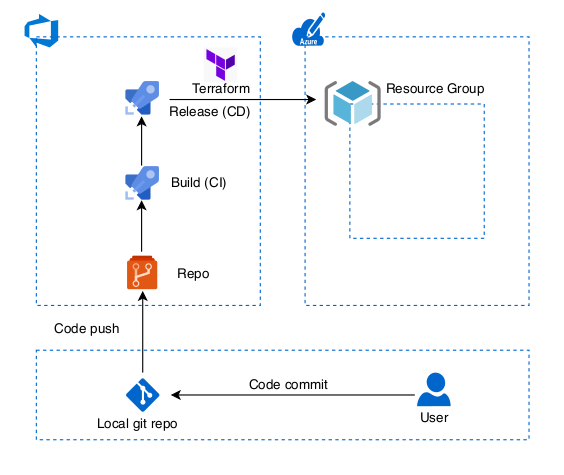
Using a pipeline for Terraform code offers a multitude of advantages that streamline and enhance the infrastructure provisioning and management process. By automating the deployment of infrastructure as code (IaC) through a well-structured pipeline, organizations can achieve greater efficiency, reliability, and collaboration in their cloud infrastructure management. In this discussion, we will explore these advantages in detail, highlighting how implementing a Terraform pipeline can lead to improved consistency, scalability, and overall operational excellence in cloud infrastructure management.

Overall Architecture in Azure
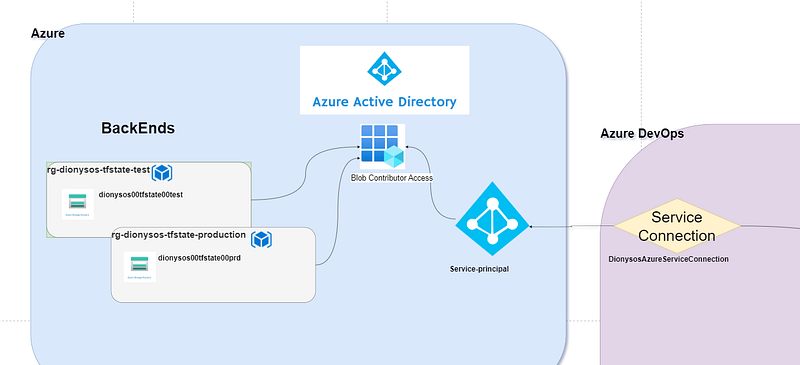
Overall Architecture Infra in Azure DevOps (ADO)
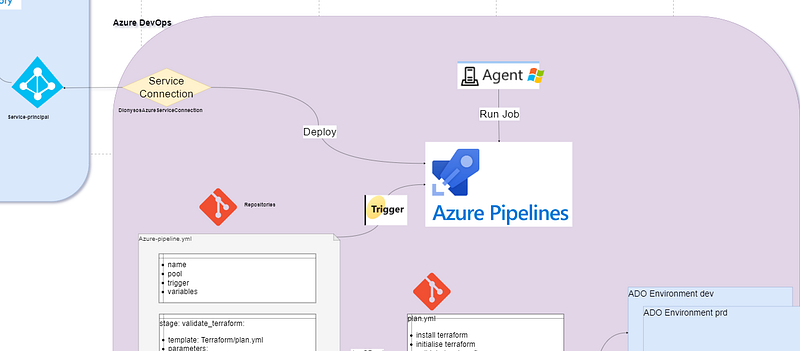
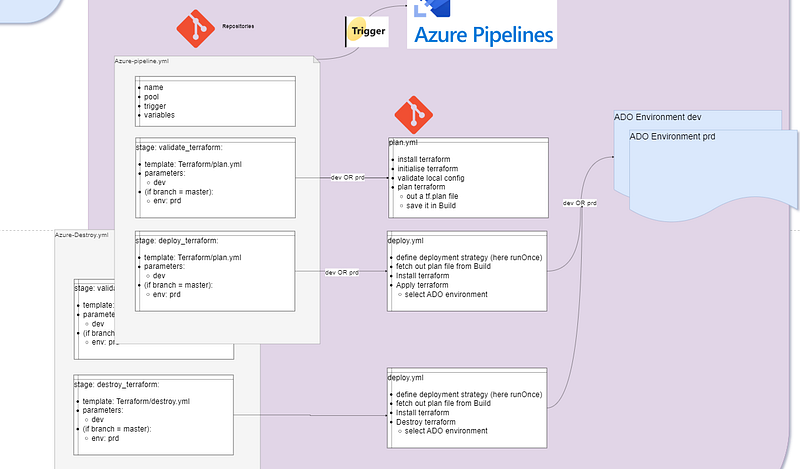
Overall Git Architecture in Azure DevOps (ADO)
First it is necessary to store the state file in a backend.

Why using a backend in Terraform?

The Terraform backend, a vital component of the Terraform workflow, is responsible for storing and managing infrastructure state. It stores the state remotely in Azure blob storage to facilitate collaboration, locking, versioning, and security.

- Security: Terraform backends store the state file remotely, preventing it from residing on local workstations or version control systems, enhancing Security. Backends offer access control and encryption features to secure the state data, ensuring only authorised users can access or modify it.

- Concurrency and Locking: Backends provide a locking mechanism to prevent multiple users from simultaneously modifying the infrastructure, reducing the risk of conflicting changes.

- Collaboration: Remote backends enable team members to collaborate effectively and avoid the manual distribution of state files.

- State History and Versioning: Many backends support state versioning and history tracking, allowing users to review changes over time and revert to previous states.

Steps to create and use a terraform backend

- Create a dedicated resource-group and storage account for test and production

- Enable Soft Delete (90 days)

- Disable public blob access

- Create a container called tfstate (it will contain the backend)

- Add a delete Lock

Backend Documentation

- Create your resources with AZ command line

- Securing Terraform State in Azure

- Terraform on Azure Pipelines Best Practices

- Managing Terraform State in Azure: Best Practices for Multiple Environments

- Running Terraform in an Azure DevOps Pipeline: A Comprehensive Guide

- Azure DevOps Pipelines with Terraform and Stages

- Set up Backend (az storage accounts)

Once the backend has been created, the storage account has to be securely configured.

Backend Security

- Connect to your backend using a Service-Principal (see next step)

- Encryption: Enable Azure Storage Service Encryption (SSE)

- Access control: Implement role-based access control (RBAC) for your Azure Blob Storage using Azure Active Directory (Azure AD)

- Firewall: Limit access to the storage account by configuring a Service Principal

- Public network access: Enabled from selected virtual networks and IP addresses (e.g. your local IP for local testing)

- Network Routing: Internet routing

- Set Authentication method to Access key

Once the backend has been securely setup, it is time to access it from Azure DevOps (ADO)

ADO will use what is called a Service Connection that will connect to a Service Principal (SP) in Azure.

What is a SP and why do you need it?

- A SP is an identity that is used to perform tasks in Azure on behalf of our pipeline

- It is setup in Azure Active Directory (now Microsoft Entra ID) in app registration

- With it, the pipeline can connect to Azure and create/delete resources automatically

Advantages of SP

- Non-Interactive Authentication: SP provides an automatic authentication to Azure without having to go through any logins

- Granular Permissions: every SP can be granted a granular scope of permission on a resource, resource-group or subscription level

- Long-Term Access: there won’t be any tokens or password to update

A Service Principal will be automatically created when creating a service connection in ADO.

Creating a Service Connection in ADO

- Project settings > Create service connection > azure resource manager > service principal > keep rg blank > enter a name > select ‘grant access permission to all pipelines’

- e.g. Name in ADO: DionysosAzureServiceConnection

- e.g. Name in AAD: WineApp-******** — MPN in AAD

- Assign the Storage Blob Data Contributor role in Azure Active Directory to the service principal used to connect ADO to the azure container where the backend is

How to Create an Azure Remote Backend for Terraform

Then, Install Terraform Extension

- Organization Settings > extensions > market place > search for terraform > select org > install

Now we can create the yaml pipeline, the terraform pipeline is made of 3 parts:

- the main file (azure-pipeline.yml) which is going to pass variables (e.g. dev or prd) and call the two other files

- the plan.yml file which will screen the terraform code for errors and create a plan terraform file

- the deploy.yml which will use the plan file to then deploy resources

Here is the organisation of the azure-pipeline.yml

- trigger: upon pushing to the mentioned branch, the pipeline will automatically start (for the first time the trigger branch wont work)

- variables: we pass the service connection used in the pipeline and the backend configuration (please note the backend key is actually the name of backend file, the name is determined in the pipeline)

  • pool: the OS of the VM (agents) that will run the pipeline. Can be either Ubuntu or Windows. It matters because Ubuntu is faster but Windows has tools that can be used in the pipeline that Ubuntu doesn’t have. Also in Linux, file path are with \ whilst in windows they are with /
name: $(BuildDefinitionName)$(SourceBranchName)$(date:yyyyMMdd)$(rev:.r)

trigger:
  branches:
    include:
    - master
    # - development

variables: # terraform variables
 ServiceConnectionName: 'anynameofsp'
 bk-rg-name: 'rg-name'
 bk-str-account-name: 'strname'
 bk-container-name: 'containername'
 bk-key: 'terraform.tfstate' # key is actually name of the file, determined here

pool:
  vmImage: ubuntu-latest # This is the default if you don't specify a pool or vmImage.

stages:

  - stage: validate_terraform
    displayName: 'Validate Terraform'

    jobs:
    - template: Terraform/plan.yml
      parameters:
        env: dev
    - ${{ if eq(variables['Build.SourceBranch'], 'refs/heads/master')}}: #if branch is master then execute
      - template: Terraform/plan.yml
        parameters:
          env: prd

  - stage: deploy_terraform
    displayName: 'Deploy Terraform'
    dependsOn:
    - validate_terraform # makes sure validate_terraform stage runs first
    condition: succeeded('validate_terraform') ## stage runs only if validate_terraform is successful

    jobs:
    - template: Terraform/deploy.yml
      parameters:
        env: dev
    - ${{ if eq(variables['Build.SourceBranch'], 'refs/heads/master')}}: #if branch is master then execute
      - template: Terraform/deploy.yml
        parameters:
          env: prd

How a yml pipeline is organised

- Each pipeline has a stage, which has agents, that run jobs, that contain steps, that have tasks

- stage > jobs > steps > tasks

- Key concepts for new Azure Pipelines users

How to ensure that a pipeline runs dev and prd differently and only if pushing to production?

- By adding an if statement: ${{ if eq(variables[‘Build.SourceBranch’], ‘refs/heads/master’)}}

- This will run this step only if the branch is named master (in this case)

How to ensure that a pipeline runs only if the previous step worked?

- By adding condition: succeeded(‘validate_terraform’)

How to use separate files in a pipeline

- In order to use another file (here plan.yml and deploy.yml) you can use template

- E.g. template: Terraform/plan.yml (Terraform is the name of the folder in the directory)

Now we can build our terraform plan.yml

- pass-on the parameters dev or prd using parameters

- first: install terraform (every terraform yml file needs to do so)

- second: initialise terraform (see init command)

- third: validate terraform (optional): checks if tf code is correct

- fourth: run plan (see plan command)

- fith: move plan.tf to artifact directory

- finally: publish plan.tf as an artifact

init command:

- Add the working directory where the main.tf is at (e.g. ‘$(System.DefaultWorkingDirectory)/Infrastructure’)

- Add the backend configuration

plan command:

- Add the working directory where the main.tf is at (e.g. ‘$(System.DefaultWorkingDirectory)/Infrastructure’)

- Add the name of the service connection

- command options: see command options plan

command options plan:

- -lock=false (so the agent running this tage doesn’t lock the backend)

- -var-file=”vars/${{parameters.env}}.tfvars” to provide the tfvars file, without it the pipeline won’t proceed if you’re using variables

- -out=$(System.DefaultWorkingDirectory)/Infrastructure/terraform.tfplan’ to create the plan.tf file that will be saved to artifacts and used by the deploy stage

save artifact:

  • After plan completes, archive the entire working directory, including the .terraform subdirectory created during init, and save it somewhere where it will be available to the apply step. A common choice is as a “build artifact” within the chosen orchestration tool.
parameters:
  env: ''

jobs:
  - job: ${{parameters.env}}_validate_tf
    displayName: 'Validate ${{parameters.env}} terraform scripts'
    pool:
      vmImage: windows-latest

    steps:
    - task: TerraformInstaller@1 # 1st/ install terraform
      displayName: 'Install Terraform' # install always need to be installed at every stage
      inputs:
        terraformVersion: 'latest'

    - task: TerraformTaskV4@4
      displayName: 'Initialise Terraform' # init needs to be installed at every stage
      inputs:
        provider: 'azurerm'
        command: init
        workingDirectory: '$(System.DefaultWorkingDirectory)/Infrastructure' # where the Terraform code is at
        # fetched from variables (azure-pipeline.yml)
        backendServiceArm: $(ServiceConnectionName)
        backendAzureRmResourceGroupName: '$(bk-rg-name)-${{parameters.env}}'  
        backendAzureRmStorageAccountName: '$(bk-str-account-name)${{parameters.env}}'  
        backendAzureRmContainerName: '$(bk-container-name)-${{parameters.env}}'  
        backendAzureRmKey: '${{parameters.env}}$(bk-key)'  

    - task: TerraformTaskV4@4
      displayName: 'Validate Terraform'
      inputs:
        provider: 'azurerm'
        command: 'validate'   

    - task: TerraformTaskV4@4
      displayName: 'Plan Terraform'
      inputs:
        provider: 'azurerm'
        command: 'plan'
        workingDirectory: '$(System.DefaultWorkingDirectory)/Infrastructure'
        environmentServiceNameAzureRM: $(ServiceConnectionName)
        commandOptions: '-lock=false -var-file="vars/${{parameters.env}}.tfvars" -out=$(System.DefaultWorkingDirectory)/Infrastructure/terraform.tfplan'
        # var file = selecting the tfvars for each environment
        # out = creating the plan file to the Infrastructure folder and call it terraform.tfplan

    - task: CopyFiles@2
      displayName: 'Moving Terraform Code to artifact staging'
      inputs:
        Contents: 'Infrastructure/**'
        TargetFolder: '$(build.ArtifactStagingDirectory)'
        # Plan and apply are on different machines
        # plan state should thus be saved on a file
        # it will be then be loaded by apply

    - task: PublishBuildArtifacts@1
      displayName: 'Making artifact available to apply stage'
      inputs:
        PathtoPublish: '$(Build.ArtifactStagingDirectory)'
        ArtifactName: 'output-${{parameters.env}}'
        publishLocation: 'Container'

Now we can build our terraform deploy.yml

- For this stage we are using a deployment job

- Deployment strategy: runOnce vs Canary vs rolling. The runOnce is the simplest deployment strategy and all steps are executed once (preDeploy, deploy, routeTraffic)

- enviroment: create an environment in ADO (Pipelines > environment) read more about Deployment Environment

- Checkout: if self, the repository will be cloned within the job

- download:

- artifact: Before running apply, obtain the archive created in the previous step and extract it at the same absolute path. This re-creates everything that was present after plan, avoiding strange issues where local files were created during the plan step

- install terraform

- run terraform apply

Command options terraform apply:

- -lock=true we want to lock the backend

- -lock-timeout=5m we want to realse the backend after the step has been run

  • $(Pipeline.Workspace)/output-${{ parameters.env }}/Infrastructure/terraform.tfplan’
parameters:
 env: ''

jobs:
- deployment: deploy_infrastructure_${{ parameters.env }}
  displayName: 'Deploy infrastructure for ${{ parameters.env }}'
  pool:
    vmImage: 'windows-latest'
  environment: 'deploy_infrastructure_${{ parameters.env }}' # Pipeline Environment (ADO), benefit??
      # First, you need to make sure you are Creator in the Security of environment to solve below issue:
      # Job deploy_infrastructure_dev: Environment dev could not be found. => needs to be first created
      # The environment does not exist or has not been authorized for use.

  strategy:
    runOnce: ## RunOnce vs Canary Deployment
      deploy:
        steps:
          - checkout: none #or self (clone repo in current job)# getting code from the repo # TO DO: try without
          - download: current # get latest artifact
            artifact: 'output-${{ parameters.env }}' #fetch the output file from the plan phase

          - task: TerraformInstaller@1 # 1st/ install terraform
            displayName: 'Install Terraform' # install always need to be installed at every stage
            inputs:
              terraformVersion: 'latest'

          - task: TerraformTaskV4@4
            displayName: 'Apply Terraform' # init needs to be installed at every stage
            inputs:
              provider: 'azurerm'
              command: 'apply'
              workingDirectory: '$(Pipeline.Workspace)/output-${{ parameters.env }}/Infrastructure'
              environmentServiceNameAzureRM: $(ServiceConnectionName)
              commandOptions: '-lock=true -lock-timeout=5m $(Pipeline.Workspace)/output-${{ parameters.env }}/Infrastructure/terraform.tfplan'
              # lock timeout so lease is unlocked after 5 minutes

Build a separate Terraform Destroy Pipeline

name: $(BuildDefinitionName)$(SourceBranchName)$(date:yyyyMMdd)$(rev:.r)

trigger: none

variables: # terraform variables
 ServiceConnectionName: 'nameofserviceconnection'
 bk-rg-name: 'rg-name'
 bk-str-account-name: 'sracountname'
 bk-container-name: 'tfstate'
 bk-key: 'terraform.tfstate' # key is actually name of the file, determined here

pool:
  vmImage: ubuntu-latest # This is the default if you don't specify a pool or vmImage.

stages:

  - stage: validate_terraform
    displayName: 'Validate Terraform'

    jobs:
    - ${{ if eq(variables['Build.SourceBranch'], 'refs/heads/development')}}: #if branch is development then execute
      - template: Terraform/plan.yml
        parameters:
          env: dev
    - ${{ if eq(variables['Build.SourceBranch'], 'refs/heads/master')}}: #if branch is master then execute
      - template: Terraform/plan.yml
        parameters:
          env: prd

  - stage: destroy_terraform
    displayName: 'Destroy Terraform'

    jobs:
    - ${{ if eq(variables['Build.SourceBranch'], 'refs/heads/development')}}: #if branch is development then execute
      - template: Terraform/plan.yml
        parameters:
          env: dev
    - ${{ if eq(variables['Build.SourceBranch'], 'refs/heads/master')}}: #if branch is master then execute
      - template: Terraform/destroy.yml
        parameters:
          env: prd
parameters:
  env: ''

jobs:
- deployment: destroy_infrastructure_${{ parameters.env }}
  displayName: 'Destroy infrastructure for ${{ parameters.env }}'
  pool:
    vmImage: 'windows-latest'
  environment: 'deploy_infrastructure_${{ parameters.env }}' # Pipeline Environment (ADO), benefit??
      # First, you need to make sure you are Creator in the Security of environment:
      # Job deploy_infrastructure_dev: Environment dev could not be found. => needs to be first created
      # The environment does not exist or has not been authorized for use.

  strategy:
    runOnce: ## RunOnce vs Canary Deployment
      deploy:
        steps:
          - checkout: none #or self (clone repo in current job)
          - download: current # get latest artifact
            artifact: 'output-${{ parameters.env }}' #fetch the output file from the plan phase

          - task: TerraformInstaller@1 # 1st/ install terraform
            displayName: 'Install Terraform' # install always need to be installed at every stage
            inputs:
              terraformVersion: 'latest'

          - task: TerraformTaskV4@4
            inputs:
              provider: 'azurerm'
              command: 'destroy'
              workingDirectory: '$(Pipeline.Workspace)/output-${{ parameters.env }}/Infrastructure'
              environmentServiceNameAzureRM: $(ServiceConnectionName)
              commandOptions: '-lock=true -var-file="vars/${{parameters.env}}.tfvars"'

Tips to help you build terraform yaml

- Use templates: in ADO go to Repo > Set up build > show assistant > get terraform suggestions, then get the yaml code and copy it in a .yml file

- Give a custom name to your pipeline

- Select the right Agent Pool

- How to set up Triggers trigger can be a branch (e.g. branches: include: -name of branch) or a folder (e.g. paths: include: -name of folder)

- Build the step validate

- Move the terraform plan to an artifiact as specified by hashicorp documentation

- apply in a deployment job

- Automated Terraform CLI Workflow

- Edit system environment variables > environment variables > path > new > add path where terraform is at > new command line

Solving errors

Error while loading schemas for plugin components: Failed to obtain

│ provider schema: Could not load the schema for provider

│ registry.terraform.io/hashicorp/azurerm: failed to instantiate provider

│ “registry.terraform.io/hashicorp/azurerm” to obtain schema: fork/exec

│ .terraform/providers/registry.terraform.io/hashicorp/azurerm/3.72.0/linux_amd64/terraform-provider-azurerm_v3.72.0_x5:

│ permission denied..

Solution for ADO

- using Ubuntu agents, (linux uses ‘/’ instead of ‘\’), Terraform couldn’t find the file. Switching to the correct agent (in my case Windows) solved it

Solution locally

- hashicorp_documentation

- In your terraform folder run the following command to find your permissions: ls -l .terraform\providers\registry.terraform.io\hashicorp\azurerm\3.72.0\windows_386

- Then run the PowerShell command to setup permissions: icacls .terraform\providers\registry.terraform.io\hashicorp\azurerm\3.72.0\windows_386

- Solution in pipeline = give the service principal, in Azure AD app registration, contributor rights to the backend blob container

Giving permissions to the environment

- Checks and manual validations for deploy Terraform: Permission Environment permission needed: permit ==> Granting permission here will enable the use of Environment ‘deploy_infrastructure_prd’ for all waiting and future runs of this pipeline. ==> Permission granted

Terraform
Azure Devops
Yaml
Pipeline As Code
Azure
Recommended from ReadMedium