
Terraform — 5 Ways To Create Infrastructure in Multiple Environments
Exploring Different ways of creating infrastructure in different environments with Terraform
Terraform is an open-source infrastructure as a code software tool that provides a consistent CLI workflow to manage hundreds of cloud services. Terraform codifies cloud APIs into declarative configuration files.
Most of the time we deploy the infrastructure in multiple environments. We need these environments for the development, stage, testing, and production. It’s very important to write a maintainable and scalable Terraform configuration that should allow us to provision infrastructure on these different environments.
In this post, we will see the different ways of provisioning infrastructure in multiple environments. Each of them has pros and cons.
- Introduction
- Prerequisite
- Using Folders — Method 1
- Using Folders — Method 2
- Workspaces
- Modules
- Terragrunt
- Summary
- Conclusion
Introduction
Every Application goes through different environments before it is deployed into production. It’s always best practice to have similar environments for consistency purposes. It’s so easy to replicate the bugs and fix them easily. It’s not easy to replicate the same set of infrastructure in each environment if we do that manually. Terraform makes it easy to create infrastructure in a multi-cloud environment.
Since the Terraform is an Infrastructure as a code tool you write your infrastructure in code and it’s very easy to write for different environments in a modular way.
We will see the possible ways of creating infrastructure in multiple environments in the following sections.
Prerequisite
If you are new to the Terraform and just getting started with it I would recommend you go through the below article first.
Using Folders — Method 1
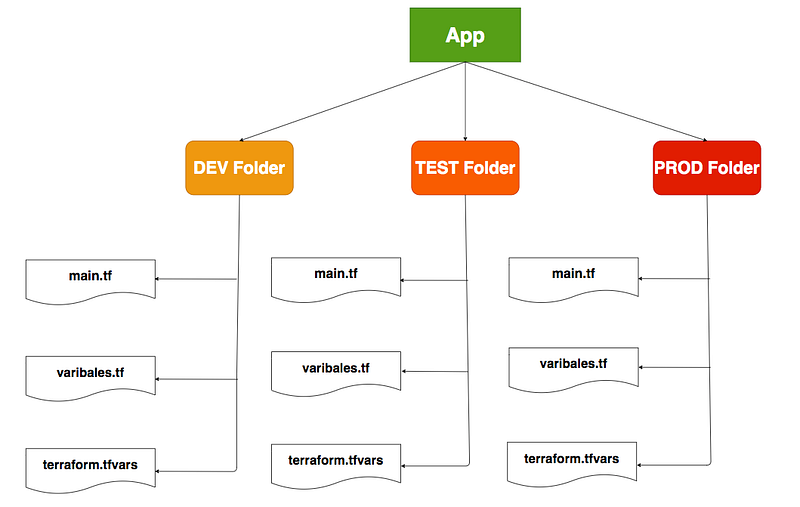
In this method, we duplicate the same infrastructure in each folder with different values in the terraform.tfvars file. This is not ideal when you have the same infrastructure in all environments.
Each folder represents a separate environment and you can have a backend in each folder as well and there is nothing common between these folders. You can have outputs.tf, providers.tf, variables.tf files, etc in each folder. When you are running terraform commands you have to navigate to the respective folder and run the three commands init, plan and apply.
Pros
- You can easily add or remove resources in each environment
- Changes in one environment don’t affect other environments
Cons
- Duplication of code
- If you want to change the resource you have to change it in all environments.
Using Folders — Method 2
In this method, we maintain the same infrastructure in common files but have different terraform.tfvars in each environment. This is not ideal when you have the different infrastructure in all environments.
Since we are maintaining the same main.tf, variables.tf files, when you are running terraform commands you need to pass different variables based on the environment. For example, if we have three environments these are the commands you need to run for creating infrastructure.
// Dev Environment
terraform plan --var-file="tfvars/environment/dev.tfvars"
// QA Environment
terraform plan --var-file="tfvars/environment/qa.tfvars"// Prod Environment
terraform plan --var-file="tfvars/environment/prod.tfvars"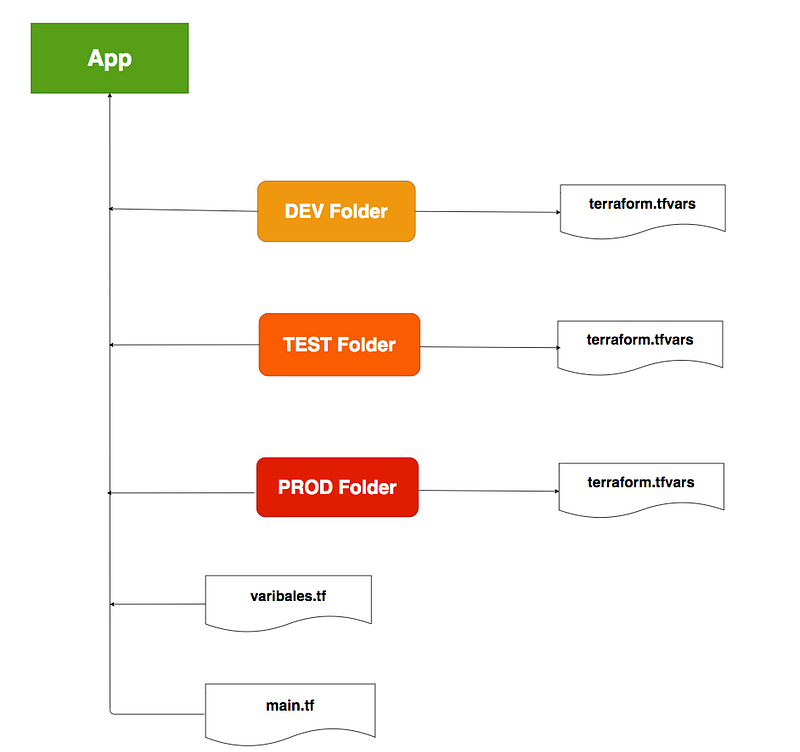
Pros
- There is no duplication of code
- If you want to change the resource you don’t have to change in all the environments.
Cons
- You can’t easily add or remove resources in each environment
- Changes in one environment do affect other environments since we are using the same files with different var files.
Workspaces
Terraform starts with a single workspace named default. The workspace is special because it is the default and also because it can’t ever be deleted. If you have never explicitly used workspaces, then you have only ever worked on the default workspace.
Workspaces are managed with the command terraform workspace. There are a set of commands for the workspaces. For Example, You can use this command terraform workspace new to create a new workspace.
Modules
A module is a container for multiple resources that are used together. Every Terraform configuration has at least one module, known as the root module. This root module usually consists of the resources defined in the files which have the extension .tf in the main working directory.
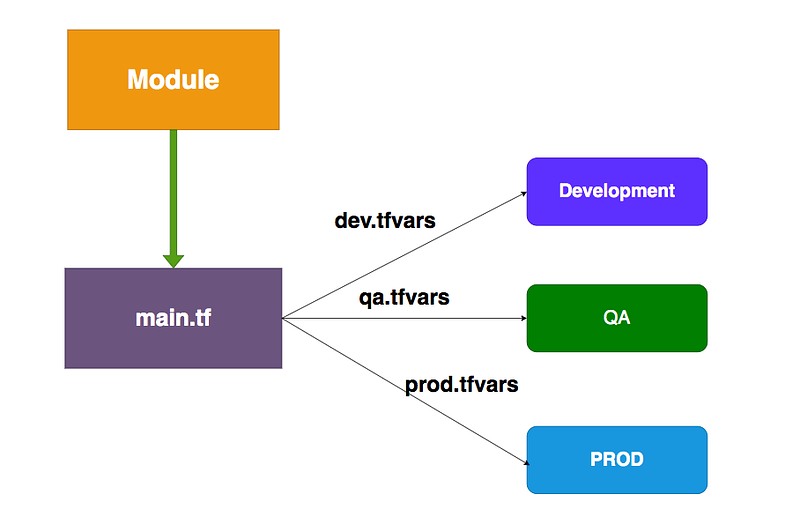
A module can call other modules and these called modules have become child modules to the calling modules. You can put a lot of resources in a particular module you can use it in your main module in a concise way. You can use these modules in a configurable way so that the same module can be used in different environments without changing any code.
This is a combination of using folders and modules. You import the module into your main file and you can pass respective input variables based on the environment as depicted in the following figure.
Terragrunt
Terragrunt is a thin wrapper that provides extra tools for keeping your configurations DRY, working with multiple Terraform modules, and managing remote state.
You can get to know more about this tool on their official site below. I will write a detailed post on this in future posts.
https://terragrunt.gruntwork.io/Summary
- Terraform is an open-source infrastructure as a code software tool that provides a consistent CLI workflow to manage hundreds of cloud services.
- Most of the time we deploy the infrastructure in multiple environments. We need these environments for the development, stage, testing, and production.
- There are 5 ways to write reusable code for different environments in Terraform.
- Using Folders is the most used one of all. There are two ways to do this.
- Terraform starts with a single workspace named default. The workspace is special because it is the default and also because it can’t ever be deleted.
- A module is a container for multiple resources that are used together. You can use these modules in a configurable way so that the same module can be used in different environments without changing any code.
- Terragrunt is a thin wrapper that provides extra tools for keeping your configurations DRY, working with multiple Terraform modules, and managing remote state.
Conclusion
These are different ways to create infrastructure using Terraform in different environments. We have to mix up these ways to create different environments and has their own pros and cons. In future posts, I will write detailed posts on all these ways in multi-cloud environments.