avatarSayantini Deb

Free AI web copilot to create summaries, insights and extended knowledge, download it at here

20993

Abstract

dataset_folder_path): <span class="hljs-keyword">with</span> tarfile.<span class="hljs-built_in">open</span>(<span class="hljs-string">'cifar-10-python.tar.gz'</span>) <span class="hljs-keyword">as</span> tar: tar.extractall() tar.close()</pre></div><h2 id="0fa6">Importing Necessary Libraries</h2><div id="0613"><pre><span class="hljs-keyword">import</span> pickle <span class="hljs-keyword">import</span> numpy <span class="hljs-keyword">as</span> np <span class="hljs-keyword">import</span> matplotlib.pyplot <span class="hljs-keyword">as</span> plt</pre></div><h2 id="df0e">Understanding the Data</h2><p id="55dd">The original batch of Data is 10000×3072 tensor expressed in a numpy array, where 10000 is the number of sample data. The image is colored and of size 32×32. Feeding can be done either in a format of (width x height x num_channel) or (num_channel x width x height). Let’s define the labels.</p><div id="b509"><pre><span class="hljs-keyword">def</span> <span class="hljs-title function_">load_label_names</span>(): <span class="hljs-keyword">return</span> [<span class="hljs-string">'airplane'</span>, <span class="hljs-string">'automobile'</span>, <span class="hljs-string">'bird'</span>, <span class="hljs-string">'cat'</span>, <span class="hljs-string">'deer'</span>, <span class="hljs-string">'dog'</span>, <span class="hljs-string">'frog'</span>, <span class="hljs-string">'horse'</span>, <span class="hljs-string">'ship'</span>, <span class="hljs-string">'truck'</span>]</pre></div><h2 id="f3d3">Reshaping the Data</h2><p id="6e75">We are going to reshape the data in two stages</p><p id="144d">Firstly, divide the row vector (3072) into 3 pieces. Each piece corresponds to each channel. This results in (3 x 1024) dimension of a tensor. Then Divide the resulting tensor from the previous step with 32. 32 here means the width of an image. This results in (3x32x32).</p><p id="bb9a">Secondly, we have to transpose the data from (num_channel, width, height) to (width, height, num_channel). For that, we are going to use the transpose function.</p><figure id="6149"><img src="https://cdn-images-1.readmedium.com/v2/resize:fit:800/1*cpONIZmO-tOkyfW4QmwCYA.png"><figcaption></figcaption></figure><div id="b63f"><pre>def load_cfar10_batch(cifar10_dataset_folder_path, batch_id): <span class="hljs-keyword">with</span> <span class="hljs-built_in">open</span>(cifar10_dataset_folder_path + <span class="hljs-string">'/data_batch'</span> + str(batch_id), mode=<span class="hljs-string">'rb'</span>) <span class="hljs-keyword">as</span> <span class="hljs-built_in">file</span>: <span class="hljs-comment"># note the encoding type is 'latin1'</span> batch = pickle.<span class="hljs-built_in">load</span>(<span class="hljs-built_in">file</span>, encoding=<span class="hljs-string">'latin1'</span>)

features = batch[<span class="hljs-string">'data'</span>].reshape((<span class="hljs-built_in">len</span>(batch[<span class="hljs-string">'data'</span>]), <span class="hljs-number">3</span>, <span class="hljs-number">32</span>, <span class="hljs-number">32</span>)).<span class="hljs-built_in">transpose</span>(<span class="hljs-number">0</span>, <span class="hljs-number">2</span>, <span class="hljs-number">3</span>, <span class="hljs-number">1</span>)
labels = batch[<span class="hljs-string">'labels'</span>]
    
<span class="hljs-literal">return</span> features, label</pre></div><h2 id="87bb">Exploring the Data</h2><div id="ed0e"><pre>def <span class="hljs-built_in">display_stats</span>(cifar10_dataset_folder_path, batch_id, sample_id):
features, labels = <span class="hljs-built_in">load_cfar10_batch</span>(cifar10_dataset_folder_path, batch_id)

if not (<span class="hljs-number">0</span> &lt;= sample_id &lt; <span class="hljs-built_in">len</span>(features)):
    <span class="hljs-built_in">print</span>(<span class="hljs-string">'{} samples in batch {}.  {} is out of range.'</span>.<span class="hljs-built_in">format</span>(<span class="hljs-built_in">len</span>(features), batch_id, sample_id))
    return None

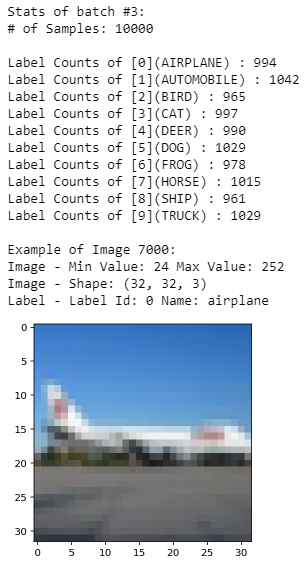
<span class="hljs-built_in">print</span>(<span class="hljs-string">'\nStats of batch #{}:'</span>.<span class="hljs-built_in">format</span>(batch_id))
<span class="hljs-built_in">print</span>(<span class="hljs-string">'# of Samples: {}\n'</span>.<span class="hljs-built_in">format</span>(<span class="hljs-built_in">len</span>(features)))

label_names = <span class="hljs-built_in">load_label_names</span>()
label_counts = <span class="hljs-built_in">dict</span>(<span class="hljs-built_in">zip</span>(*np.<span class="hljs-built_in">unique</span>(labels, return_counts=True)))
for key, value in label_counts.<span class="hljs-built_in">items</span>():
    <span class="hljs-built_in">print</span>(<span class="hljs-string">'Label Counts of [{}]({}) : {}'</span>.<span class="hljs-built_in">format</span>(key, label_names[key].<span class="hljs-built_in">upper</span>(), value))

sample_image = features[sample_id]
sample_label = labels[sample_id]

<span class="hljs-built_in">print</span>(<span class="hljs-string">'\nExample of Image {}:'</span>.<span class="hljs-built_in">format</span>(sample_id))
<span class="hljs-built_in">print</span>(<span class="hljs-string">'Image - Min Value: {} Max Value: {}'</span>.<span class="hljs-built_in">format</span>(sample_image.<span class="hljs-built_in">min</span>(), sample_image.<span class="hljs-built_in">max</span>()))
<span class="hljs-built_in">print</span>(<span class="hljs-string">'Image - Shape: {}'</span>.<span class="hljs-built_in">format</span>(sample_image.shape))
<span class="hljs-built_in">print</span>(<span class="hljs-string">'Label - Label Id: {} Name: {}'</span>.<span class="hljs-built_in">format</span>(sample_label, label_names[sample_label]))

plt.<span class="hljs-built_in">imshow</span>(sample_image)</pre></div><h2 id="a528">Plotting the stats</h2><div id="328d"><pre>%matplotlib <span class="hljs-keyword">inline</span>

%config InlineBackend.figure_format = <span class="hljs-string">'retina'</span>

<span class="hljs-keyword">import</span> numpy <span class="hljs-keyword">as</span> np

Explore the dataset

batch_id = <span class="hljs-number">3</span> sample_id = <span class="hljs-number">7000</span> display_stats(cifar10_dataset_folder_path, batch_id, sample_id)</pre></div><figure id="7969"><img src="https://cdn-images-1.readmedium.com/v2/resize:fit:800/1*HUsGwo97_Pekqp5GIud9vg.png"><figcaption></figcaption></figure><h2 id="1c4b">Implementing Pre-processing Functions</h2><p id="159b">We are going to Normalize the data via Min-Max Normalization. This simply makes all x values to range between 0 and 1. y = (x-min) / (max-min)</p><div id="b326"><pre><span class="hljs-keyword">def</span> <span class="hljs-title function_">normalize</span>(<span class="hljs-params">x</span>): <span class="hljs-string">""" argument - x: input image data in numpy array [32, 32, 3] return - normalized x """</span> min_val = np.<span class="hljs-built_in">min</span>(x) max_val = np.<span class="hljs-built_in">max</span>(x) x = (x-min_val) / (max_val-min_val) <span class="hljs-keyword">return</span> x</pre></div><h2 id="9a42">One-Hot Encode</h2><div id="b8cb"><pre><span class="hljs-keyword">def</span> <span class="hljs-title function_">one_hot_encode</span>(<span class="hljs-params">x</span>): <span class="hljs-string">""" argument - x: a list of labels return - one hot encoding matrix (number of labels, number of class) """</span> encoded = np.zeros((<span class="hljs-built_in">len</span>(x), <span class="hljs-number">10</span>))

<span class="hljs-keyword">for</span> idx, val <span class="hljs-keyword">in</span> <span class="hljs-built_in">enumerate</span>(x):
    encoded[idx][val] = <span class="hljs-number">1</span>

<span class="hljs-keyword">return</span> encoded</pre></div><h2 id="50ce">Preprocess and Save the Data</h2><div id="333a"><pre>def _preprocess_and_save(normalize, one_hot_encode, <span class="hljs-built_in">features</span>, <span class="hljs-built_in">labels</span>, filename):
<span class="hljs-built_in">features</span> = normalize(<span class="hljs-built_in">features</span>)
<span class="hljs-built_in">labels</span> = one_hot_encode(<span class="hljs-built_in">labels</span>)</pre></div><div id="d5b9"><pre>    pickle.<span class="hljs-built_in">dump</span>((features, labels), <span class="hljs-built_in">open</span>(filename, <span class="hljs-string">'wb'</span>))

</pre></div><div id="8dc7"><pre><span class="hljs-attribute">def</span> preprocess_and_save_data(cifar10_dataset_folder_path, normalize, one_hot_encode): <span class="hljs-attribute">n_batches</span> = <span class="hljs-number">5</span> <span class="hljs-attribute">valid_features</span> =<span class="hljs-meta"> []</span> <span class="hljs-attribute">valid_labels</span> =<span class="hljs-meta"> []</span></pre></div><div id="af91"><pre> <span class="hljs-keyword">for</span> batch_i in <span class="hljs-built_in">range</span>(<span class="hljs-number">1</span>, n_batches + <span class="hljs-number">1</span>): features, labels = load_cfar10_batch(cifar10_dataset_folder_path, batch_i)

    # <span class="hljs-keyword">find</span> <span class="hljs-built_in">index</span> <span class="hljs-keyword">to</span> <span class="hljs-keyword">be</span> the point <span class="hljs-keyword">as</span> validation data in the whole dataset of the batch (<span class="hljs-number">10</span>%)
    index_of_validation = <span class="hljs-keyword">int</span>(<span class="hljs-built_in">len</span>(features) * <span class="hljs-number">0.1</span>)</pre></div><div id="a5d9"><pre>        <span class="hljs-comment"># preprocess the 90% of the whole dataset of the batch</span>
    <span class="hljs-comment"># - normalize the features</span>
    <span class="hljs-comment"># - one_hot_encode the lables</span>
    <span class="hljs-comment"># - save in a new file named, "preprocess_batch_" + batch_number</span>
    <span class="hljs-comment"># - each file for each batch</span>
    _preprocess_and_save(normalize, one_hot_encode,
                         features[<span class="hljs-symbol">:-index_of_validation</span>], labels[<span class="hljs-symbol">:-index_of_validation</span>], 
                         <span class="hljs-string">'preprocess_batch_'</span> + str(batch_i) + <span class="hljs-string">'.p'</span>)</pre></div><div id="6958"><pre>        <span class="hljs-comment"># unlike the training dataset, validation dataset will be added through all batch dataset</span>
    <span class="hljs-comment"># - take 10% of the whold dataset of the batch</span>
    <span class="hljs-comment"># - add them into a list of</span>
    <span class="hljs-comment">#   - valid_features</span>
    <span class="hljs-comment">#   - valid_labels</span>
    valid_features.<span class="hljs-keyword">extend</span>(features[-<span class="hljs-symbol">index_of_validation:</span>])
    valid_labels.<span class="hljs-keyword">extend</span>(labels[-<span class="hljs-symbol">index_of_validation:</span>])</pre></div><div id="2a01"><pre>    # preprocess the <span class="hljs-keyword">all</span> <span class="hljs-keyword">stacked</span> validation dataset
_preprocess_and_save(normalize, one_hot_encode,
                     np.<span class="hljs-keyword">array</span>(valid_features), np.<span class="hljs-keyword">array</span>(valid_labels),
                     <span class="hljs-string">'preprocess_validation.p'</span>)</pre></div><div id="7b95"><pre>    <span class="hljs-comment"># load the test dataset</span>
<span class="hljs-keyword">with</span> <span class="hljs-built_in">open</span>(cifar10_dataset_folder_path + <span class="hljs-string">'/test_batch'</span>, mode=<span class="hljs-string">'rb'</span>) <span class="hljs-keyword">as</span> <span class="hljs-built_in">file</span>:
    batch = pickle.<span class="hljs-built_in">load</span>(<span class="hljs-built_in">file</span>, encoding=<span class="hljs-string">'latin1'</span>)</pre></div><div id="5930"><pre>    <span class="hljs-comment"># preprocess the testing data</span>
<span class="hljs-attribute">test_features</span> = batch['data'].reshape((len(batch['data']), <span class="hljs-number">3</span>, <span class="hljs-number">32</span>, <span class="hljs-number">32</span>)).transpose(<span class="hljs-number">0</span>, <span class="hljs-number">2</span>, <span class="hljs-number">3</span>, <span class="hljs-number">1</span>)
<span class="hljs-attribute">test_labels</span> = batch['labels']</pre></div><div id="b00d"><pre>    <span class="hljs-comment"># Preprocess and Save all testing data</span>
<span class="hljs-title function_ invoke__">_preprocess_and_save</span>(normalize, one_hot_encode,
                     np.<span class="hljs-keyword">array</span>(test_features), np.<span class="hljs-keyword">array</span>(test_labels),
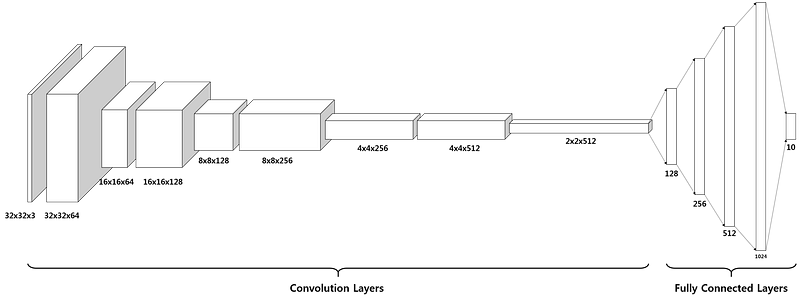
                     <span class="hljs-string">'preprocess_training.p'</span>)</pre></div><h2 id="152e">Execute:</h2><div id="e3c0"><pre><span class="hljs-function"><span class="hljs-title">preprocess_and_save_data</span><span class="hljs-params">(cifar10_dataset_folder_path, normalize, one_hot_encode)</span></span></pre></div><h2 id="c48a">Checkpoint</h2><div id="b200"><pre><span class="hljs-keyword">import</span> pickle</pre></div><div id="35c6"><pre>valid_features, valid_labels = pickle.<span class="hljs-built_in">load</span>(<span class="hljs-built_in">open</span>(<span class="hljs-string">'preprocess_validation.p'</span>, mode=<span class="hljs-string">'rb'</span>))</pre></div><h2 id="874e">Building the Network</h2><p id="5b40">The entire model consists of 14 layers in total.</p><figure id="0324"><img src="https://cdn-images-1.readmedium.com/v2/resize:fit:800/1*k9vqHlbdpn1z08fZh5miDw.png"><figcaption></figcaption></figure><div id="2db8"><pre><span class="hljs-attribute">import</span> tensorflow as tf

<span class="hljs-attribute">def</span> conv_net(x, keep_prob): <span class="hljs-attribute">conv1_filter</span> = tf.Variable(tf.truncated_normal(shape=[<span class="hljs-number">3</span>, <span class="hljs-number">3</span>, <span class="hljs-number">3</span>, <span class="hljs-number">64</span>], mean=<span class="hljs-number">0</span>, stddev=<span class="hljs-number">0</span>.<span class="hljs-number">08</span>)) <span class="hljs-attribute">conv2_filter</span> = tf.Variable(tf.truncated_normal(shape=[<span class="hljs-number">3</span>, <span class="hljs-number">3</span>, <span class="hljs-number">64</span>, <span class="hljs-number">128</span>], mean=<span class="hljs-number">0</span>, stddev=<span class="hljs-number">0</span>.<span class="hljs-number">08</span>)) <span class="hljs-attribute">conv3_filter</span> = tf.Variable(tf.truncated_normal(shape=[<span class="hljs-number">5</span>, <span class="hljs-number">5</span>, <span class="hljs-number">128</span>, <span class="hljs-number">256</span>], mean=<span class="hljs-number">0</span>, stddev=<span class="hljs-number">0</span>.<span class="hljs-number">08</span>)) <span class="hljs-attribute">conv4_filter</span> = tf.Variable(tf.truncated_normal(shape=[<span class="hljs-number">5</span>, <span class="hljs-number">5</span>, <span class="hljs-number">256</span>, <span class="hljs-number">512</span>], mean=<span class="hljs-number">0</span>, stddev=<span class="hljs-number">0</span>.<span class="hljs-number">08</span>))

<span class="hljs-comment"># 1, 2</span>
<span class="hljs-attribute">conv1</span> = tf.nn.conv2d(x, conv1_filter, strides=[<span class="hljs-number">1</span>,<span class="hljs-number">1</span>,<span class="hljs-number">1</span>,<span class="hljs-number">1</span>], padding='SAME')
<span class="hljs-attribute">conv1</span> = tf.nn.relu(conv1)
<span class="hljs-attribute">conv1_pool</span> = tf.nn.max_pool(conv1, ksize=[<span class="hljs-number">1</span>,<span class="hljs-number">2</span>,<span class="hljs-number">2</span>,<span class="hljs-number">1</span>], strides=[<span class="hljs-number">1</span>,<span class="hljs-number">2</span>,<span class="hljs-number">2</span>,<span class="hljs-number">1</span>], padding='SAME')
<span class="hljs-attribute">conv1_bn</span> = tf.layers.batch_normalization(conv1_pool)

<span class="hljs-comment"># 3, 4</span>
<span class="hljs-attribute">conv2</span> = tf.nn.conv2d(conv1_bn, conv2_filter, strides=[<span class="hljs-number">1</span>,<span class="hljs-number">1</span>,<span class="hljs-number">1</span>,<span class="hljs-number">1</span>], padding='SAME')
<span class="hljs-attribute">conv2</span> = tf.nn.relu(conv2)
<span class="hljs-attribute">conv2_pool</span> = tf.nn.max_pool(conv2, ksize=[<span class="hljs-number">1</span>,<span class="hljs-number">2</span>,<span class="hljs-number">2</span>,<span class="hljs-number">1</span>], strides=[<span class="hljs-number">1</span>,<span class="hljs-number">2</span>,<span class="hljs-number">2</span>,<span class="hljs-number">1</span>], padding='SAME')    
<span class="hljs-attribute">conv2_bn</span> = tf.layers.batch_normalization(conv2_pool)

<span class="hljs-comment"># 5, 6</span>
<span class="hljs-attribute">conv3</span> = tf.nn.conv2d(conv2_bn, conv3_filter, strides=[<span class="hljs-number">1</span>,<span class="hljs-number">1</span>,<span class="hljs-number">1</span>,<span class="hljs-number">1</span>], padding='SAME')
<span class="hljs-attribute">conv3</span> = tf.nn.relu(conv3)
<span class="hljs-attribute">conv3_pool</span> = tf.nn.max_pool(conv3, ksize=[<span class="hljs-number">1</span>,<span class="hljs-number">2</span>,<span class="hljs-number">2</span>,<span class="hljs-number">1</span>], strides=[<span class="hljs-number">1</span>,<span class="hljs-number">2</span>,<span class="hljs-number">2</span>,<span class="hljs-number">1</span>], padding='SAME')  
<span class="hljs-attribute">conv3_bn</span> = tf.layers.batch_normalization(conv3_pool)

<span class="hljs-comment"># 7, 8</span>
<span class="hljs-attribute">conv4</span> = tf.nn.conv2d(conv3_bn, conv4_filter, strides=[<span class="hljs-number">1</span>,<span class="hljs-number">1</span>,<span class="hljs-number">1</span>,<span class="hljs-number">1</span>], padding='SAME')
<span class="hljs-attribute">conv4</span> = tf.nn.relu(conv4)
<span class="hljs-attribute">conv4_pool</span> = tf.nn.max_pool(conv4, ksize=[<span class="hljs-number">1</span>,<span class="hljs-number">2</span>,<span class="hljs-number">2</span>,<span class="hljs-number">1</span>], strides=[<span class="hljs-number">1</span>,<span class="hljs-number">2</span>,<span class="hljs-number">2</span>,<span class="hljs-number">1</span>], padding='SAME')
<span class="hljs-attribute">conv4_bn</span> = tf.layers.batch_normalization(conv4_pool)

<span class="hljs-comment"># 9</span>
<span class="hljs-attribute">flat</span> = tf.contrib.layers.flatten(conv4_bn)  

<span class="hljs-comment"># 10</span>
<span class="hljs-attribute">full1</span> = tf.contrib.layers.fully_connected(inputs=flat, num_outputs=<span class="hljs-number">128</span>, activation_fn=tf.nn.relu)
<span class="hljs-attribute">full1</span> = tf.nn.dropout(full1, keep_prob)
<span class="hljs-attribute">full1</span> = tf.layers.batch_normalization(full1)

<span class="hljs-comment"># 11</span>
<span class="hljs-attribute">full2</span> = tf.contrib.layers.fully_connected(inputs=full1, num_outputs=<span class="hljs-number">256</span>, activation_fn=tf.nn.relu)
<span class="hljs-attribute">full2</span> = tf.nn.dropout(full2, keep_prob)
<span class="hljs-attribute">full2</span> = tf.layers.batch_normalization(full2)

<span class="hljs-comment"># 12</span>
<span class="hljs-attribute">full3</span> = tf.contrib.layers.fully_connected(inputs=full2, num_outputs=<span class="hljs-number">512</span>, activation_fn=tf.nn.relu)
<span class="hljs-attribute">full3</span> = tf.nn.dropout(full3, keep_prob)
<span class="hljs-attribute">full3</span> = tf.layers.batch_normalization(full3)    

<span class="hljs-comment"># 13</span>
<span class="hljs-attribute">full4</span> = tf.contrib.layers.fully_connected(inputs=full3, num_outputs=<span class="hljs-number">1024</span>, activation_fn=tf.nn.relu)
<span class="hljs-attribute">full4</span> = tf.nn.dropout(full4, keep_prob)
<span class="hljs-attribute">full4</span> = tf.layers.batch_normalization(full4)        

<span class="hljs-comment"># 14</span>
<span class="hljs-attribute">out</span> = tf.contrib.layers.full

Options

y_connected(inputs=full3, num_outputs=<span class="hljs-number">10</span>, activation_fn=None) <span class="hljs-attribute">return</span> out</pre></div><h2 id="6be0">Hyperparameters</h2><div id="6cdb"><pre><span class="hljs-attr">epochs</span> = <span class="hljs-number">10</span> <span class="hljs-attr">batch_size</span> = <span class="hljs-number">128</span> <span class="hljs-attr">keep_probability</span> = <span class="hljs-number">0.7</span> <span class="hljs-attr">learning_rate</span> = <span class="hljs-number">0.001</span></pre></div><div id="d64d"><pre><span class="hljs-attr">logits</span> = conv_net(x, keep_prob) <span class="hljs-attr">model</span> = tf.identity(logits, name=<span class="hljs-string">'logits'</span>) <span class="hljs-comment"># Name logits Tensor, so that can be loaded from disk after training</span></pre></div><div id="a260"><pre><span class="hljs-comment"># Loss and Optimizer</span> cost = tf.reduce_mean(tf.nn.softmax_cross_entropy_with_logits(<span class="hljs-attribute">logits</span>=logits, <span class="hljs-attribute">labels</span>=y)) optimizer = tf.train.AdamOptimizer(<span class="hljs-attribute">learning_rate</span>=learning_rate).minimize(cost)</pre></div><div id="f669"><pre># Accuracy correct_pred = <span class="hljs-keyword">tf</span>.equal(<span class="hljs-keyword">tf</span>.argmax(logits, <span class="hljs-number">1</span>), <span class="hljs-keyword">tf</span>.argmax(<span class="hljs-keyword">y</span>, <span class="hljs-number">1</span>)) accuracy = <span class="hljs-keyword">tf</span>.reduce_mean(<span class="hljs-keyword">tf</span>.cast(correct_pred, <span class="hljs-keyword">tf</span>.float32), name=<span class="hljs-string">'accuracy'</span>)</pre></div><h2 id="036f">Train the Neural Network</h2><div id="b1a7"><pre><span class="hljs-comment">#Single Optimization</span> <span class="hljs-attribute">def train_neural_network(session, optimizer, keep_probability, feature_batch, label_batch)</span><span class="hljs-punctuation">:</span> <span class="hljs-attribute">session.run(optimizer, feed_dict={ x</span><span class="hljs-punctuation">:</span> <span class="hljs-string">feature_batch,</span> <span class="hljs-attribute">y</span><span class="hljs-punctuation">:</span> <span class="hljs-string">label_batch,</span> <span class="hljs-attribute">keep_prob</span><span class="hljs-punctuation">:</span> <span class="hljs-string">keep_probability</span> })</pre></div><div id="3418"><pre><span class="hljs-comment">#Showing Stats</span> <span class="hljs-attribute">def print_stats(session, feature_batch, label_batch, cost, accuracy)</span><span class="hljs-punctuation">:</span> <span class="hljs-attribute">loss = sess.run(cost, feed_dict={ x</span><span class="hljs-punctuation">:</span> <span class="hljs-string">feature_batch,</span> <span class="hljs-attribute">y</span><span class="hljs-punctuation">:</span> <span class="hljs-string">label_batch,</span> <span class="hljs-attribute">keep_prob</span><span class="hljs-punctuation">:</span> <span class="hljs-string">1.</span> <span class="hljs-attribute">}) valid_acc = sess.run(accuracy, feed_dict={ x</span><span class="hljs-punctuation">:</span> <span class="hljs-string">valid_features,</span> <span class="hljs-attribute">y</span><span class="hljs-punctuation">:</span> <span class="hljs-string">valid_labels,</span> <span class="hljs-attribute">keep_prob</span><span class="hljs-punctuation">:</span> <span class="hljs-string">1.</span> <span class="hljs-attribute">})

print('Loss</span><span class="hljs-punctuation">:</span> <span class="hljs-string">{:&gt;10.4f} Validation Accuracy: {:.6f}'.format(loss, valid_acc))</span></pre></div><h2 id="f8f6">Fully Training and Saving the Model</h2><div id="1d6d"><pre><span class="hljs-keyword">def</span> <span class="hljs-title function_">batch_features_labels</span>(<span class="hljs-params">features, labels, batch_size</span>):
<span class="hljs-string">"""
Split features and labels into batches
"""</span>
<span class="hljs-keyword">for</span> start <span class="hljs-keyword">in</span> <span class="hljs-built_in">range</span>(<span class="hljs-number">0</span>, <span class="hljs-built_in">len</span>(features), batch_size):
    end = <span class="hljs-built_in">min</span>(start + batch_size, <span class="hljs-built_in">len</span>(features))
    <span class="hljs-keyword">yield</span> features[start:end], labels[start:end]</pre></div><div id="c5c5"><pre><span class="hljs-keyword">def</span> <span class="hljs-title function_">load_preprocess_training_batch</span>(<span class="hljs-params">batch_id, batch_size</span>):
<span class="hljs-string">"""
Load the Preprocessed Training data and return them in batches of &lt;batch_size&gt; or less
"""</span>
filename = <span class="hljs-string">'preprocess_batch_'</span> + <span class="hljs-built_in">str</span>(batch_id) + <span class="hljs-string">'.p'</span>
features, labels = pickle.load(<span class="hljs-built_in">open</span>(filename, mode=<span class="hljs-string">'rb'</span>))</pre></div><div id="2313"><pre>    # <span class="hljs-keyword">Return</span> the training <span class="hljs-keyword">data</span> <span class="hljs-keyword">in</span> batches of <span class="hljs-built_in">size</span> &lt;batch_size&gt; or less
<span class="hljs-keyword">return</span> batch_features_labels(features, labels, batch_size)</pre></div><h2 id="43be">Saving the Model and Path</h2><div id="697b"><pre>#Saving <span class="hljs-keyword">Model</span> <span class="hljs-keyword">and</span> Path

save_model_path = <span class="hljs-string">'./image_classification'</span>

<span class="hljs-function"><span class="hljs-title">print</span>(<span class="hljs-params">'Training...'</span>)</span> with tf.Session() as sess: # Initializing the <span class="hljs-keyword">variables</span> sess.run(tf.global_variables_initializer())

# Training <span class="hljs-comment">cycle</span>
for <span class="hljs-comment">epoch in range(epochs):</span>
    # Loop <span class="hljs-comment">over all batches</span>
    n_batches <span class="hljs-comment">= 5</span>
    for <span class="hljs-comment">batch_i in range(1, n_batches + 1):</span>
        for <span class="hljs-comment">batch_features, batch_labels in load_preprocess_training_batch(batch_i, batch_size):</span>
            train_neural_network(sess, optimizer, keep_probability, batch_features, batch_labels)
            
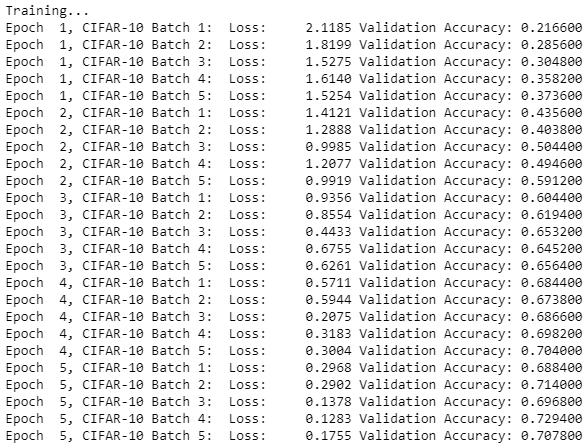
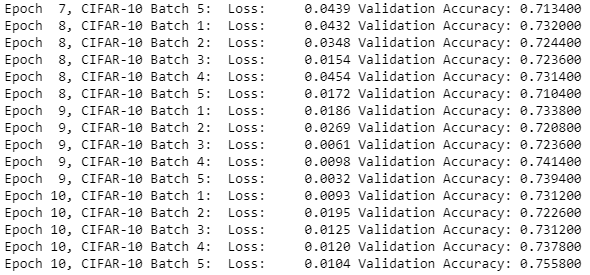
        print(<span class="hljs-string">'Epoch {:&gt;2}, CIFAR-10 Batch {}:  '</span>.format(epoch <span class="hljs-comment">+ 1, batch_i), end=</span><span class="hljs-comment">''</span><span class="hljs-comment">)</span>
        print_stats(sess, batch_features, batch_labels, cost, accuracy)
        
# Save <span class="hljs-comment">Model</span>
saver <span class="hljs-comment">= tf.train.Saver()</span>
save_path <span class="hljs-comment">= saver.save(sess, save_model_path)</span></pre></div><figure id="c78d"><img src="https://cdn-images-1.readmedium.com/v2/resize:fit:800/1*3P6STirrNXyI25t1w76apg.png"><figcaption></figcaption></figure><figure id="68ce"><img src="https://cdn-images-1.readmedium.com/v2/resize:fit:800/1*7_n86D87F4NoxOFStruhrw.png"><figcaption></figcaption></figure><p id="c13e">Now, the important part of Tensorflow Image Classification is done. Now, it’s time to test the model.</p><h2 id="e046">Testing the Model</h2><div id="3017"><pre><span class="hljs-keyword">import</span> pickle

<span class="hljs-keyword">import</span> numpy <span class="hljs-keyword">as</span> np <span class="hljs-keyword">import</span> matplotlib.pyplot <span class="hljs-keyword">as</span> plt <span class="hljs-title">from</span> sklearn.preprocessing <span class="hljs-keyword">import</span> LabelBinarizer</pre></div><div id="dc27"><pre><span class="hljs-keyword">def</span> <span class="hljs-title function_">batch_features_labels</span>(<span class="hljs-params">features, labels, batch_size</span>): <span class="hljs-string">""" Split features and labels into batches """</span> <span class="hljs-keyword">for</span> start <span class="hljs-keyword">in</span> <span class="hljs-built_in">range</span>(<span class="hljs-number">0</span>, <span class="hljs-built_in">len</span>(features), batch_size): end = <span class="hljs-built_in">min</span>(start + batch_size, <span class="hljs-built_in">len</span>(features)) <span class="hljs-keyword">yield</span> features[start:end], labels[start:end]</pre></div><div id="5a45"><pre>def <span class="hljs-built_in">display_image_predictions</span>(features, labels, predictions, top_n_predictions): n_classes = <span class="hljs-number">10</span> label_names = <span class="hljs-built_in">load_label_names</span>() label_binarizer = <span class="hljs-built_in">LabelBinarizer</span>() label_binarizer.<span class="hljs-built_in">fit</span>(<span class="hljs-built_in">range</span>(n_classes)) label_ids = label_binarizer.<span class="hljs-built_in">inverse_transform</span>(np.<span class="hljs-built_in">array</span>(labels))</pre></div><div id="4452"><pre> fig, axies = plt.subplots(<span class="hljs-attribute">nrows</span>=top_n_predictions, <span class="hljs-attribute">ncols</span>=2, figsize=(20, 10)) fig.tight_layout() fig.suptitle(<span class="hljs-string">'Softmax Predictions'</span>, <span class="hljs-attribute">fontsize</span>=20, <span class="hljs-attribute">y</span>=1.1)</pre></div><div id="297c"><pre> <span class="hljs-attribute">n_predictions</span> = <span class="hljs-number">3</span> <span class="hljs-attribute">margin</span> = <span class="hljs-number">0</span>.<span class="hljs-number">05</span> <span class="hljs-attribute">ind</span> = np.arange(n_predictions) <span class="hljs-attribute">width</span> = (<span class="hljs-number">1</span>. - <span class="hljs-number">2</span>. * margin) / n_predictions

<span class="hljs-attribute">for</span> image_i, (feature, label_id, pred_indicies, pred_values) in enumerate(zip(features, label_ids, predictions.indices, predictions.values)):
    <span class="hljs-attribute">if</span> (image_i &lt; top_n_predictions):
        <span class="hljs-attribute">pred_names</span> =<span class="hljs-meta"> [label_names[pred_i] for pred_i in pred_indicies]</span>
        <span class="hljs-attribute">correct_name</span> = label_names[label_id]
        
        <span class="hljs-attribute">axies</span>[image_i][<span class="hljs-number">0</span>].imshow((feature*<span class="hljs-number">255</span>).astype(np.int32, copy=False))
        <span class="hljs-attribute">axies</span>[image_i][<span class="hljs-number">0</span>].set_title(correct_name)
        <span class="hljs-attribute">axies</span>[image_i][<span class="hljs-number">0</span>].set_axis_off()</pre></div><div id="a8ae"><pre>            axies<span class="hljs-selector-attr">[image_i]</span><span class="hljs-selector-attr">[1]</span><span class="hljs-selector-class">.barh</span>(ind + <span class="hljs-attribute">margin</span>, pred_values[:<span class="hljs-number">3</span>], width)
        axies<span class="hljs-selector-attr">[image_i]</span><span class="hljs-selector-attr">[1]</span><span class="hljs-selector-class">.set_yticks</span>(ind + <span class="hljs-attribute">margin</span>)
        axies<span class="hljs-selector-attr">[image_i]</span><span class="hljs-selector-attr">[1]</span><span class="hljs-selector-class">.set_yticklabels</span>(pred_names<span class="hljs-selector-attr">[::-1]</span>)
        axies<span class="hljs-selector-attr">[image_i]</span><span class="hljs-selector-attr">[1]</span><span class="hljs-selector-class">.set_xticks</span>(<span class="hljs-selector-attr">[0, 0.5, 1.0]</span>)</pre></div><h2 id="26b3">Testing Accuracy</h2><div id="feaa"><pre>%matplotlib inline

%config InlineBackend.figure_format = <span class="hljs-string">'retina'</span>

<span class="hljs-keyword">import</span> tensorflow <span class="hljs-keyword">as</span> tf <span class="hljs-keyword">import</span> pickle <span class="hljs-keyword">import</span> random

save_model_path = <span class="hljs-string">'./image_classification'</span> batch_size = <span class="hljs-number">64</span> n_samples = <span class="hljs-number">10</span> top_n_predictions = <span class="hljs-number">5</span>

<span class="hljs-keyword">def</span> <span class="hljs-title function_">test_model</span>(): test_features, test_labels = pickle.load(<span class="hljs-built_in">open</span>(<span class="hljs-string">'preprocess_training.p'</span>, mode=<span class="hljs-string">'rb'</span>)) loaded_graph = tf.Graph()

<span class="hljs-keyword">with</span> tf.Session(graph=loaded_graph) <span class="hljs-keyword">as</span> sess:
    <span class="hljs-comment"># Load model</span>
    loader = tf.train.import_meta_graph(save_model_path + <span class="hljs-string">'.meta'</span>)
    loader.restore(sess, save_model_path)

    <span class="hljs-comment"># Get Tensors from loaded model</span>
    loaded_x = loaded_graph.get_tensor_by_name(<span class="hljs-string">'input_x:0'</span>)
    loaded_y = loaded_graph.get_tensor_by_name(<span class="hljs-string">'output_y:0'</span>)
    loaded_keep_prob = loaded_graph.get_tensor_by_name(<span class="hljs-string">'keep_prob:0'</span>)
    loaded_logits = loaded_graph.get_tensor_by_name(<span class="hljs-string">'logits:0'</span>)
    loaded_acc = loaded_graph.get_tensor_by_name(<span class="hljs-string">'accuracy:0'</span>)
    
    <span class="hljs-comment"># Get accuracy in batches for memory limitations</span>
    test_batch_acc_total = <span class="hljs-number">0</span>
    test_batch_count = <span class="hljs-number">0</span>
    
    <span class="hljs-keyword">for</span> train_feature_batch, train_label_batch <span class="hljs-keyword">in</span> batch_features_labels(test_features, test_labels, batch_size):
        test_batch_acc_total += sess.run(
            loaded_acc,
            feed_dict={loaded_x: train_feature_batch, loaded_y: train_label_batch, loaded_keep_prob: <span class="hljs-number">1.0</span>})
        test_batch_count += <span class="hljs-number">1</span>

    <span class="hljs-built_in">print</span>(<span class="hljs-string">'Testing Accuracy: {}\n'</span>.<span class="hljs-built_in">format</span>(test_batch_acc_total/test_batch_count))

    <span class="hljs-comment"># Print Random Samples</span>
    random_test_features, random_test_labels = <span class="hljs-built_in">tuple</span>(<span class="hljs-built_in">zip</span>(*random.sample(<span class="hljs-built_in">list</span>(<span class="hljs-built_in">zip</span>(test_features, test_labels)), n_samples)))
    random_test_predictions = sess.run(
        tf.nn.top_k(tf.nn.softmax(loaded_logits), top_n_predictions),
        feed_dict={loaded_x: random_test_features, loaded_y: random_test_labels, loaded_keep_prob: <span class="hljs-number">1.0</span>})
    display_image_predictions(random_test_features, random_test_labels, random_test_predictions, top_n_predictions)

test_model()</pre></div><h2 id="097a">Output: Testing Accuracy: 0.5882762738853503</h2><figure id="b504"><img src="https://cdn-images-1.readmedium.com/v2/resize:fit:800/1*h1ZSea5UFkbQqivfRtbRkA.png"><figcaption></figcaption></figure><p id="8676">Now, if you train your neural network for more epochs or change the activation function, you might get a different result that might have better accuracy.</p><p id="45b8"><i>So, with this, we come to an end of this TensorFlow Image Classification article. I’m sure you can now use the same to classify any sort of images and you’re not a beginner to image classification.</i></p><p id="58b3">If you wish to check out more articles on the market’s most trending technologies like Artificial Intelligence, DevOps, Ethical Hacking, then you can refer to <a href="https://www.edureka.co/blog/?utm_source=medium&amp;utm_medium=content-link&amp;utm_campaign=tensorflow-image-classification">Edureka’s official site.</a></p><p id="27e8">Do look out for other articles in this series which will explain the various other aspects of Deep Learning.</p><blockquote id="31e9"><p>1.<a href="https://readmedium.com/tensorflow-tutorial-ba142ae96bca"> TensorFlow Tutorial</a></p></blockquote><blockquote id="b494"><p>2.<a href="https://readmedium.com/pytorch-tutorial-9971d66f6893"> PyTorch Tutorial</a></p></blockquote><blockquote id="4bd0"><p>3. <a href="https://readmedium.com/perceptron-learning-algorithm-d30e8b99b156">Perceptron learning Algorithm</a></p></blockquote><blockquote id="3544"><p>4. <a href="https://readmedium.com/neural-network-tutorial-2a46b22394c9">Neural Network Tutorial</a></p></blockquote><blockquote id="da2a"><p>5.<a href="https://readmedium.com/backpropagation-bd2cf8fdde81"> What is Backpropagation?</a></p></blockquote><blockquote id="cdfc"><p>6. <a href="https://readmedium.com/convolutional-neural-network-3f2c5b9c4778">Convolutional Neural Networks</a></p></blockquote><blockquote id="ee39"><p>7.<a href="https://readmedium.com/capsule-networks-d7acd437c9e"> Capsule Neural Networks</a></p></blockquote><blockquote id="f238"><p>8.<a href="https://readmedium.com/recurrent-neural-networks-df945afd7441"> Recurrent Neural Networks</a></p></blockquote><blockquote id="bc18"><p>9. <a href="https://readmedium.com/autoencoders-tutorial-cfdcebdefe37">Autoencoders Tutorial</a></p></blockquote><blockquote id="ed3f"><p>10. <a href="https://readmedium.com/restricted-boltzmann-machine-tutorial-991ae688c154">Restricted Boltzmann Machine Tutorial</a></p></blockquote><blockquote id="f8ef"><p>11. <a href="https://readmedium.com/pytorch-vs-tensorflow-252fc6675dd7">PyTorch vs TensorFlow</a></p></blockquote><blockquote id="0aa7"><p>12. <a href="https://readmedium.com/deep-learning-with-python-2adbf6e9437d">Deep Learning With Python</a></p></blockquote><blockquote id="12b5"><p>13. <a href="https://readmedium.com/artificial-intelligence-tutorial-4257c66f5bb1">Artificial Intelligence Tutorial</a></p></blockquote><blockquote id="092d"><p>14. <a href="https://readmedium.com/tensorflow-object-detection-tutorial-8d6942e73adc">Object Detection in TensorFlow</a></p></blockquote><blockquote id="fc63"><p>15. <a href="https://readmedium.com/artificial-intelligence-applications-7b93b91150e3">Artificial Intelligence Applications</a></p></blockquote><blockquote id="6e09"><p>16. <a href="https://readmedium.com/become-artificial-intelligence-engineer-5ac2ede99907">How to Become an Artificial Intelligence Engineer?</a></p></blockquote><blockquote id="522a"><p>17. <a href="https://readmedium.com/q-learning-592524c3ecfc">Q Learning</a></p></blockquote><blockquote id="77e1"><p>18. <a href="https://readmedium.com/apriori-algorithm-d7cc648d4f1e">Apriori Algorithm</a></p></blockquote><blockquote id="0a21"><p>19. <a href="https://readmedium.com/introduction-to-markov-chains-c6cb4bcd5723">Markov Chains With Python</a></p></blockquote><blockquote id="5a06"><p>20. <a href="https://readmedium.com/artificial-intelligence-algorithms-fad283a0d8e2">Artificial Intelligence Algorithms</a></p></blockquote><blockquote id="9414"><p>21. <a href="https://readmedium.com/best-laptop-for-machine-learning-a4a5f8ba5b">Best Laptops for Machine Learning</a></p></blockquote><blockquote id="a5e1"><p>22. <a href="https://readmedium.com/top-artificial-intelligence-tools-36418e47bf2a">Top 12 Artificial Intelligence Tools</a></p></blockquote><blockquote id="2d7c"><p>23. <a href="https://readmedium.com/artificial-intelligence-interview-questions-872d85387b19">Artificial Intelligence (AI) Interview Questions</a></p></blockquote><blockquote id="708b"><p>24. <a href="https://readmedium.com/theano-vs-tensorflow-15f30216b3bc">Theano vs TensorFlow</a></p></blockquote><blockquote id="1dea"><p>25. <a href="https://readmedium.com/what-is-a-neural-network-56ae7338b92d">What Is A Neural Network?</a></p></blockquote><blockquote id="971b"><p>26. <a href="https://readmedium.com/pattern-recognition-5e2d30ab68b9">Pattern Recognition</a></p></blockquote><blockquote id="3f3f"><p>27. <a href="https://readmedium.com/alpha-beta-pruning-in-ai-b47ee5500f9a">Alpha Beta Pruning in Artificial Intelligence</a></p></blockquote><p id="a110"><i>Originally published at <a href="https://www.edureka.co/blog/tensorflow-image-classification">https://www.edureka.co</a> on May 08, 2019.</i></p></article></body>

TensorFlow Image Classification - Build your own Classifier

TensorFlow Image Classification — Edureka

Image Classification a task which even a baby can do in seconds, but for a machine, it has been a tough task until the recent advancements in Artificial Intelligence and Deep Learning. Self-driving cars can detect objects and take required action in real-time and most of this is possible because of TensorFlow Image Classification. In this article, I’ll guide you through the following topics:

  • What is TensorFlow?
  • What is Image Classification?
  • TensorFlow Image Classification: Fashion MNIST
  • CIFAR 10: CNN

What is TensorFlow?

TensorFlow is Google’s Open Source Machine Learning Framework for dataflow programming across a range of tasks. Nodes in the graph represent mathematical operations, while the graph edges represent the multi-dimensional data arrays communicated between them.
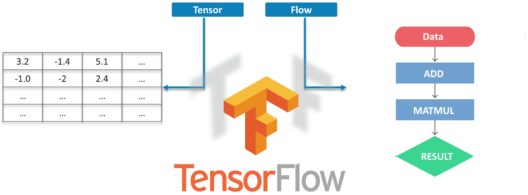
Tensors are just multidimensional arrays, an extension of 2-dimensional tables to data with a higher dimension. There are many features of Tensorflow which makes it appropriate for Deep Learning and it’s core open source library helps you develop and train ML models.

What is Image Classification?

The intent of Image Classification is to categorize all pixels in a digital image into one of several land cover classes or themes. This categorized data may then be used to produce thematic maps of the land cover present in an image.
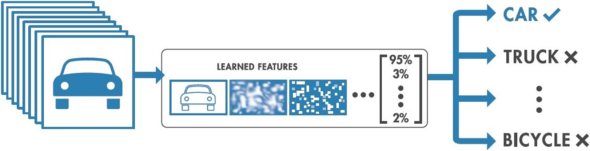
Now Depending on the interaction between the analyst and the computer during classification, there are two types of classification:

  • Supervised &
  • Unsupervised

So, without wasting any time let’s jump into TensorFlow Image Classification. I have 2 examples: easy and difficult. Let’s proceed with the easy one.

TensorFlow Image Classification: Fashion MNIST
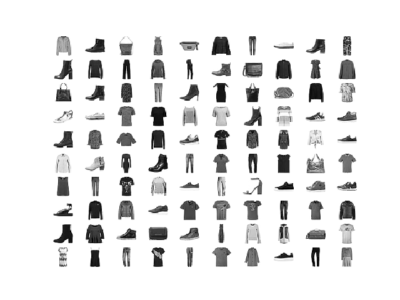
Here we are going to use Fashion MNIST Dataset, which contains 70,000 grayscale images in 10 categories. We will use 60000 for training and the rest 10000 for testing purposes. You can access the Fashion MNIST directly from TensorFlow, just import and load the data.

Let’s import the libraries first

from __future__ import absolute_import, division, print_function
# TensorFlow and tf.keras
import tensorflow as tf
from tensorflow import keras
# Helper libraries
import numpy as np
import matplotlib.pyplot as plt

Let’s load the data

fashion_mnist = keras.datasets.fashion_mnist
(train_images, train_labels), (test_images, test_labels) = fashion_mnist.load_data()

Next, we are going to map the images into classes

class_names = ['T-shirt/top', 'Trouser', 'Pullover', 'Dress', 'Coat','Sandal', 'Shirt', 'Sneaker', 'Bag', 'Ankle boot']

Exploring the data

train_images.shape
#Each Label is between 0-9
train_labels
test_images.shape

Now, it’s time to pre-process the data.

plt.figure()
plt.imshow(train_images[0])
plt.colorbar()
plt.grid(False)
plt.show()
#If you inspect the first image in the training set, you will see that the pixel values fall in the range of 0 to 255.
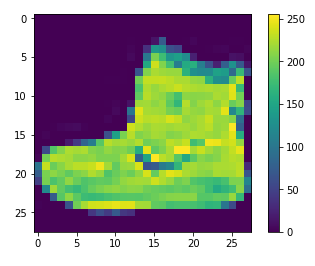
We have to scale the images from 0–1 to feed it into the Neural Network

train_images = train_images / 255.0
test_images = test_images / 255.0

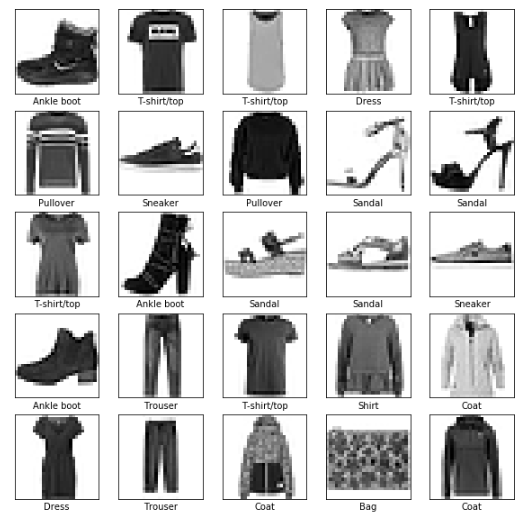
Let’s display some images.

plt.figure(figsize=(10,10))
for i in range(25):
    plt.subplot(5,5,i+1)
    plt.xticks([])
    plt.yticks([])
    plt.grid(False)
    plt.imshow(train_images[i], cmap=plt.cm.binary)
    plt.xlabel(class_names[train_labels[i]])
plt.show()
Setup the layers

model = keras.Sequential([
    keras.layers.Flatten(input_shape=(28, 28)),
    keras.layers.Dense(128, activation=tf.nn.relu),
    keras.layers.Dense(10, activation=tf.nn.softmax)
])

Compile the Model

model.compile(optimizer='adam',
              loss='sparse_categorical_crossentropy',
              metrics=['accuracy'])

Model Training

model.fit(train_images, train_labels, epochs=10)
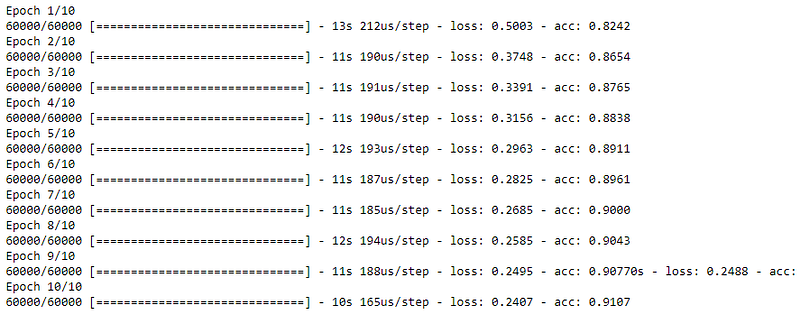
Evaluating Accuracy

test_loss, test_acc = model.evaluate(test_images, test_labels)
print('Test accuracy:', test_acc)

Making Predictions

predictions = model.predict(test_images)
predictions[0]

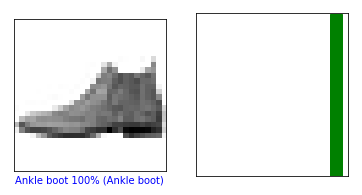
A prediction is an array of 10 numbers. These describe the “confidence” of the model that the image corresponds to each of the 10 different articles of clothing. We can see which label has the highest confidence value.

np.argmax(predictions[0])
#Model is most confident that it's an ankle boot. Let's see if it's correct

Output: 9

test_labels[0]

Output: 9

Now, it’s time to look at the full set of 10 channels

def plot_image(i, predictions_array, true_label, img):
  predictions_array, true_label, img = predictions_array[i], true_label[i], img[i]
  plt.grid(False)
  plt.xticks([])
  plt.yticks([])
  plt.imshow(img, cmap=plt.cm.binary)
  predicted_label = np.argmax(predictions_array)
  if predicted_label == true_label:
    color = 'green'
  else:
    color = 'red'
  plt.xlabel("{} {:2.0f}% ({})".format(class_names[predicted_label],
                                100*np.max(predictions_array),
                                class_names[true_label]),
                                color=color)
def plot_value_array(i, predictions_array, true_label):
  predictions_array, true_label = predictions_array[i], true_label[i]
  plt.grid(False)
  plt.xticks([])
  plt.yticks([])
  thisplot = plt.bar(range(10), predictions_array, color="#777777")
  plt.ylim([0, 1])
  predicted_label = np.argmax(predictions_array)
  thisplot[predicted_label].set_color('red')
  thisplot[true_label].set_color('green')

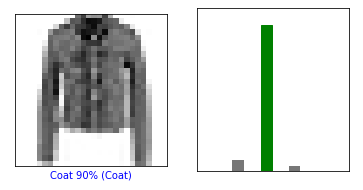
Let’s look at the 0th and 10th image first

i = 0
plt.figure(figsize=(6,3))
plt.subplot(1,2,1)
plot_image(i, predictions, test_labels, test_images)
plt.subplot(1,2,2)
plot_value_array(i, predictions,  test_labels)
plt.show()
i = 10
plt.figure(figsize=(6,3))
plt.subplot(1,2,1)
plot_image(i, predictions, test_labels, test_images)
plt.subplot(1,2,2)
plot_value_array(i, predictions,  test_labels)
plt.show()
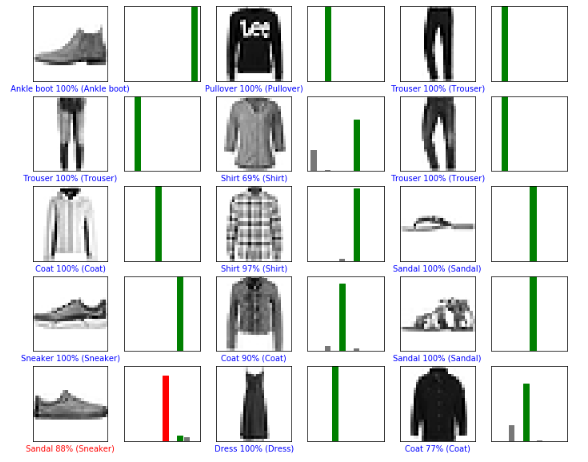
Now, let’s plot several images and their predictions. Correct ones are green, while the incorrect ones are red.

num_rows = 5
num_cols = 3
num_images = num_rows*num_cols
plt.figure(figsize=(2*2*num_cols, 2*num_rows))
for i in range(num_images):
  plt.subplot(num_rows, 2*num_cols, 2*i+1)
  plot_image(i, predictions, test_labels, test_images)
  plt.subplot(num_rows, 2*num_cols, 2*i+2)
  plot_value_array(i, predictions, test_labels)
plt.show()
Finally, we will use the trained model to make a prediction about a single image.

# Grab an image from the test dataset
img = test_images[0]
print(img.shape)
# Add the image to a batch where it's the only member.
img = (np.expand_dims(img,0))
print(img.shape)
predictions_single = model.predict(img) 
print(predictions_single)

plot_value_array(0, predictions_single, test_labels)
plt.xticks(range(10), class_names, rotation=45)
plt.show()
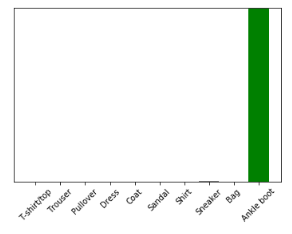
As you can see the prediction for our only image in batch.

prediction_result = np.argmax(predictions_single[0])

Output: 9

CIFAR-10: CNN

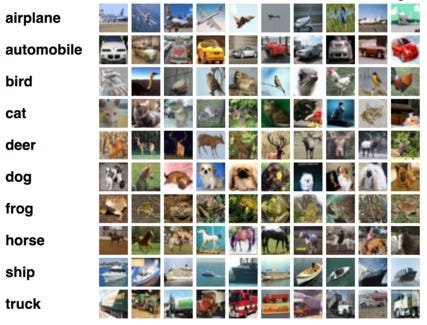
The CIFAR-10 dataset consists of airplanes, dogs, cats, and other objects. You’ll preprocess the images, then train a convolutional neural network on all the samples. The images need to be normalized and the labels need to be one-hot encoded. This use-case will surely clear your doubts about TensorFlow Image Classification.

Downloading the Data

from urllib.request import urlretrieve
from os.path import isfile, isdir
from tqdm import tqdm 
import tarfile

cifar10_dataset_folder_path = 'cifar-10-batches-py'

class DownloadProgress(tqdm):
    last_block = 0

    def hook(self, block_num=1, block_size=1, total_size=None):
        self.total = total_size
        self.update((block_num - self.last_block) * block_size)
        self.last_block = block_num

""" 
    check if the data (zip) file is already downloaded
    if not, download it from "https://www.cs.toronto.edu/~kriz/cifar-10-python.tar.gz" and save as cifar-10-python.tar.gz
"""
if not isfile('cifar-10-python.tar.gz'):
    with DownloadProgress(unit='B', unit_scale=True, miniters=1, desc='CIFAR-10 Dataset') as pbar:
        urlretrieve(
            'https://www.cs.toronto.edu/~kriz/cifar-10-python.tar.gz',
            'cifar-10-python.tar.gz',
            pbar.hook)

if not isdir(cifar10_dataset_folder_path):
    with tarfile.open('cifar-10-python.tar.gz') as tar:
        tar.extractall()
        tar.close()

Importing Necessary Libraries

import pickle
import numpy as np
import matplotlib.pyplot as plt

Understanding the Data

The original batch of Data is 10000×3072 tensor expressed in a numpy array, where 10000 is the number of sample data. The image is colored and of size 32×32. Feeding can be done either in a format of (width x height x num_channel) or (num_channel x width x height). Let’s define the labels.

def load_label_names():
    return ['airplane', 'automobile', 'bird', 'cat', 'deer', 'dog', 'frog', 'horse', 'ship', 'truck']

Reshaping the Data

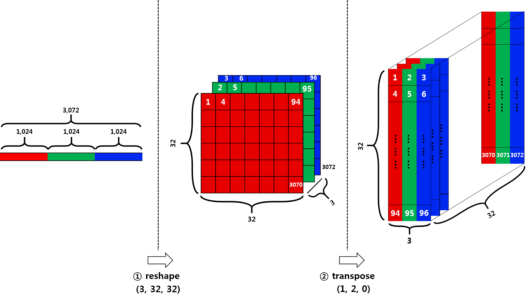
We are going to reshape the data in two stages

Firstly, divide the row vector (3072) into 3 pieces. Each piece corresponds to each channel. This results in (3 x 1024) dimension of a tensor. Then Divide the resulting tensor from the previous step with 32. 32 here means the width of an image. This results in (3x32x32).

Secondly, we have to transpose the data from (num_channel, width, height) to (width, height, num_channel). For that, we are going to use the transpose function.
def load_cfar10_batch(cifar10_dataset_folder_path, batch_id):
    with open(cifar10_dataset_folder_path + '/data_batch_' + str(batch_id), mode='rb') as file:
        # note the encoding type is 'latin1'
        batch = pickle.load(file, encoding='latin1')
        
    features = batch['data'].reshape((len(batch['data']), 3, 32, 32)).transpose(0, 2, 3, 1)
    labels = batch['labels']
        
    return features, label

Exploring the Data

def display_stats(cifar10_dataset_folder_path, batch_id, sample_id):
    features, labels = load_cfar10_batch(cifar10_dataset_folder_path, batch_id)
    
    if not (0 <= sample_id < len(features)):
        print('{} samples in batch {}.  {} is out of range.'.format(len(features), batch_id, sample_id))
        return None

    print('\nStats of batch #{}:'.format(batch_id))
    print('# of Samples: {}\n'.format(len(features)))
    
    label_names = load_label_names()
    label_counts = dict(zip(*np.unique(labels, return_counts=True)))
    for key, value in label_counts.items():
        print('Label Counts of [{}]({}) : {}'.format(key, label_names[key].upper(), value))
    
    sample_image = features[sample_id]
    sample_label = labels[sample_id]
    
    print('\nExample of Image {}:'.format(sample_id))
    print('Image - Min Value: {} Max Value: {}'.format(sample_image.min(), sample_image.max()))
    print('Image - Shape: {}'.format(sample_image.shape))
    print('Label - Label Id: {} Name: {}'.format(sample_label, label_names[sample_label]))
    
    plt.imshow(sample_image)

Plotting the stats

%matplotlib inline
%config InlineBackend.figure_format = 'retina'

import numpy as np

# Explore the dataset
batch_id = 3
sample_id = 7000
display_stats(cifar10_dataset_folder_path, batch_id, sample_id)
Implementing Pre-processing Functions

We are going to Normalize the data via Min-Max Normalization. This simply makes all x values to range between 0 and 1. y = (x-min) / (max-min)

def normalize(x):
    """
        argument
            - x: input image data in numpy array [32, 32, 3]
        return
            - normalized x 
    """
    min_val = np.min(x)
    max_val = np.max(x)
    x = (x-min_val) / (max_val-min_val)
    return x

One-Hot Encode

def one_hot_encode(x):
    """
        argument
            - x: a list of labels
        return
            - one hot encoding matrix (number of labels, number of class)
    """
    encoded = np.zeros((len(x), 10))
    
    for idx, val in enumerate(x):
        encoded[idx][val] = 1
    
    return encoded

Preprocess and Save the Data

def _preprocess_and_save(normalize, one_hot_encode, features, labels, filename):
    features = normalize(features)
    labels = one_hot_encode(labels)
    pickle.dump((features, labels), open(filename, 'wb'))
def preprocess_and_save_data(cifar10_dataset_folder_path, normalize, one_hot_encode):
    n_batches = 5
    valid_features = []
    valid_labels = []
    for batch_i in range(1, n_batches + 1):
        features, labels = load_cfar10_batch(cifar10_dataset_folder_path, batch_i)
        
        # find index to be the point as validation data in the whole dataset of the batch (10%)
        index_of_validation = int(len(features) * 0.1)
        # preprocess the 90% of the whole dataset of the batch
        # - normalize the features
        # - one_hot_encode the lables
        # - save in a new file named, "preprocess_batch_" + batch_number
        # - each file for each batch
        _preprocess_and_save(normalize, one_hot_encode,
                             features[:-index_of_validation], labels[:-index_of_validation], 
                             'preprocess_batch_' + str(batch_i) + '.p')
        # unlike the training dataset, validation dataset will be added through all batch dataset
        # - take 10% of the whold dataset of the batch
        # - add them into a list of
        #   - valid_features
        #   - valid_labels
        valid_features.extend(features[-index_of_validation:])
        valid_labels.extend(labels[-index_of_validation:])
    # preprocess the all stacked validation dataset
    _preprocess_and_save(normalize, one_hot_encode,
                         np.array(valid_features), np.array(valid_labels),
                         'preprocess_validation.p')
    # load the test dataset
    with open(cifar10_dataset_folder_path + '/test_batch', mode='rb') as file:
        batch = pickle.load(file, encoding='latin1')
    # preprocess the testing data
    test_features = batch['data'].reshape((len(batch['data']), 3, 32, 32)).transpose(0, 2, 3, 1)
    test_labels = batch['labels']
    # Preprocess and Save all testing data
    _preprocess_and_save(normalize, one_hot_encode,
                         np.array(test_features), np.array(test_labels),
                         'preprocess_training.p')

Execute:

preprocess_and_save_data(cifar10_dataset_folder_path, normalize, one_hot_encode)

Checkpoint

import pickle
valid_features, valid_labels = pickle.load(open('preprocess_validation.p', mode='rb'))

Building the Network

The entire model consists of 14 layers in total.
import tensorflow as tf

def conv_net(x, keep_prob):
    conv1_filter = tf.Variable(tf.truncated_normal(shape=[3, 3, 3, 64], mean=0, stddev=0.08))
    conv2_filter = tf.Variable(tf.truncated_normal(shape=[3, 3, 64, 128], mean=0, stddev=0.08))
    conv3_filter = tf.Variable(tf.truncated_normal(shape=[5, 5, 128, 256], mean=0, stddev=0.08))
    conv4_filter = tf.Variable(tf.truncated_normal(shape=[5, 5, 256, 512], mean=0, stddev=0.08))

    # 1, 2
    conv1 = tf.nn.conv2d(x, conv1_filter, strides=[1,1,1,1], padding='SAME')
    conv1 = tf.nn.relu(conv1)
    conv1_pool = tf.nn.max_pool(conv1, ksize=[1,2,2,1], strides=[1,2,2,1], padding='SAME')
    conv1_bn = tf.layers.batch_normalization(conv1_pool)

    # 3, 4
    conv2 = tf.nn.conv2d(conv1_bn, conv2_filter, strides=[1,1,1,1], padding='SAME')
    conv2 = tf.nn.relu(conv2)
    conv2_pool = tf.nn.max_pool(conv2, ksize=[1,2,2,1], strides=[1,2,2,1], padding='SAME')    
    conv2_bn = tf.layers.batch_normalization(conv2_pool)
  
    # 5, 6
    conv3 = tf.nn.conv2d(conv2_bn, conv3_filter, strides=[1,1,1,1], padding='SAME')
    conv3 = tf.nn.relu(conv3)
    conv3_pool = tf.nn.max_pool(conv3, ksize=[1,2,2,1], strides=[1,2,2,1], padding='SAME')  
    conv3_bn = tf.layers.batch_normalization(conv3_pool)
    
    # 7, 8
    conv4 = tf.nn.conv2d(conv3_bn, conv4_filter, strides=[1,1,1,1], padding='SAME')
    conv4 = tf.nn.relu(conv4)
    conv4_pool = tf.nn.max_pool(conv4, ksize=[1,2,2,1], strides=[1,2,2,1], padding='SAME')
    conv4_bn = tf.layers.batch_normalization(conv4_pool)
    
    # 9
    flat = tf.contrib.layers.flatten(conv4_bn)  

    # 10
    full1 = tf.contrib.layers.fully_connected(inputs=flat, num_outputs=128, activation_fn=tf.nn.relu)
    full1 = tf.nn.dropout(full1, keep_prob)
    full1 = tf.layers.batch_normalization(full1)
    
    # 11
    full2 = tf.contrib.layers.fully_connected(inputs=full1, num_outputs=256, activation_fn=tf.nn.relu)
    full2 = tf.nn.dropout(full2, keep_prob)
    full2 = tf.layers.batch_normalization(full2)
    
    # 12
    full3 = tf.contrib.layers.fully_connected(inputs=full2, num_outputs=512, activation_fn=tf.nn.relu)
    full3 = tf.nn.dropout(full3, keep_prob)
    full3 = tf.layers.batch_normalization(full3)    
    
    # 13
    full4 = tf.contrib.layers.fully_connected(inputs=full3, num_outputs=1024, activation_fn=tf.nn.relu)
    full4 = tf.nn.dropout(full4, keep_prob)
    full4 = tf.layers.batch_normalization(full4)        
    
    # 14
    out = tf.contrib.layers.fully_connected(inputs=full3, num_outputs=10, activation_fn=None)
    return out

Hyperparameters

epochs = 10
batch_size = 128
keep_probability = 0.7
learning_rate = 0.001
logits = conv_net(x, keep_prob)
model = tf.identity(logits, name='logits') # Name logits Tensor, so that can be loaded from disk after training
# Loss and Optimizer
cost = tf.reduce_mean(tf.nn.softmax_cross_entropy_with_logits(logits=logits, labels=y))
optimizer = tf.train.AdamOptimizer(learning_rate=learning_rate).minimize(cost)
# Accuracy
correct_pred = tf.equal(tf.argmax(logits, 1), tf.argmax(y, 1))
accuracy = tf.reduce_mean(tf.cast(correct_pred, tf.float32), name='accuracy')

Train the Neural Network

#Single Optimization
def train_neural_network(session, optimizer, keep_probability, feature_batch, label_batch):
    session.run(optimizer, 
                feed_dict={
                    x: feature_batch,
                    y: label_batch,
                    keep_prob: keep_probability
                })
#Showing Stats
def print_stats(session, feature_batch, label_batch, cost, accuracy):
    loss = sess.run(cost, 
                    feed_dict={
                        x: feature_batch,
                        y: label_batch,
                        keep_prob: 1.
                    })
    valid_acc = sess.run(accuracy, 
                         feed_dict={
                             x: valid_features,
                             y: valid_labels,
                             keep_prob: 1.
                         })
    
    print('Loss: {:>10.4f} Validation Accuracy: {:.6f}'.format(loss, valid_acc))

Fully Training and Saving the Model

def batch_features_labels(features, labels, batch_size):
    """
    Split features and labels into batches
    """
    for start in range(0, len(features), batch_size):
        end = min(start + batch_size, len(features))
        yield features[start:end], labels[start:end]
def load_preprocess_training_batch(batch_id, batch_size):
    """
    Load the Preprocessed Training data and return them in batches of <batch_size> or less
    """
    filename = 'preprocess_batch_' + str(batch_id) + '.p'
    features, labels = pickle.load(open(filename, mode='rb'))
    # Return the training data in batches of size <batch_size> or less
    return batch_features_labels(features, labels, batch_size)

Saving the Model and Path

#Saving Model and Path
save_model_path = './image_classification'

print('Training...')
with tf.Session() as sess:
    # Initializing the variables
    sess.run(tf.global_variables_initializer())
    
    # Training cycle
    for epoch in range(epochs):
        # Loop over all batches
        n_batches = 5
        for batch_i in range(1, n_batches + 1):
            for batch_features, batch_labels in load_preprocess_training_batch(batch_i, batch_size):
                train_neural_network(sess, optimizer, keep_probability, batch_features, batch_labels)
                
            print('Epoch {:>2}, CIFAR-10 Batch {}:  '.format(epoch + 1, batch_i), end='')
            print_stats(sess, batch_features, batch_labels, cost, accuracy)
            
    # Save Model
    saver = tf.train.Saver()
    save_path = saver.save(sess, save_model_path)
Now, the important part of Tensorflow Image Classification is done. Now, it’s time to test the model.

Testing the Model

import pickle
import numpy as np
import matplotlib.pyplot as plt
from sklearn.preprocessing import LabelBinarizer
def batch_features_labels(features, labels, batch_size):
    """
    Split features and labels into batches
    """
    for start in range(0, len(features), batch_size):
        end = min(start + batch_size, len(features))
        yield features[start:end], labels[start:end]
def display_image_predictions(features, labels, predictions, top_n_predictions):
    n_classes = 10
    label_names = load_label_names()
    label_binarizer = LabelBinarizer()
    label_binarizer.fit(range(n_classes))
    label_ids = label_binarizer.inverse_transform(np.array(labels))
    fig, axies = plt.subplots(nrows=top_n_predictions, ncols=2, figsize=(20, 10))
    fig.tight_layout()
    fig.suptitle('Softmax Predictions', fontsize=20, y=1.1)
    n_predictions = 3
    margin = 0.05
    ind = np.arange(n_predictions)
    width = (1. - 2. * margin) / n_predictions
   
    for image_i, (feature, label_id, pred_indicies, pred_values) in enumerate(zip(features, label_ids, predictions.indices, predictions.values)):
        if (image_i < top_n_predictions):
            pred_names = [label_names[pred_i] for pred_i in pred_indicies]
            correct_name = label_names[label_id]
            
            axies[image_i][0].imshow((feature*255).astype(np.int32, copy=False))
            axies[image_i][0].set_title(correct_name)
            axies[image_i][0].set_axis_off()
            axies[image_i][1].barh(ind + margin, pred_values[:3], width)
            axies[image_i][1].set_yticks(ind + margin)
            axies[image_i][1].set_yticklabels(pred_names[::-1])
            axies[image_i][1].set_xticks([0, 0.5, 1.0])

Testing Accuracy

%matplotlib inline
%config InlineBackend.figure_format = 'retina'

import tensorflow as tf
import pickle
import random

save_model_path = './image_classification'
batch_size = 64
n_samples = 10
top_n_predictions = 5

def test_model():
    test_features, test_labels = pickle.load(open('preprocess_training.p', mode='rb'))
    loaded_graph = tf.Graph()

    with tf.Session(graph=loaded_graph) as sess:
        # Load model
        loader = tf.train.import_meta_graph(save_model_path + '.meta')
        loader.restore(sess, save_model_path)

        # Get Tensors from loaded model
        loaded_x = loaded_graph.get_tensor_by_name('input_x:0')
        loaded_y = loaded_graph.get_tensor_by_name('output_y:0')
        loaded_keep_prob = loaded_graph.get_tensor_by_name('keep_prob:0')
        loaded_logits = loaded_graph.get_tensor_by_name('logits:0')
        loaded_acc = loaded_graph.get_tensor_by_name('accuracy:0')
        
        # Get accuracy in batches for memory limitations
        test_batch_acc_total = 0
        test_batch_count = 0
        
        for train_feature_batch, train_label_batch in batch_features_labels(test_features, test_labels, batch_size):
            test_batch_acc_total += sess.run(
                loaded_acc,
                feed_dict={loaded_x: train_feature_batch, loaded_y: train_label_batch, loaded_keep_prob: 1.0})
            test_batch_count += 1

        print('Testing Accuracy: {}\n'.format(test_batch_acc_total/test_batch_count))

        # Print Random Samples
        random_test_features, random_test_labels = tuple(zip(*random.sample(list(zip(test_features, test_labels)), n_samples)))
        random_test_predictions = sess.run(
            tf.nn.top_k(tf.nn.softmax(loaded_logits), top_n_predictions),
            feed_dict={loaded_x: random_test_features, loaded_y: random_test_labels, loaded_keep_prob: 1.0})
        display_image_predictions(random_test_features, random_test_labels, random_test_predictions, top_n_predictions)


test_model()

Output: Testing Accuracy: 0.5882762738853503
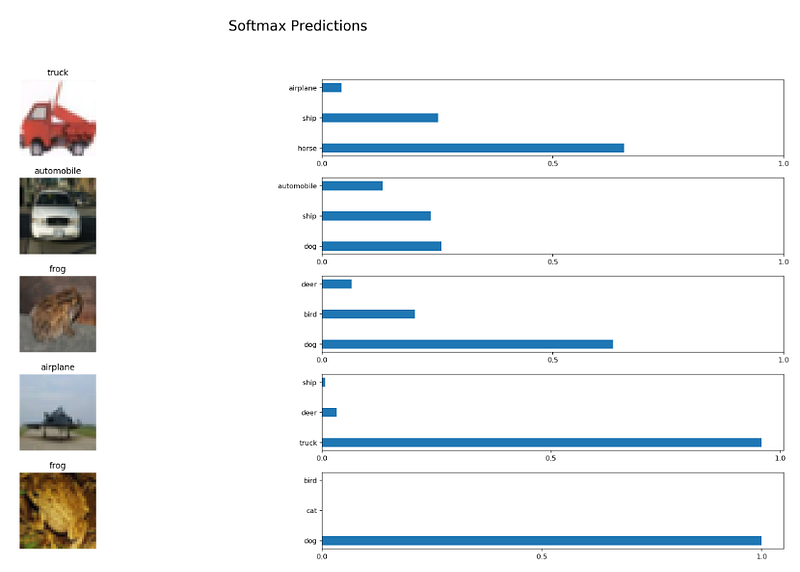
Now, if you train your neural network for more epochs or change the activation function, you might get a different result that might have better accuracy.

So, with this, we come to an end of this TensorFlow Image Classification article. I’m sure you can now use the same to classify any sort of images and you’re not a beginner to image classification.

If you wish to check out more articles on the market’s most trending technologies like Artificial Intelligence, DevOps, Ethical Hacking, then you can refer to Edureka’s official site.

Do look out for other articles in this series which will explain the various other aspects of Deep Learning.

1. TensorFlow Tutorial

2. PyTorch Tutorial

3. Perceptron learning Algorithm

4. Neural Network Tutorial

5. What is Backpropagation?

6. Convolutional Neural Networks

7. Capsule Neural Networks

8. Recurrent Neural Networks

9. Autoencoders Tutorial

10. Restricted Boltzmann Machine Tutorial

11. PyTorch vs TensorFlow

12. Deep Learning With Python

13. Artificial Intelligence Tutorial

14. Object Detection in TensorFlow

15. Artificial Intelligence Applications

16. How to Become an Artificial Intelligence Engineer?

17. Q Learning

18. Apriori Algorithm

19. Markov Chains With Python

20. Artificial Intelligence Algorithms

21. Best Laptops for Machine Learning

22. Top 12 Artificial Intelligence Tools

23. Artificial Intelligence (AI) Interview Questions

24. Theano vs TensorFlow

25. What Is A Neural Network?

26. Pattern Recognition

27. Alpha Beta Pruning in Artificial Intelligence

Originally published at https://www.edureka.co on May 08, 2019.

Machine Learning
TensorFlow
Artificial Intelligence
Deep Learning
Image Classification
Recommended from ReadMedium