
Template and Dataview for tracking movie scenes in Obsidian
I’ve seen some movie databases in the Obsidian forums, but they haven’t really worked for me because I prefer specific scenes to whole movies. Instead of giving a coarse ranking of movie based on 1 or more criteria, I think the true test of a movie is how many scenes I go back to watch over time. Like the final mission in Zero Dark Thirty or the beach landing from Saving Private Ryan.
So I have used Dataview for a few years to help tell me which are my favorite scenes based on times I’d watched them.
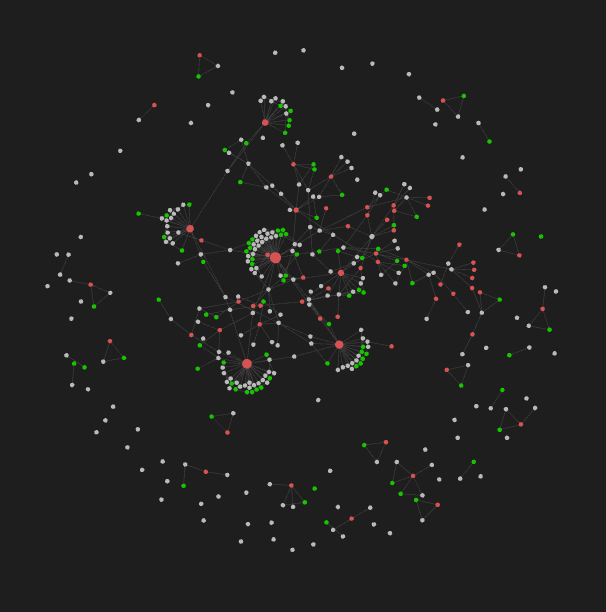
Step 1: Use templates
Templates are essential for dataview to work because they help you standardise the tags and information entered. For the latter, make sure you use a double-colon to tell dataview that line is a piece of data you want to keep track of. For example:

Steps to create a template:
- Activate the template plugin, which is in your core plugin list
- In the template options screen, define a folder name into which your templates will do into. I use “template”
- Create a folder in your vault named “template”
- Create a new note with the features you want. Move it into the template folder
My templates include:
Movie. There should be a page for each Movie, with a standard list of facts. That way, dataview will be able to provide summary reports based on stadardised set of data. This sort of page would be tagged #movie.
Important person. There should be a page for each Director, Producer, Actor/Actress, Writer, Editor, with the appropriate tag (eg #director). With Obsidian’s auto-suggestion feature for tags and pages, you’re less likely to enter a new name or tag wrongly.
Scene watched. This page template includes the date, the scene watched and the tag #scenewatched. Rather straightforward, except you have to decide how to distinguish a scene when you create a #scenewatched page. I’m not sure there is an objective way to define when a scene ends, but I usually count a scene as ended when there is a transition to another location, set of people, tone or something else. I tend to just describe a scene by the time stamp when it begins. That way I don’t have to map out all the scenes from a movie just for a specific scene I like.
The page’s title is important. It is best to title a #scenewatched page by date and time for a unique ID. I generate this by using the date and time creation function in the template plugin. Just have this somewhere in the page for you to copy into the title.

You can use the same piece of code to populate your date watched variable, if you want one.

Step 2: Create dataview summary pages
You need to decide what sort of information you’d like to see. Depending on the variables you created in your templates above, you can basically create any sort of filtered list. Such as movie (or scene, or director etc) watched the most times in the last month.
How to create summary pages
The main dataview page can be intimidating (at least to me), so here are a two generic ones to get you started:
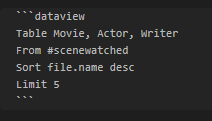
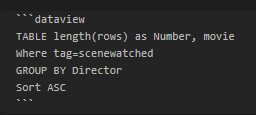
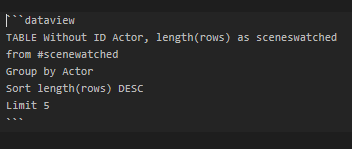
Note the different ways you can use “where” or “from” to define a tag. Also the use of “Table Without ID” if you do not want the filename to be included in the table.
Tip: Use file metadata
The secret is that besides the tags, page names and data variables, you can also use some metadata from each page that are well-hidden. Here’s a list that I compiled of the more relevant metadata:
`file.name`: The file title (a string). `file.folder`: The path of the folder this file belongs to. `file.ctime`: The date that the file was created (a date + time). `file.cday`: The date that the file was created (just a date). `file.mtime`: The date that the file was last modified (a date + time). `file.mday`: The date that the file was last modified (just a date). `file.tags`: An array of all unique tags in the note. Subtags are broken down by each level, so `#Tag/1/A` will be stored in the array as `[#Tag, #Tag/1, #Tag/1/A]`. `file.etags`: An array of all explicit tags in the note; unlike `file.tags`, does not include subtags. `file.inlinks`: An array of all incoming links to this file. `file.outlinks`: An array of all outgoing links from this file. `file.aliases`: An array of all aliases for the note.
Step 3: Create a record each time you watch a particular scene
Straightforward enough? :)
What do you think about Dataview and Template? What do you use them for? Tell me in a comment!
In the meantime, take a look at the rest of my articles on Obsidian:


