
Obsidian’s Graph Analysis plugin
This is a follow up article to Using Obsidian’s Graph view for real. Now I want to look at a massive enhancement using analytics: the community plugin Graph Analysis!
The very detailed videos and documentation might feel a bit daunting, so I’ve broken down what you can get out of Graph Analysis, along with some primary testing. Note, I also used the nlp add-on that allows Graph Analysis to compare notes based on the words in them, not just their place in the structure of the graph.
Use-case 1: Find very similar notes / clones
There are six sorts of algorithms to find similar notes, they are:
- Co-citations
- Adamic Adar
- Jaccard
- Overlap
- Bag of Words (nlp)
- Otuska Chiai (nlp)
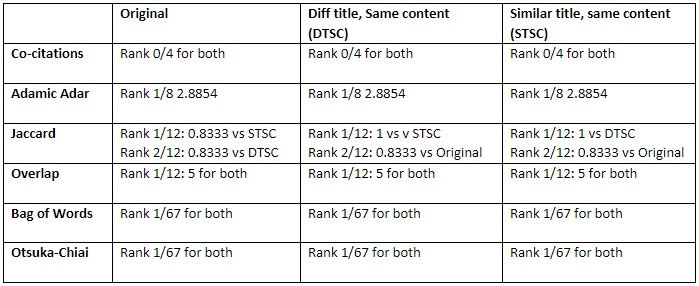
To investigate them, I first set up an original note (“Original”), a note with a different title but exactly the same content (“DTSC” for different title, same content), and a third exactly the same as the original, but with a “2” at the end of the title (“STSC” for similar title, same content).
Then I selected Original and checked how the algorithms DTSC and STSC in terms of their similarity to Original. 5 of the 6 algorithms correctly identified the other 2 notes as the most similar. Co-citations did not, probably because the incoming links did not also point to DTSC and STSC. (here’s a very in-depth video on how Co-citations works). I then selected DTSC and STSC in turn as the base note, and found similar results.
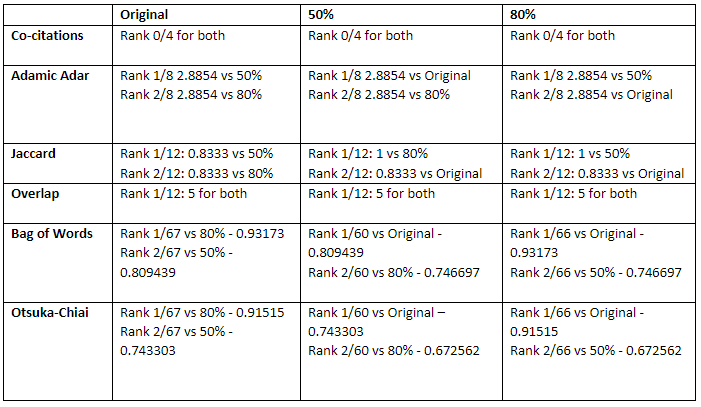
Next, I wondered how much of the note needs to be similar. I compared Original with one note that contained 80% of Original (“80%”) and another note with 50% of Original (“50%”). In all cases, these three-related notes were the highest ranked in similarity to each other, excepting Co-citations, probably for the same reason as before.
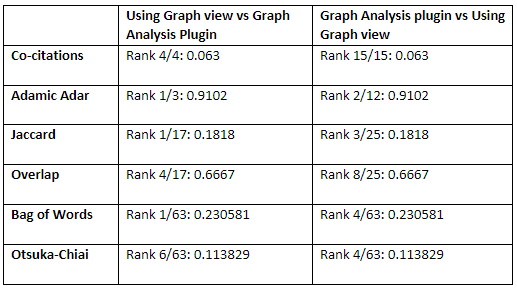
Using a more naturally linked pair of notes (my two reference notes for my articles on graph view and graph analysis), I found that the two were identified as closely linked to each other but with lower ranks.
Conclusion — if you are looking for very similar notes, 5 of the similarity algorithms will probably work. Co-citations is the outlier.
Use-case 2: Identify influential notes
Use HITS to figure out which of your notes are summarising your content. Granted you might already know this, having consciously set out make them summary notes.
Identifying authorities is but the first step. I’ve found it important to check those notes with high authority scores to see if there is anything in them. Because it is natural to just keep adding a link to refer to it but maybe you haven’t actually written anything into that authoritative note yet!
Background: HITS is used to rate webpages based on link-analysis. When the internet was younger, it tried to identify ‘Hubs’ — sites that were used like large directories but were not authoritative in the information within them ie good compilations. Conversely an “Authority” page rates the value of the content in it. HITS stands for Hyperlink-Induced Topic Search.
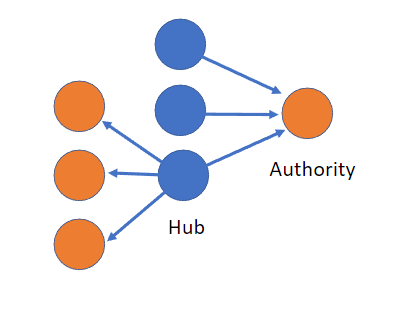
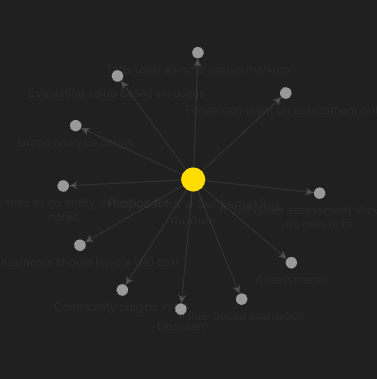
And indeed the highest hub rating for my working vault is a readme note that summarises and refers to many other notes.
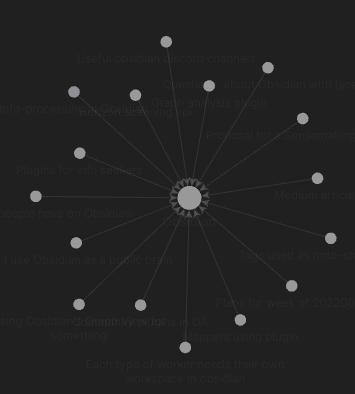
The highest Authority for me had nothing inside! But many links are going into it, indicating that I should at some point put some explanatory remarks in.
Use-case 3: Cluster your notes
How do you organise your notes? MOCs? Tags? The main point is to help group notes that are related to each other. You could manually do this by using the local graph or the various methods I note in this article. Clustering algorithms are another way to suggest that some notes might be related to each other. Graph Analysis has 3 algorithms for clustering:
Label propagation
Label propagation was the most accurate and works on your entire vault. It was able to go to max iterations and still identify Original, 80% and 50% in the same group. along with others that I would naturally suspect of being related.
Louvain
Louvain suggests to you the other notes that should be part of the same group, based on the level of resolution you choose. Louvain did say Original, 80% and 50% were part of the same family at lower (more permissive) resolutions, but lost them after 4 resolution steps. Nice that it includes attachments.
Clustering Co-efficient
Clustering Coefficient identifies the top notes which have similar neighbours. In a way it sounds like the Co-citation function and therefore it did not detect 80% and 50% as part of the same cluster as Original
Moral of the story: Use Label propagation. It clusters your whole vault and seems to work the best.
Get a sense of the notes in your vault using Sentiment
I guess that’s useful if you have lots of daily notes or journal and put in positive and negative statements.
Annex: List of algorithms and description
Co-citations
It seems to be their flagship. includes tags as results too. This video gives much more detail on Co-citations.
For the other algorithms, check out:https://www.youtube.com/watch?v=Id4ynVqP3Uo&t=669s
Adamic Adar
Predicts links in a network based on the amount of shared links between two notes. So the two notes need to have links in common.
Jaccard / Overlap
Is a classic measure of similarity between 2 sets. Used to gauge similarity of sets and predicts which notes are most similar to the current note. Shows the ratio of the common neighbours vs total neighbours for 2 notes.
Overlap: Is related to the Jaccard index and is also a similarity measure that measures the overlap between two sets. Defined as the size of the union of set A and set B over the smaller set between A and B.
Bag of Words (needs nlp)
Takes all the words in a note, counts them and sees which other notes have similar words
Otsuka-Chiai (needs nlp)
A type of cosine similarity. Returns a similarity calculation between the selected note and every other note.
Label Propagation
(Global) Community detection, Can choose number of iterations
Clusters notes together based on the most common title amongst their neighbours. A possible way to detect MOCs
Louvain
Community detection.
Shows the louvain community for the current note. Basically a clustering function. Includes attachments
Clustering Coefficient
(Global) Gives the probability that a note’s neighbours are linked to each other. Looking online, the description seems closest to local clustering coefficient. A high coefficient suggests that a note is part of a group that has many links between each other.
Sentiment (needs nlp)
(Global) Labels notes for positive and negative sentiment. Positive sentiment is higher.
Take a look at the rest of my articles on Obsidian:
- When you should consider switching to Obsidian
- Using Obsidian’s Graph View for real
- Using Obsidian for group KM
- Obsidian for making sense of things
What other ways have you found the graph analysis plugin to be useful? Let me know in the comments or just leave a clap for me. It’s very much appreciated!


