avatarAnne Bonfert

Free AI web copilot to create summaries, insights and extended knowledge, download it at here

2278

Abstract

on the computer into the wanted image. Since I don’t have a Mac I wasn’t sure if my editing program would be able to do it, but I learned I didn’t even need a laptop for it.</p><p id="19fc">In case you’ve never heard of this function but are curious about it, just give <a href="undefined">Erika</a>’s article a read. She explains everything step-by-step. When you turn the <i>“live”</i> button on, your iPhone will take a couple more pictures after the actual photograph and can create out of the pictures taken a long exposure shot.</p><figure id="9227"><img src="https://cdn-images-1.readmedium.com/v2/resize:fit:800/1*j0TnJ35vB4fCq1BBrqiHIQ.jpeg"><figcaption>Credit: <a href="https://medium.com/@anne.bonfert">Anne Bonfert</a></figcaption></figure><p id="aa09">And all of a sudden I found myself sitting on the beach of a tropical island, drinking some delicious cocktails while taking photographs with my husband’s iPhone.</p><p id="0ca3"><i>Meanwhile, my own beloved Canon camera was lying on the beach chair next to me.</i></p><p id="2283">Well, it’s not like I didn’t take pictures of the sunset with my camera, but I also took these two pictures with the iPhone. And after taking the shot above I was trying to explain to my husband the function when I went into the phone’s gallery to see the image I had taken.</p><p id="756c">And there was the little icon on the side saying <i>“live”</i>. As I clicked on it, a dropdown menu opened up and one of the options was <i>“long exposure”</i>. I selected it, had to wait a few seconds, and all of a sudden I had this image below.</p><figure id="63ab"><img src="https://cdn-images-1.readmedium.com/v2/resize:fit:800/1*WIst9py_q1QRJbyrTglEFw.jpeg"><figcaption>Credit: <a href="https://medium.com/@anne.bonfert">Anne Bonfert</a></figcaption></figure><p id="4cc0">Since the ocean was the only thing in motion between the series of images that were taken, the image remained clear but the ocean blurred out. As if I’d taken a long exposure shot with my camera.</p><p id="a0a5">Just that I didn’t need to change any settings, adjust the ISO, and everything else. All I did, was click on <i>“live”</i> and then select <i>“long exposure”</i> afterward.</p><p id="31fa">I must say, I am pretty impressed with this specific function.

Options

</p><p id="922b">I am not going to drop my Canon camera, that is for sure. But I might use the iPhone in certain situations for trying out some more long exposure shots. It was fun and while my pictures above aren’t the best I’ve ever taken, they were an inspiration for more. For sure.</p><p id="a5a8"><i>I wrote yesterday already on <a href="https://readmedium.com/the-surprising-photographic-skills-of-a-simple-phone-850df34a64c1">cell phone photography</a> and received a few comments on the images. I’d love to know your opinion on taking photographs with a phone. Are you up for it or is it a no-go in your eyes?</i></p><div id="cf85" class="link-block"> <a href="https://readmedium.com/the-surprising-photographic-skills-of-a-simple-phone-850df34a64c1"> <div> <div> <h2>The Surprising Photographic Skills of a Simple Phone</h2> <div><h3>Experimenting with the iPhone 10 camera and some cocktails</h3></div> <div><p>medium.com</p></div> </div> <div> <div style="background-image: url(https://miro.readmedium.com/v2/resize:fit:320/1*cOykHcol3Um3KBt9h5ALpA.jpeg)"></div> </div> </div> </a> </div><div id="0784" class="link-block"> <a href="https://medium.com/@anne.bonfert/who-am-i-and-what-do-i-do-ce5d95c77b18"> <div> <div> <h2>Who am I and What do I Do?</h2> <div><h3>A collection of six-word photo stories presenting myself</h3></div> <div><p>medium.com</p></div> </div> <div> <div style="background-image: url(https://miro.readmedium.com/v2/resize:fit:320/1*QBqxZr4OyI_OXMsFoMDzaQ.jpeg)"></div> </div> </div> </a> </div><blockquote id="a272"><p>Join my email list <a href="https://mailchi.mp/9dd74c10ac6b/signup-mydreamofafrica">here</a> if you would like to read more travel essays or sign up for the Medium <a href="https://medium.com/@anne.bonfert/membership">membership</a> to receive unlimited access to my and other writer’s stories out here (I will receive a commission fee in return).</p></blockquote></article></body>
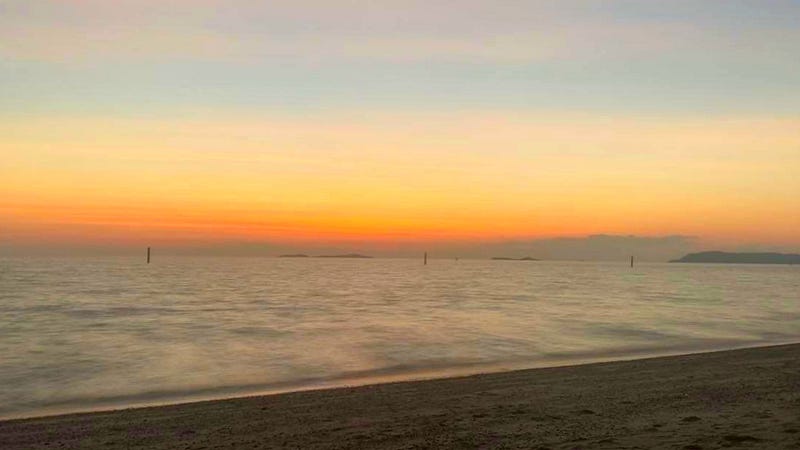
Credit: Anne Bonfert

PHOTOGRAPHY. TIPS

Taking Long Exposure Shots With the iPhone 10

This brings photography with your mobile phone to a new level

This is really something I never thought I’d be writing about. I don’t like taking pictures with a phone and love my good DSLR Canon to bits. Nothing will change that anytime soon.

But. And here comes the point. I’m not an Apple fan or ever even had a product from them. I only learned to use an iPhone once I got together with my now-husband.

Occasionally I ended up taking pictures with it. But only when I didn’t have my camera or GoPro with me. It was to capture moments that would have been otherwise gone.

A couple of weeks ago when I was taking pictures with my husband’s new iPhone 10 I realized a sign popping up on the screen saying “live”. I had no idea what it meant. I just found out that it makes the image file as large as 20MB.

I had no idea what it meant until I stumbled upon Erika Burkhalter‘s article describing this exact function. On a beautiful evening on the beach, she captured a stunning sunset and turned the photograph into a long exposure shot.

I commented on her piece and she encouraged me to give this function a try. She explained how to convert the file on the computer into the wanted image. Since I don’t have a Mac I wasn’t sure if my editing program would be able to do it, but I learned I didn’t even need a laptop for it.

In case you’ve never heard of this function but are curious about it, just give Erika’s article a read. She explains everything step-by-step. When you turn the “live” button on, your iPhone will take a couple more pictures after the actual photograph and can create out of the pictures taken a long exposure shot.
Credit: Anne Bonfert

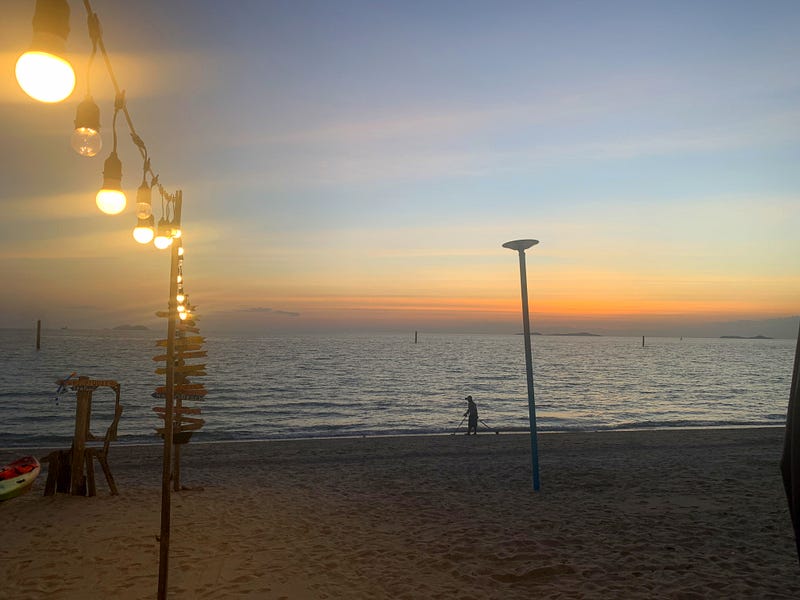
And all of a sudden I found myself sitting on the beach of a tropical island, drinking some delicious cocktails while taking photographs with my husband’s iPhone.

Meanwhile, my own beloved Canon camera was lying on the beach chair next to me.

Well, it’s not like I didn’t take pictures of the sunset with my camera, but I also took these two pictures with the iPhone. And after taking the shot above I was trying to explain to my husband the function when I went into the phone’s gallery to see the image I had taken.

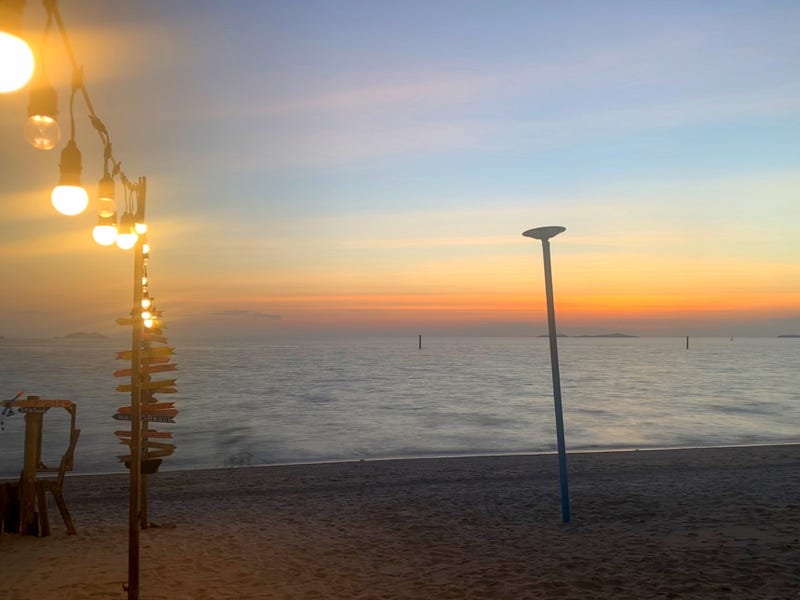
And there was the little icon on the side saying “live”. As I clicked on it, a dropdown menu opened up and one of the options was “long exposure”. I selected it, had to wait a few seconds, and all of a sudden I had this image below.
Credit: Anne Bonfert

Since the ocean was the only thing in motion between the series of images that were taken, the image remained clear but the ocean blurred out. As if I’d taken a long exposure shot with my camera.

Just that I didn’t need to change any settings, adjust the ISO, and everything else. All I did, was click on “live” and then select “long exposure” afterward.

I must say, I am pretty impressed with this specific function.

I am not going to drop my Canon camera, that is for sure. But I might use the iPhone in certain situations for trying out some more long exposure shots. It was fun and while my pictures above aren’t the best I’ve ever taken, they were an inspiration for more. For sure.

I wrote yesterday already on cell phone photography and received a few comments on the images. I’d love to know your opinion on taking photographs with a phone. Are you up for it or is it a no-go in your eyes?

Join my email list here if you would like to read more travel essays or sign up for the Medium membership to receive unlimited access to my and other writer’s stories out here (I will receive a commission fee in return).

Photography
Travel
Photography Tips
Inspiration
Ideas
Recommended from ReadMedium
avatarTom Zimberoff
Danny DeVito

Ruthless People

8 min read