

SwiftUI Microservices
A modern approach to application architecture in SwiftUI
SwiftUI brings a new declarative, state-driven, component-based approach to application development on iOS, macOS, and all of Apple’s other devices.
As such, it’s time for our approach to application architecture to move forward as well.
But before we move forward, let’s take a brief glance at the history and the current state of the art.
Model View Controller
The classic approach to iOS-application development rests on the shoulders of MVC (Model View Controller). In MVC, the controller shuttles information back and forth between the model and the various views that represent our interface.
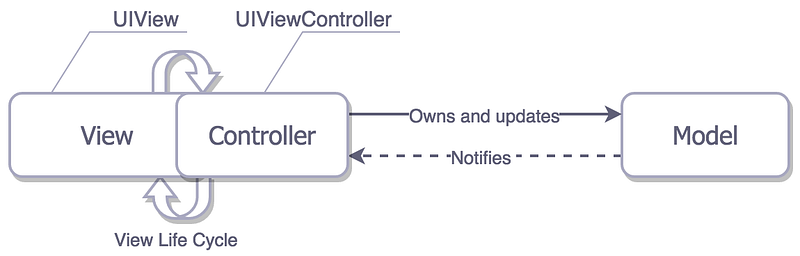
In iOS, the controller manifested itself as a single object, the UIViewController. The view controller managed all user interactions and state changes — including loading information, manipulating and updating that data, and it also handled user navigation to and from the various screens and pages in our app.
This approach meant the controller had an overly large part to play in our application architecture. Its role was so large, in fact, that it became common to refer to it MVC (shorthand for Massive View Controller).
Needless to say, this approach was somewhat less than optimal.
Model-View-ViewModel
Various solutions have been proposed to combat massive view controllers, but most boil down to some form of model-view-viewmodel (MVVM).
Models and views still exist, as do view controllers, for that matter. But the guts of the application, the data manipulation and business logic, has been extracted from the view controller and moved into the ViewModel.
Why? Well, it simplifies the view controller, for one thing, but the primary goal behind extracting all of that logic out of the view controller is that it now makes that logic testable. We can instantiate a view model and feed it information and call its methods and directly observe the resulting changes in state the view model will then present to the view controller.
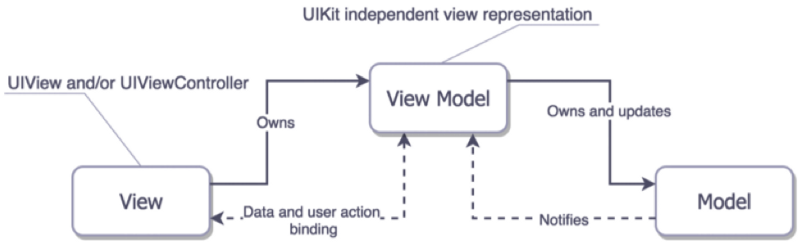
Since the view controller’s job has been reduced to simply shuttling those state changes to the views that make up our application, we can be fairly confident if the view model’s outputs are correct, our application will be correct as well.
There are variations on this theme: model-view-presenter (MVP). VIPER. Clean. But they’re all built on the same fundamental concepts and differ primarily on how they divide responsibilities among a set of components.
All agree on one thing, however, and that’s that the view controller should be as dumb as possible.
SwiftUI
Apple apparently agrees with this, as WWDC19 came along and Apple introduced SwiftUI which, among other things, eliminates most user-defined and managed-view controllers entirely.
In SwiftUI, you use a simple syntax to declare your user interface.
Further, that interface is driven entirely by the state of the application at any given point in time. Change the application state, and the application interface will immediately update to reflect those changes.
Apple refers to this concept as the “Single Source of Truth.”
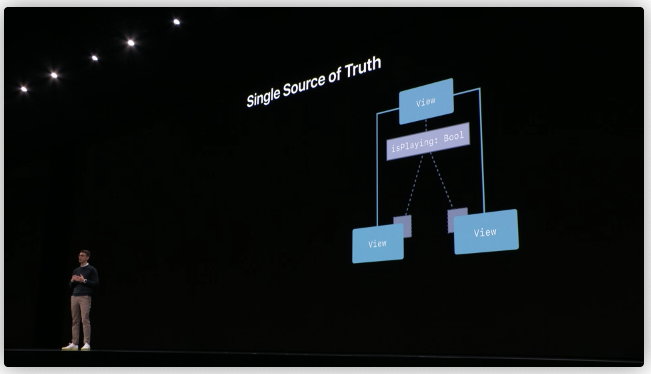
But just because there should be a Single Source of Truth for any given part of your application doesn’t necessarily mean there should be a Single Source of Truth for the entire application.
Confused? Let me explain.
Composition
As I wrote in my article “View Composition In SwiftUI,” Apple encourages you to decompose your views into small, tight, distinct components where each view controls a specific portion of your user interface.
Let’s take another look at one component from that article, a favorites button that’s used to indicate that a given item should be remembered and displayed in a favorites list in the app.

The code behind the favorites button is as follows:
struct FavoritesButton: View { let item: MenuItem @EnvironmentObject var favorites: FavoritesService var imageName: String {
favorites.isFavorite(item) ? "star.fill" : "star"
} var body: some View {
Image(systemName: imageName)
.foregroundColor(.accentColor)
.scaleEffect(1.2)
.onTapGesture {
self.favorites.toggleFavorite(self.item)
}
}
}The favorites button interface and behavior is completely self-contained and can be used anywhere in any view throughout our application. As shown in the screenshot, we can even drop it into the navigation bar.
struct DetailView: View {
    let item: MenuItem
    var body: some View {
        ScrollView(.vertical) {
            VStack {
                ...
            }
        }
        .navigationBarTitle("Details", displayMode: .inline)
        .navigationBarItems(trailing: FavoritesButton(item: item))
    }
}
Tap the favorites button in the navigation bar, and the current item is marked as a favorite. Or removed. Regardless, the DetailView has no knowledge of the button’s internal details or implementation.
The favorite service
While the code behind the favorites button interface is self-contained, internally the view’s basic functionality is dependent upon FavoritesService, an environment object that’s been defined and inserted into the view hierarchy somewhere higher up the chain.
FavoritesService is a SwiftUI ObservableObject that exposes one published value and two methods to our view. One is an isFavorite(item) method that determines if this item is already a favorite, and the other is toggleFavorite(item), which toggles the state of the item accordingly.
Note that when toggleFavorite(item) is called — from here or from anywhere in the application — our list of favorites items is updated, and, as such, any view dependent upon FavoritesService will be asked to update its view presentation accordingly.
class FavoritesService: ObservableObject { @Published var items: [MenuItem] = [] func isFavorite(_ menuItem: MenuItem) -> Bool {
items.firstIndex(where: { $0.id == menuItem.id }) != nil
} func toggleFavorite(_ menuItem: MenuItem) {
if let index = items.firstIndex(where: { $0.id == menuItem.id }) {
items.remove(at: index)
} else {
items.append(menuItem)
}
}}
FavoritesService is the Single Source of Truth for this particular view. It may also be a source of truth for other views as well, but FavoritesButton doesn’t care about that.
FavoritesService also adheres to the Single Responsibility Principle. Its purpose is to manage a list of favorite menu items, and that’s it.
Application tabs
Let’s look at another service, albeit an extremely minimalist one.
enum AppTabs: Int {
    case favorites
    case menu
    case order
}
class AppState: ObservableObject {
@Published var currentTab = AppTabs.favorites
}Here, we track the current tab state of the app so we can move to a specific tab programatically as needed.
struct AppTabView: View {
    @EnvironmentObject var appState: AppState
    var body: some View {
        TabView(selection: $appState.currentTab) {
            FavoritesView()
                .tabItem {
                    Image(systemName: "star")
                    Text("Favorites")
                    }
                .tag(AppTabs.favorites)
            ...
            }
    }
}
Order service
And one more. Here’s an OrderService from the same app, used to track the items ordered.
class OrderService: ObservableObject { @Published var items = [MenuItem]() var total: Int {
items.reduce(0) { $0 + $1.price }
} func isInCart(_ menuItem: MenuItem) -> Bool {
items.firstIndex(where: { $0.id == menuItem.id }) != nil
} func add(item: MenuItem) {
items.append(item)
} func remove(item: MenuItem) {
if let index = items.firstIndex(of: item) {
items.remove(at: index)
}
}
}Redux
Since there should be a Single Source of Truth for each component of the application, some have proposed that SwiftUI move to a Redux-style state model, with a Single Source of Truth for the entire application.
class AppState: ObservableObject {
    @Published var currentTab = AppTabs.favorites
    @Published var menuItems: [MenuItem] = []
    @Published var favoriteItems: [MenuItem] = []
    @Published var orderItems: [MenuItem] = []
}
Or if you want to maintain functionality among the component lines, perhaps try doing something more like this:
class AppState: ObservableObject {
    @Published var currentTab = AppTabs.favorites
    @Published var menu = MenuService()
    @Published var favorites = FavoritesService()
    @Published var order = OrderService()
}
Import the global AppState into each of the views that need the data, and you’re done.
Single global state pros and cons
The advantages of doing a single AppState lie mostly in simplicity. As mentioned, you just have one environmentObject import to deal with.
But the disadvantages, to me, are many.
First and foremost, they relate to performance. Make one single change to application state — say, mark a single item as a favorite — and now every single view tree in the application needs to be walked and checked for changes. Why? Because the single environment object that each view depends upon has signaled an update has occurred.
For smaller applications, this hit may be negligible. But for larger ones?
(One should note this is a known issue for large React/Redux web applications as well.)
Global data
My second biggest objection relates to the global exposure of application data.
Import AppState into a single view, and everything is exposed for everyone to see. That being the case, how can you be sure just what information a given view may be accessing or manipulating without walking through every line of code in the view?
Our FavoritesButton above is a great example of not doing this. I can tell just by looking at the beginning of the code the only thing this code can see or change is the FavoritesService because that’s the only object imported from the application environment.
Further, should I want to use FavoritesButton in another application, it’s easy to see just what else I need to move to the other application.
Testing
My third objection relates to testing. One of our primary motivations in regard to breaking code out into view models and services lies in making that code easier to test.
In SwiftUI our application is controlled entirely by it’s state. So if we put that state into a model or service, and if that state changes as a result of actions triggered by the user, then in testing we can trigger those actions and observe the resulting change in state.
If the state updates correctly for each possible change or action, then we can have a fairly high level of confidence that our application is correct.
But putting all of our state into a single container makes it much, much more difficult to test our individual models or services in isolation. It work fairly well for integration testing, but it’s not so great for unit testing.
And even then, with global state the potential of having untested and therefore unforseen side effects is extremely high. “Oh, I didn’t realize it was changing that variable too!”
Late binding
As also pointed out in the view-composition article, another SwiftUI best practice is to bind state as low in the hierarchy as possible.
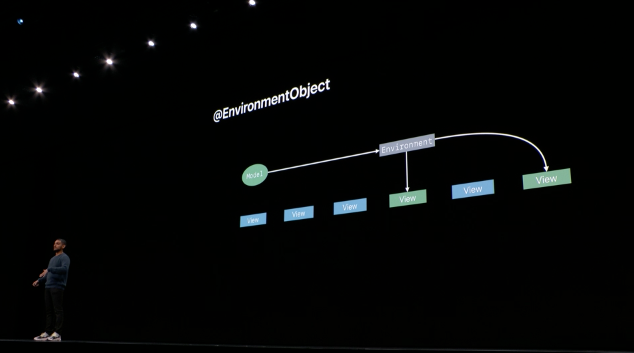
When we bind low in the hierarchy, we dramatically minimize the number of interface updates and rerendering needed, as only small portions of our view tree are affected by any given update and need to be regenerated.
All of this dramatically improves application performance.
Above, the favorites service is bound directly to the object that needs it. The DetailView that wants to display a favorites button neither knows nor cares about it. Someone higher up the chain had to provide it, of course, but that’s a different responsibility for someone else to deal with.
Why services and not ViewModels?
One might ask why we’re calling them services and not just ViewModels.
In this case, the key differentiating factor is that view models are usually written to drive a single screen, page, or view, and that view owns the view model.
Services, on the other hand, are created and shared among multiple views and components in our SwiftUI application by injecting them into the application environment at some level of the view hierarchy for use by elements at a lower level. They persist for as long as that level persists.
In fact, many services tend to be created and injected into the very top of the view hierarchy when our initial content view is created in our SceneDelegate.
func scene(_ scene: UIScene, willConnectTo session: UISceneSession, options connectionOptions: UIScene.ConnectionOptions) { // Create the SwiftUI view that provides the window contents.
let contentView = AppTabView()
.environmentObject(AppState())
.environmentObject(MenuService())
.environmentObject(MessageService())
.environmentObject(FavoritesService())
.environmentObject(OrderService())
.environmentObject(RatingsService()) // Use a UIHostingController as window root view controller.
if let windowScene = scene as? UIWindowScene {
let window = UIWindow(windowScene: windowScene)
window.rootViewController = UIHostingController(rootView: contentView)
self.window = window
window.makeKeyAndVisible()
}
}Though a better solution might be to use a system-services modifier, as described in “SwiftUI and the Missing Environment Object.”
    let contentView = AppTabView()
        .modifier(SystemServices())
With the services modifier as follows:
struct SystemServices: ViewModifier { private static var appState: AppState = AppState()
private static var menu = MenuService()
private static var messages = MessageService()
private static var favorites = FavoritesService()
private static var ratings = RatingsService()
private static var order = OrderService() func body(content: Content) -> some View {
content
// defaults
.accentColor(.red)
// messages
.overlay(MessageOverlayView(), alignment: .top)
// services
.environmentObject(Self.appState)
.environmentObject(Self.menu)
.environmentObject(Self.messages)
.environmentObject(Self.favorites)
.environmentObject(Self.order)
.environmentObject(Self.ratings)
}}
Note that our SystemServices modifier exists simply to inject our services into the SwiftUI environment when needed (such as when we present a new modal view or action sheet). That’s why its members are private.
Microservices in SwiftUI
A microservice architecture is defined as arranging an application into a collection of loosely coupled services. These services are fine-grained, and the protocols between them are lightweight.
In a microservice architecture, services are independently deployable. In the case of FavoritesService above, we’ve seen that we could easily redeploy that service and those interface components in another application.
Finally, referring to them as microservices further reinforces the idea that our services should be small, well-defined, and each one implemented with a laser-tight focus on managing a single aspect of our application.
A Single Source of Truth.
Completion block
If a primary goal behind SwiftUI is to build our applications out of well-composed, independent, reusable views, then should we not consider implementing our internal-service architecture in the same fashion?
That’s my take on it, but if you have a different one, I’d like to hear it.
Note: My version of the iDine-application source code is available from my iDine repository on GitHub. It includes the examples mentioned in this article.
Long form content like this takes a lot of time to produce, so please, hit the like button if you want to see more, and if you have any questions or thoughts on the matter just leave a comment.
Seriously. Medium has changed their promotion and payout algorithms, so clapping and leaving comments makes a HUGE difference. Thanks!
If you enjoyed this article then try my latest: Deep Inside Views, State and Performance in SwiftUI. Or why almost none of those words mean what you think they mean…


