
Clean Architecture for SwiftUI

Can you imagine, UIKit is 11 years old! Ever since the release of the iOS SDK in 2008 we were building our apps with it. And throughout this time the developers were in a relentless search for the best architecture to use for their apps. It all started with MVC, but later we witnessed the rise of MVP, MVVM, VIPER, RIBs, and VIP.
But something has happened recently. This “something” is so significant, that the majority of the architectural patterns used for iOS will soon become history.
I’m talking about SwiftUI. It’s not going anywhere. Like it or not, this is the future of iOS development. And it’s a game-changer in terms of the challenges we face when designing the architecture.
What are the conceptual changes?
UIKit was an imperative, event-driven framework. We could reference each view in the hierarchy, update it’s appearance when the view is loaded or as a reaction on an event (a touch-down on the button or a new data becoming available for display in UITableView). We used callbacks, delegates, target-actions for handling these events.
Now, it is all gone. SwiftUI is a declarative, state-driven framework. We cannot reference any view in the hierarchy, neither can we directly mutate a view as a reaction to an event. Instead, we mutate the state bound to the view. Delegates, target-actions, responder chain, KVO, — the entire zoo of callback techniques have been replaced with closures and bindings.
Every view in SwiftUI is a struct that can be created many times faster than an analogous UIView descendant. That struct keeps references to the state that it feeds to the function body for rendering the UI.

So a view in SwiftUI is just a programming function. You provide it with input (the state) — it draws the output. And the only way to change the output is to change the input: we cannot touch the algorithm (the body function) by adding or removing subviews — all the possible alterations in the displayed UI have to be declared in the body and cannot be changed in runtime.
In terms of the SwiftUI we’re not adding or removing subviews, but enabling or disabling different pieces of the UI in the predefined flowchart algorithm.
MVVM is the new standard architecture
SwiftUI comes with MVVM built-in.
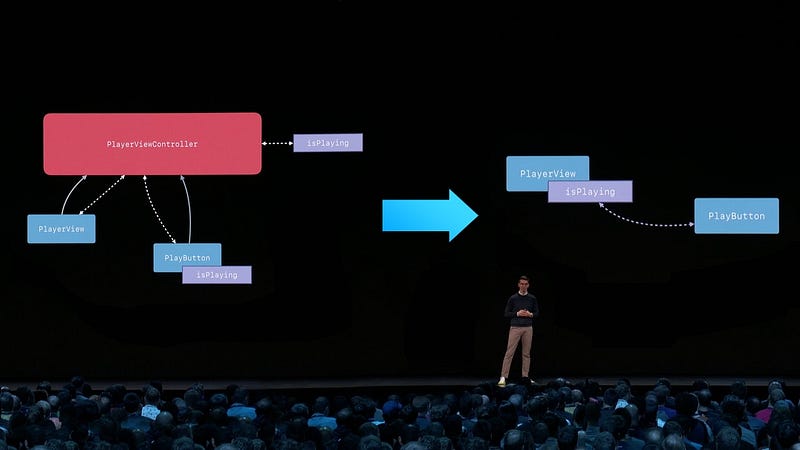
In the simplest case, where the View does not rely on any external state, its local @State variables take the role of the ViewModel, providing the subscription mechanism (Binding) for refreshing the UI whenever the state changes.
For more complex scenarios, Views can reference an external ObservableObject, which in this case can be a distinct ViewModel.
One way or another, the way SwiftUI views work with the state very much resembles the classical MVVM (unless we introduce a more complex graph of programming entities).
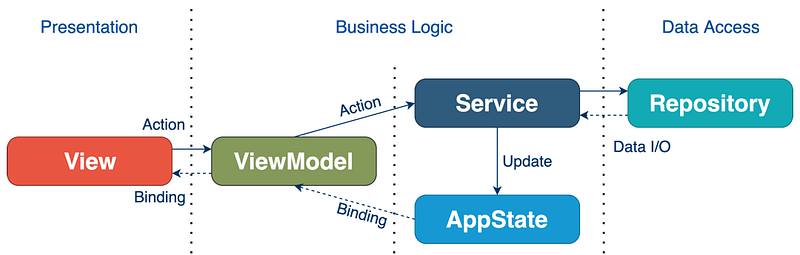
So if you choose to design the architecture for your SwiftUI app in an MVVM style, you’d come up with something like this:
- Model: a data container
- View: a SwiftUI view
- ViewModel: an
ObservableObjectthat encapsulates the business logic and allows theViewto observe changes of the state
In this simplified example, when the View appears on the screen, the onAppearcallback calls loadCountries() on the ViewModel, triggering the networking call for loading the data inside WebService. ViewModel receives the data in the callback and pushes the updates through @Published variable countries, observed by the View.
Although this article is dedicated to Clean Architecture, I was receiving many questions about the application of MVVM in SwiftUI, so I took the original sample project and ported it to MVVM in a separate branch. You can compare the two and choose which suits your needs best. The project’s key features:
- Vanilla SwiftUI + Combine implementation
- Decoupled Presentation, Business Logic, and Data Access layers
- Full test coverage, including the UI (thanks to the ViewInspector)
- Redux-like centralized AppState as the single source of truth
- Programmatic navigation (deep links support)
- Simple yet flexible networking layer built on Generics
- Handling of the system events (blurring the view hierarchy when the app is inactive)
SwiftUI is conceptually ELM Architecture
Just watch a couple minutes from this talk “MCE 2017: Yasuhiro Inami, Elm Architecture in Swift” from 28:26
That guy had a WORKING prototype of SwiftUI in 2017!
Does it feel like we’re on a reality show where SwiftUI, a half-orphan kid, has just got to know who his father is?
Anyways, what interests us is whether we can use any other ELM concepts for making our SwiftUI apps better.
I followed the ELM Architecture description on the ELM language’s web site and… found nothing new. SwiftUI is based on the same essences as ELM:
Model — the state of your application
View — a way to turn your state into HTML
Update — a way to update your state based on messages
We saw this somewhere, didn’t we?
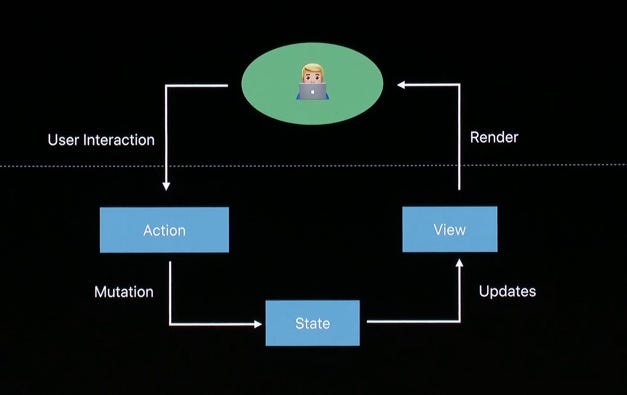
We already have the Model, the View gets generated automatically from the Model, the only thing we can tweak is the way Update in delivered. We can go REDUX way and use the Command pattern for state mutation instead of letting SwiftUI’s views and other modules write to the state directly.
Although I preferred using REDUX in my previous UIKit projects (ReSwift❤), it’s questionable whether it’s needed for a SwiftUI app — the data flows are already under control and are easily traceable.
Coordinator in SwiftUI
Coordinator (aka Router) was an essential part of VIPER, RIBs and MVVM-R architectures. Allocation of a separate module for screen navigation was well justified in UIKit apps — the direct routing from one ViewController to another led to their tight coupling, not to mention the coding hell of deep linking to a screen deeply inside the ViewController’s hierarchy.
Adding a Coordinator in UIKit was quite easy because UIView (and UIViewController) are environment-independent instances that you could toss over by adding / removing from the hierarchy at any time.
When it comes to SwiftUI, such dynamism is not possible by design: the hierarchy is static and all the possible navigations are defined and fixed at compile time. There is no way to make tweaks to the hierarchy structure at runtime: instead, navigation is fully controlled by the state changing through Bindings: take you NavigationView, TabView or .sheet(), every time you’ll see an init that takes the Binding parameter for routing.
“Views are a function of state”, remember? The key word here is function. An algorithm of converting state data to a rendered picture.
This explains why extracting routing off the SwiftUI view is quite a challenge: routing is an integral part of this static drawing algorithm.
Coordinators aimed to solve these two problems: isolation of the ViewControllers from each other, when one has to link to another for navigation purposes, and programmatic navigation (opending a specific screen for a deeplink).
SwiftUI has a built-in mechanism for programmatic navigation through aforementioned Bindings (I have a dedicated article about it), and Views will be statically linked to each other at compile time.
If you don’t want the view A to refer to the view B directly, you can simply turn the B a generic parameter for A, and call it a day.
You may as well use this same approach for abstracting the factual way the view A can open the B (using TabView, NavigationView, etc), although I don’t see a problem actually stating this in your view: there is nothing to be ashamed of! You can easily change the routing model right in place if you need to, without touching the view B.
And don’t forget about the @ViewBuilder - this is an alternative to using an explicit generic parameter.
I believe that SwiftUI made the Coordinator needless: we can isolate views using generic parameters or @ViewBuilder and achieve programmatic navigation with standard tooling.
There is a practical example of using Coordinators in SwiftUI by quickbirdstudios, however, to my state, it’s overkill. Plus, this approach has several drawbacks, such as granting Coordinators full access to all ViewModels, but you should check it out and decide for yourself.
Are VIPER, RIBs, and VIP applicable for SwiftUI?
There are a lot of great ideas and concepts we can borrow from these architectures, but ultimately the canonical implementation of either one doesn’t make sense for the SwiftUI app.
First, as you already know, there is no more practical need to have a Router.
Secondly, the completely new design of the data flow in SwiftUI coupled with native support of view-state bindings shrank the required setup code to the degree that Presenter becomes a goofy entity doing nothing useful. Along with the decreased number of modules in the pattern, we figure out that we don’t need Builder either. So basically, the whole pattern just falls apart, as the problems it aimed to solve don't exist anymore.
SwiftUI introduced its own set of challenges in the system’s design, so the patterns we had for UIKit have to be re-designed from the ground up.
There are attempts to stick with the beloved architectures no matter what, but please, don’t.
Clean Architecture
Let’s not play the architect and just refer to the Uncle Bob’s Clean Architecture, the progenitor of Clean Swift (VIP).
By separating the software into layers, and conforming to The Dependency Rule, you will create a system that is intrinsically testable, with all the benefits that imply.
Clean Architecture is quite liberal about the number of layers we should introduce because this depends on the application domain.
But in the most common scenario for a mobile app we’ll need to have three layers:
- Presentation layer
- Business Logic layer
- Data Access layer
So if we distilled the requirements of the Clean Architecture through the peculiarity of SwiftUI, we’d come up with something like this:
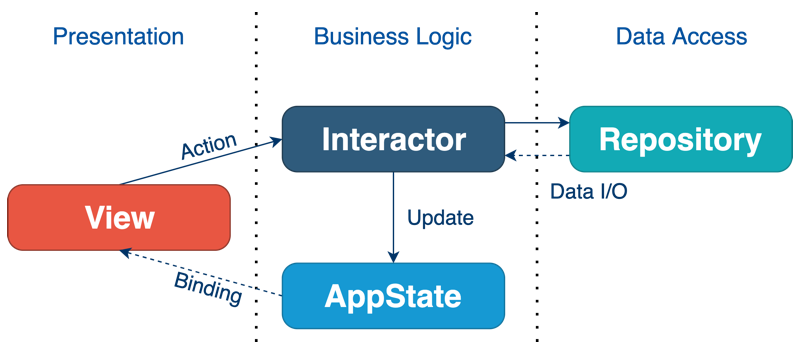
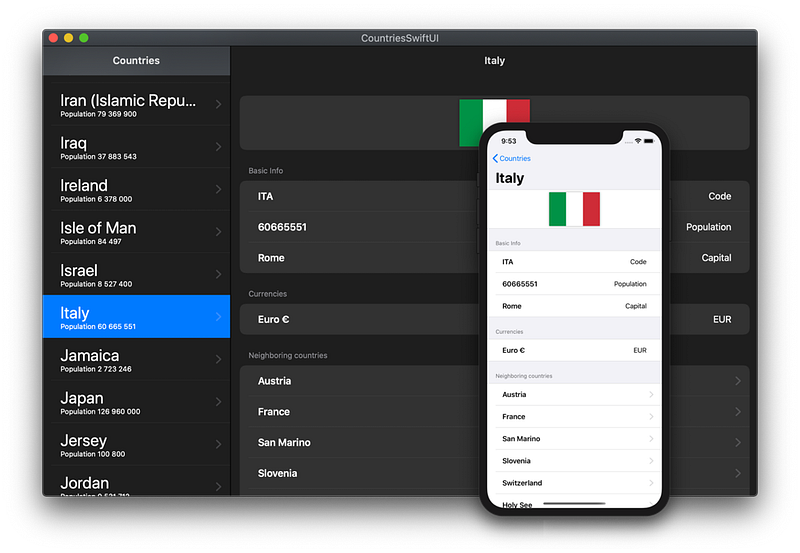
There is a demo project I’ve created to illustrate the use of this pattern. The app talks to the restcountries.eu REST API to show the list of countries and details about them:
AppState
AppState is the only entity in the pattern that requires to be an object, specifically, an ObservableObject. Alternatively, it can be a struct wrapped in a CurrentValueSubject from Combine.
Just like with Redux, AppState works as the single source of truth and keeps the state for the entire app, including user’s data, authentication tokens, screen navigation state (selected tabs, presented sheets) and system state (is active / is backgrounded, etc.)
AppState knows nothing about any other layer and does not contain any business logic.
An example of the AppState from the Countries demo project:
View
This is the usual SwiftUI’s view. It may be stateless or have local @State variables.
No other layers know about the View layer existence, so there is no need to hide it behind a protocol.
When the view is instantiated, it receives AppState and Interactor through the SwiftUI's standard dependency injection of a variable attributed with @Environment, @EnvironmentObject or @ObservedObject.
Side effects are triggered by the user’s actions (such as a tap on a button) or view lifecycle event onAppear and are forwarded to the Interactor.
Interactor
Interactor encapsulates the business logic for the specific View or a group of views. Together with the AppState forms the Business Logic layer, that's fully independent of the presentation and the external resources.
It is fully stateless and only refers to the AppState object injected as a constructor parameter.
Interactors should be “facaded” with a protocol so that the View could talk to a mocked Interactor in tests.
Interactors receive requests to perform work, such as obtaining data from an external source or making computations, but they never return data back directly, such as in a closure.
Instead, they forward the result to the AppState or a Binding provided by the View.
The Binding is used when the result of work (the data) is owned locally by one View and does not belong to the central AppState, that is, it doesn't need to be persisted or shared with other screens of the app.
CountriesInteractor from the demo project:
Repository
Repository is an abstract gateway for reading / writing data. Provides access to a single data service, be that a web server or a local database.
I have a dedicated article explaining why extracting the Repository is essential.
For example, if the app is using its backend, Google Maps APIs and writes something to a local database, there will be three Repositories: two for different web API providers and one for database IO operations.
The repository is also stateless, doesn’t have write access to the AppState, contains only the logic related to working with the data. It knows nothing about View or Interactor.
The factual Repository should be hidden behind a protocol so that the Interactor could talk to a mocked Repository in tests.
CountriesWebRepository from the demo project:
Since WebRepository takes URLSession as a constructor parameter, it is very easy to test it by mocking the networking calls with a custom URLProtocol
Final thoughts
The demo project now has 97% test coverage, all thanks to the Clean Architecture’s “dependency rule” and segregation of the app on multiple layers.
It offers fully setup persistence layer with CoreData, deep linking from a Push Notification, and other non-trivial yet practical examples.
A few other SwiftUI-related articles I wrote:
But don’t let the paywall stop you! All my articles are also available for free in my tech blog:


