Free AI web copilot to create summaries, insights and extended knowledge, download it at here
10725
Abstract
ss="hljs-operator">=</span> greet(name: <span class="hljs-string">"Bytefer"</span>, greeting: <span class="hljs-string">"Greetings"</span>)
<span class="hljs-keyword">let</span> defaultGreeting <span class="hljs-operator">=</span> greet(name: <span class="hljs-string">"Bytefer"</span>)
<span class="hljs-built_in">print</span>(customGreeting)
<span class="hljs-built_in">print</span>(defaultGreeting)
<span class="hljs-comment">/**
Output:
Greetings, Bytefer!
Hello, Bytefer!
*/</span></pre></div><p id="7613"><b>TypeScript Code</b></p><div id="88e9"><pre><span class="hljs-keyword">function</span> <span class="hljs-title function_">greet</span>(<span class="hljs-params">name: <span class="hljs-built_in">string</span>, greeting?: <span class="hljs-built_in">string</span></span>): <span class="hljs-built_in">string</span> {
<span class="hljs-keyword">if</span> (greeting) {
<span class="hljs-keyword">return</span> <span class="hljs-string"><span class="hljs-subst">${greeting}</span>, <span class="hljs-subst">${name}</span>!</span>;
} <span class="hljs-keyword">else</span> {
<span class="hljs-keyword">return</span> <span class="hljs-string">Hello, <span class="hljs-subst">${name}</span>!</span>;
}
}
<span class="hljs-keyword">const</span> <span class="hljs-attr">customGreeting</span>: <span class="hljs-built_in">string</span> = <span class="hljs-title function_">greet</span>(<span class="hljs-string">"Bytefer"</span>, <span class="hljs-string">"Greetings"</span>);
<span class="hljs-keyword">const</span> <span class="hljs-attr">defaultGreeting</span>: <span class="hljs-built_in">string</span> = <span class="hljs-title function_">greet</span>(<span class="hljs-string">"Bytefer"</span>);
<span class="hljs-variable language_">console</span>.<span class="hljs-title function_">log</span>(customGreeting);
<span class="hljs-variable language_">console</span>.<span class="hljs-title function_">log</span>(defaultGreeting);
<span class="hljs-comment">/**
Output:
"Greetings, Bytefer!"
"Hello, Bytefer!"
*/</span></pre></div><h1 id="5a27">Define variadic parameters</h1><p id="c559">Variadics allow a function to accept a variable number of parameters. In Swift, variadic parameters are declared by adding an ellipsis <code>…</code>after the parameter type.</p><p id="cbfc"><b>Swift Code</b></p><div id="85e2"><pre><span class="hljs-keyword">func</span> <span class="hljs-title function_">calculateSum</span>(<span class="hljs-keyword">_</span> <span class="hljs-params">numbers</span>: <span class="hljs-type">Double</span>...) -> <span class="hljs-type">Double</span> {
<span class="hljs-keyword">return</span> numbers.reduce(<span class="hljs-number">0</span>, <span class="hljs-operator">+</span>)
}
<span class="hljs-keyword">let</span> sum <span class="hljs-operator">=</span> calculateSum(<span class="hljs-number">4</span>, <span class="hljs-number">5</span>, <span class="hljs-number">6</span>)
<span class="hljs-built_in">print</span>(<span class="hljs-string">"Sum: <span class="hljs-subst">(sum)</span>"</span>)
<span class="hljs-comment">// Output: Sum: 15.0</span></pre></div><p id="901d">The function calculateSum accepts a variadic parameter <code>numbers</code>, which means it can accept a variable number of Double parameters. The underscore <code></code> indicates that we can omit the external naming of this parameter when calling the function, making the call more concise.</p><div id="b9f8"><pre><span class="hljs-keyword">let</span> sum <span class="hljs-operator">=</span> calculateSum(<span class="hljs-number">4</span>, <span class="hljs-number">5</span>, <span class="hljs-number">6</span>)</pre></div><p id="2bb7">In this call, we pass the number directly to calculateSum without specifying a parameter name. Without the underscore <code></code>, the call would look like this:</p><div id="3d6a"><pre><span class="hljs-keyword">func</span> <span class="hljs-title function_">calculateSum</span>(<span class="hljs-params">numbers</span>: <span class="hljs-type">Double</span>...) -> <span class="hljs-type">Double</span> {
<span class="hljs-keyword">return</span> numbers.reduce(<span class="hljs-number">0</span>, <span class="hljs-operator">+</span>)
}
<span class="hljs-keyword">let</span> sum <span class="hljs-operator">=</span> calculateSum(numbers: <span class="hljs-number">4</span>, <span class="hljs-number">5</span>, <span class="hljs-number">6</span>)</pre></div><p id="3e0c"><b>TypeScript Code</b></p><div id="e96d"><pre><span class="hljs-keyword">function</span> <span class="hljs-title function_">calculateSum</span>(<span class="hljs-params">...numbers: <span class="hljs-built_in">number</span>[]</span>): <span class="hljs-built_in">number</span> {
<span class="hljs-keyword">return</span> numbers.<span class="hljs-title function_">reduce</span>(<span class="hljs-function">(<span class="hljs-params">sum, num</span>) =></span> sum + num, <span class="hljs-number">0</span>);
}
<span class="hljs-keyword">const</span> sum = <span class="hljs-title function_">calculateSum</span>(<span class="hljs-number">4</span>, <span class="hljs-number">5</span>, <span class="hljs-number">6</span>);
<span class="hljs-variable language_">console</span>.<span class="hljs-title function_">log</span>(<span class="hljs-string">Sum: <span class="hljs-subst">${sum}</span></span>);
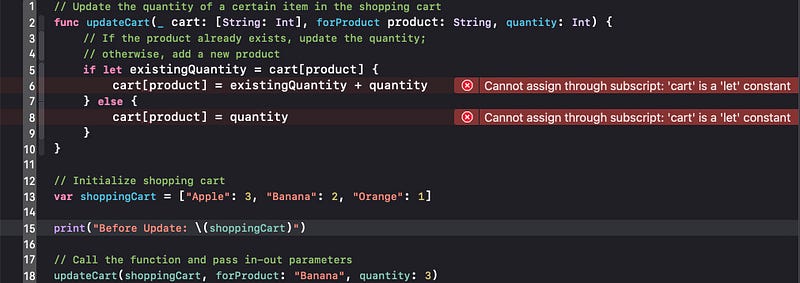
<span class="hljs-comment">// Output: "Sum: 15"</span></pre></div><h1 id="c016">In-out Parameters</h1><p id="8441">In Swift, function parameters can be declared as <b>in-out parameters</b>, which means that they can be changed by the function and these changes will be retained after the function call ends. This feature is useful in situations where you need to change the value of a parameter within a function.</p><div id="c482"><pre><span class="hljs-comment">// Update the quantity of a certain item in the shopping cart</span>
<span class="hljs-keyword">func</span> <span class="hljs-title function_">updateCart</span>(<span class="hljs-keyword">_</span> <span class="hljs-params">cart</span>: <span class="hljs-keyword">inout</span> [<span class="hljs-params">String</span>: <span class="hljs-type">Int</span>], <span class="hljs-params">forProduct</span> <span class="hljs-params">product</span>: <span class="hljs-type">String</span>, <span class="hljs-params">quantity</span>: <span class="hljs-type">Int</span>) {
<span class="hljs-comment">// If the product already exists, update the quantity;</span>
<span class="hljs-comment">// otherwise, add a new product</span>
<span class="hljs-keyword">if</span> <span class="hljs-keyword">let</span> existingQuantity <span class="hljs-operator">=</span> cart[product] {
cart[product] <span class="hljs-operator">=</span> existingQuantity <span class="hljs-operator">+</span> quantity
} <span class="hljs-keyword">else</span> {
cart[product] <span class="hljs-operator">=</span> quantity
}
}
<span class="hljs-comment">// Initialize shopping cart</span>
<span class="hljs-keyword">var</span> shoppingCart <span class="hljs-operator">=</span> [<span class="hljs-string">"Apple"</span>: <span class="hljs-number">3</span>, <span class="hljs-string">"Banana"</span>: <span class="hljs-number">2</span>, <span class="hljs-string">"Orange"</span>: <span class="hljs-number">1</span>]
<span class="hljs-built_in">print</span>(<span class="hljs-string">"Before Update: <span class="hljs-subst">(shoppingCart)</span>"</span>)
<span class="hljs-comment">// Call the function and pass in-out parameters</span>
updateCart(<span class="hljs-operator">&</span>shoppingCart, forProduct: <span class="hljs-string">"Banana"</span>, quantity: <span class="hljs-number">3</span>)
<span class="hljs-built_in">print</span>(<span class="hljs-string">"After Update: <span class="hljs-subst">(shoppingCart)</span>"</span>)
<span class="hljs-comment">/**
Output:
Before Update: ["Apple": 3, "Banana": 2, "Orange": 1]
After Update: ["Apple": 3, "Banana": 5, "Orange": 1]
*/</span></pre></div><p id="021f">If the <code>inout</code> keyword is removed from the <code>cart</code> parameter, the Swift compiler will prompt the following error message.</p><figure id="930c"><img src="https://cdn-images-1.readmedium.com/v2/resize:fit:800/1*D6_RGB9ujvtX6oeTkcwmvQ.png"><figcaption></figcaption></figure><h1 id="a8a8">Returns multiple values</h1><p id="d814">Functions in Swift can return multiple values, effectively returning a tuple containing multiple values.</p><p id="2f2c"><b>Swift Code</b></p><div id="3592"><pre><span class="hljs-keyword">func</span> <span class="hljs-title function_">getPersonInfo</span>() -> (name: <span class="hljs-type">String</span>, age: <span class="hljs-type">Int</span>) {
<span class="hljs-keyword">return</span> (<span class="hljs-string">"Bytefer"</span>, <span class="hljs-number">30</span>)
}
<span class="hljs-keyword">let</span> personInfo <span class="hljs-operator">=</span> getPersonInfo()
<span class="hljs-built_in">print</span>(<span class="hljs-string">"Name: <span class="hljs-subst">(personInfo.name)</span>, Age: <span class="hljs-subst">(personInfo.age)</span>"</span>)
<span class="hljs-comment">// Output: Name: Bytefer, Age: 30</span></pre></div><p id="3483"><b>TypeScript Code</b></p><div id="8447"><pre><span class="hljs-keyword">function</span> <span class="hljs-title function_">getPersonInfo</span>(<span class="hljs-params"></span>): [<span class="hljs-built_in">string</span>, <span class="hljs-built_in">number</span>] {
<span class="hljs-keyword">return</span> [<span class="hljs-string">"Bytefer"</span>, <span class="hljs-number">30</span>];
}
<span class="hljs-keyword">const</span> <span class="hljs-attr">personInfo</span>: [<span class="hljs-built_in">string</span>, <span class="hljs-built_in">number</span>] = <span class="hljs-title function_">getPersonInfo</span>();
<span class="hljs-variable language_">console</span>.<span class="hljs-title function_">log</span>(<span class="hljs-string">Name: <span class="hljs-subst">${personInfo[<span class="hljs-number">0</span>]}</span>, Age: <span class="hljs-subst">${personInfo[<span class="hljs-number">1</span>]}</span></span>);
<span class="hljs-comment">// Output: "Name: Bytefer, Age: 30"</span></pre></div><h1 id="1ce3">Function Types</h1><h2 id="ca53">1. Declare function type</h2><p id="a87c">In Swift, when declaring a function type, you need to specify the parameter types and return type.</p><p id="c261"><b>Swift Code</b></p><div id="8923"><pre><span class="hljs-keyword">func</span> <span class="hljs-title function_">add</span>(<span class="hljs-keyword">_</span> <span class="hljs-params">a</span>: <span c
Options
lass="hljs-type">Int</span>, <span class="hljs-keyword">_</span> <span class="hljs-params">b</span>: <span class="hljs-type">Int</span>) -> <span class="hljs-type">Int</span> {
<span class="hljs-keyword">return</span> a <span class="hljs-operator">+</span> b
}
<span class="hljs-comment">// Declare a variable of function type</span>
<span class="hljs-keyword">var</span> mathFunction: (<span class="hljs-type">Int</span>, <span class="hljs-type">Int</span>) -> <span class="hljs-type">Int</span>
<span class="hljs-comment">// Assign function to variable</span>
mathFunction <span class="hljs-operator">=</span> add
<span class="hljs-comment">// Calling a function using a function type variable</span>
<span class="hljs-keyword">let</span> result <span class="hljs-operator">=</span> mathFunction(<span class="hljs-number">2</span>, <span class="hljs-number">3</span>)
<span class="hljs-built_in">print</span>(<span class="hljs-string">"Result: <span class="hljs-subst">(result)</span>"</span>)
<span class="hljs-comment">// Output: Result: 5</span></pre></div><p id="bd7a"><b>TypeScript Code</b></p><div id="303c"><pre><span class="hljs-keyword">function</span> <span class="hljs-title function_">add</span>(<span class="hljs-params">a: <span class="hljs-built_in">number</span>, b: <span class="hljs-built_in">number</span></span>): <span class="hljs-built_in">number</span> {
<span class="hljs-keyword">return</span> a + b;
}
<span class="hljs-comment">// Declare a variable of function type</span>
<span class="hljs-keyword">let</span> <span class="hljs-attr">mathFunction</span>: <span class="hljs-function">(<span class="hljs-params">a: <span class="hljs-built_in">number</span>, b: <span class="hljs-built_in">number</span></span>) =></span> <span class="hljs-built_in">number</span>;
<span class="hljs-comment">// Assign function to variable</span>
mathFunction = add;
<span class="hljs-comment">// Calling a function using a function type variable</span>
<span class="hljs-keyword">const</span> <span class="hljs-attr">result</span>: <span class="hljs-built_in">number</span> = <span class="hljs-title function_">mathFunction</span>(<span class="hljs-number">2</span>, <span class="hljs-number">3</span>);
<span class="hljs-variable language_">console</span>.<span class="hljs-title function_">log</span>(<span class="hljs-string">Result: <span class="hljs-subst">${result}</span></span>);
<span class="hljs-comment">// Output: "Result: 5"</span></pre></div><h2 id="6864">2. Function type as parameter type</h2><p id="172f"><b>Swift Code</b></p><div id="fdbb"><pre><span class="hljs-keyword">func</span> <span class="hljs-title function_">add</span>(<span class="hljs-keyword"></span> <span class="hljs-params">a</span>: <span class="hljs-type">Int</span>, <span class="hljs-keyword"></span> <span class="hljs-params">b</span>: <span class="hljs-type">Int</span>) -> <span class="hljs-type">Int</span> {
<span class="hljs-keyword">return</span> a <span class="hljs-operator">+</span> b
}
<span class="hljs-comment">// Define a function that executes a function</span>
<span class="hljs-keyword">func</span> <span class="hljs-title function_">executeMathOperation</span>(<span class="hljs-keyword"></span> <span class="hljs-params">a</span>: <span class="hljs-type">Int</span>, <span class="hljs-keyword"></span> <span class="hljs-params">b</span>: <span class="hljs-type">Int</span>, <span class="hljs-keyword">_</span> <span class="hljs-params">operation</span>: (<span class="hljs-type">Int</span>, <span class="hljs-type">Int</span>) -> <span class="hljs-type">Int</span>) -> <span class="hljs-type">Int</span> {
<span class="hljs-keyword">return</span> operation(a, b)
}
<span class="hljs-comment">// Call the function and pass the add function as parameter</span>
<span class="hljs-keyword">let</span> result <span class="hljs-operator">=</span> executeMathOperation(<span class="hljs-number">2</span>, <span class="hljs-number">3</span>, add)
<span class="hljs-built_in">print</span>(<span class="hljs-string">"Result: <span class="hljs-subst">(result)</span>"</span>)
<span class="hljs-comment">// Output: Result: 5</span></pre></div><p id="04f7"><b>TypeScript Code</b></p><div id="0f3e"><pre><span class="hljs-keyword">function</span> <span class="hljs-title function_">add</span>(<span class="hljs-params">a: <span class="hljs-built_in">number</span>, b: <span class="hljs-built_in">number</span></span>): <span class="hljs-built_in">number</span> {
<span class="hljs-keyword">return</span> a + b;
}
<span class="hljs-comment">// Define a function that executes a function</span>
<span class="hljs-keyword">function</span> <span class="hljs-title function_">executeMathOperation</span>(<span class="hljs-params">a: <span class="hljs-built_in">number</span>, b: <span class="hljs-built_in">number</span>, operation: (a: <span class="hljs-built_in">number</span>, b: <span class="hljs-built_in">number</span>) => <span class="hljs-built_in">number</span></span>): <span class="hljs-built_in">number</span> {
<span class="hljs-keyword">return</span> <span class="hljs-title function_">operation</span>(a, b);
}
<span class="hljs-comment">// Call the function and pass the add function as parameter</span>
<span class="hljs-keyword">const</span> result = <span class="hljs-title function_">executeMathOperation</span>(<span class="hljs-number">2</span>, <span class="hljs-number">3</span>, add);
<span class="hljs-variable language_">console</span>.<span class="hljs-title function_">log</span>(<span class="hljs-string">Result: <span class="hljs-subst">${result}</span></span>);
<span class="hljs-comment">// Output: "Result: 5"</span></pre></div><h2 id="aed3">Function type as the type of return value</h2><p id="ac0f"><b>Swift Code</b></p><div id="10dd"><pre><span class="hljs-keyword">func</span> <span class="hljs-title function_">add</span>(<span class="hljs-keyword"></span> <span class="hljs-params">a</span>: <span class="hljs-type">Int</span>, <span class="hljs-keyword"></span> <span class="hljs-params">b</span>: <span class="hljs-type">Int</span>) -> <span class="hljs-type">Int</span> {
<span class="hljs-keyword">return</span> a <span class="hljs-operator">+</span> b
}
<span class="hljs-comment">// Define a function that returns an addition function</span>
<span class="hljs-keyword">func</span> <span class="hljs-title function_">getAdditionFunction</span>() -> (<span class="hljs-type">Int</span>, <span class="hljs-type">Int</span>) -> <span class="hljs-type">Int</span> {
<span class="hljs-keyword">return</span> add
}
<span class="hljs-comment">// Get the addition function and call</span>
<span class="hljs-keyword">let</span> additionFunction <span class="hljs-operator">=</span> getAdditionFunction()
<span class="hljs-keyword">let</span> result <span class="hljs-operator">=</span> additionFunction(<span class="hljs-number">2</span>, <span class="hljs-number">3</span>)
<span class="hljs-built_in">print</span>(<span class="hljs-string">"Result: <span class="hljs-subst">(result)</span>"</span>)
<span class="hljs-comment">// Output: Result: 5</span></pre></div><p id="4d27"><b>TypeScript Code</b></p><div id="1e0c"><pre><span class="hljs-keyword">function</span> <span class="hljs-title function_">add</span>(<span class="hljs-params">a: <span class="hljs-built_in">number</span>, b: <span class="hljs-built_in">number</span></span>): <span class="hljs-built_in">number</span> {
<span class="hljs-keyword">return</span> a + b;
}
<span class="hljs-comment">// Define a function that returns an addition function</span>
<span class="hljs-keyword">function</span> <span class="hljs-title function_">getAdditionFunction</span>(<span class="hljs-params"></span>): <span class="hljs-function">(<span class="hljs-params">a: <span class="hljs-built_in">number</span>, b: <span class="hljs-built_in">number</span></span>) =></span> <span class="hljs-built_in">number</span> {
<span class="hljs-keyword">return</span> add;
}
<span class="hljs-comment">// Get the addition function and call</span>
<span class="hljs-keyword">const</span> <span class="hljs-attr">additionFunction</span>: <span class="hljs-function">(<span class="hljs-params">a: <span class="hljs-built_in">number</span>, b: <span class="hljs-built_in">number</span></span>) =></span> <span class="hljs-built_in">number</span> = <span class="hljs-title function_">getAdditionFunction</span>();
<span class="hljs-keyword">const</span> <span class="hljs-attr">result</span>: <span class="hljs-built_in">number</span> = <span class="hljs-title function_">additionFunction</span>(<span class="hljs-number">2</span>, <span class="hljs-number">3</span>);
<span class="hljs-variable language_">console</span>.<span class="hljs-title function_">log</span>(<span class="hljs-string">Result: <span class="hljs-subst">${result}</span></span>);
<span class="hljs-comment">// Output: "Result: 5"</span></pre></div><p id="057a">In this article, we introduce how to define functions, optional parameters, variadic parameters, in-out parameters, and function types in Swift. By comparing it to TypeScript syntax, we hope to help you better understand the features of Swift. If you want to learn Swift, follow me on <a href="https://medium.com/@bytefer">Medium</a> or <a href="https://twitter.com/Tbytefer">Twitter</a> to read more about Swift and TS!</p><div id="1440" class="link-block">
<a href="https://medium.com/@bytefer/list/688ee7c12807">
<div>
<div>
<h2>Mastering TypeScript Series</h2>
<div><h3>This series will introduce the core knowledge and techniques of TypeScript in the form of animations.</h3></div>
<div><p>medium.com</p></div>
</div>
<div>
<div style="background-image: url(https://miro.readmedium.com/v2/resize:fit:320/0*624748c44fc686389a9ed7259663c489edb2ceb7.jpeg)"></div>
</div>
</div>
</a>
</div><h1 id="fc03">Stackademic</h1><p id="2fe8"><i>Thank you for reading until the end. Before you go:</i></p><ul><li><i>Please consider <b>clapping</b> and <b>following</b> the writer! 👏</i></li><li><i>Follow us on <a href="https://twitter.com/stackademichq"><b>Twitter(X)</b></a>, <a href="https://www.linkedin.com/company/stackademic"><b>LinkedIn</b></a>, and <a href="https://www.youtube.com/c/stackademic"><b>YouTube</b></a><b>.</b></i></li><li><i>Visit <a href="http://stackademic.com/"><b>Stackademic.com</b></a> to find out more about how we are democratizing free programming education around the world.</i></li></ul></article></body>