
Swift Tutorials for Front-end Developers: Arrays, Dictionaries and Sets
Master Swift in 2024 and Start Developing Your Own iOS/macOS App
Swift is a general-purpose programming language that’s approachable for newcomers and powerful for experts.It is fast, modern, safe, and a joy to write.
Welcome to the Mastering Swift tutorial series, in this article, we will introduce the three collection types Arrays, Dictionaries, and Sets in Swift. If you still need to install Xcode and configure your Swift development environment, please read the following article first.
Next, we launch Xcode and select “File” > “New” > “Playground”. Create a new Playground and name it “Collections”.
- Optional parameters, Variadic parameters, In-out parameters, and Function types
- Closure expressions, Trailing closures, and Escape closuress
- Defining enums, Enum raw values, and Enum associated values
- Classes and Class inheritance, Optional properties, Type properties, and Property observers
- Protocol Conformance, Protocol Composition, Protocol Inheritance
- Structure Stored Properties, Computed Properties, Type Properties, Property Observers
Arrays
An array is an ordered collection of elements of the same type and is one of Swift's commonly used data structures.
1. Creating an array
Swift Code
var numbers = [1, 2, 3, 4, 5]
// Or var numbers: [Int] = [1, 2, 3, 4, 5]

var fruits = ["Apple", "Banana", "Orange"]
// Or var fruits: [String] = ["Apple", "Banana", "Orange"]
TypeScript Code
let numbers = [1, 2, 3, 4, 5];
// Or let numbers: number[] = [1, 2, 3, 4, 5];

let fruits = ["Apple", "Banana", "Orange"];
// Or let fruits: string[] = ["Apple", "Banana", "Orange"];
2. Accessing and Modifying Array Element
In Swift and TypeScript, you can access and modify array elements via subscripts.
Swift Code
let firstNumber = numbers[0]
// firstNumber: 1

numbers[1] = 6
TypeScript Code
const firstNumber = numbers[0];
// firstNumber: 1

numbers[1] = 6;
3. Adding an item to the array
In Swift, you add an element using the append method. In TypeScript, you use the push method.
Swift Code
fruits.append("Grapes")
// fruits: ["Apple", "Banana", "Orange", "Grapes"]
TypeScript Code
fruits.push("Grapes");
// fruits: ["Apple", "Banana", "Orange", "Grapes"]
4. Removing an item from the array
In Swift, the remove(at:) method removes the element at the specified position. In TypeScript, the splice method is used.
Swift Code
fruits.remove(at: 1)
// fruits: ["Apple", "Orange", "Grapes"]
TypeScript Code
fruits.splice(1, 1);
// fruits: ["Apple", "Orange", "Grapes"]
5. Counting items in the array
In Swift, you use the count property to get the length of an array. In TypeScript, you use the length property.
Swift Code
let count = fruits.count
// print("Count: \(fruits.count)")
TypeScript Code
const count = fruits.length;
// console.log(`Count: ${fruits.length}`)
6. Iterate over array elements
In Swift, you can use for-in to iterate through an array. In TypeScript, you can use for-of loops.
Swift Code
for fruit in fruits {
    print("I like \(fruit)s")
}

/**
Output:
I like Apples
I like Oranges
I like Grapess
*/
TypeScript Code
for (const fruit of fruits) {
    console.log(`I like ${fruit}s`);
}

/**
Output:
"I like Apples"
"I like Oranges"
"I like Grapess"
*/
Dictionaries
A dictionary is a collection of key-value pairs that allows you to quickly retrieve values by key.
1. Creating a Dictionary
In Swift, dictionaries are declared using the syntax [Key: Value], where Key is the data type of the key and Value is the data type of the value.
Swift Code
var studentScores = ["Alice": 95, "Bob": 87, "Charlie": 90]TypeScript Code
let studentScores: { [key: string]: number } = { "Alice": 95, "Bob": 87, "Charlie": 90 };2. Access and modify dictionary elements
In Swift and TypeScript, you can access and modify dictionary elements by key.
Swift Code
let aliceScore = studentScores["Alice"]

studentScores["Bob"] = 92
// studentScores: ["Alice": 95, "Bob": 92, "Charlie": 90]
TypeScript Code
const aliceScore: number = studentScores["Alice"];

studentScores["Bob"] = 92;
// studentScores: {"Alice": 95, "Bob": 92, "Charlie": 90}
3. Add key-value pairs
In Swift and TypeScript, key-value pairs are added using the subscript assignment.
Swift Code
studentScores["David"] = 88
// studentScores: ["Charlie": 90, "Alice": 95, "Bob": 92, "David": 88]
TypeScript Code
studentScores["David"] = 88;
// studentScores: {"Charlie": 90, "Alice": 95, "Bob": 92, "David": 88}
4. Delete key-value pair
In Swift, the removeValue(forKey:) method removes a key-value pair for a specified key. In TypeScript, the deleteoperator is used to remove a key-value pair.
Swift Code
studentScores.removeValue(forKey: "Charlie")
// studentScores: ["David": 88, "Bob": 92, "Alice": 95]
TypeScript Code
delete studentScores["Charlie"];
// studentScores: {"David": 88, "Bob": 92, "Alice": 95}
5. Get a collection of keys and values
In Swift, the keys and values properties are used to get the set of keys and values of a dictionary. In TypeScript, you use the Object.keys and Object.values methods.
Swift Code
let allKeys = Array(studentScores.keys)
let allValues = Array(studentScores.values)
// allKeys: ["David", "Bob", "Alice"]
// allValues: [88, 92, 95]
TypeScript Code
const allKeys: string[] = Object.keys(studentScores);
const allValues: number[] = Object.values(studentScores);
// allKeys: ["Alice", "Bob", "David"]
// allValues: [95, 92, 88]
6. Traverse dictionary
In both Swift and TypeScript, dictionaries can be traversed in for-in loops.
Swift Code
for (name, score) in studentScores {
    print("\(name) scored \(score)")
}

/**
Output:
Alice scored 95
Bob scored 92
David scored 88
*/
TypeScript Code
for (const name in studentScores) {
    const score: number = studentScores[name];
    console.log(`${name} scored ${score}`);
}

/**
Output:
"Alice scored 95"
"Bob scored 92"
"David scored 88"
*/
Sets
A set is an unordered collection type with no duplicate elements. In Swift, collections are represented by the Set type.
1. Creating a set
Swift Code
var numberSet: Set<Int> = [1, 2, 3, 4, 5]TypeScript Code
let numberSet: Set<number> = new Set([1, 2, 3, 4, 5]);2. Adding to a set
In Swift, use the insert method to add elements to a collection. In TypeScript, use the add method.
Swift Code
numberSet.insert(6)
// numberSet: [3, 4, 5, 1, 2, 6]
TypeScript Code
numberSet.add(6);
// numberSet: {1, 2, 3, 4, 5, 6}
3. Removing an element from a set
In Swift, you use the remove method to remove an element from a collection. In TypeScript, the delete method is used.
Swift Code
numberSet.remove(3)
// numberSet: [5, 2, 1, 4, 6]
TypeScript Code
numberSet.delete(3);
// numberSet: {1, 2, 4, 5, 6}
4. Looping through a set
In Swift, you can iterate through a collection using a for-in loop. In TypeScript, you can iterate through collections using the forEach method.
Swift Code
for number in numberSet {
    print("Number is \(number)")
}

/**
Output:
Number is 2
Number is 1
Number is 5
Number is 6
Number is 4
*/
TypeScript Code
numberSet.forEach((number) => {
    console.log(`Number is ${number}`);
});

/**
Output:
"Number is 1"
"Number is 2"
"Number is 4"
"Number is 5"
"Number is 6"
*/
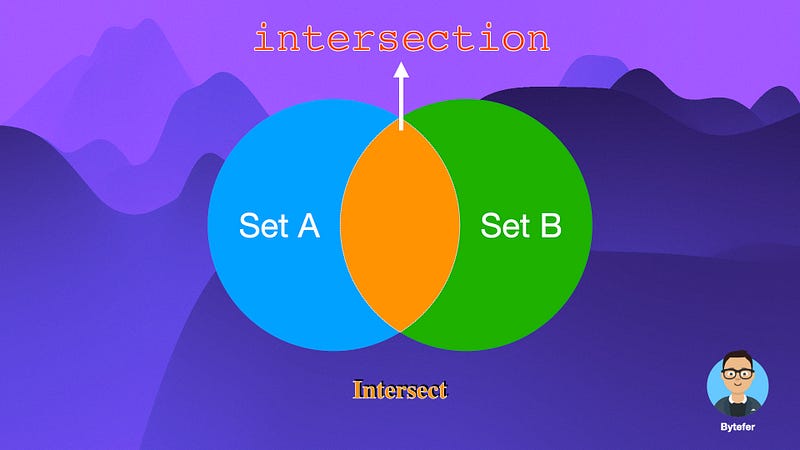
5. Intersections
In Swift, you use the intersection method to get the intersection of two sets. In TypeScript, you can use the Set constructor and the filter method.
Swift Code
let anotherSet: Set<Int> = [4, 5, 6]
let intersection = numberSet.intersection(anotherSet)

// numberSet: [1, 5, 4, 2, 6]
// anotherSet: [5, 4, 6]
// intersection: [5, 4, 6]
TypeScript Code
const anotherSet: Set<number> = new Set([4, 5, 6]);
const intersection: Set<number> = new Set([...numberSet].filter(x => anotherSet.has(x)));

// numberSet: {1, 2, 4, 5, 6}
// anotherSet: {4, 5, 6}
// intersection: {4, 5, 6}
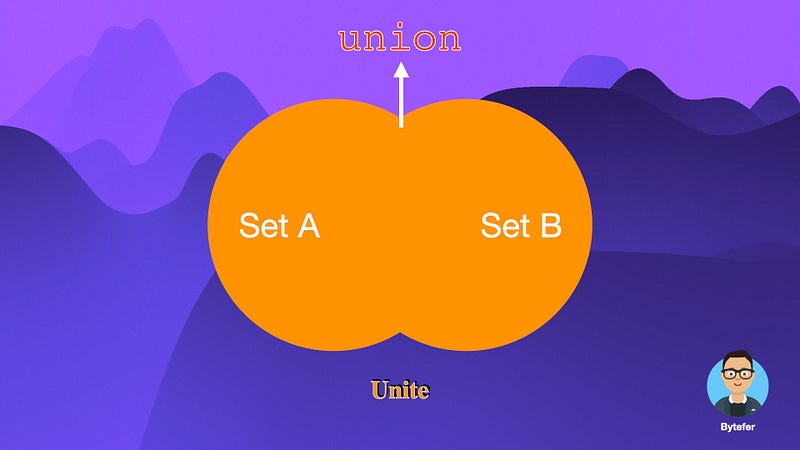
6. Unions
In Swift, use the union method to get the union of two collections.
Swift Code
let union = numberSet.union(anotherSet)

// numberSet: [5, 1, 4, 2, 6]
// anotherSet: [4, 5, 6]
// union: [5, 1, 4, 2, 6]
TypeScript Code
const union: Set<number> = new Set([...numberSet, ...anotherSet]);

// numberSet: {1, 2, 4, 5, 6}
// anotherSet: {4, 5, 6}
// union: {1, 2, 4, 5, 6}
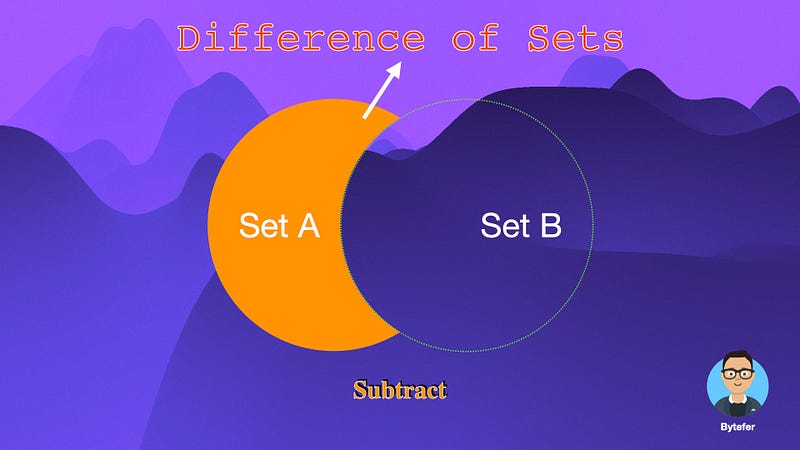
7. Difference of Sets
In Swift, you use the subtracting method to get the difference between two sets. In TypeScript, you can use the Set constructor and the filter method.
Swift Code
let difference = numberSet.subtracting(anotherSet)

// numberSet: [6, 2, 4, 1, 5]
// anotherSet: [5, 6, 4]
// difference: [1, 2]
TypeScript Code
const difference: Set<number> = new Set([...numberSet].filter(x => !anotherSet.has(x)));

// numberSet: {1, 2, 4, 5, 6}
// anotherSet: {4, 5, 6}
// difference: {1, 2}
In this article, we introduce the collection types Arrays, Dictionaries, and Sets. By comparing it to TypeScript syntax, we hope to help you better understand the features of Swift. If you want to learn Swift, follow me on Medium or Twitter to read more about Swift and TS!


