avatarTeri MacLean

Free AI web copilot to create summaries, insights and extended knowledge, download it at here

808

Abstract

e: url(https://miro.readmedium.com/v2/resize:fit:320/1*DiPjXUt2w1fG1vBRXpUOiw.png)"></div> </div> </div> </a> </div><p id="0a3a">I wanted to include the chapter project in that story, but it was taking me a while to sort out, so here we are.</p><p id="f125">For this project, we needed to take a nested list and find the longest string in each list to know how much to pad the words to make a table that looks nice. The instructions said to use the right justification method, but I thought the left looked nicer. I’ll show both down below.</p><p id="766c">The justification methods are rjust(), ljust(), and center(). They justify text to the right, left, or center respectively. One could also add in a character to place on the empty sides of the justification.

Options

For the project, I used a space. If I used a ‘=’ for example, it could look like ===Hello=== with center justification.</p><figure id="192f"><img src="https://cdn-images-1.readmedium.com/v2/resize:fit:800/1*w8dQGDNcJTlDdn2mWZ176g.png"><figcaption>The code.</figcaption></figure><figure id="1562"><img src="https://cdn-images-1.readmedium.com/v2/resize:fit:800/1*5Y3QDRBKGSME1ZXTGd_rkg.png"><figcaption>The result using ljust().</figcaption></figure><figure id="6603"><img src="https://cdn-images-1.readmedium.com/v2/resize:fit:800/1*UnkA7fq5j1noVCRGFUqvtw.png"><figcaption>The result using rjust()</figcaption></figure><figure id="c8db"><img src="https://cdn-images-1.readmedium.com/v2/resize:fit:800/1*sFNNFWVJNBLpWG5uOX25iw.png"><figcaption>The result using center()</figcaption></figure></article></body>

String Manipulation Project — Python

Okay, I got it. I did need some help from the Googs, but I figured it out.

If you’re wondering what I’m referring to, it’s the Chapter 6 project in Automate the Boring Stuff. I wrote about the chapter here:

I wanted to include the chapter project in that story, but it was taking me a while to sort out, so here we are.

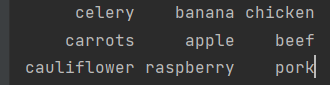
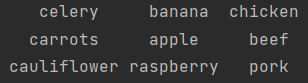
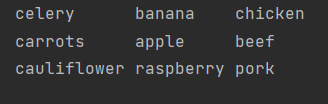
For this project, we needed to take a nested list and find the longest string in each list to know how much to pad the words to make a table that looks nice. The instructions said to use the right justification method, but I thought the left looked nicer. I’ll show both down below.

The justification methods are rjust(), ljust(), and center(). They justify text to the right, left, or center respectively. One could also add in a character to place on the empty sides of the justification. For the project, I used a space. If I used a ‘=’ for example, it could look like ===Hello=== with center justification.
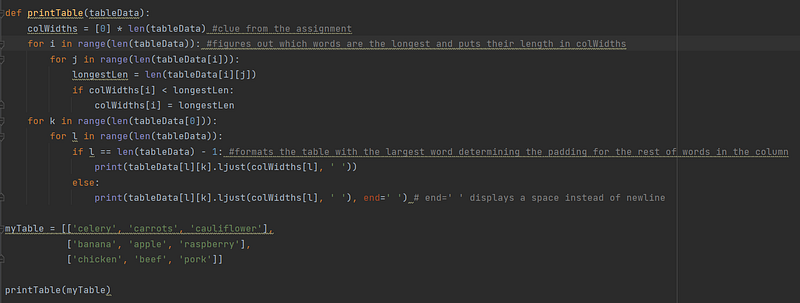
The code.
The result using ljust().
The result using rjust()
The result using center()
Python
Python Project
Programming
Coding
Learning To Code
Recommended from ReadMedium