avatarTeri MacLean

Free AI web copilot to create summaries, insights and extended knowledge, download it at here

1672

Abstract

re id="4f9e"><img src="https://cdn-images-1.readmedium.com/v2/resize:fit:800/1*tI7nLu0EooFjSAQx0Yoahg.png"><figcaption>This is what happens without the use of the single quote escape character.</figcaption></figure><figure id="1262"><img src="https://cdn-images-1.readmedium.com/v2/resize:fit:800/1*R69IlJLhnUczl6JGHuah5g.png"><figcaption>Utilizing the single quote escape character allows the apostrophe to be printed without error.</figcaption></figure><figure id="4d1b"><img src="https://cdn-images-1.readmedium.com/v2/resize:fit:800/1*tGSKqFgTBJTtvFW2OrDrfQ.png"><figcaption>An example of the newline escape character.</figcaption></figure><p id="148e">These are pretty straightforward and are useful for formatting text as desired.</p><p id="0a37">The next section covers strings as lists. I’ve provided a brief example of this, partly because I was curious to see how Python handles the escape characters when iterating through the string. It looks like the escape characters aren’t included which makes sense.</p><figure id="dc18"><img src="https://cdn-images-1.readmedium.com/v2/resize:fit:800/1*L7QRqq9tQmvAd9mPc55S6w.png"><figcaption></figcaption></figure><p id="f30a">The rest of the chapter covers methods. There are a lot of different methods for strings, but I’m only going to cover a handful here. For a complete list check out <a href="https://www.w3schools.com/python/python_ref_string.asp">W3Schools</a>.</p><p id="ba9e">The methods upper() and lower() will return a new string where the entire string has been changed to either all uppercase or all lowercase.</p><figure id="33b1"><img src="https://cdn-images-1.readmedium.com/v2/resize:fit:800/1*2-lNvR

Options

uZWL6b4pnSMIJEhQ.png"><figcaption></figcaption></figure><p id="fdf7">The isupper() and islower() methods return True or False depending on if the string is all uppercase or all lowercase.</p><figure id="f5be"><img src="https://cdn-images-1.readmedium.com/v2/resize:fit:800/1*DiPjXUt2w1fG1vBRXpUOiw.png"><figcaption></figcaption></figure><p id="dd41">The split() and join() methods will split up a string into a list based on the specified delimiter, or join a list into a single string value, respectively. If the delimiter is left blank, it will split or join on spaces.</p><figure id="8bec"><img src="https://cdn-images-1.readmedium.com/v2/resize:fit:800/1*PB5Z9-AiDMNQgcjt57EUrw.png"><figcaption>Example of using the split method followed by the join method using a comma and leaving it blank.</figcaption></figure><p id="3eb7">I’m working through the project for this chapter (it’s taking me longer than I had anticipated), and once that’s completed I’ll add a link to it here!</p><div id="619c" class="link-block"> <a href="https://readmedium.com/string-manipulation-project-python-21ad8ec7701f"> <div> <div> <h2>String Manipulation Project — Python</h2> <div><h3>Okay, I got it. I did need some help from the Googs, but I figured it out.</h3></div> <div><p>medium.com</p></div> </div> <div> <div style="background-image: url(https://miro.readmedium.com/v2/resize:fit:320/1*w8dQGDNcJTlDdn2mWZ176g.png)"></div> </div> </div> </a> </div><p id="7dec">I’ve completed the project!</p></article></body>

Manipulating Strings in Python

I want to learn Python, so I’ve been working through the Automate the Boring Stuff book by Al Sweigart. I’m documenting my journey on Medium to help retain what I’ve learned and maybe help some of you as well! Check out what I’ve completed so far here:

Chapter 6 in Automate the Boring Stuff covers strings. I honestly found this chapter quite fascinating. There is so much that can be done with strings simply by adding a method. They are also inherently set up as a list (each character has its own index) which makes slicing and dicing easy-peasy.

The beginning of the chapter covers escape characters. These make it possible to use certain characters in strings as well as help with formatting. They all start with a backslash (\).
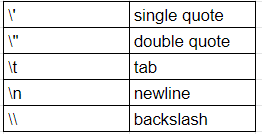
Using the single quote or double quote escape character will allow for the use of quotes or apostrophes inside of a string.
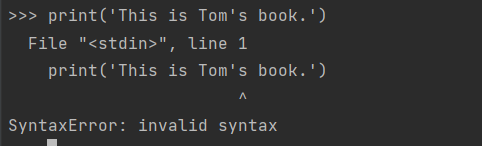

This is what happens without the use of the single quote escape character.
Utilizing the single quote escape character allows the apostrophe to be printed without error.
An example of the newline escape character.

These are pretty straightforward and are useful for formatting text as desired.

The next section covers strings as lists. I’ve provided a brief example of this, partly because I was curious to see how Python handles the escape characters when iterating through the string. It looks like the escape characters aren’t included which makes sense.

The rest of the chapter covers methods. There are a lot of different methods for strings, but I’m only going to cover a handful here. For a complete list check out W3Schools.

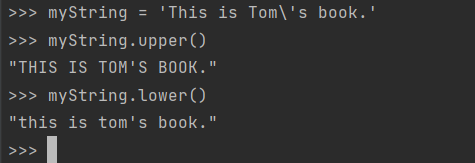
The methods upper() and lower() will return a new string where the entire string has been changed to either all uppercase or all lowercase.
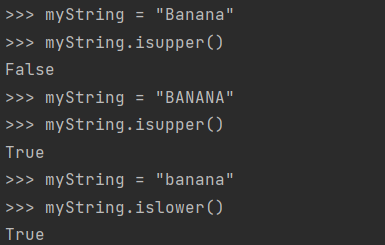
The isupper() and islower() methods return True or False depending on if the string is all uppercase or all lowercase.
The split() and join() methods will split up a string into a list based on the specified delimiter, or join a list into a single string value, respectively. If the delimiter is left blank, it will split or join on spaces.
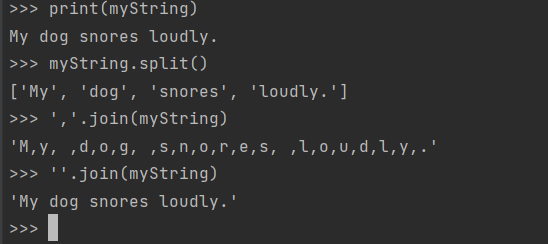
Example of using the split method followed by the join method using a comma and leaving it blank.

I’m working through the project for this chapter (it’s taking me longer than I had anticipated), and once that’s completed I’ll add a link to it here!

I’ve completed the project!

Python
Strings
Programming
Learning To Code
Women In Tech
Recommended from ReadMedium
