avatarCoucou Camille

Free AI web copilot to create summaries, insights and extended knowledge, download it at here

3579

Abstract

span>"</span>)</pre></div><div id="c2f0"><pre><span class="hljs-keyword">def</span> <span class="hljs-title function_">on_close</span>(<span class="hljs-params"><span class="hljs-variable language_">self</span>, close_msg</span>): print(f<span class="hljs-string">"Connection close"</span>)</pre></div><div id="a1ad"><pre>ws = websocket.WebSocketApp(endpoint, <span class="hljs-attribute">on_open</span>=on_open, <span class="hljs-attribute">on_message</span>=on_message, <span class="hljs-attribute">on_error</span>=on_error, <span class="hljs-attribute">on_close</span>=on_close) ws.run_forever(<span class="hljs-attribute">ping_interval</span>=15)</pre></div><p id="58e6">In the case of ticker streaming, channel to subscribe is <i>“ticker”</i>, and <code>on_open</code> function was defined as follows:</p><div id="b7bd"><pre><span class="hljs-keyword">import</span> json</pre></div><div id="5485"><pre>def <span class="hljs-built_in">on_open</span>(self, ws): data = json.<span class="hljs-built_in">dumps</span>({"op": <span class="hljs-string">"subscribe"</span>, <span class="hljs-string">"channel"</span>: <span class="hljs-string">"ticker"</span>, <span class="hljs-string">"market"</span>: <span class="hljs-string">"BTC-PERP"</span>}) ws<span class="hljs-selector-class">.send</span>(data) <span class="hljs-built_in">print</span>("Connected")</pre></div><p id="5d81">For channel <i>“fill”</i>, authentication is needed, with the API key and secret generated in the previous step.</p><p id="df80">As requested in FTX Websocket API, following info is needed for private channels:</p><ul><li><code>key</code> : API key</li><li><code>time</code> : integer current timestamp (in milliseconds)</li><li><code>sign</code> : SHA256 HMAC of the following string, using your API secret: <code><time>websocket_login</code></li><li><code>subaccount</code>: (optional) subaccount name</li></ul><p id="fa7a">Store the API key and secret as strings:</p><div id="54fc"><pre><span class="hljs-attr">API_KEY</span> = <span class="hljs-string">"7jEZE__dl6qI2bFH4sdemgPbbBEtMmZ_wtzAQ4DL"</span> <span class="hljs-attr">API_SECRET</span> = <span class="hljs-string">"zHBIsNP2nq-zeoPo9U4zH0XXisXs0nasXLSFO-pJ"</span></pre></div><p id="e693">Encoding of API secret requires the use of <code>hmac</code> package, install it in Python console: <code>pip install hmac</code></p><p id="a474">Finally, the <code>on_open</code> function is defined as follows:</p><div id="7343"><pre><span class="hljs-keyword">import</span> time <span class="hljs-keyword">import</span> json <span class="hljs-keyword">import</span> hmac</pre></div><div id="d996"><pre>def on_open(self, ws): # <span class="hljs-keyword">with</span> authentication tims_ms = <span class="hljs-type">int</span>(<span class="hljs-type">time</span>.time() * <span class="hljs-number">1000</span>) # <span class="hljs-keyword">in</span> milliseconds auth = <span class="hljs-type">json</span>.dumps( { "op": "login", "args": { "key": API_KEY, "time": tims_ms, "sign": hmac.<span class="hljs-built_in">new</span>(API_SECRET.encode(), f"{ts}websocket_login".encode(), "sha256").hexdigest(), "subaccount": self.subaccount } } ) ws.send(auth) data = <spa

Options

n class="hljs-type">json</span>.dumps({"op": "subscribe", "channel": "fills"}) ws.send(data) print("Fills channel connected")</pre></div><p id="8585">Response will be in the following format, but in strings:</p><figure id="5b50"><img src="https://cdn-images-1.readmedium.com/v2/resize:fit:800/1*TD2ZlCpRtZ1q7wywXN8Mcw.png"><figcaption>Screenshot from FTX</figcaption></figure><p id="9925">To convert the received <code>message</code> from string to map:</p><div id="2159"><pre><span class="hljs-keyword">def</span> <span class="hljs-title function_">on_message</span>(<span class="hljs-params"><span class="hljs-variable language_">self</span>, ws, message</span>): msg_map = json.loads(message)[<span class="hljs-string">"data"</span>]</pre></div><div id="2e6f"><pre> <span class="hljs-comment"># detailed info for fill</span> <span class="hljs-attr">data</span> = msg_map[<span class="hljs-string">"data"</span>]</pre></div><div id="c482"><pre> <span class="hljs-attr">market</span> = data[<span class="hljs-string">"market"</span>] <span class="hljs-attr">side</span> = data[<span class="hljs-string">"side"</span>] <span class="hljs-comment"># "buy" or "sell"</span> <span class="hljs-attr">price</span> = data[<span class="hljs-string">"price"</span>] <span class="hljs-attr">size</span> = data[<span class="hljs-string">"size"</span>] <span class="hljs-attr">fee</span> = data[<span class="hljs-string">"fee"</span>] <span class="hljs-attr">liquidity</span> = data[<span class="hljs-string">"liquidity"</span>] <span class="hljs-comment"># "maker" or "taker"</span></pre></div><h2 id="5f83">3. Streaming Orders</h2><p id="ee78">Orders channel streams updates to your orders across all markets. Orders streamer works exactly the same way as fills streamer, only difference in the program is to change <code>"channel"</code> in <code>on_open()</code> from <code>"fills"</code> to <code>"orders"</code> . Message received will be like:</p><figure id="6cb9"><img src="https://cdn-images-1.readmedium.com/v2/resize:fit:800/1*ZVgnvkUoaWBMWZ6oE91p2Q.png"><figcaption>Screenshot from FTX</figcaption></figure><ul><li><code>"type"</code> : “limit” or “market”</li><li><code>"status"</code> : “new” or “closed”</li></ul><h2 id="cca8">Final Note:</h2><p id="34ee">Order and fill streaming are helpful if you have a<b> large number of orders</b> in play and wish to get <b>instant updates</b>, especially in <b>high-frequency algorithm trading</b>. Orders streamer publish about every single update of each order but could take up a lot of resources as well. Hence it’s recommended that you choose the one that better suits your needs and specific use cases.</p><p id="9bba"><b>Thanks for reading, and feel free to comment if you encounter any problems!</b></p><p id="98c6">Update: New article on order update streaming for <b>Binance</b>!</p><div id="80ac" class="link-block"> <a href="https://readmedium.com/streaming-binance-order-updates-using-python-90520e0d307f"> <div> <div> <h2>Streaming Binance Order Updates Using Python</h2> <div><h3>The detailed steps to stream the order and account update from Binance, specific for your account.</h3></div> <div><p>medium.com</p></div> </div> <div> <div style="background-image: url(https://miro.readmedium.com/v2/resize:fit:320/0*NDik27Z00xJO787j)"></div> </div> </div> </a> </div></article></body>

Streaming FTX Order Updates using Python

In a previous article, I wrote about the steps to stream live data from FTX & Binance using Python.

Streaming live updates of orders (new, cancel, fill), or the fills alone could also be done for FTX, and save you the trouble to query the order status. This article will walk you through the detailed steps.

1. Get FTX API and Secret for Login 2. Streaming Fills 3. Streaming Orders

1. Get FTX API and Secret for Login

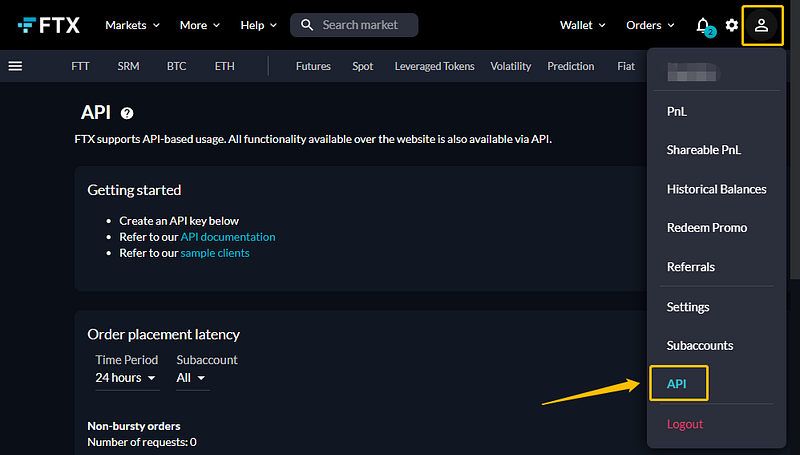
First, you need to login to FTX, and from the profile icon on the top right of the website, select “API”:
Screenshot from FTX

Scroll down to the API section, and you can choose from the following:

Screenshot from FTX

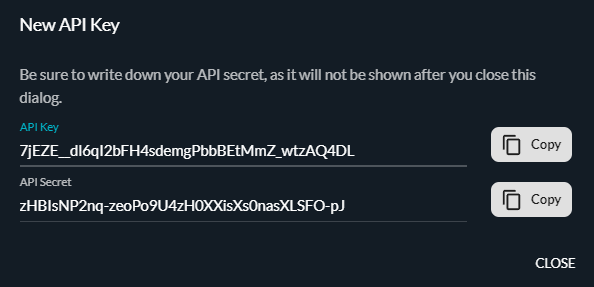
A new set of API Key are Secret will be generated. The values change every time you try to create a new one, and once created, you won’t be able to see the API Secret again. So make sure you store the key and secret and do not share it with anyone!

* The set of key and secret below have been deleted before this piece is published.
Screenshot from FTX

2. Streaming Fills

The basic structure is the same as data streaming:

import websocket
endpoint = "wss://ftx.com/ws/"
def on_open(self, ws): 
    # todo: send authentication
def on_message(self, ws, message):
    print(message)
def on_error(self, ws, error):
    print(f"Error: {error}")
def on_close(self, close_msg):
    print(f"Connection close")
ws = websocket.WebSocketApp(endpoint,
                            on_open=on_open,
                            on_message=on_message,
                            on_error=on_error,
                            on_close=on_close)
ws.run_forever(ping_interval=15)

In the case of ticker streaming, channel to subscribe is “ticker”, and on_open function was defined as follows:

import json
def on_open(self, ws):
    data = json.dumps({"op": "subscribe",
                       "channel": "ticker",
                       "market": "BTC-PERP"})
    ws.send(data)
    print("Connected")

For channel “fill”, authentication is needed, with the API key and secret generated in the previous step.

As requested in FTX Websocket API, following info is needed for private channels:

  • key : API key
  • time : integer current timestamp (in milliseconds)
  • sign : SHA256 HMAC of the following string, using your API secret: <time>websocket_login
  • subaccount: (optional) subaccount name

Store the API key and secret as strings:

API_KEY = "7jEZE__dl6qI2bFH4sdemgPbbBEtMmZ_wtzAQ4DL"
API_SECRET = "zHBIsNP2nq-zeoPo9U4zH0XXisXs0nasXLSFO-pJ"

Encoding of API secret requires the use of hmac package, install it in Python console: pip install hmac

Finally, the on_open function is defined as follows:

import time
import json
import hmac
def on_open(self, ws):  # with authentication
    tims_ms = int(time.time() * 1000)  # in milliseconds
    auth = json.dumps(
        {
            "op": "login",
            "args": {
                "key": API_KEY,
                "time": tims_ms,
                "sign": hmac.new(API_SECRET.encode(),
                                 f"{ts}websocket_login".encode(),
                                 "sha256").hexdigest(),
                "subaccount": self.subaccount
            }
        }
    )
    ws.send(auth)
    data = json.dumps({"op": "subscribe",
                       "channel": "fills"})
    ws.send(data)
    print("Fills channel connected")

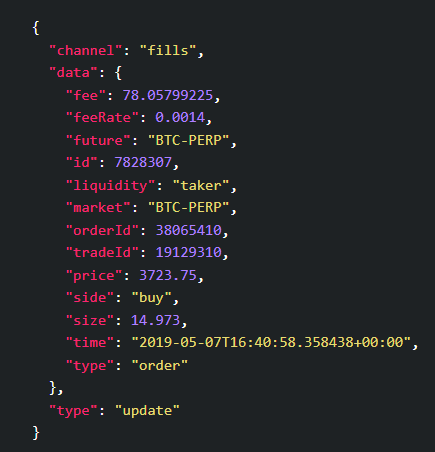
Response will be in the following format, but in strings:
Screenshot from FTX

To convert the received message from string to map:

def on_message(self, ws, message):
    msg_map = json.loads(message)["data"]
    # detailed info for fill
    data = msg_map["data"]
    market = data["market"]
    side = data["side"]  # "buy" or "sell"
    price = data["price"]
    size = data["size"]
    fee = data["fee"]
    liquidity = data["liquidity"]  # "maker" or "taker"

3. Streaming Orders

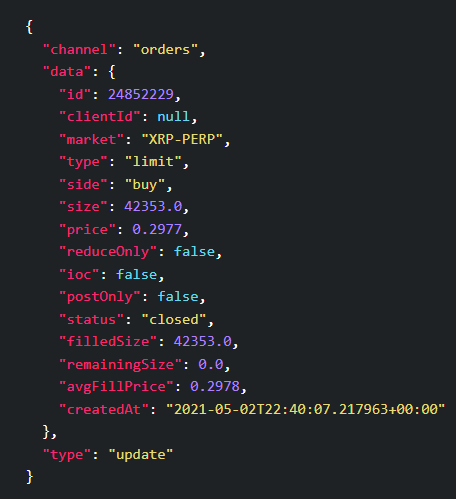
Orders channel streams updates to your orders across all markets. Orders streamer works exactly the same way as fills streamer, only difference in the program is to change "channel" in on_open() from "fills" to "orders" . Message received will be like:
Screenshot from FTX
  • "type" : “limit” or “market”
  • "status" : “new” or “closed”

Final Note:

Order and fill streaming are helpful if you have a large number of orders in play and wish to get instant updates, especially in high-frequency algorithm trading. Orders streamer publish about every single update of each order but could take up a lot of resources as well. Hence it’s recommended that you choose the one that better suits your needs and specific use cases.

Thanks for reading, and feel free to comment if you encounter any problems!

Update: New article on order update streaming for Binance!

Python
Ftx
Trading
Websocket
Streaming
Recommended from ReadMedium