
Streaming Binance Order Updates Using Python
The detailed steps to stream your order and account update from Binance.
In previous articles, I wrote about the steps for live market data streaming from crypto exchanges, as well as streaming order & fill updates from FTX.
Streaming from Binance is not so straightforward as FTX, but still feasible.
1. Get Binance API and Secret 2. Streaming Order Updates 2.1. Generate Listen Key 2.2. Websocket Endpoints 2.3. Streaming Connection 2.4. Message Processing 2.5. Additional notes
1. Get Binance API and Secret
You may skip this session if you are familiar with the steps. Just make sure you set it for the intended purpose: spot & margin or futures trading or both.

- Log in to your Binance account.
- Go to your Profile, and under API Management page, enter your new API key name to “Create”.
- Binance will ask for a code from your email and a code from your authentication app. Enter the codes and click “Submit”.
- The new API key is now created. Note that the secret key is only visible to you this step and will be hidden afterwards. So remember to securely save it for your future references.
- Edit API key permissions.
- Save the changes by entering a code from your authentication app.
2. Streaming Order Updates
Unlike the endpoints and channels used for market data streaming, to stream the order and account update, you need to create a User Data Stream with unique listen key, which needs to be generated each time you start a new connection.
2.1. Generate Listen Key
The base API endpoint is different for Spot and Futures:
- Binance Spot & Margin: https://api.binance.com
- Binance Futures: https://fapi.binance.com
2.2. Websocket Endpoints
The base websocket endpoints for Spot and Futures:
- Binance Spot & Margin: wss://stream.binance.com:9443
- Binance Futures: wss://fstream.binance.com or wss://fstream-auth.binance.com
User Data Streams are accessed at /ws/<listenKey> or /stream?streams=<listenKey>. As an example:
Substitute api_key in line 5 to the API key generated in Step 1.
2.3. Streaming Connection
With the listen_key generated and the websocket endpoints that matches your streaming needs, the websocket connection can be implemented similarly as examples in previous articles. Detailed code as follows:
2.4. Message Processing
Message received will be in the following format. For event type "executionReport" (order updates):
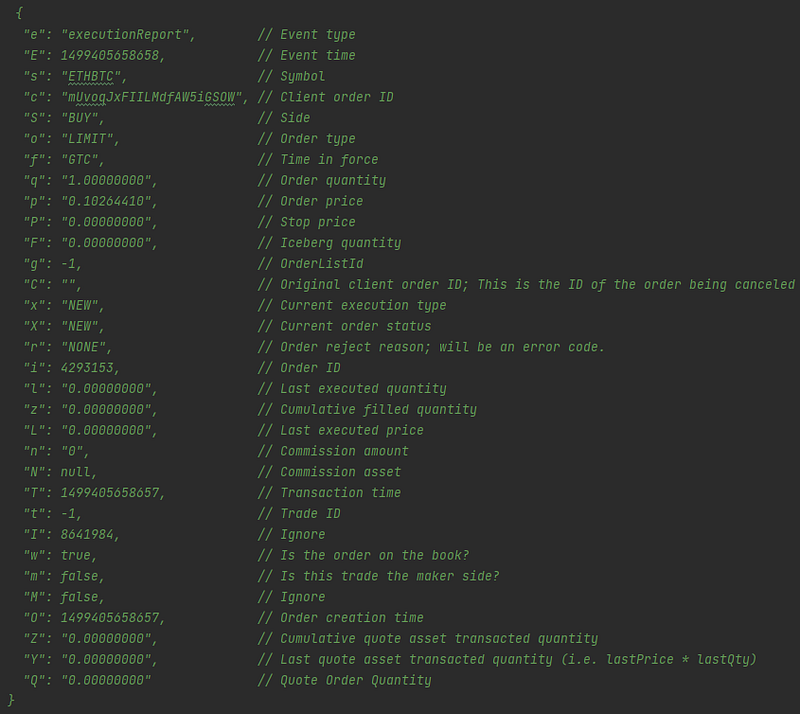
Possible execution types are:
NEWCANCELED: order canceled by userTRADE: partial of full fill of the orderEXPIRED: order cancelled because of its order type (e.g. IOC or FOK orders, etc)
Event type "ourboundAccountPosition" is sent whenever an account balance has changed:
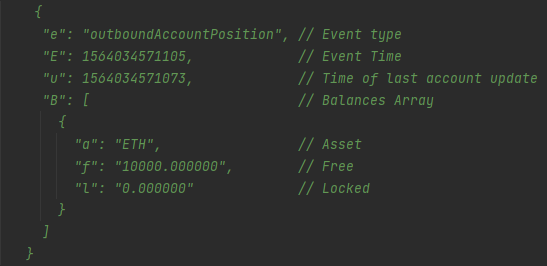
Event type "balanceUpdate" for any deposit or withdrawals from the account:
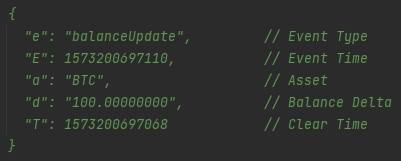
Take executionReport as an example to process the fill messages. To convert the received message from string to map, and extract the detailed information on trade done:
2.5. Additional notes
- A User Data Stream
listenKeyis valid for 60 minutes after creation. To prevent a timeout and keep it alive, it is recommended to send a ping about every 30 minutes. - Doing a
PUTon alistenKeywill extend its validity for 60 minutes. - Doing a
DELETEon alistenKeywill close the stream and invalidate thelistenKey. - A single connection to stream.binance.com is only valid for 24 hours; do expect a disconnection at the 24 hour mark.


