
Stop Doing That: 10 common mistakes on PHP development
Don’t do that, instead do that!
PHP is my preferred language for web development and one that I quite like. Thanks to its ease of use and wide community support, even beginners can easily adapt to this language.
However, as in every language, there is always a risk of making some mistakes in PHP. I’ve made my share of these mistakes in the past, and in addition to costing me time, these mistakes also caused annoying problems.
Let’s dive into!
1. Bad Variable Naming (Really?)
Is anyone still doing this in 2024?
Meaningless and ambiguous variable names make the code difficult to understand. Think of it this way, you wrote a web application and wrote variable names like $ab or $pa. A year has passed and you had to make a recovery or whatever. Ouch, you don’t understand anything.
To avoid exposure to these, well-named variables increase the readability and maintainability of the code. For example, I use meaningful names like $userEmail instead of $a.

2. Ignoring Security Configurations
When I start every new project, I take a look at some settings.
PHP’s default security settings may sometimes not be sufficient. I review the settings in the php.ini file and make sure I have taken the necessary security measures.
For example, it is important for me to disable register_globals, turn off display_errors in the production environment, and enable session security settings such as session.cookie_httponly.
3. Using Only GET and POST Methods
Using only GET and POST methods can sometimes make data transmission insecure. I implement a RESTful API design using HTTP methods such as PUT and DELETE.
This makes the application more secure and modern. Just as there is a difference between GET and POST, this is also present in other methods. Why do we write code if we’re not going to use it all?
4. Not Taking Security Measures Against SQL Injection
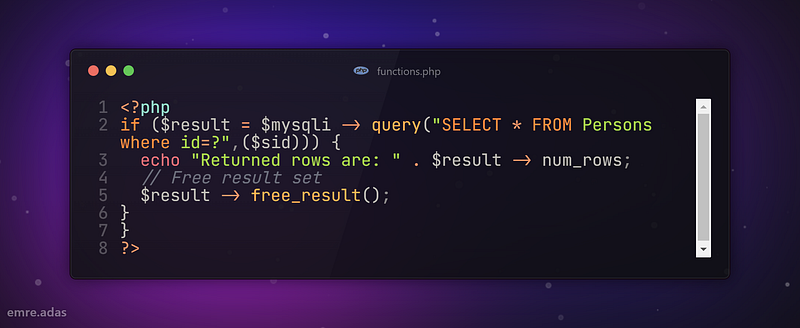
Unfortunately, it is one of the most common methods used by hackers. SQL injection is one of the most common methods by which your database can be damaged. To avoid this, I use prepared statements using PDO (PHP Data Objects) or MySQLi. Now let the hackers think!
5. Forgetting to Close Database Connections
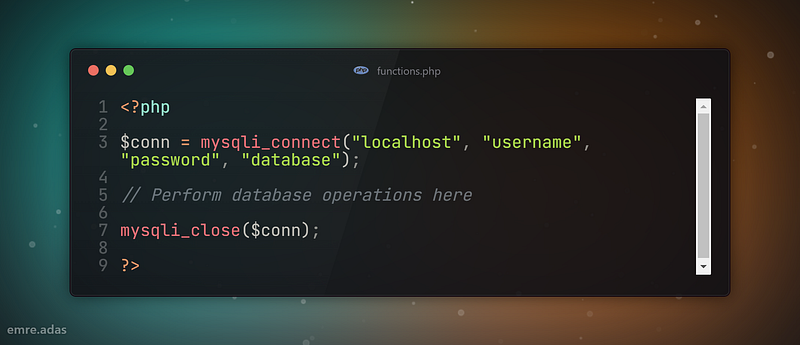
I always close my database connections. If it remains open, it will definitely cause performance problems and memory leaks. If I’m using mysqli, I use mysqli’s “mysqli_close($conn)” function to ensure the connection is closed automatically.
6. Not Using Backup and Version Control Systems
I don’t know what I would do without git. Imagine, something happened to the code computer and it can’t open. Oh my God!
Backup and version control systems are critical to the security and reversibility of your code. Using a version control system like Git, I keep track of code changes and revert them when necessary. I also try to prevent data loss by making regular backups.
7. Ignoring Security Filters
I always filter and validate user input. After all, it is not clear what the user will do. Even if he has good intentions, he can make mistakes. I use functions such as htmlspecialchars and filter_input to protect against XSS (Cross-Site Scripting) attacks.
You can look here for more detailed information.
$safeInput = htmlspecialchars($userInput, ENT_QUOTES, 'UTF-8');8. Not Knowing PHP’s Internal Functions
PHP offers a large number of built-in functions. Not knowing these functions may cause you to reinvent the wheel. I try to review the official PHP documentation regularly to explore PHP’s wide range of functions.
For example, functions such as array_filter, array_map are very useful. If you do not read the documentation regularly, you will definitely be left out of new vulnerabilities or improvements. More information
9. Don’t Duplicate Your Code
In my opinion, the most troublesome part of code repetition is doing the same thing many times. Avoiding code duplication (DRY — Don’t Repeat Yourself) makes your code cleaner and more manageable.
Instead of writing the same code over and over in different places, I make it reusable using functions or classes. For example, I create a database connection function:
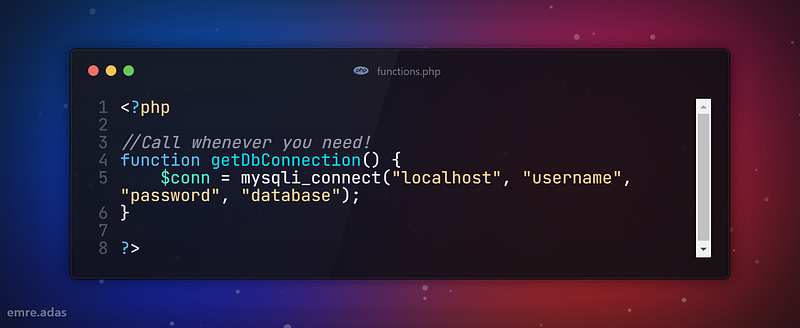
10. Ignoring Error Management
Do you know how important error handling is in PHP? Ignoring errors or not handling them well enough makes your code unreliable and difficult to understand.
I usually show all errors and warnings using settings like error_reporting(E_ALL) and ini_set(‘display_errors’, 1). I also make error handling more effective by using try-catch blocks.
Last Words
Still I do a lots of mistakes. The important thing is working constantly. There will be no end to learning. Stay online stay connected. Have a wonderful say!
Thanks for coming this far 🎉
- 👏 Could you please clap the story to help spread the article? (50 applause).
You can reach me from the links below:
To access my other articles:


