
Build Your Own Trading Bot by AppnologyJames
Step-by-Step Guide to Add Bollinger Bands™️ to Your Trading Bot with Python, Alpaca Markets and TA Lib
The Bollinger Bands technical indicator is a technical indicator that is widely used to calculate the movements of financial assets. Adding it to your trading bot can be a powerful way to analyze crypto, forex, and stock data patterns and use the insights you gain to level up your trading strategies.
In this episode, I’ll show you how to add the Bollinger Bands technical indicator to your trading bot and customize it for your trading bot strategies.
About This Episode
In this episode, I’ll show you how to add the Bollinger Bands Technical Indicator to your trading bot. While I’ve specifically mentioned stock trading in the title, you can use this same technical indicator on any capital market you want to automate trading for, including Crypto, Forex, and more.
What You’ll Need to Complete This Episode
- 15 minutes. Including your code writing, development, and a bit of fun testing, this episode will take a beginner Python developer around 15 minutes to complete.
- Beginner knowledge of Python Programming. The code is pitched at those who are at the beginner to intermediate level of Python development.
- Dev environment. You can check out my article, “Build Your Own Trading Bot Development Environment” if you want an AI supercharged, available anywhere development environment.
- Market data. You’ll need some market data to analyze. If you want to get some stock data, check out my article “Step-by-Step Guide to Get Any US Stock Price Data with Python and Alpaca Markets”
Level Up Your Learning Experience with TradeOxy’s Free Support
I’m a huge believer in creating exceptional learning experiences for people. Education changes everything! Built right into the DNA of my company is a culture of helping those who are investing in their learning. Here are the resources we’ve built so far:
- Open Source TradeOxy Trading Bot. All of the code I’ll show you comes from the TradeOxy Trading Bot. This trading bot is completely open source, and you are welcome to use it — just give us credit when you do 🙂
- Discord Help Channel. If you’ve got any questions about the content, reach out to us on our Discord Channel. We’ll reply as soon as we can, and our community is pretty helpful as well.
- YouTube Channel. If you prefer video content to written content, check out my YouTube channel.
Legal Stuff
- DYOR. Note that all trading is at your own risk. My goal is to provide you with the self-developed methods, systems, and tools I use — it is up to you to figure out if this solution works for you AND if I’ve provided credible content. Always DYOR (Do Your Own Research).
- Not Financial Advice. At no point should you consider anything in these articles to be financial advice. Any opinions expressed are about the technical aspects of the topic, not financial suitability.
- Referrals. I receive no commissions for any of the products I mention in this blog. They’re all free (or have a free tier), and I simply provide links to simplify your learning experience.
- AI Use. No AI was harmed in the creation of this blog. Some of the images are partially generated or enhanced through AI tools, we always use a real human to put them together. I do not use AI to generate the text, just spell check.
How to Set up Your Trading Bot for Indicators
Algorithmic trading relies on analysis to inform decision-making. Almost always, this means adding some kind of indicator.
The thing about indicators and trading bots is that they tend to breed. The more you analyze data, the more likely it is that you’ll have more and more indicators you want to add to your trading bot.
A common way to manage this complexity is by building your own indicator library
In this library, you can add any indicator you choose.
- Bollinger Bands✅
- Other indicators from TradeOxy ✅
- Indicators from other content creators✅
It’s a powerful way to simplify much of your future autotrading development 🚀🚀🚀
Add an indicators.py file
If you haven’t done this in a previous episode, add the indicators.py file to your trading bot. This file will handle anything to do with indicators in the rest of your TradeOxy Trading Bot development.
Get the Python Pandas Library
The Python Pandas Library is considered a gold standard in data analysis. It’s transcended the into the ranks of mythical status in Python and is widely used in an incredible set of industries.
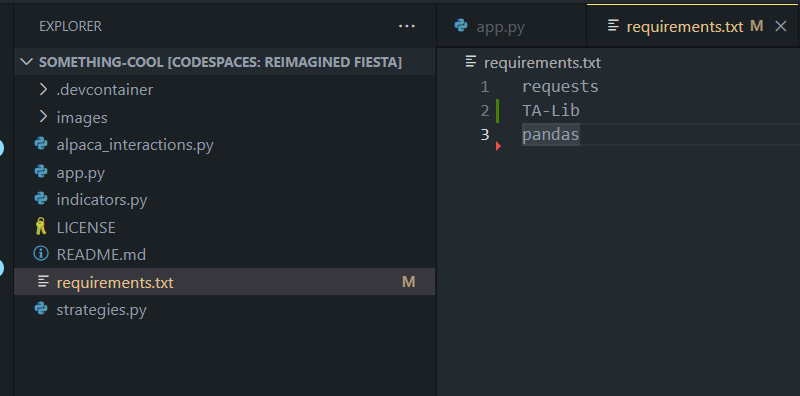
Adding this exceptionally powerful analysis tool to your trading is as simple as 4 steps:
- Navigate to
requirements.txt - Add the word
pandasto the bottom - Save
- Run
pip install -r requirements.txt
Here’s what your should look like if you used my dev environment episode to get started:
Dynamic Indicator Selection
To prepare for a multi-indicator future for your trading bot, we’re going to add some routing to your indicators.py file. This routing allows you to simply specify the indicator you want to use at any stage of your algorithm by using normal human language.
Add this code to your indicators.py (note that we’ll be adding in the Bollinger Bands technical indicator in the next section):
Here you can see:
- We create a parent routing function
- We use the
**kwargsspecial Python argument to allow us to add the components specific to each indicator - We add in some helpful error handling
To see how this might work when you have multiple indicators, check out the indicators.py file in the main trading bot repo.
How to Add the Bollinger Bands Indicator to Your Trading Bot
Now that we can route to the Bollinger Bands indicator, we can go ahead and add the code to calculate it.
Default Values
I used the following default values for the Bollinger Bands indicator:
- Bollinger Period: 20
- Bollinger Standard Deviation: 2
You could easily expand the standard deviation to provide a differential between the upper and lower standard deviations, but I’ve left that aside for a more advanced approach in a future episode.
P.S. A great reference article to read more about Bollinger Bands is from Investopedia here.
Python Code + TA Lib for the Bollinger Bands Indicator
TA Lib is considered by many traders to be the go-to library for calculating technical indicators. It’s also a part of the dev environment.
The code below adds the Bollinger Bands indicator to your library using Python and TA Lib:
You’re all set!
Check out the Bollinger Bands in Action on Your Trading Bot!
- Navigate to your app.py
- Update the code in your file to look like this:
Run your code with the play button.
Here’s what mine looked like when I ran it:
You’ll get some different values depending on when you run it and the stock you use.
Unleash the Power of a Trading Bot on Your Analysis!
Trading bots make analysis waaaaaaayyyyyy faster
Let me show you how you could take this EXACT SAME ANALYSIS and apply it to ten different stocks all by changing ONE LINE on your code.
- Select ten different stock tickers (I’m using the US Stock Market so mine will be from there)
- Change the line starting with
symbolsto include your ten stocks - Press Play
Here’s what mine looked like when I ran it:
Ten indicators at once by changing just one line of code on your trading bot. Now that’s a game changer.
Or, we could change the timeframe from the current 1 hour to 30 minutes with…ONE LINE CHANGE.
- Choose the timeframe you’d like
- Change the line starting with timeframe
- Press Play
Same ten indicators…totally different timeframe. Took me 20 seconds to update, another 20 seconds to run.
It is this kind of analysis that makes trading bots truly exceptional!
Anyways, enough fanboy-ing !
So What
My point is that when you build your trading bot right, it becomes exceptionally simple to turbocharge your analysis.
As a case in point, TradeOxy, the platform I’m currently building with my team takes this concept but applies it to tens of thousands of stocks in real-time. In our latest internal demo, we were able to get the analysis down to 5 seconds from a new candlestick occurring to analysis across FOREX, Crypto, and stocks assets completed.
That’s truly amazing and allows us to do some really interesting things like:
- Identifying stock breakouts across an entire capital market
- Perform comparative analysis of stocks
And it all starts with the technique I just showed you.
Feel free to sign up on our Discord if that’s of interest to you :)
Here’s a demo of some of our AI features as well:
Wrapping Up
Hopefully, you enjoyed the episode and it resonated with you. Please follow me on Medium and sign up to receive my content via email if it’s helped you — that helps me know what’s working.
See you on the next episode 🙂


