
How do we represent our models?
Before diving into the details, we need to understand how we represent the data.
If you haven’t read the previous post, the introduction, here’s the link.
Book
The posts about “Automated Planning and Acting” here are based on the book with same title by Malik Ghallab, Danau Nau and Paolo Traverso.
Planning Domain
In the previous post, we discussed about descriptive models of actions which describe the states that may happen as result of performing actions.
The models are often called Planning Domain or State-Transition System (think about finite state machine).
A planning domain is a 4-tuple of:
Σ =(S, A, γ, cost)
Where: S: a set of states A: a set of actions γ: state-transition function, or prediction function cost: the cost of performing an action
For state transition function, we can write in the following form: γ(s₀, a) = s₁
Example
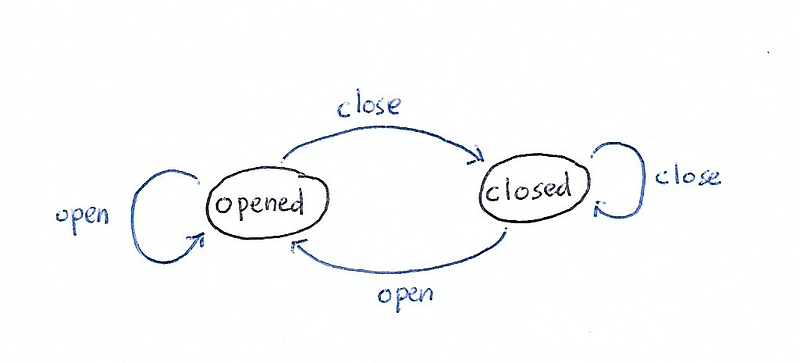
An example is a simple door system. S = {opened, closed} A = {open, close}
There are 4 transition functions: γ(opened, open) = opened γ(opened, close) = closed γ(closed, open) = opened γ(closed, close) = closed
For this simple example, let’s assume that the cost is uniform, 1.
Objects and State Variables
To understand state variables, we start with the meaning of the state in our model.
State is a description of the properties of various objects in the environment — Automated Planning and Acting
That means if we have multiple objects in the environment, we will have one unique state if one of the object’s property changes.
There are two different types of property:
- Rigid If it remains the same in different states, for example the adjacency of rooms in a floor plan
- Varying If it may differ in one state and another
State Variable
State variable is represented as x=sv(b₁, …, bᴋ), where:
- sv: state variable’s name
- b: object’s name
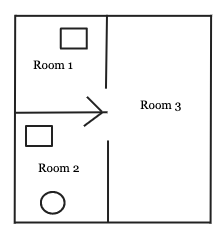
Let’s look at an example. In our floor plan below, we have 3 objects:
- robot (circle)
- objects (rectangle)
- rooms
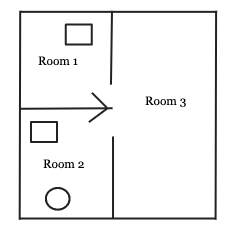
Rigid relations can be represented as:
Adjacent = [(Room1, Room2), (Room1, Room3), (Room2, Room1), (Room2, Room3), (Room3, Room1), (Room3, Room2)]This won’t change because they are rigid.
State variables can be represented as follows, (let’s assume that rectangle in Room 1 is object 1):
location(robot) = Room2
location(object1) = Room1
location(object2) = Room2
occupied(Room1) = True
occupied(Room2) = True
occupied(Room3) = False
So, current state of our world is:
current_state = [location(robot) = Room2, location(object1) = Room1, location(object2) = Room2, occupied(Room1) = True, occupied(Room2) = True, occupied(Room3) = False]If one of the state variables in current_state changes, it is another state.
The code snippet is just for illustration, when we code it is better to create a class to represent the “world”.
Actions and Action Templates
The next part in our planning domain is action. Action is important part of the domain model because this is the component where we predict what the next state will be.
Action has the three parts:
- input parameters
- pre-conditions
- effects
Action template is a generic form, action is an instance of action template.
Action template is written in the following format:
action(*params):
cost = 1
 if preconditions(current_state):
  return effects(), cost
 else:
  return current_state, cost
if preconditions() returns true, the effects of the action is returned. Otherwise this action isn’t applicable in current state of the world/environment.
Let’s look at an example. In Example 1 above we can add an action, let’s call it move.
move(from, to):
 cost = 1
 if preconditions(current_state, from, to):
  return effects(), cost
 else:
  return current_state, cost
Now, the preconditions:
preconditions(current_state, from, to):
 if current_state.door(from, to) == OPENED:
  return True
 else:
  return False
The effects:
effects(current_state, from, to):
 predicted_state = current_state
 predicted_state.location(robot, to)
 return predicted_state
We can see from the example above how the action and action template works, the predicted state will contain robot’s location in the new room. If the door is not opened, the action is not applicable.
Plans and Planning Problems
The final part is plans and planning problems.
Plan
The definition of plan is:
A finite sequence of actions
plan = [action1, action2, action3]In this example, the length of the plan is 3 and the cost is the total cost of all the actions.
plan_cost = 0
for action in plan:
 plan_cost = plan_cost + action.cost
Planning Problem
Planning problem is the tuple of planning domain, initial state and goal(desired) state.
Planning Problem is the problem that we want to solve, the plan solves the planning problem.
planning_problem = PlanningProblem(planning_domain, initial_state, goal_state)Remember that Planning Domain is our tuple of:
- states
- actions
- state-transition functions
- cost
Now, that we have the complete understanding of the representation, let’s look at one example.
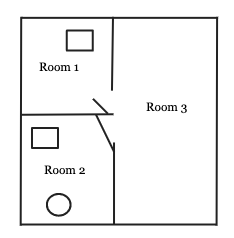
This is the initial state,
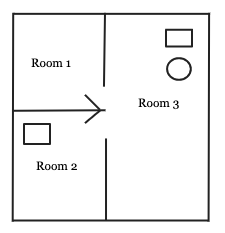
This is our goal state,
We add 3 more actions:
grab(object)
carry(object, from, to)
place(object)
So, we can create the plan as follows to solve this planning problem:
plan = [move(room2, room3), move(room3, room1), grab(object1), carry(object1, room1, room3), place(object1)]We say that plan is the solution to our planning problem.
Of course this is a simplified example where there is only one actor, our robot, and the assumption that the world is static.
In later chapter, we’ll see the examples with Python to solve real planning problems.
We’ll discuss about search algorithms in the next posts.