
SQL window functions explained through 4 real-world examples
Let’s face it: sometimes we just need to see some real-life examples before things make sense

Window functions are one of the most powerful tools in SQL and are great for tackling tasks like:
- Finding the max/min/average value in a group
- Finding the first or last record in a group
- Calculating running totals
- Assigning row numbers to all rows in a table
Despite their usefulness, however, many SQL users struggle to use window functions effectively because they can be difficult to learn. In this article, I’ll give a brief overview of how SQL window functions work and then illustrate their usefulness by walking through 4 real-world use cases.
What is a window function?
SQL window functions are fairly similar to other aggregation functions like GROUP BY, but have one crucial difference. In the words of the BigQuery documentation:
A window function […] computes values over a group of rows and returns a single result for each row. This is different from an aggregate function, which returns a single result for a group of rows.
In other words, unlike GROUP BY aggregation functions, window functions do not cause related rows to become grouped into a single output row. If you started with 10 rows, you’ll end with 10 rows. This can be very useful when you don’t want to “collapse” your table into aggregated rows.
If that sounds like gobbledygook, bear with me. By talking through 4 concrete examples of this, I’ll try and make it easy to get your head around.
Use case #1: Find the average value in a group
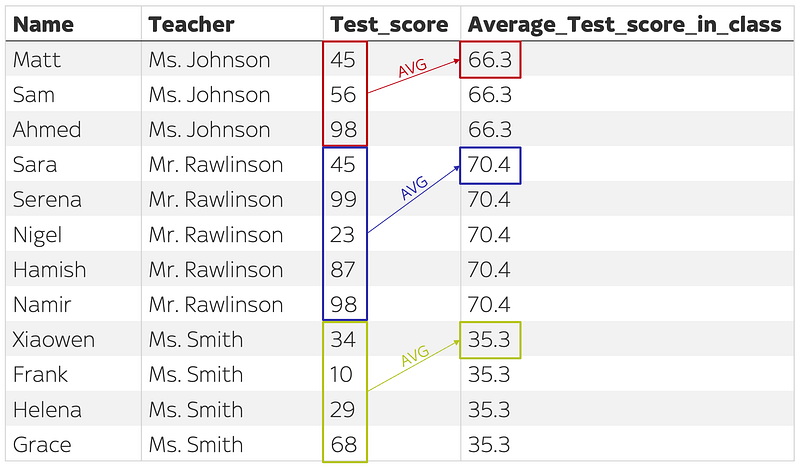
Imagine that we had the following table students, where each row represents a student, their teacher, and the score they received for their most recent test:

Let’s say that we want to find the average score in each class, in order to compare individual students’ scores to the average and get a sense of how they’ve performed compared to their peers. In other words, we want to produce something like this:
If we tried to compute the average score in each class using a normal GROUP BY aggregation function, we would write:
SELECT
  Teacher,
  AVG(Test_Score)
FROM students
GROUP BY 1
… which would generate an output like this:
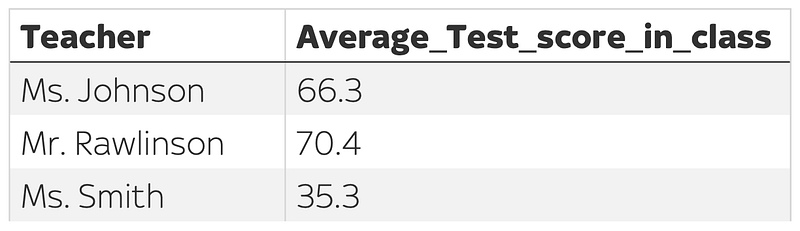
… which we could store in a CTE and then join back to the original table in order to get our desired column:
WITH averages AS (

  SELECT
    Teacher,
    AVG(Test_Score) AS Average_Test_score_in_class
  FROM students
  GROUP BY 1

)

SELECT
  students.Name,
  students.Teacher,
  students.Test_Score,
  averages.Average_Test_score_in_class
FROM students
LEFT JOIN averages ON students.Teacher = averages.Teacher
ORDER BY Teacher
Using a window function, however, it is possible to preserve the original structure of the table and simply add in the averages as an additional column, without relying on any GROUP BY subqueries or joins. We could simply write:
SELECT
  Name,
  Teacher,
  Test_Score,
  AVG(Test_Score) OVER(PARTITION BY Teacher) AS Average_Test_score_in_class
FROM students
ORDER BY Teacher
which would also produce our desired output:
As you can see, using a window function removed the need to use a CTE and join clause, and enabled us to get our desired output in just one line of code. Is it just me, or does that feel like a win?
To understand what’s going on here, let’s take a closer look at the syntax.
All SQL window functions, including this one, follow the same basic syntax:
WINDOW_FUNCTION(column) OVER( [PARTITION BY columns_to_group_by] [ORDER BY columns_to_order_by] )The WINDOW_FUNCTION(column) phrase specifies the analytic function we want to apply (e.g. AVG, MAX or MIN) and the column we want to analyse, while the OVER clause allows us to specify the “window” for which we want to run the analysis. In this example, we wrote AVG(Test_score) OVER(PARTITION BY Teacher), which told our database that we want to calculate the average value of the Test_score column after partitioning our table into three groups: one for each unique value in the Teacher.
Use case #2: Assign a row number to each row
To illustrate the second use case, imagine that we had a table sales which records every sale that a shop makes on a given day. Each row represents a single transaction and contains the timestamp of the sale, the product purchased, and the total amount of money spent in that sale.
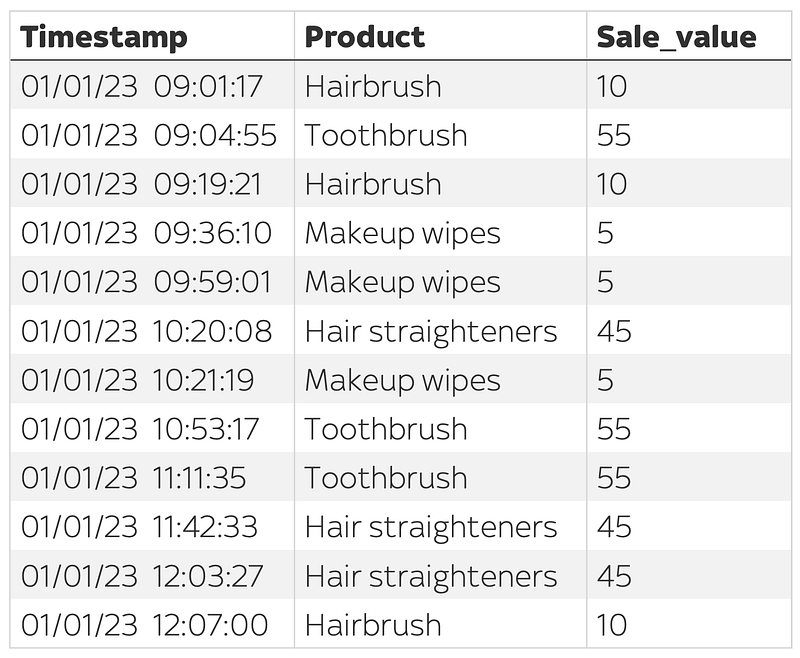
Let’s say that we wanted to assign a row number to each sale. Using a window function, this is remarkably simple: we simply use the expression:
SELECT
  Timestamp,
  Product,
  Sale_value,
  ROW_NUMBER() OVER(ORDER BY Timestamp ASC) as row_num
FROM sales
ORDER BY row_num
which would return the desired result:
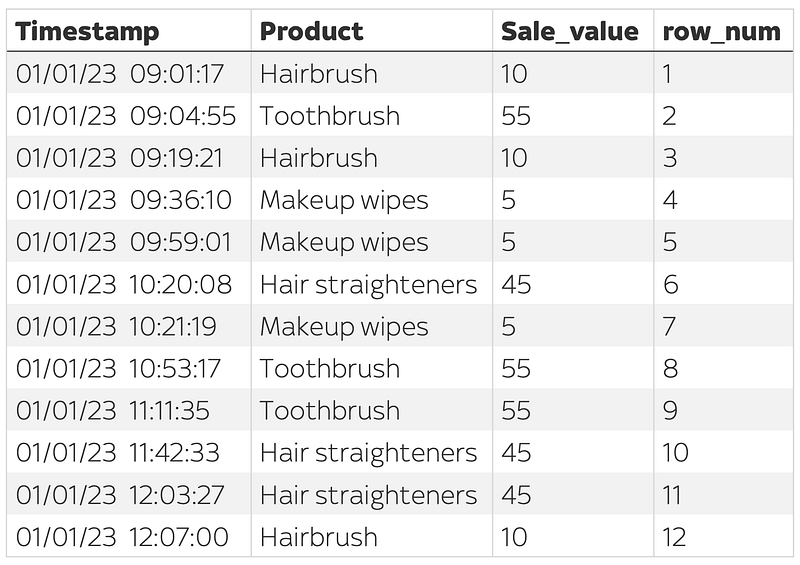
Here, we are simply using the ROW_NUMBER() analytic function to assign numbers to each row, and by including the phrase ORDER BY Timestamp ASC in our OVER() clause, we ensure that the rows will be sorted in ascending order based on their timestamp.
Use case #3: Select the first row in each group
Our next use case builds on the previous one. Imagine that instead of assigning a row number to each individual sale, we wanted to partition our sales table into different groups based on the type of product being sold, and select the first sale within each group. In other words, we want to produce something like this:
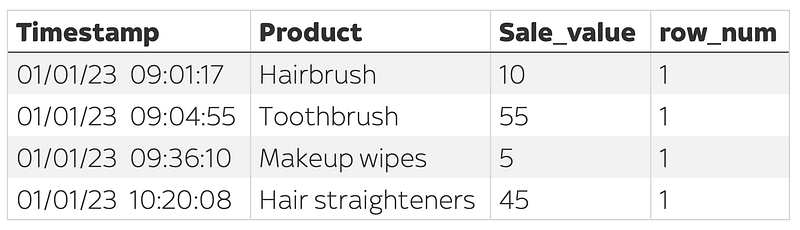
By making a small change to our previous query, we can easily achieve the desired result. First, we add in the expression PARTITION BY Product into our OVER() clause, which instructs the database to group our rows based on the product being sold, before sorting by timestamp and assigning row numbers. Next, we add in the expression QUALIFY row_num = 1 to select only those rows which were assigned a row number of 1*.
SELECT
  Timestamp,
  Product,
  Sale_value,
  ROW_NUMBER() OVER(PARTITION BY Product ORDER BY Timestamp ASC) as row_num
FROM sales
QUALIFY row_num = 1
* Note that the QUALIFY command is not available in all dialects of SQL. If you can’t use QUALIFY, you can replicate this functionality by using a CTE:
WITH sales AS (

SELECT
  Timestamp,
  Product,
  Sale_value,
  ROW_NUMBER() OVER(PARTITION BY Product ORDER BY Timestamp ASC) as row_num
FROM sales

)

SELECT
  *
FROM sales
WHERE row_num = 1
Use case #4: Calculating a running total
The fourth use case involves calculating a running total; a very common task for SQL users.
Imagine that we have a table called video_views which records the number of daily views received by a YouTube video. Each row represents a date, and shows the number of views that the video received on that date.
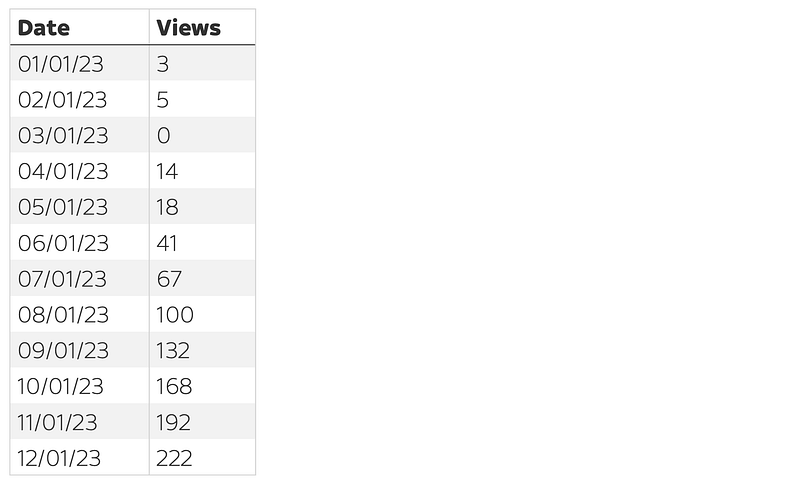
If we want to see a running total of the number of views, we will need to create a new column Cumulative_Views column shows the total number of views received up to that point (i.e. on that day plus all previous days):
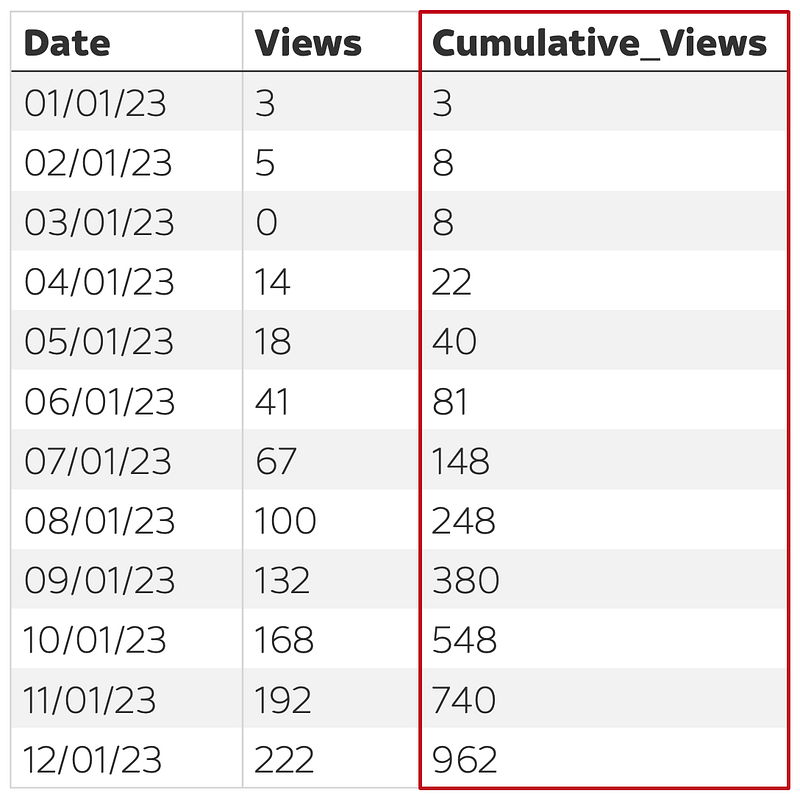
Using a window function, we can achieve this with just one additional line of code:
SELECT
  Date,
  Views,
  SUM(Views) OVER(ORDER BY Date) AS Cumulative_Views
FROM video_views
ORDER BY Date
… and this would generate our new Cumulative_Views column. We simply used the aggregation function SUM(Views) to calculate a running total of the views column after ordering by date. If you want to dive into this in more detail and see how to calculate cumulative views after splitting into subgroups, take a look at this more detailed tutorial I wrote which explains all this in more detail.
Conclusion
SQL window functions are incredibly powerful, but only if you know how to use them. In this article, I’ve provided a simple guide to using window functions through discussing 4 real-world examples.
Thank you so much for reading, and, if you’ve got any feedback, please let me know.
Go from SELECT * to interview-worthy project. Get our free 5-page guide.


