
A simple guide to calculating running totals in SQL
One line of code is all you need. Pinky promise.
The ability to quickly calculate a running total is a must-have for SQL users. In this article, I’ll give you a simple guide on how to do this using just one line of code.
Yep, just one.
I’ll start by introducing an example and showing you the query you need to calculate a running total. Then, I’ll explain what’s going on under the hood.
The problem
Imagine that we have a table called video_views which records the number of daily views received by a YouTube video. Each row represents a date, and shows the number of views that the video received on that date.
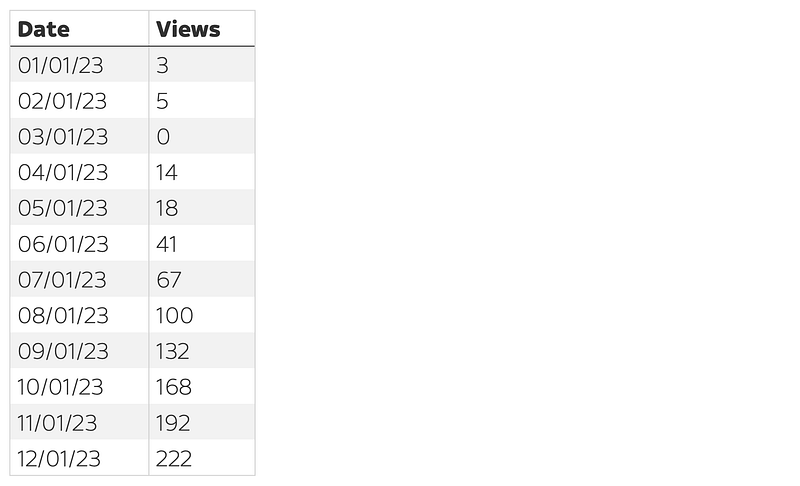
If we want to see a running total of the number of views, we will need to create something like this, where each “cell” in the Cumulative_Views column shows the total number of views received up to that point:
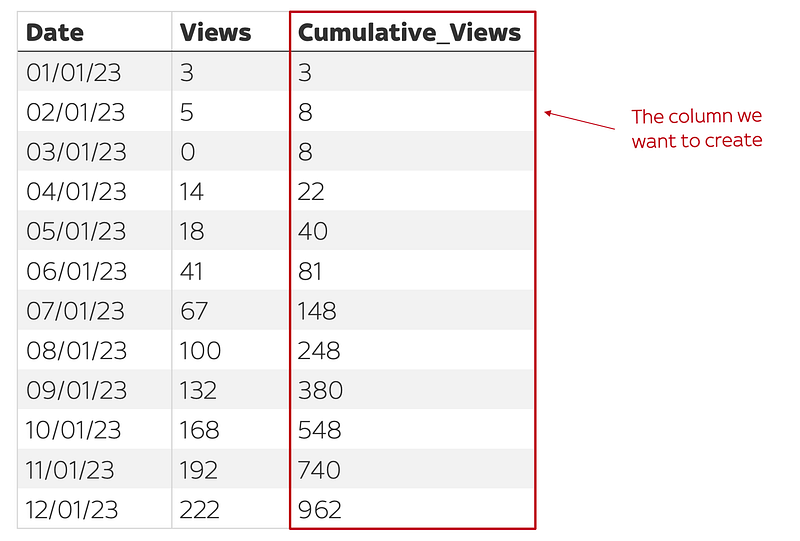
The solution
The recommended way to create a column like this in SQL is to use a window function, also known as an analytic function. Specifically, we can use this window function: SUM(Views) OVER(ORDER BY Date) AS Cumulative_Views. In a query, we’d simply add this in as a new column:
SELECT
  Date,
  Views,
  SUM(Views) OVER(ORDER BY Date) AS Cumulative_Views
FROM video_views
ORDER BY Date
… and this would generate our new Cumulative_Views column, as pictured above. See, I told you it was only one line!
What’s going on here?
If you’re interested in understanding why this works, keep reading.
All window functions, including the one above, follow the same basic pattern:
WINDOW_FUNCTION(column) OVER( [PARTITION BY columns_to_group_by] [ORDER BY columns_to_order_by] )Let’s unpack this.
The first component of our window function is the WINDOW_FUNCTION(column) segment. TheWINDOW_FUNCTION phrase is the analytic/aggregation function that we want to apply — e.g., SUM, COUNT, or AVG — and column refers to the column that we want to aggregate. In our example, we wrote SUM(Views), which tells our database that we want to calculate the sum of values in the Views column.
The next component of our window function is the OVER() command, which is how we define the “window” for which we want to calculate the SUM of Views. For now, don’t worry too much about what goes inside the OVER() command. Just focus on the big picture: this command enables us to specify a subset of rows (i.e. a “window”) over which we want to make our calculation.
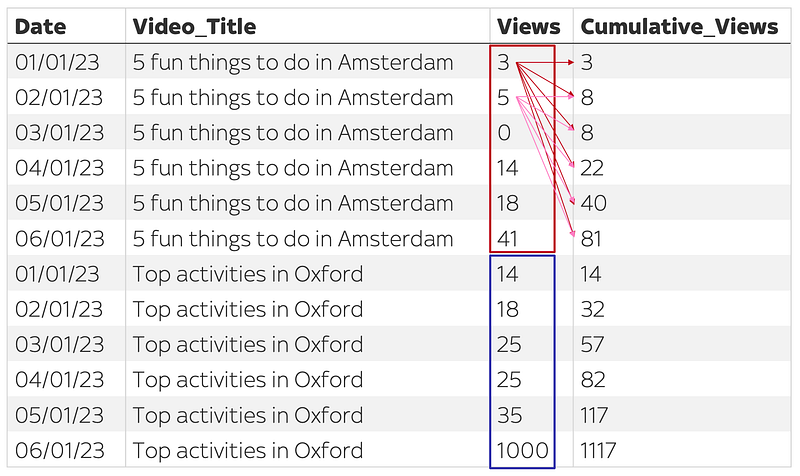
To illustrate this, consider the following example. Let’s say we had another table video_views_by_video which is similar to one above, but includes an additional column, Video_Title, which specifies the video for which we are counting views:

If we want to calculate the cumulative views for each video, we will need to specify two separate groups of rows in our table. The first group needs to contain rows relating to the video “5 fun things to do in Amsterdam” (red), and the second group will consist of rows relating to the video “Top activities in Oxford” (blue).
The OVER() clause is what allows us to specify these groups.
To “partition” our table into these separate windows, we would write OVER(PARTITION BY Video_Title), which creates one partition for each unique value in the Video_Title column. Then, we could use the phraseORDER BY Date to make sure that rows in each window are sorted according to the Date column.
Putting it all together, we’d write SUM(Views) OVER(PARTITION BY Video_Title ORDER BY Date), which tells the database to return a new column in which we calculate the running total of video views for each different video, ordered by date. In a full query, this would be written as:
SELECT
  Date,
  Video_Title,
  Views,
  SUM(Views) OVER(PARTITION BY Video_Title ORDER BY Date) AS Cumulative_Views
FROM video_views_by_video
ORDER BY Video_Title, Date
… which would return:
One final thing
It’s not compulsory to include both the PARTITION BY and ORDER BY clauses inside the OVER() command if you don’t need to. For example, in our original task of calculating the running total in the table video_views, we didn’t include the PARTITION BY clause. This was because we didn’t need to partition our table into different groups (there was only one video!) and we only needed to use the ORDER BY clause to make sure that the rows would be ordered according to date.
Thanks for reading. I hope this has been helpful!
Go from SELECT * to interview-worthy project. Get our free 5-page guide.