avatarRoderick Hsiao

Free AI web copilot to create summaries, insights and extended knowledge, download it at here

3484

Abstract

less than desire. The web app shows lots of loading state when entering a spotty network area even we already done a lot to improve the first page load. Data consumption also is one of the critical area of focus when it comes to international market where unlimited data might not be accessible or affordable to all users.</p><p id="73ac">Thanks to the new browser APIs, we can now adaptively change our loading strategies based on different device/network conditions.</p><p id="a266"><a href="https://developer.mozilla.org/en-US/docs/Web/API/Network_Information_API"><b>Network Information API</b></a></p><p id="9e94">(MDN) The Network Information API provides information about the system’s connection in terms of general connection type (e.g., ‘wifi’, ‘cellular’, etc.). This can be used to select high definition content or low definition content based on the user’s connection. The entire API consists of the addition of the <a href="https://developer.mozilla.org/en-US/docs/Web/API/NetworkInformation"><code>NetworkInformat</code>ion</a> interface and a single property to the <a href="https://developer.mozilla.org/en-US/docs/Web/API/Navigator"><code>Naviga</code>tor</a> interface: <a href="https://developer.mozilla.org/en-US/docs/Web/API/Navigator/connection"><code>Navigator.connect</code>ion</a>.</p><figure id="d04c"><img src="https://cdn-images-1.readmedium.com/v2/resize:fit:800/1*S8aehMUK8MY5IRA9DRn-JA.png"><figcaption><a href="https://caniuse.com/#feat=mdn-api_networkinformation">https://caniuse.com/#feat=mdn-api_networkinformation</a></figcaption></figure><p id="28b0">Although not fully supported by browser vendors, the api is heavily used in our web app. (Especially the browser supports align with our international users where Android dominates the market). We regard adaptive loading as progressive enhancement and serve default behavior for unsupported browsers.</p><p id="5600">Two main informations we collects from the API</p><p id="d392"><a href="https://developer.mozilla.org/en-US/docs/Web/API/NetworkInformation/effectiveType"><co<b>de>NetworkInformation.effectiveType</co<b></a></p><p id="011b">(MDN) Returns the effective type of the connection meaning one of ‘slow-2g’, ‘2g’, ‘3g’, or ‘4g’. This value is determined using a combination of recently observed round-trip time and downlink values.</p><p id="603e"><a href="https://developer.mozilla.org/en-US/docs/Web/API/NetworkInformation/saveData"><co<b>de>NetworkInformation.saveData</co<b></a></p><p id="6b62">(MDN) Returns <code>true</code> if the user has set a reduced data usage option on the user agent.</p><p id="3d8d">Some examples we adopt for network-aware loading (based on the above prefetch scenario)</p><ol><li><b>Route/Link base preload: </b>As browser has limited amount of parallel download, it is critical to yield the download quota to high priority resources .We notice that when the network condition is poor, aggressive preload will cause the main experiences flaky. Some important resources got deferred and device CPU occupied. We decide to check only preload next route when user is in good network conditions.</li></ol> <figure id="f5c2"> <div> <div>

            <iframe class="gist-iframe" src="/gist/tinder-rhsiao/8ec6d779d5795e682480411a417c59d5.js" allowfullscreen="" frameborder="0" height="undefined" width="undefined">
          </div>
        </div>
    </figure></iframe></div></div></fi

Options

gure><p id="aba2"><b>2. Progressive image loading: </b>As mentioned above, we fetch multiple dimensions of same image to progressively display in browser. However, on fast network condition, images complete loading almost in the same time, and the logic cause CPU overhead fetching and swapping image after each image complete loading. We also honer user’s data consumption preference to prevent aggressively prefetching resource if they have data-saver turned on.</p><p id="ed49">Other UI enhancements we accomplished:</p><ol><li><b>Videos: </b>We use video to display gif images (much smaller size) and disable video auto play for slow network. (We selectively pass <code>poster</code> attribute to video element which browser will only download the video resource after user interaction.)</li></ol> <figure id="2829"> <div> <div>

            <iframe class="gist-iframe" src="/gist/tinder-rhsiao/43d580507c520a1da4028761adfa4a7f.js" allowfullscreen="" frameborder="0" height="undefined" width="undefined">
          </div>
        </div>
    </figure></iframe></div></div></figure><figure id="826d"><img src="https://cdn-images-1.readmedium.com/v2/resize:fit:800/1*0j8_5keLCnokN5RNT5LiYA.png"><figcaption></figcaption></figure><figure id="68bd"><img src="https://cdn-images-1.readmedium.com/v2/resize:fit:800/1*lFWXbxVOMf0Z0DY0_ggxEA.png"><figcaption>Left (Autoplay), Right (Poster, no autoplay)</figcaption></figure><p id="66aa">2. <b>Carousel</b></p><figure id="1bcc"><img src="https://cdn-images-1.readmedium.com/v2/resize:fit:800/1*bg5gpRZ73xIVOus1IBDlmQ.png"><figcaption></figcaption></figure><p id="a4ce">To prevent user seeing blank placeholder when navigate to second page of carousel, we used to load the next page photo together. This causes a janky swipe experience on our international market.</p><p id="401a">We change the behavior to only load the first image under slow network, and start prefetching next page image if user has intention to view more photo for a specific profile (when they view to next page or other interaction indicates the intention).</p><p id="dbc6">By implementing the adaptive loading, we notice an improvement our user engagement (more user interaction such as click or swipe) for emerging market where Android is the major device OS and user experiences slow network frequently.</p><p id="fd37"><b>Progressively Increase Optimizations</b></p><p id="fbf7">Adoptive loading provides a new way to dynamic decide serving logics to cover broader real world scenario, it also open a space of creatively in terms of optimization strategies.</p><p id="1b4d">From out experiences, we use heuristic approach to decide one base strategy which will cover most of the browser metrics and devices. Then we add some enhancements for modern browsers to handle use cases more sophisticated. This approach also enables us to maintain the code complexity while adding/removing enhancements.</p><p id="77bb"><b>Related Reads:</b></p><ol><li><a href="https://github.com/GoogleChromeLabs/adaptive-loading">Adaptive Loading Library and Examples</a></li><li><a href="https://addyosmani.com/blog/adaptive-serving/">Adaptive Serving using JavaScript and the Network Information API</a></li><li><a href="https://deanhume.com/dynamic-resources-using-the-network-information-api-and-service-workers/">Dynamic resources using the Network Information API and service workers</a></li></ol></article></body>

Sophisticated Adaptive Loading Strategies

Performance is now one of the core value for modern web app. Most of the user shift the web browser experiences from desktop to mobile web. Other than smaller screen, lower CPU power, network condition becomes one of the important factor to make your content assessable to all users.

We want all of our user can enjoy the same experiences globally regardless of the network conditions (and respect user’s preferences in terms of data consumption).

We use some aggressive prefetch/preload strategies in order to make seamless experiences on interactions. However, these loading strategies heavily relies on predicting user’s intention to fetch the resources (Javascript/CSS/images …) needed to present the user experiences.

Some strategies we adopted:

  1. Route/Link base preload: Similar to Addy Osmani’s quicklink library, we use a combination with react router, React lazy and intersection observer to preload the next page bundle when the link component entering viewport and on idle. (Will also suggest to check Minko Gechev’s guess-js which use a data-driven approach to load bundles)
  2. Progressive image loading: We create a library to preload different dimensions of same image simultaneously via Javascript before painting on the page. User will see the smallest image first then seeing the main picture without seeing a blank placeholder.
  3. Service worker precache: For critical assets, we use workbox to generate precache manifest and load those assets upfront in order to fast serve bundle when needed.
  4. Browser resource priority hint: By using html link preload prefetch resource priority hint, we are able to make the first page experience load instantly.

Some deep dive of our web app could be found here: A Tinder Progressive Web App Performance Case Study (by Addy).

Network-aware loading strategies (Adaptive loading)

Our performance journey doesn’t ends there. When testing on real mobile device outside of office, we notice that a lot of time the experiences are less than desire. The web app shows lots of loading state when entering a spotty network area even we already done a lot to improve the first page load. Data consumption also is one of the critical area of focus when it comes to international market where unlimited data might not be accessible or affordable to all users.

Thanks to the new browser APIs, we can now adaptively change our loading strategies based on different device/network conditions.

Network Information API

(MDN) The Network Information API provides information about the system’s connection in terms of general connection type (e.g., ‘wifi’, ‘cellular’, etc.). This can be used to select high definition content or low definition content based on the user’s connection. The entire API consists of the addition of the NetworkInformation interface and a single property to the Navigator interface: Navigator.connection.
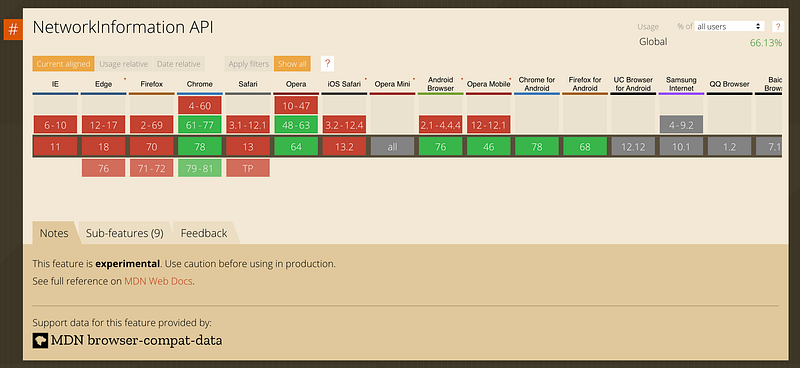
https://caniuse.com/#feat=mdn-api_networkinformation

Although not fully supported by browser vendors, the api is heavily used in our web app. (Especially the browser supports align with our international users where Android dominates the market). We regard adaptive loading as progressive enhancement and serve default behavior for unsupported browsers.

Two main informations we collects from the API

de>NetworkInformation.effectiveType

(MDN) Returns the effective type of the connection meaning one of ‘slow-2g’, ‘2g’, ‘3g’, or ‘4g’. This value is determined using a combination of recently observed round-trip time and downlink values.

de>NetworkInformation.saveData

(MDN) Returns true if the user has set a reduced data usage option on the user agent.

Some examples we adopt for network-aware loading (based on the above prefetch scenario)

  1. Route/Link base preload: As browser has limited amount of parallel download, it is critical to yield the download quota to high priority resources .We notice that when the network condition is poor, aggressive preload will cause the main experiences flaky. Some important resources got deferred and device CPU occupied. We decide to check only preload next route when user is in good network conditions.

2. Progressive image loading: As mentioned above, we fetch multiple dimensions of same image to progressively display in browser. However, on fast network condition, images complete loading almost in the same time, and the logic cause CPU overhead fetching and swapping image after each image complete loading. We also honer user’s data consumption preference to prevent aggressively prefetching resource if they have data-saver turned on.

Other UI enhancements we accomplished:

  1. Videos: We use video to display gif images (much smaller size) and disable video auto play for slow network. (We selectively pass poster attribute to video element which browser will only download the video resource after user interaction.)

Left (Autoplay), Right (Poster, no autoplay)

2. Carousel

To prevent user seeing blank placeholder when navigate to second page of carousel, we used to load the next page photo together. This causes a janky swipe experience on our international market.

We change the behavior to only load the first image under slow network, and start prefetching next page image if user has intention to view more photo for a specific profile (when they view to next page or other interaction indicates the intention).

By implementing the adaptive loading, we notice an improvement our user engagement (more user interaction such as click or swipe) for emerging market where Android is the major device OS and user experiences slow network frequently.

Progressively Increase Optimizations

Adoptive loading provides a new way to dynamic decide serving logics to cover broader real world scenario, it also open a space of creatively in terms of optimization strategies.

From out experiences, we use heuristic approach to decide one base strategy which will cover most of the browser metrics and devices. Then we add some enhancements for modern browsers to handle use cases more sophisticated. This approach also enables us to maintain the code complexity while adding/removing enhancements.

Related Reads:

  1. Adaptive Loading Library and Examples
  2. Adaptive Serving using JavaScript and the Network Information API
  3. Dynamic resources using the Network Information API and service workers
Progressive Web App
JavaScript
React
Tinder
Web Development
Recommended from ReadMedium