
React App Performance Optimization
React is perhaps the most popular Javascript framework recently. It provides a very easy API for engineer to develop sharable components as well as single page application. Combining container like Redux or data flow concept Flux makes React even more powerful.
I found it interesting (and sometime challenging) when in comes to React performance optimization.
In general, there are several angles we could tackle. Some of the optimizations are probably for web app in general (Progressive web app).
- Initial load
- Subsequent page load
- React update
- Animation and frame rate
- General Javascript optimization
- General CSS/HTML render optimization
This post will focus on speeding up initial load time of your React app.
If you are not familar with how browser renders the page, I will strongly recommend to read the awesome article by Ilya Grigorik about critical rendering path. [1]
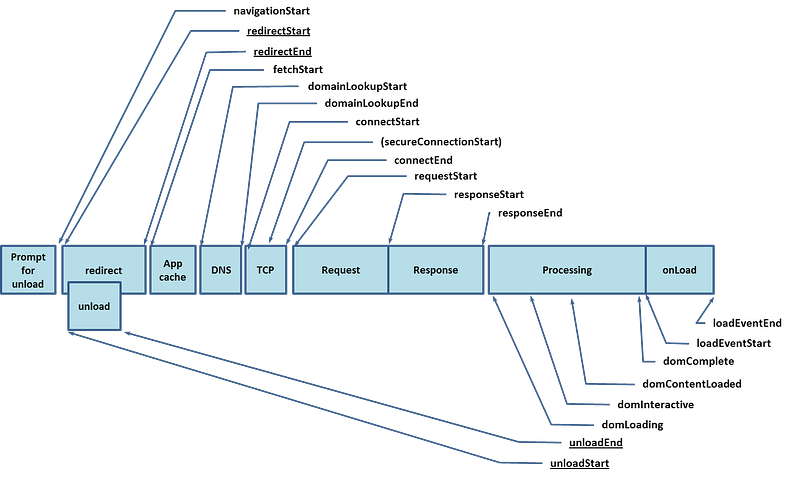
- Network priority: different resources has different download priority. Some resources with high priory could block the rendering.
Let’s say you have an external Javascript file
<script src="javascript.js"></script>This will block the browser rendering until the resource returns. You page will be even slower if you have a huge Javascript file and a slow network (such as 3G mobile network).
Luckily there are several approaches for browser to handle blocking assets more elegant.
async v.s. defer
A common approach is to utilize HTML5 async and defer attribute.
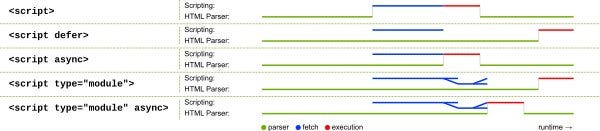
Both attributes will make the Javascript file non-blocking assets, but they work differently.
async indicates that this is a non-blocking assets, and should execute asynchronously.
<script src="javascript.js" async></script>defer will tell browser that this script should be executed only after DOM being parsed (But before DOMContentLoaded event)
<script src="javascript.js" defer></script>If you have multiple scripts, defer attributes will still guarantee the execution sequence while async will not.
“preload” v.s. “prefetch”
Using technique like preload and prefetch will help browser to fetch the critical resource even earlier.
Addy Osmani wrote [2] a brilliant post about preload and prefetch that I will strongly recommend to check it out.
“programmatically defer assets”
Another common practice is to defer Javascript loads after DOMContentLoaded event or load event.
<script> const loadscript = link => {
var head = document.getElementsByTagName('head')[0];
var script = document.createElement('script');
script.type = 'text/javascript';
script.charset = 'utf-8';
script.async = false;
script.src = link; head.appendChild(script);
} document.addEventListener("DOMContentLoaded", function(event) {
loadscript('yourscript');
});</script>2. Initial payload
In order to prevent round trips of your web app, it is unavoidable that we will need to reduce your bundle size.
One of the approach is to reduce the framework code size by looking for React alternative. For instance, Preact and Inferno all provides drop in replacement for React which will greatly reduce the bundle size.
The other approach is to reduce your own bundle size. I will use Webpack as an example here.
CommonsChunkPlugin helps you to move common Javascript library to an individual file to better optimize browser caching for subsequence page load.
A good approach is to list up those external dependencies which might not change that often such as “react”, “lodash”, “immutablejs” … to common vendor chunk and update hash value when there are changes or upgrade. Browser then can load vender chunk from cache.
Lazy load (dynamic import) and code splitting
Dynamic import is currently on stage 3 proposal.
You can lazy load your resource using require.ensure().
require.ensure([/* dependencies */], require => {
  const Foo = require('foo');
}, error => {
  // handle error
}, 'custom-bundle-name');
If you prefer promise based function, you can also use import with babel. Import use Promise internally, so you will need polyfills for older browser.
You will also need to babel plugin while its still on stage 3.
import(/* webpackChunkName: "custom-bundle-name" */'foo').then(Foo => {});npm install --save-dev babel-core babel-loader babel-plugin-syntax-dynamic-import babel-preset-es2015module.exports = {
module: {
rules: [{
test: /\.js$/,
exclude: /(node_modules)/,
use: [{
loader: 'babel-loader',
options: {
presets: [['es2015', { modules: false }]],
plugins: ['syntax-dynamic-import']
}
}]
}]
}
};To know more details about code splitting, you can check here [3].
An practical example is to implement coding splitting by route. I will use an example combining react-router and react-loadable.
Before optimization, Webpack will bundle you assets into a single file, which will load all resources up front for initial page load.
import React from 'react';
import {
  BrowserRouter as Router,
  Route
} from 'react-router-dom';
import Home from './Home';
import About from './About';const App = () => (
<Router>
<h1>My App</h1> <div>
<Route exact path="/" component={Home}/>
<Route path="/about" component={About}/>
</div>
</Router>
);By utilizing dynamic import, we could potentially split out non-critical assets from initial bundle.
import React from 'react'
import {
  BrowserRouter as Router,
  Route
} from 'react-router-dom';
import Loadable from 'react-loadable';
import Home from './Home';const About = Loadable({
loader: () => import('./About'),
LoadingComponent: null // or your loading component
});const App = () => (
<Router>
<h1>My App</h1> <div>
<Route exact path="/" component={Home}/>
<Route path="/about" component={About}/>
</div>
</Router>
);In this example, “About” component will not be loaded until you access “/about” route. However, as the resource loads asynchronously, your page could see a flash after the resource load. react-loadable provides a placeholder component “LoadingComponent” to be displayed before the chunk loaded. You can also use the “preload” function provided by react-loadable to preload the resource if you are certain that your user will visit the page.
function preloadNextPage(LoadableComponent) {
  LoadableComponent.preload();
}
As Webpack now split out all lazy-loaded bundles, you might found out that some common used libraries are duplicated in several child chunk. By utilizing again the CommonsChunkPlugin, you should be able to move up those common chunk into parent and reduce overall duplications.
new webpack.optimize.CommonsChunkPlugin({
  children: true,
  minChunks: 3
})
A comprehensive post [5] by Sean T. Larkin will help you understand the magic about the Webpack plugin.
From my experience, we are seeing around 45% decrease in load time after adopting preload/prefetch and code splitting for our React app.
The next step will be some practices to help reducing subsequence load time.
[1] https://developers.google.com/web/fundamentals/performance/critical-rendering-path/
[2] https://readmedium.com/preload-prefetch-and-priorities-in-chrome-776165961bbf
[3] https://webpack.js.org/guides/code-splitting-async/
[4] https://developers.google.com/web/fundamentals/performance/prpl-pattern/
[5] https://readmedium.com/webpack-bits-getting-the-most-out-of-the-commonschunkplugin-ab389e5f318