avatarMike Wolfe

Free AI web copilot to create summaries, insights and extended knowledge, download it at here

3581

Abstract

sed as a JSON object and the header object containing an API key needs passed in too.</p><div id="b664"><pre>dev_response = requests.post(<span class="hljs-string">"https://dev.to/api/articles"</span>, json=article, headers=header)

<span class="hljs-built_in">print</span>(dev_response)</pre></div><p id="e866">For now, we will just print out the response from the request. However, you will want to add in some error handling should something go wrong. I’ll let you handle that part :).</p><p id="63ac">The second function we need for this script is Python’s main function. This is where we will create some fake data and pass it to the <i>publish_to_dev function</i> that will (hopefully) post it to dev.to.</p><div id="f5c7"><pre><span class="hljs-keyword">if</span> name == <span class="hljs-string">"main"</span>: article_data = { <span class="hljs-string">"ArticleName"</span>: <span class="hljs-string">"Test Article"</span>, <span class="hljs-string">"ArticleContent"</span>: <span class="hljs-string">'''# Test Article Blah blah blah'''</span>, <span class="hljs-string">"ArticleTags"</span>: <span class="hljs-string">"Python, programming, testing"</span> }

publish_to_dev(article_data)</pre></div><p id="fe48">Once that is added in, go ahead and run the script. If you are using Linux, that can be done with this command.</p><div id="4fda"><pre>python &lt;YOUR_FILENAME&gt;.py</pre></div><p id="f13c">If you get output similar to the following, then pat yourself on the back, because it worked!</p><figure id="6e9c"><img src="https://cdn-images-1.readmedium.com/v2/resize:fit:800/1*Pvr7efjIGiMKNtX_fSCamA.png"><figcaption>Successfully published an article to dev.to.</figcaption></figure><p id="8fee">You can double-check that by viewing the article on the dev.to website.</p><figure id="37f9"><img src="https://cdn-images-1.readmedium.com/v2/resize:fit:800/1*YFo059-1_FePs2tOX4YGMA.png"><figcaption>Viewing the article in draft form on dev.to.</figcaption></figure><h1 id="1fb4">Conclusion</h1><p id="c07e">Publishing an article with the dev.to API is super easy and a great tool to help automate publishing for blogs. Beyond what we covered today, the API has tons of more endpoints that could be useful to the developer too that allow for getting data such as comments, podcasts, tags, users, followers, articles, and data related to individual articles. I know I have tons of ideas on how to use this newfound information to expand my blog writing application and I hope that it has inspired you to write something awesome! Feel free to leave a comment about your thoughts on the dev.to API and if you have any plans on using it because I would love to read them. Until next time, cheers!</p><p id="271a"><b><i>Read all my articles for free with my <a href="https://crafty-leader-2062.ck.page/8f8bcfb181">weekly newsletter</a>, thanks!</i></b></p><p id="b94e"><i>Check out some of my recent articles:</i></p><div id="8272" class="link-block">
      <a href="https://python.plainenglish.io/5-fun-apis-to-use-in-2023-d980d489903b">
        <div>
          <div>
            <h2>5 Fun APIs to Use in 2023</h2>
            <div><h3>API’s for jokes, quotes and useless facts!</h3></div>
            <div><p>python.plainenglish.io</p></div>
          </div>
          <div>
            <div style="background-image: url(https://miro.readmedium.com/v2/resize:fit:320/0*2GkDRjV0PisLz0VL)"></div>
          </div>
        </div>
      </a>
    </div><div id="434b" cla

Options

ss="link-block"> <a href="https://readmedium.com/fastapi-logging-in-2023-f926fd0bdfcb"> <div> <div> <h2>FastAPI Logging in 2023</h2> <div><h3>File logging, database logging, console logging?</h3></div> <div><p>medium.com</p></div> </div> <div> <div style="background-image: url(https://miro.readmedium.com/v2/resize:fit:320/0*aCw2de7HY2A2Knfz)"></div> </div> </div> </a> </div><div id="1c58" class="link-block"> <a href="https://readmedium.com/the-pros-and-cons-of-cloud-computing-44d1a443744e"> <div> <div> <h2>The Pros and Cons of Cloud Computing</h2> <div><h3>Reasons why Cloud Computing may or may not be the right decision for your team.</h3></div> <div><p>medium.com</p></div> </div> <div> <div style="background-image: url(https://miro.readmedium.com/v2/resize:fit:320/0*A-2uId9uazSaEezr)"></div> </div> </div> </a> </div><div id="e91e" class="link-block"> <a href="https://readmedium.com/couchdb-vs-mongodb-c3fd8f0ba325"> <div> <div> <h2>CouchDB vs MongoDB</h2> <div><h3>Comparing NoSQL databases</h3></div> <div><p>medium.com</p></div> </div> <div> <div style="background-image: url(https://miro.readmedium.com/v2/resize:fit:320/0*jL_AF5uQSVWi0re5)"></div> </div> </div> </a> </div><div id="59b0" class="link-block"> <a href="https://readmedium.com/what-is-phind-ae78b8977351"> <div> <div> <h2>What is Phind?</h2> <div><h3>And does it work?</h3></div> <div><p>medium.com</p></div> </div> <div> <div style="background-image: url(https://miro.readmedium.com/v2/resize:fit:320/0*p4NuE88fIRFtRUiL)"></div> </div> </div> </a> </div><h1 id="8b55">References</h1><div id="b708" class="link-block"> <a href="https://realpython.com/python-main-function/#a-basic-python-main"> <div> <div> <h2>Defining Main Functions in Python - Real Python</h2> <div><h3>In this step-by-step tutorial, you'll learn how Python main functions are used and some best practices to organize your…</h3></div> <div><p>realpython.com</p></div> </div> <div> <div style="background-image: url(https://miro.readmedium.com/v2/resize:fit:320/0*mmcbG-1xslHKKeiM)"></div> </div> </div> </a> </div><div id="6e31" class="link-block"> <a href="https://developers.forem.com/api/v1#tag/articles/operation/createArticle"> <div> <div> <h2>Forem API V1 | Forem Docs</h2> <div><h3>Access Forem articles, users and other resources via API. For a real-world example of Forem in action, check out…</h3></div> <div><p>developers.forem.com</p></div> </div> <div> <div style="background-image: url(https://miro.readmedium.com/v2/resize:fit:320/)"></div> </div> </div> </a> </div></article></body>

Something I Learned This Week: The dev.to API

Another way to automate publishing blog articles…

Photo by Alex Knight on Unsplash

Around this time last year, I wrote an article about how to use Medium’s (now deprecated) API. At the time, I was trying to solve the problem of working with multiple blog editors by creating a single editor that had the ability to publish articles to different blogging sites (Medium, Hackernoon, etc.). The end result worked out pretty well and I actually still use it today. Just recently, I’ve been wanting to branch out a little and start publishing articles on the blogging site dev.to. Dev.to has a lot of really good articles and a pretty large developer community. Not only that, it has an API with a ton of endpoints! So, today, we are going to take a closer look at how to use the dev.to API. Let’s get coding!

Calling the API

To start off, we will be using Python to make our API calls. In a new file, import the requests module.

import requests

After that, declare a new function named publish_to_dev that takes a single parameter. That parameter will be a dictionary object containing all the needed article data.

def publish_to_dev(article_data):

Inside the body of this new function, a header object is needed so that we have a place to store a dev.to API key when making API requests.

header = {
  "api-key": "<API_KEY>"
}

To get a key, all you have to do is simply create an account on dev.to, navigate to the user settings page (found on the user dropdown menu), click on Extensions, scroll down to DEV Community API Keys, and click the Generate API Key button.
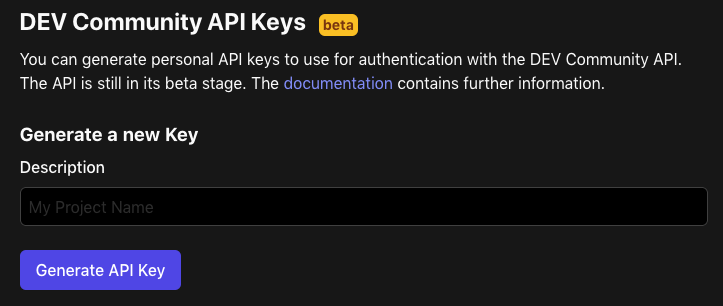
Screen to generate Dev.to API key.

Jumping back to the code, with a newly generated key, we next need to create an article dictionary to store all of the blog article information. A few noteworthy things to point out are the body of the article needs to be in markdown format (not HTML :( ) and the tags field has to be a list.

data = {
  "article": {
    "title": article_data["ArticleName"],
    "body_markdown": article_data["ArticleContent"],
    "description": article_data["ArticleDescription"],
    "tags": article_data["ArticleTags"]
  }
}

The last thing to do in this function is POST the request. The article dictionary we just created has to be passed as a JSON object and the header object containing an API key needs passed in too.

dev_response = requests.post("https://dev.to/api/articles", json=article, headers=header)

print(dev_response)

For now, we will just print out the response from the request. However, you will want to add in some error handling should something go wrong. I’ll let you handle that part :).

The second function we need for this script is Python’s main function. This is where we will create some fake data and pass it to the publish_to_dev function that will (hopefully) post it to dev.to.

if __name__ == "__main__":
    article_data = {
        "ArticleName": "Test Article",
        "ArticleContent": '''# Test Article 
        Blah blah blah''',
        "ArticleTags": "Python, programming, testing"
    }

    publish_to_dev(article_data)

Once that is added in, go ahead and run the script. If you are using Linux, that can be done with this command.

python <YOUR_FILENAME>.py

If you get output similar to the following, then pat yourself on the back, because it worked!

Successfully published an article to dev.to.

You can double-check that by viewing the article on the dev.to website.

Viewing the article in draft form on dev.to.

Conclusion

Publishing an article with the dev.to API is super easy and a great tool to help automate publishing for blogs. Beyond what we covered today, the API has tons of more endpoints that could be useful to the developer too that allow for getting data such as comments, podcasts, tags, users, followers, articles, and data related to individual articles. I know I have tons of ideas on how to use this newfound information to expand my blog writing application and I hope that it has inspired you to write something awesome! Feel free to leave a comment about your thoughts on the dev.to API and if you have any plans on using it because I would love to read them. Until next time, cheers!

Read all my articles for free with my weekly newsletter, thanks!

Check out some of my recent articles:

References

Python
Automation
Blogging
Programming
Software Development
Recommended from ReadMedium