avatarChristianlauer

Free AI web copilot to create summaries, insights and extended knowledge, download it at here

1058

Abstract

ecords information about the DML changes after this snapshot was taken. Change records provide the state of a row before and after the change. Change information mirrors the column structure of the tracked source object and includes additional metadata columns that describe each change event </i>[1].</p><figure id="5191"><img src="https://cdn-images-1.readmedium.com/v2/resize:fit:800/0*-dP0BUnGnU2SQEQX.png"><figcaption>Streams in Snowflake — Image Source: Snowflake[1]</figcaption></figure><h2 id="33b8">How Streams on Views work</h2><p id="dd6f">Now Snowflake has announced that you can use streams on views with extended table streams to track change data capture (CDC) records for views, including secure views.</p><p id="c471">This new feature is however limited to views that meet the following requirements [1]:</p><ul><li>All of the underlying tables must be native tables.</li><li>Projections</li><li>Filters</li><li>Inner or cross joins</li><li>UNION ALL</li></ul><p id="1456">At this time, Materialized views are not supported.</p><h2 id="b751"

Options

Summary</h2><p id="1c37">A feature that will surely simplify ETL or ELT processes within Snowflake and make Data Engineers happy. If you want to get further into the topic, the following article might be also interesting for you:</p><div id="81a9" class="link-block"> <a href="https://readmedium.com/building-modern-elt-pipelines-in-snowflake-87024c4b98e8"> <div> <div> <h2>Building Modern ELT Pipelines in Snowflake</h2> <div><h3>How to realize Data Pipelines with SQL and Tasks in Snowflake</h3></div> <div><p>medium.com</p></div> </div> <div> <div style="background-image: url(https://miro.readmedium.com/v2/resize:fit:320/1*IwajhqPPXl-6K2yyWYwbVw.jpeg)"></div> </div> </div> </a> </div><h2 id="2eb5">Sources and Further Readings</h2><p id="f07f">[1] Snowflake, <a href="https://docs.snowflake.com/en/user-guide/streams-intro">Introduction to Streams</a> (2023)</p></article></body>

Snowflake launches Streams on Views

How this can ease your Data CDC Pipelines and Data Integration

Photo by Alessio Soggetti on Unsplash

With this new function, you can now enable CDC using views, which can greatly simplify data integration and subsequent data analysis.

What are Streams again?

Snowflake operates streams as the following: it creates an initial snapshot of each row within the sources object in a logical manner (e.g. a table, an external table, or the underlying tables for a view). The change tracking system utilized by the stream then records information about the DML changes after this snapshot was taken. Change records provide the state of a row before and after the change. Change information mirrors the column structure of the tracked source object and includes additional metadata columns that describe each change event [1].
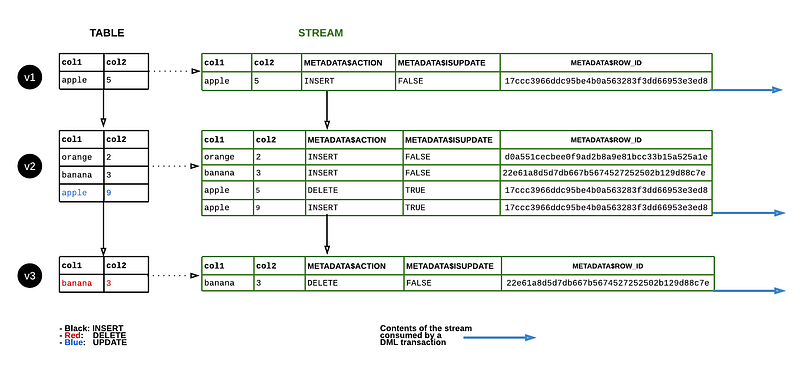
Streams in Snowflake — Image Source: Snowflake[1]

How Streams on Views work

Now Snowflake has announced that you can use streams on views with extended table streams to track change data capture (CDC) records for views, including secure views.

This new feature is however limited to views that meet the following requirements [1]:

  • All of the underlying tables must be native tables.
  • Projections
  • Filters
  • Inner or cross joins
  • UNION ALL

At this time, Materialized views are not supported.

Summary

A feature that will surely simplify ETL or ELT processes within Snowflake and make Data Engineers happy. If you want to get further into the topic, the following article might be also interesting for you:

Sources and Further Readings

[1] Snowflake, Introduction to Streams (2023)

Data Science
Technology
Snowflake
Sql
Data
Recommended from ReadMedium