
Python Programming: Manipulating tabular data efficiently
How to Speed up Pandas by 100x
With Great power comes great responsibility.

Pandas is a Data Analysis python library that aids in working with tabular data stored in spreadsheets and databases. It provides a vast set of functionalities for manipulating and transforming structural data aka dataframes. In this blog post, we shall discuss 3 simple tricks for speeding up Pandas operations.
1. Stop using iterrows() :
- Data manipulation often requires iterating over dataframe rows.
iterrows()is often the go-to option for such use cases. However, it is notoriously slow and can be easily swapped byitertuples().- Consider a simple (read: trivial) problem of adding two columns of a Pandas dataframe.
- Now, let us apply the function
simple_sumto every row of the dataframe usingiterrows()and measure the time needed to finish the task.
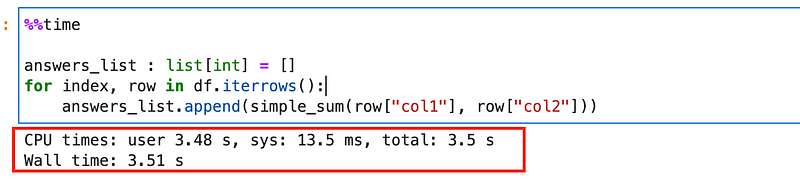
- It can be seen that it takes approximately 3.5 seconds to loop through the entire dataframe using
iterrows(). - Alternatively, let us perform the same operation, only this time by replacing
iterrows()withitertuples().
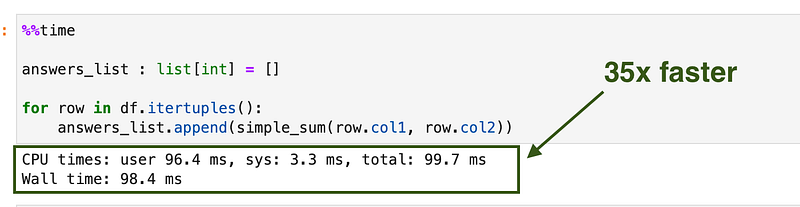
- WOW !!! Simply replacing
iterrows()withitertuples()speeds up the code by 35x. That is not a bad improvement, is it?

2. Appending new rows efficiently:
- Consider the same task as above i.e. adding two columns of a dataframe. Only this time, the goal is to create a new dataframe containing original data along with a column of summed values.
- An inefficient way of accomplishing the task would involve initializing a new dataframe and appending new rows to it from a loop. For a dataframe with 100k rows, it takes roughly 56s to complete the task.
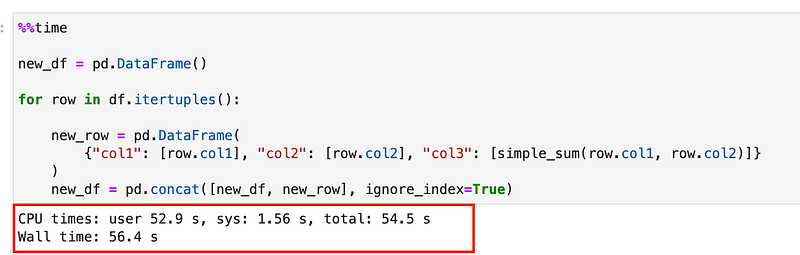
- Appending rows to a dataframe in a loop is an extremely bad idea. A better to implement the task would be to accumulate the results in a list and creating a new dataframe from the list of accumulated results.
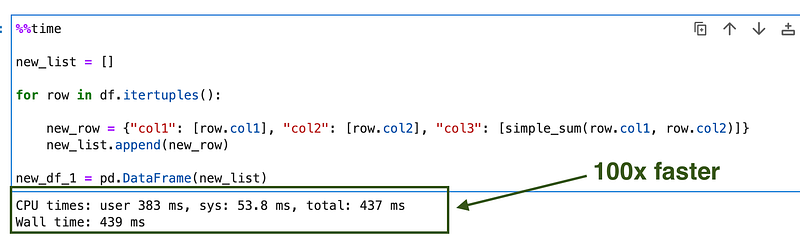
- Boom !!! A minor tweak to get a 100x boost in speed.

3. apply() is just a glorified for loop:
- A more traditional way of applying a function to dataframe rows involves using
apply()method. - Under the hood,
apply()uses a loop with an added overhead. It can often be avoided by leveraging vectorized operations. - Consider the problem of conditionally multiplying the column of a dataframe. If the value is greater than or equal to 1000, we multiply it by 2 else multiply it by 3.
- A suboptimal implementation is illustrated below.
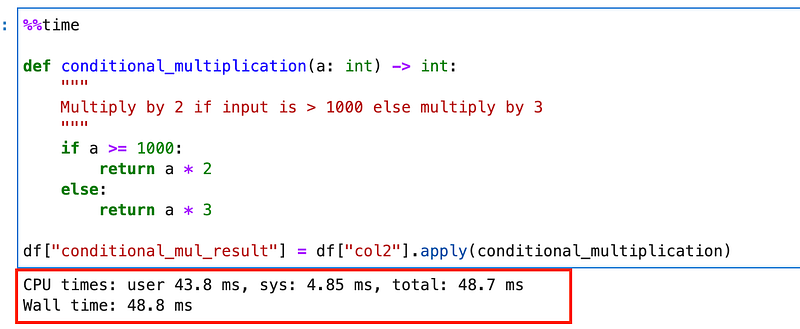
- To speed things up, one efficient way of implementing the above task is to leverage NumPy operations.


- Let's goooooo !!!! A 12x bump in speed. If that does not impress you, I don't know what will.
Final Comments:
- Pandas is a powerful tool for data analysis and manipulation. However, “With great power comes great responsibility”.
- It is imperative to choose tools wisely while writing efficient code. This blog is just a small attempt to highlight some of the inefficiencies that we unknowingly introduce in our code.
- Comment and share your favorite pandas trick with the readers.


