
Simple Sentiment Analysis for NLP Beginners and Everyone Else using VADER and TextBlob

Understanding Sentiment
Businesses want to understand their customers and often have dedicated customer service teams working to make sure patrons have positive experiences. From working the Customer Service desk in retail stores to working as a Technical Support Adviser in a software company, I’ve worked in a lot of customer facing positions over the past decade and have developed some intuition for keeping the customer happy. When I was in the trenches working with people, it seemed easy to gauge their sentiment and whether or not they were upset. Although it might be possible for me to gauge sentiment on a face-to-face basis, as a big data solution to gauge customer sentiment as a whole, face to face interactions do not easily scale. Instead of using people to gauge sentiment, machine learning techniques can be used to perform sentiment analysis on text data with ease.
If you’re interested in mining sentiment metrics from text stored in a Panda’s DataFrame in a few lines of code without training models, this is the tutorial for you!
If you’re unfamiliar with VADER and TextBlob, read on. If you want to see how you can use them to easily add sentiment metrics to Panda’s data frames, check the code in the Applying the Tools section of the article.
If you’re looking for data to test your sentiment models, check out my tutorial for downloading twitter streams
Two Tools for Sentiment Metrics
In Machine learning, there is often a trade off between speed and accuracy. While these two tools do a pretty good job and can be applied quickly, there are more sophisticated techniques for sentiment analysis that could provide better accuracy depending on the requirements of your task. If you’re interested in advanced methods, check out tools like word2vec.
I’ve been exploring two tools for generating simple sentiment metrics. These tools do not require you to train a model. They work out of the box:
- TextBlob
- VADER Sentiment Analysis
Sentiment Metrics
Extracting the sentiment from text, we’re essentially classifying the text as positive, neutral or negative. This can be referred to as Polarity. We can also try to gauge the subjectivity of the text. There are a ton of great resources that cover the theory behind sentiment analysis.
TextBlob outputs: Polarity and Subjectivity.
Vader Sentiment outputs: Negative (neg), Neutral (neu), Positive (pos) and Compound
TextBlob
Built on top of NLTK and pattern, the TextBlob library for Python 2 and 3 tries to simplify several text processing tasks. It provides tools for classification, part-of-speech tagging, noun phrase extraction, sentiment analysis and more. Check out the documentation for a full list of features and several tutorials.
Install the Packages
If you don’t want to use pip or are interested in the various installation options, check out the installation guide. The following install commands will install TextBlob and download the necessary NLTK corpora. The download directory can be changed by setting the NLTK_DATA environment variable.
pip install -U textblob
python -m textblob.download_corpora
Creating TextBlobs
Textblob objects are general text blocks meant to represent larger bodies of texts like paragraphs and documents.
#Simple text blob examplefrom textblob import TextBlobblob = TextBlob("This is a good example of a TextBlob")
print(blob)TextBlob Sentiment Analysis
Using the sentiment property, TextBlob returns a namedtuple of the form Sentiment(polarity, subjectivity). Polarity is a float in the range [-1.0, 1.0] where -1 is the most negative and 1 is the most positive. Subjectivity is a float in the range [0.0, 1.0] where 0.0 is very objective and 1.0 is very subjective.
blob = TextBlob("This is a good example of a TextBlob")
print(blob)blob.sentiment
#Sentiment(polarity=0.7, subjectivity=0.6000000000000001)VADER Sentiment Analysis
Given it has a certain sci-fi ring to it, VADER Sentiment Analysis is a powerful open source tool designed for analyzing the sentiment expressed in social media. VADER stands for Valence Aware Dictionary and sEntiment Reasoner. It is a simple lexicon and rule-based model for general sentiment analysis. If interested in what’s under the hood, check this paper.
Install the Package
The easiest way to install the package is using pip, however additional options are discussed in the VADER installation guide.
pip install vaderSentimentDependencies and Example
Import the dependencies and call the SentimentIntensityAnalyzer. Then use the polarity_scores() method to generate the sentiment metrics.
from vaderSentiment.vaderSentiment import SentimentIntensityAnalyzeranalyzer= SentimentIntensityAnalyzer()sentence = "This is a great VADER Example"analyzer.polarity_scores(sentence)
#{'neg': 0.0, 'neu': 0.494, 'pos': 0.506, 'compound': 0.6249}Compound is the most useful metric if you want a single unidimensional measure of sentiment for a given sentence. To quote the documentation:
It is a ‘normalized, weighted composite score computed by summing the valence scores of each word in the lexicon, adjusted according to the rules, and then normalized to be between -1 (most extreme negative) and +1 (most extreme positive).
Valence is essentially a score representing the intrinsic emotional alignment of the word. For example, stress is negative valence and pleasure or happiness is positive valence.

Putting it Together
I want to add sentiment metrics as to the Wine Review dataset from Kaggle. It will be interesting to see if they can be used to predict the wine’s rating! I have already cleaned the data and stored it in a sqlite database.
Applying the Tools
I’ll import the dependencies and read the data from the database. I’ll print the shape and load the first three rows.
import pandas as pd
import sqlite3
from textblob import TextBlob
from vaderSentiment.vaderSentiment import SentimentIntensityAnalyzer
conn = sqlite3.connect(r"db\wine_data.sqlite")
c = conn.cursor()df = pd.read_sql("select country, description, rating, price, province, title, variety, winery, color from wine_data", conn)print(df.shape)df.head(3)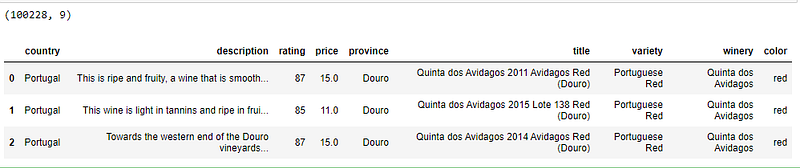
TextBlob Sentiment Analysis
Using a few simple list comprehensions, it is easy to load the description column as a TextBlob, and then create two new columns to store the Polarity and Subjectivity.
#load the descriptions into textblob
desc_blob = [TextBlob(desc) for desc in df['description']]
#add the sentiment metrics to the dataframe
df['tb_Pol'] = [b.sentiment.polarity for b in desc_blob]
df['tb_Subj'] = [b.sentiment.subjectivity for b in desc_blob]#show dataframe
df.head(3)Notice the two new columns were added to the dataframe:

VADER Sentiment Analysis
Call the Sentiment Intensity Analyzer. Then use list comprehensions to create a new column in the dataframe for each polarity_scores metric. The dataframe is a little over 100k rows; this might take a few minutes to complete.
#load VADER
analyzer = SentimentIntensityAnalyzer()#Add VADER metrics to dataframe
df['compound'] = [analyzer.polarity_scores(v)['compound'] for v in df['description']]
df['neg'] = [analyzer.polarity_scores(v)['neg'] for v in df['description']]
df['neu'] = [analyzer.polarity_scores(v)['neu'] for v in df['description']]
df['pos'] = [analyzer.polarity_scores(v)['pos'] for v in df['description']]df.head(3)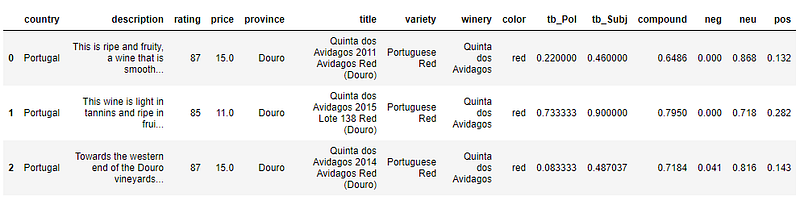
As simple as that, sentiment metrics have been added to the dataframe! Do the sentiment metrics correlate to the rating or price? Can they be used as predictors? Perhaps I’ll leave those for another article. Feel free to explore using the full code below.
Final Thoughts and Code
The Python libraries TextBlob and VADER Sentiment Analysis make it super easy to generate simple sentiment metrics without training a model. They offer out of the box solutions and are easy to interpret. In a few lines of code, anyone can generate metrics and look for outliers and trends in the sentiment of their text data.
import pandas as pd
import sqlite3
from textblob import TextBlob
from vaderSentiment.vaderSentiment import SentimentIntensityAnalyzer
conn = sqlite3.connect(r"db\wine_data.sqlite")
c = conn.cursor()df = pd.read_sql("select country, description, rating, price, province, title, variety, winery, color from wine_data", conn)print(df.shape)#load the descriptions into textblob
desc_blob = [TextBlob(desc) for desc in df['description']]#add the sentiment metrics to the dataframe
df['tb_Pol'] = [b.sentiment.polarity for b in desc_blob]
df['tb_Subj'] = [b.sentiment.subjectivity for b in desc_blob]#load VADER
analyzer = SentimentIntensityAnalyzer()#Add VADER metrics to dataframe
df['compound'] = [analyzer.polarity_scores(v)['compound'] for v in df['description']]
df['neg'] = [analyzer.polarity_scores(v)['neg'] for v in df['description']]
df['neu'] = [analyzer.polarity_scores(v)['neu'] for v in df['description']]
df['pos'] = [analyzer.polarity_scores(v)['pos'] for v in df['description']]df.head(3)Thank You!
- If you enjoyed this, follow me on Medium for more
- Get FULL ACCESS and help support my content by subscribing
- Let’s connect on LinkedIn
- Analyze Data using Python? Check out my website
Check out my other coding tutorials!


