
Learn SQL Techniques: Selecting Data and More in SQL Server

Start Using SQL
Even if you’re not in to programming, SQL is a fantastic language to have in your toolbox since so many businesses store tabular data. It turns out storing data by rows and columns is convenient in a lot of situations, so relational databases have remained a cornerstone of data management. SQL statements allow you to access and manipulate the data stored in SQL databases. I find Structured Query Language (SQL) to be a fairly straightforward language that is easy to learn. Although the basics come easy, SQL and relational data is a mature technology that can get quite deep and complex.
If you’re new to SQL, this article is for you! If you’re familiar with SQL and want a more advanced example, I show a query I use to find duplicate data at the end of the article.
Table of Contents:
- Flavors of SQL
- Data Structure
- SQL Statements
- SELECT Statements
- Find Duplicate Data
Flavors of SQL
There are many different flavors of SQL databases, but SQL is a standard language overall. I am most familiar with Microsoft SQL Server and SQL Server Management Studio, but I have used MySQL and PostgreSQL. Here is a list of some of the most popular brands:
MySQL PostgreSQL Microsoft SQL Server and SQL Server Management Studio Oracle
Several cloud services offer SQL Relational Databases as well.
Regardless of the brand you’re using, the concepts will be fairly similar. Each brand has a few syntax differences, so refer to documentation as needed.
Data Structure
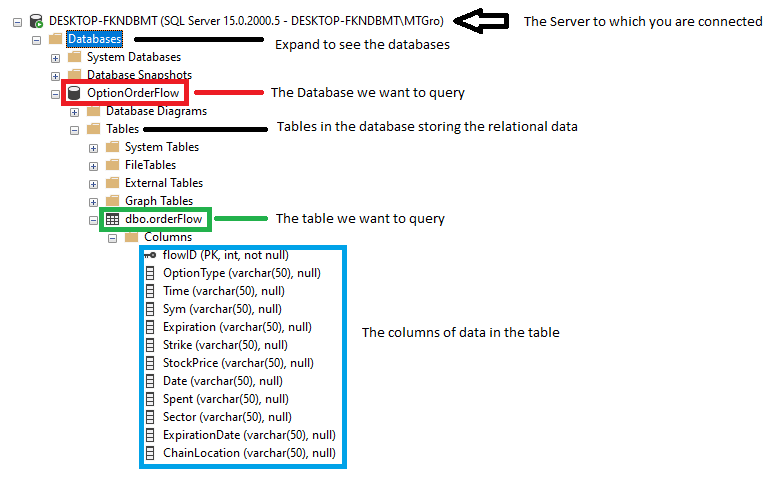
When you connect to the SQL Server, you’ll see databases are organized into a folder named Databases. A database contains tables. Tables store the data by rows in columns, similar to an excel spreadsheet. In a previous article, I walk through how to import the data into SQL Server.
SQL Statements
Before I show off some advanced stuff, I will use a simple SELECT statement to return all the data in a table:
SELECT * FROM orderFLowUsing an asterisk tells the SELECT statement to return ALL columns FROM the table orderFlow. Execute the query:
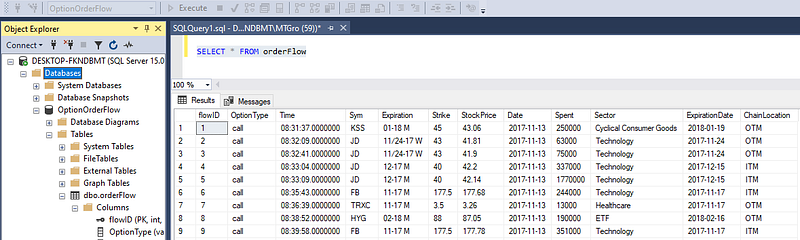
The SQL statement returns your results to a Results-set. It is essentially data stored in a virtual table.
Using SQL statements, it is possible to retrieve data from the database. That can be done using the SELECT keyword! It is also possible to insert data, update and delete it. Almost all actions you’d want to perform in SQL Server can be done using SQL statements!
Breaking Down SELECT
Using SELECT isn’t simply for selecting data from tables. It can be used to return output to the Results-set.
For example, you can do math! Notice how I named the output column MathExample. The SQL statement will return 6.
SELECT 2 + 4 as MathExample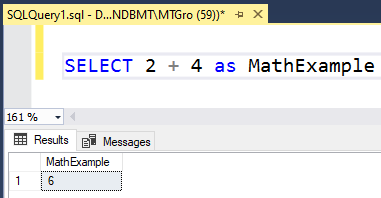
When you want to select data from a table, the basic syntax is as follows:
--Specify columns
SELECT column1, column2, column...n FROM table_name;
--Return all columns
SELECT * FROM table_nameCongrats on mastering SELECT STAR FROM!
Beyond Basics: Find Duplicates
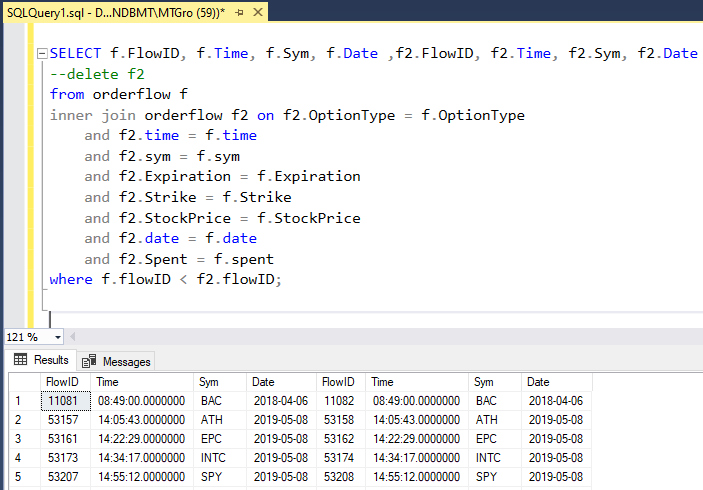
In this advanced example we want to find duplicates in the data set. In order to do this, we must join the table on to itself, matching on the identical data in the columns.
SELECT *
--delete
from orderFlow f
INNER JOIN orderFlow f2 on f2.OptionType = f.OptionType
 and f2.time = f.time
 and f2.sym = f.sym
 and f2.Expiration = f.Expiration
 and f2.Strike = f.Strike
 and f2.StockPrice = f.StockPrice
 and f2.date = f.date
 and f2.Spent = f.spent
WHERE f.flowID < f2.flowID;
Notice the new keywords INNER JOIN and WHERE.
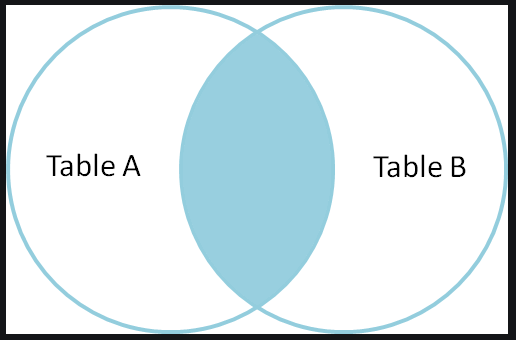
A JOIN clause is used to combine rows from two or more tables, based on a shared column. Since we want to find duplicates, use the INNER JOIN keyword to select records that have matching values in both tables.
Notice all the columns we want to match on. For example, f2.optionType = f.optionType. That means those values have to match in order for a result to return. If they all match, a duplicate is returned!
Think of a Venn Diagram when imagining JOINS:
The WHERE clause is used to filter records based on a specified condition. In the example, I want the original flowID value to be lower than the duplicate flowID value.
Final Thoughts
I think SQL will be around for the foreseeable future, and learning it can give you an advantage regardless of what your goals are. I hope this tutorial showed how simple it is to query data from a database using SQL. There are a ton of great resources for learning and practicing. Look out for more SQL articles!
Thank You!
- If you enjoyed this, follow me on Medium for more
- Get FULL ACCESS and help support my content by subscribing
- Let’s connect on LinkedIn
- Analyze Data using Python? Check out my website


