avatarTeri Radichel

Free AI web copilot to create summaries, insights and extended knowledge, download it at here

8337

Abstract

shared/</span></pre></div><p id="054b">You can include multiple contexts if you need to as well, each with a different name:</p><div id="0c70"><pre>docker <span class="hljs-keyword">buildx </span><span class="hljs-keyword">build </span>-t [tag] -f [Dockerfile location]
--<span class="hljs-keyword">build-context </span>framework=[framework path]
--<span class="hljs-keyword">build-context </span><span class="hljs-keyword">external=[some </span>other <span class="hljs-keyword">external </span>resource]</pre></div><h2 id="8799">Install buildx</h2><p id="dc25">To use buildx you need to install it. On Amazon Linux:</p><div id="deb6"><pre>sudo yum <span class="hljs-keyword">install</span> docker-buildx-plugin</pre></div><p id="561d">Check the version:</p><div id="79b1"><pre>docker buildx <span class="hljs-built_in">version</span></pre></div><p id="e2c4">If you’re not using the most up to date version the contexts feature may not be available to you.</p><p id="06db">Unfortunately installing this feature on Amazon Linux gives me an older version. To use this contexts feature I had to manually upgrade <i>buildx</i>.</p><p id="3e2f">You can find releases here:</p><div id="d606" class="link-block"> <a href="https://github.com/docker/buildx/releases"> <div> <div> <h2>Releases · docker/buildx</h2> <div><h3>Docker CLI plugin for extended build capabilities with BuildKit - Releases · docker/buildx</h3></div> <div><p>github.com</p></div> </div> <div> <div style="background-image: url(https://miro.readmedium.com/v2/resize:fit:320/0*VdBtHSUWw7gWJUUr)"></div> </div> </div> </a> </div><p id="85e1">I found a work around on this AWS post in theory:</p><div id="2fa9" class="link-block"> <a href="https://aws.amazon.com/blogs/compute/how-to-quickly-setup-an-experimental-environment-to-run-containers-on-x86-and-aws-graviton2-based-amazon-ec2-instances-effort-to-port-a-container-based-application-from-x86-to-graviton2/?src=radichel"> <div> <div> <h2>How to quickly setup an experimental environment to run containers </h2> <div><h3>undefined</h3></div> <div><p>undefined</p></div> </div> <div> <div style="background-image: url(https://miro.readmedium.com/v2/resize:fit:320/0*0_-aG_pkshlKtU32)"></div> </div> </div> </a> </div><p id="d4c8">Specifically this code:</p><div id="f174"><pre><span class="hljs-built_in">export</span> DOCKER_BUILDKIT=1 docker build --platform=<span class="hljs-built_in">local</span> -o . git://github.com/docker/buildx <span class="hljs-built_in">mkdir</span> -p ~/.docker/cli-plugins <span class="hljs-built_in">mv</span> buildx ~/.docker/cli-plugins/docker-buildx <span class="hljs-built_in">chmod</span> a+x ~/.docker/cli-plugins/docker-buildx</pre></div><p id="f345">Many problems here. You are pulling code from GitHub directly. Over the Internet. You’ll have to open up a private network or use a NAT. I don’t see a checksum here to verify the integrity of the files. It also takes a long time to run. It doesn’t work.</p><p id="ed4b">The reason it doesn’t work is that it’s using a deprecated protocol, namely <i>git:// </i>which tries to access GitHub on port 9418 and I presume is unencrypted.</p><p id="f679">While trying to run that I got the same error as when I tried to run <i>buildx</i> alone and I found the code producing this error:</p><div id="1936"><pre>ERROR: failed to solve: rpc error: code = Unknown desc = failed to solve with frontend dockerfile.v0: failed to read dockerfile: failed to load cache key: failed to fetch remote git:<span class="hljs-regexp">//gi</span>thub.com<span class="hljs-regexp">/docker/</span>buildx: <span class="hljs-keyword">exit</span> status <span class="hljs-number">128</span></pre></div><p id="06f8">I tried changing to https and that didn’t work either, so I consulted the buildx instructions for a local build.</p><div id="b412" class="link-block"> <a href="https://github.com/docker/buildx"> <div> <div> <h2>GitHub - docker/buildx: Docker CLI plugin for extended build capabilities with BuildKit</h2> <div><h3>Docker CLI plugin for extended build capabilities with BuildKit - GitHub - docker/buildx: Docker CLI plugin for…</h3></div> <div><p>github.com</p></div> </div> <div> <div style="background-image: url(https://miro.readmedium.com/v2/resize:fit:320/0*1jzr7JpgQHRdRxpu)"></div> </div> </div> </a> </div><p id="9c33">None of the options worked. I ended up running this, even though the third option seems like it should have worked:</p><div id="57a7"><pre><span class="hljs-built_in">cd</span> ~ git <span class="hljs-built_in">clone</span> https://github.com/docker/buildx.git <span class="hljs-built_in">cd</span> buildx sudo make install</pre></div><p id="f169">Then I got an error because I needed access to some CloudFlare domain so I had to fix that. Later I had to allow yet another IP range for Python.</p><p id="d310">Then it killed my little instance. I had to free up some space and try again. Nope, I need more memory and CPU.</p><figure id="4f4c"><img src="https://cdn-images-1.readmedium.com/v2/resize:fit:800/1*3FEJw8ttUSOX_oc82j48_w.png"><figcaption></figcaption></figure><p id="dd52">All this because I can’t get buildx from AWS repositories via yum.</p><p id="ba30">So I have to stop this instance, create an image, and launch a new instance with more memory because that process is apparently managing swap memory. With more memory shouldn’t have the swap issue. Right?</p><p id="3b45">Not what you thought you’d be reading about in this post? Me neither.</p><p id="229a">I run a medium instance. That’s much better. Top CPU usage I saw was 15%. No swap.</p><figure id="69a4"><img src="https://cdn-images-1.readmedium.com/v2/resize:fit:800/1*NHrqcpIbfuodVecrxIEHWg.png"><figcaption></figcaption></figure><p id="8432">That finished in maybe like 3 or 4 minutes.</p><figure id="5afb"><img src="https://cdn-images-1.readmedium.com/v2/resize:fit:800/1*lQS9EbqK_PlKw7H5gaZCag.png"><figcaption></figcaption></figure><p id="223e">Hmm. I am still seeing the old version:</p><figure id="8949"><img src="https://cdn-images-1.readmedium.com/v2/resize:fit:800/1*t4pp7HMgBqwMkiublsv9ig.png"><figcaption></figcaption></figure><p id="5e8f">To fix that I ran the following commands (output from make install above):</p><div id="971e"><pre><span class="hljs-built_in">mkdir</span> -p ~/.docker/cli-plugins <span class="hljs-comment">#no sudo</span> sudo install bin/build/buildx ~/.docker/cli-plugins/docker-buildx</pre></div><p id="2cfe">After doing that I get the updated version:</p><figure id="58fe"><img src="https://cdn-images-1.readmedium.com/v2/resize:fit:800/1*JGXNUvXB7T3DCIY8ifWSYA.png"><figcaption></figcaption></figure><p id="865f">Unfortunately still getting the error I started with:</p><figure id="a0a7"><img src="https://cdn-images-1.readmedium.com/v2/resize:fit:800/1*89jURkdK7vq-IprJUhgGrA.png"><figcaption></figcaption></figure><p id="95b7">So at this point I run the command to get the docker version details:</p><div id="9f7c"><pre>docker <span class="hljs-built_in">version</span></pre></div><p id="8a88">My system has version 20 and the latest is 24.</p><figure id="1b90"><img src="https://cdn-images-1.readmedium.com/v2/resize:fit:800/1*wcvkua39Vy6wPQV45gt-RQ.png"><figcaption></figcaption></figure><p id="c1cb">So I run another update because I’ve recently made some network changes. For some reason an AWS update requires access to <b>cli.github.com</b> (???) I really wish AWS would make this stuff work from a local yum repository but more on that later.</p><p id="b6d3">I get a bunch of updates.</p><p id="ba91">But no docker updates:</p><figure id="0fd7"><img src="https://cdn-images-1.readmedium.com/v2/resize:fit:800/1*MY79K_7g4S_yCUgbFi6edA.png"><figcaption></figcaption></figure><p id="7a06">But after unsuccessfully trying to follow the docker documentation to add the docker repo

Options

to my configuration, I found this obscure comment:</p><div id="5382" class="link-block"> <a href="https://github.com/docker/buildx/issues/1124"> <div> <div> <h2>docker buildx build --build-context throws a Unknown desc error · Issue #1124 · docker/buildx</h2> <div><h3>undefined</h3></div> <div><p>undefined</p></div> </div> <div> <div style="background-image: url(https://miro.readmedium.com/v2/resize:fit:320/0*E-E7tnba6eKWGRmy)"></div> </div> </div> </a> </div><p id="10e3">I added this comment at the very top of my Dockerfile:</p><div id="5d49"><pre><span class="hljs-meta prompt_"># </span><span class="language-bash">syntax=docker/dockerfile:1</span></pre></div><p id="464a">That fixed the problem so I could build the container.</p><h2 id="6c53">Build the container to deploy the root files (awsorginit)</h2><p id="af0e">Here’s the code I end up with to build the root container.</p><p id="42d1">First, I have the new directories associated with the above repo so for this test I’m using these two contexts:</p><ul><li><i>job-awsorginit</i></li><li><i>AWSJobExecFramework</i></li></ul><p id="1fb7">I rearranged the directors in the AWSJobExecFramework as follows:</p><ul><li><i>container</i> — everything that goes into the container image</li><li><i>scripts</i> — scripts to build the container image and push and pull the image, etc.</li><li><i>ec2</i> — still has what will be the ec2 userdata code</li><li><i>gen_code</i> — needs some updates but still has code generator code</li><li><i>testexecute.sh</i> — still the same but I’ve added a bit of code to test the container build with multiple contexts. I will need to change this further later to support the <i>awsorginit </i>job which doesn’t use the full job execution framework.</li></ul><p id="c9e4"><i>job-awsorginit/Dockerfile</i></p><p id="7094">I might be able to get rid of some of these resources later but the main goal was to try to get the new context directives working. I’m in developer mode, not security mode right now. 😉</p><figure id="2229"><img src="https://cdn-images-1.readmedium.com/v2/resize:fit:800/1*VnXXfebmTPzqIecAwvvKhg.png"><figcaption></figcaption></figure><p id="32c3"><i>job-awsorginit/execute.sh</i></p><p id="6788">This file needs to be updated to include the existing root script plus a few additional resources. I’ll cover that in a later post. It’s the file that gets executed when the container runs and is specific to this job so it lives in the job repository, whereas the run.sh file is the generic entrypoint that lives in the job execution framework respository and should be the same for every job.</p><p id="a0af"><i>AWSJobExecutionFramework/scripts/build.sh</i></p><p id="e3a6">The build script presumes that you have cloned the job execution framework repo and the job images you want to build to the same folder.</p><p id="2247">In other words, I have the following in a directory:</p><div id="a335"><pre><span class="hljs-string">/AWSJobExecFramework</span> <span class="hljs-string">/job-awsdeploy</span> <span class="hljs-string">/job-awsorginit</span></pre></div><p id="a481">The test file still lives in the root of the AWSJobExecutionFramework and all file paths are relative to that root directory (because bash).</p><p id="bbb4">The script now expects an image name (job name) to be passed in as the only argument. Using that name and the expected directories, the script can calculate all the necessary paths.</p><p id="5df9">Since we are using different contexts and the Dockerfile doesn’t live in the current directory, we specify the docker file location with -f.</p><p id="42df">I also use the build-context directive to define two build contexts — one for the job execution framework and one for the job (container image) directory.</p><figure id="f39f"><img src="https://cdn-images-1.readmedium.com/v2/resize:fit:800/1*pFYKOXuqIiC8uHALkTqz3g.png"><figcaption></figcaption></figure><p id="9300"><i>testexecute.sh</i></p><figure id="df65"><img src="https://cdn-images-1.readmedium.com/v2/resize:fit:800/1*TwadV_o4LibmxYvttejBNQ.png"><figcaption></figcaption></figure><p id="2e8b">When I run that I get a list of jobs and copy and paste the job name I want to run.</p><p id="5234">I enter y to build the container:</p><figure id="ba82"><img src="https://cdn-images-1.readmedium.com/v2/resize:fit:800/1*i9cTP4Ky0thUDCBjYD8Cjw.png"><figcaption></figcaption></figure><p id="f302">For some reason the container seems to take longer to build but at any rate it works (once I got all the file paths right).</p><figure id="d1ce"><img src="https://cdn-images-1.readmedium.com/v2/resize:fit:800/1*PHDURVbFtV1Nsyu78FfrBw.png"><figcaption></figcaption></figure><p id="25cd">I should note that although it says it copied the files I have not yet verified that and had some issues with CloudShell that I will write about in the next post.</p><h2 id="647d">Building the awsdeploy image</h2><p id="dfd1">I can use the same process to build the awsdeploy container image. I still need to adjust the Dockerfile the same way and I was working on the execute.sh file for that job when I got sidetracked once again with other things to fix. That’s all on the way.</p><h2 id="ece7">Running jobs</h2><p id="9429">Once I get my job execution framework set up, I can use my testexecute.sh script as is. However, for my initial job I’ll need to handle the credentials a bit differently. Also, I still can’t push and pull a container to and from ECR until I set up ECR. I wrote a while back about this idea of having “environments” and so I’m getting back to that — building out a whole environment to run jobs — because after I do that things should be easier.</p><p id="fb3e">The whole environment issue sidetracked me from finalizing my web deployment and the whole environment issue led to an issue with my organization setup so here we are. Hopefully I’ll get all the things done I wanted to do in the first place. I think I’m close.</p><div id="4939" class="link-block"> <a href="https://readmedium.com/a-docker-container-in-cloudshell-c46b87798b04"> <div> <div> <h2>A Docker Container In CloudShell</h2> <div><h3>ACM.435 Building and running containers in AWS CloudShell</h3></div> <div><p>medium.com</p></div> </div> <div> <div style="background-image: url(https://miro.readmedium.com/v2/resize:fit:320/1*yIZ0XTaRocwjfsRYUnq-Ew.png)"></div> </div> </div> </a> </div><p id="3673">Follow for updates.</p><p id="4a3a">Teri Radichel | <i>© <a href="https://2ndsightlab.com/?source=post_page---------------------------">2nd Sight Lab</a> 2024</i></p><div id="8b5f"><pre><span class="hljs-section">About Teri Radichel:

⭐️ Author: Cybersecurity Books
⭐️ Presentations: Presentations by Teri Radichel
⭐️ Recognition: SANS Award, AWS Security Hero, IANS Faculty
⭐️ Certifications: SANS ~ GSE 240
⭐️ Education: BA Business, Master of Software Engineering, Master of Infosec
⭐️ Company: Penetration Tests, Assessments, Phone Consulting ~ 2nd Sight Lab</pre></div><div id="caae"><pre><span class="hljs-section">Need Help With Cybersecurity, Cloud, or Application Security?
~~~~~~~~~~~~~~~~~~~~~~~~~~~~~~~~~~~~~~~~~~~~~~~~~~~~~~~~~~~~~</span>
🔒 Request a penetration test or security assessment
🔒 Schedule a consulting call
🔒 Cybersecurity Speaker for Presentation</pre></div><div id="5a42"><pre>Follow <span class="hljs-keyword">for</span> more stories like <span class="hljs-keyword">this</span>:

❤️ Sign Up my Medium Email List ❤️ Twitter: <span class="hljs-meta">@teriradichel</span> ❤️ LinkedIn: https:<span class="hljs-comment">//www.linkedin.com/in/teriradichel</span> ❤️ Mastodon: <span class="hljs-meta">@teriradichel</span><span class="hljs-meta">@infosec</span>.exchange ❤️ Facebook: 2nd Sight Lab ❤️ YouTube: @2ndsightlab</pre></div><figure id="faf5"><img src="https://cdn-images-1.readmedium.com/v2/resize:fit:800/0*H9Ew1KCl-29nZiPR.jpeg"><figcaption></figcaption></figure></article></body>

Separate Repositories for a Job Execution Framework, Job Images, and Job Configurations

ACM.434 Also building docker containers with files from different directories or contexts and problems with buildx on Amazon Linux

~~~~~~~~~~~~~~~~~~~~~~~~~~~~~~~~~~~~~~~~~~~~~~~~~~~~~~~~~~~

⚙️ Part of my series on Automating Cybersecurity Metrics. The Code.

🔒 Related Stories: AWS Security | Application Security | Batch Jobs

💻 Free Content on Jobs in Cybersecurity | ✉️ Sign up for the Email List

~~~~~~~~~~~~~~~~~~~~~~~~~~~~~~~~~~~~~~~~~~~~~~~~~~~~~~~~~~~

In the last post I explained how I want to restructure my accounts to support the job execution framework I’m building and why I need a separate container for the initial organization deployment — because there is no job execution framework when you initially start deploying.

Here’s where I make some changes I’ve wanted to demonstrate for a while. I want to create separate repositories for each job and the job configurations so people can create and run new jobs without changing the core job execution framework.

I’m going to create separate repositories for separate components. That provides the flexibility to easily add new types of jobs (containers) which I need to do now to create my root management account initialization container.

AWSJobExecutionFramework — A repository for the framework code that executes jobs using a common set of code. When someone deploys a job they can start with this reusable code base. This code base has the code to run the jobs only, nothing job-specific.

job-awsorginit — This repository contains a Dockerfile for the initial container image used to deploy the organization, initial user and role, and the first account and organization administrator in a new AWS account. You can’t use the job execution framework when the job execution framework hasn’t been deployed.

job-awsdeploy —This repository contains a Dockerfile used to build a container image that uses the job execution framework — meaning it requires an SSM parameter that contains the job configuration and a secret with credentials in the same account to deploy the job.

jobconfig-deploy — This repository contains the configurations for deployment jobs. In order to deploy a job using the awsdeploy job, the job configuration needs to first exist in SSM Parameters store. This repository maintains the job configurations separately from the code that runs the jobs.

Later I can add things like:

job-awssecurityassessment — A job to run all the tools I use and have created to assess the security of an AWS account, for example.

jobconfig-awssecurityassessment — a repository that contains the configurations to run security assessment jobs.

job-awsamibuild — A job to create new, approved AWS EC2 Amazon Machine Images for an organization.

jobconfig-awsamibuild— a repository that contains the configurations to build Amazon Machine Images. Multiple configurations can be added here to deploy different types of images or the same image in multiple environments, for example.

Separation of duties

If you’re tracking with me here, you can see how you could separate duties and only allow certain people to change certain repository code. Someone could always propose a change to another repository to make that code easier to use with a pull request if they can see the code — without having access to make the changes themselves. That way your core security functions are protected while people can freely configure new jobs as needed using approved framework code.

Accessing files in different directories in a docker build

Now I have a problem. Docker build will only allow you to access files in the same context as the Dockerfile you’re trying to build. What that means is if I’m trying to build the Dockerfile that’s located in my job-awsdeploy directory, then I have to put all the files that I want to include in my image into that directory.

I have common job execution framework code that I want to include in every container executed by the job execution framework. But I also have code related to the specific job in the repository where the Dockerfile is located.

I don’t want to copy the other repository code into the same directory or it may be copied inadvertently to my job container. In addition I want to be able to pull down updates to the job execution code easily from GitHub or CodeCommit as the code changes. So I want to leave that code in its own directory associated with the git files.

How can I solve this problem? I can use multiple build contexts as shown in this post. It’s also explained in the Docker documentation but not so clearly. Unfortunately this site tries to force you to look at a lot of ads.

Essentially what you can do is use buildx which contains some extensions to docker build. I can specify multiple named “build contexts” (file locations) when I build my container.

docker buildx build -t [tag] -f [Dockerfile location] \
--build-context framework=[framework path]

Then I can reference those contexts when I copy the files using the from directive.

From [base image]
WORKDIR /job/
COPY execute.sh /job/execute.sh
COPY --from=framework /container/resources/ /job/resources/
COPY --from=framework /container/shared/ /job/shared/

You can include multiple contexts if you need to as well, each with a different name:

docker buildx build -t [tag] -f [Dockerfile location] \
--build-context framework=[framework path] \
--build-context external=[some other external resource]

Install buildx

To use buildx you need to install it. On Amazon Linux:

sudo yum install docker-buildx-plugin

Check the version:

docker buildx version

If you’re not using the most up to date version the contexts feature may not be available to you.

Unfortunately installing this feature on Amazon Linux gives me an older version. To use this contexts feature I had to manually upgrade buildx.

You can find releases here:

I found a work around on this AWS post in theory:

Specifically this code:

export DOCKER_BUILDKIT=1
docker build --platform=local -o . git://github.com/docker/buildx
mkdir -p ~/.docker/cli-plugins
mv buildx ~/.docker/cli-plugins/docker-buildx
chmod a+x ~/.docker/cli-plugins/docker-buildx

Many problems here. You are pulling code from GitHub directly. Over the Internet. You’ll have to open up a private network or use a NAT. I don’t see a checksum here to verify the integrity of the files. It also takes a long time to run. It doesn’t work.

The reason it doesn’t work is that it’s using a deprecated protocol, namely git:// which tries to access GitHub on port 9418 and I presume is unencrypted.

While trying to run that I got the same error as when I tried to run buildx alone and I found the code producing this error:

ERROR: failed to solve: rpc error: code = Unknown desc = failed to solve with frontend dockerfile.v0: failed to read dockerfile: failed to load cache key: failed to fetch remote git://github.com/docker/buildx: exit status 128

I tried changing to https and that didn’t work either, so I consulted the buildx instructions for a local build.

None of the options worked. I ended up running this, even though the third option seems like it should have worked:

cd ~
git clone https://github.com/docker/buildx.git
cd buildx
sudo make install

Then I got an error because I needed access to some CloudFlare domain so I had to fix that. Later I had to allow yet another IP range for Python.

Then it killed my little instance. I had to free up some space and try again. Nope, I need more memory and CPU.
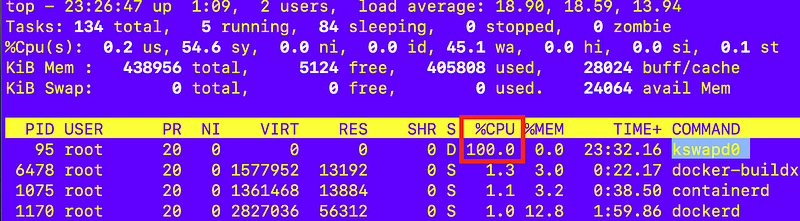
All this because I can’t get buildx from AWS repositories via yum.

So I have to stop this instance, create an image, and launch a new instance with more memory because that process is apparently managing swap memory. With more memory shouldn’t have the swap issue. Right?

Not what you thought you’d be reading about in this post? Me neither.

I run a medium instance. That’s much better. Top CPU usage I saw was 15%. No swap.
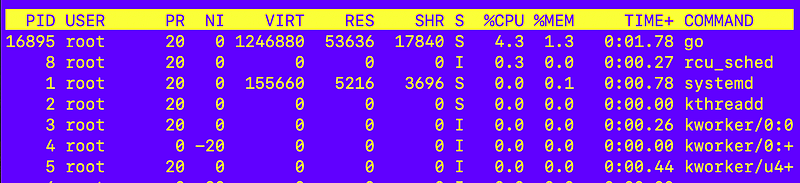
That finished in maybe like 3 or 4 minutes.

Hmm. I am still seeing the old version:

To fix that I ran the following commands (output from make install above):

mkdir -p ~/.docker/cli-plugins #no sudo
sudo install bin/build/buildx ~/.docker/cli-plugins/docker-buildx

After doing that I get the updated version:

Unfortunately still getting the error I started with:

So at this point I run the command to get the docker version details:

docker version

My system has version 20 and the latest is 24.
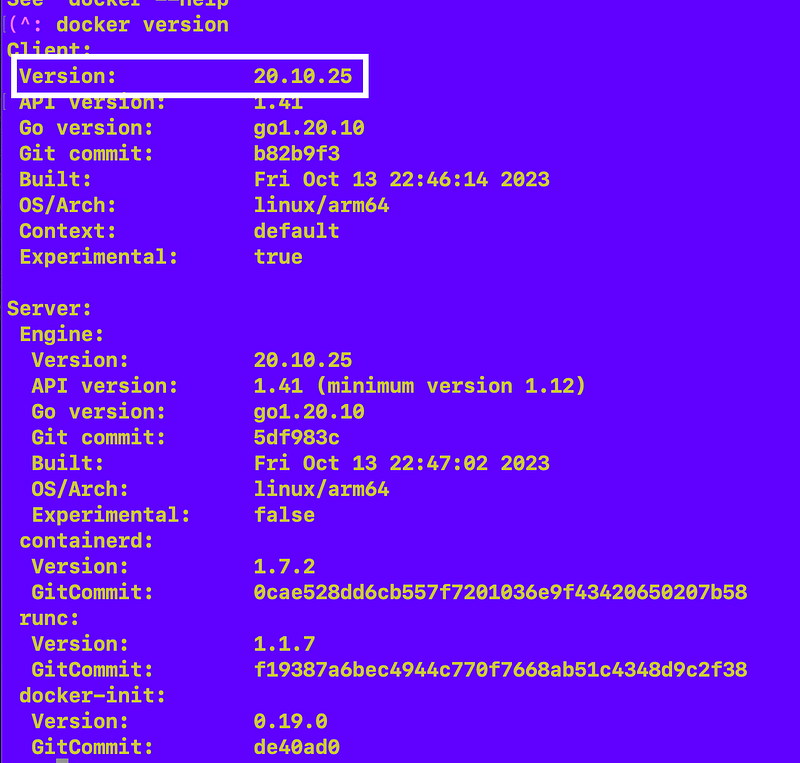
So I run another update because I’ve recently made some network changes. For some reason an AWS update requires access to cli.github.com (???) I really wish AWS would make this stuff work from a local yum repository but more on that later.

I get a bunch of updates.

But no docker updates:
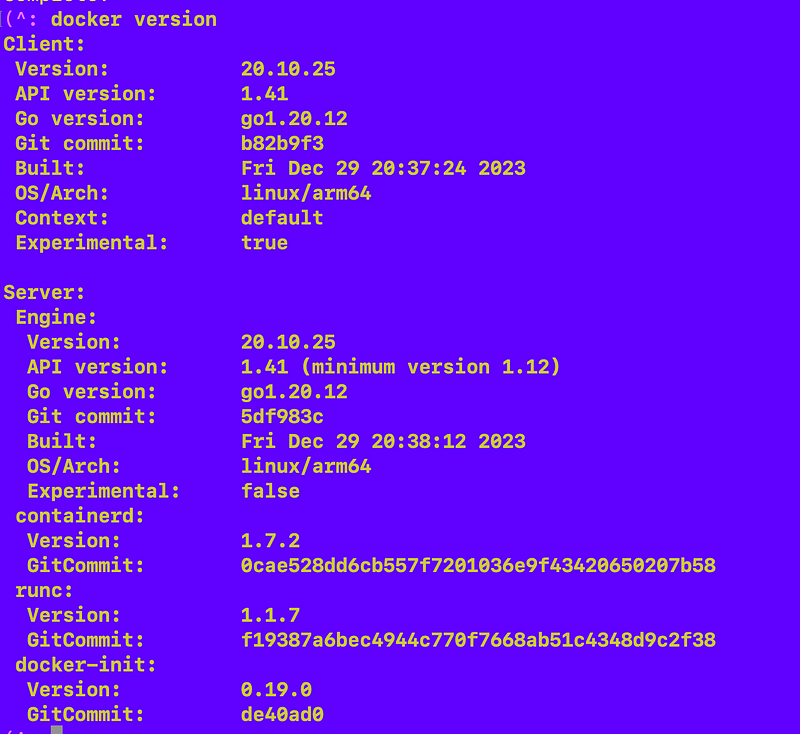
But after unsuccessfully trying to follow the docker documentation to add the docker repo to my configuration, I found this obscure comment:

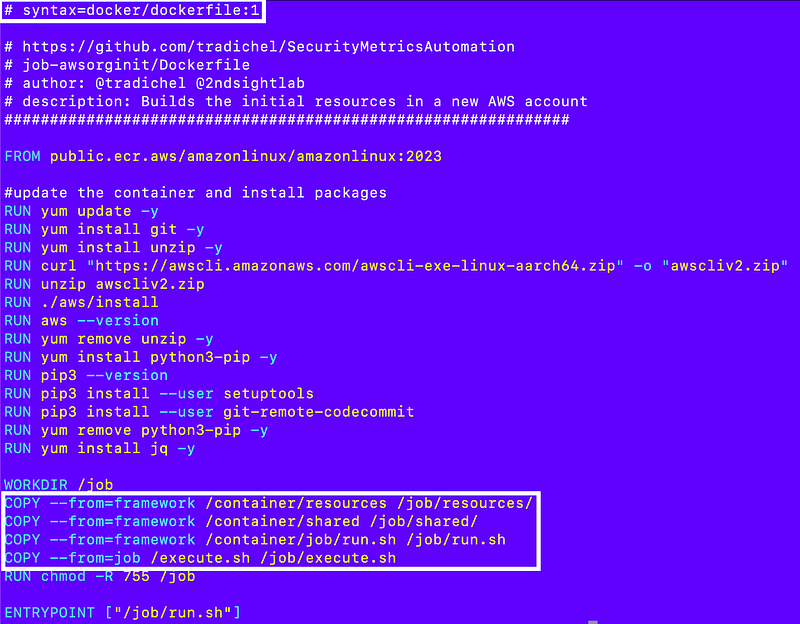
I added this comment at the very top of my Dockerfile:

# syntax=docker/dockerfile:1

That fixed the problem so I could build the container.

Build the container to deploy the root files (awsorginit)

Here’s the code I end up with to build the root container.

First, I have the new directories associated with the above repo so for this test I’m using these two contexts:

  • job-awsorginit
  • AWSJobExecFramework

I rearranged the directors in the AWSJobExecFramework as follows:

  • container — everything that goes into the container image
  • scripts — scripts to build the container image and push and pull the image, etc.
  • ec2 — still has what will be the ec2 userdata code
  • gen_code — needs some updates but still has code generator code
  • testexecute.sh — still the same but I’ve added a bit of code to test the container build with multiple contexts. I will need to change this further later to support the awsorginit job which doesn’t use the full job execution framework.

job-awsorginit/Dockerfile

I might be able to get rid of some of these resources later but the main goal was to try to get the new context directives working. I’m in developer mode, not security mode right now. 😉
job-awsorginit/execute.sh

This file needs to be updated to include the existing root script plus a few additional resources. I’ll cover that in a later post. It’s the file that gets executed when the container runs and is specific to this job so it lives in the job repository, whereas the run.sh file is the generic entrypoint that lives in the job execution framework respository and should be the same for every job.

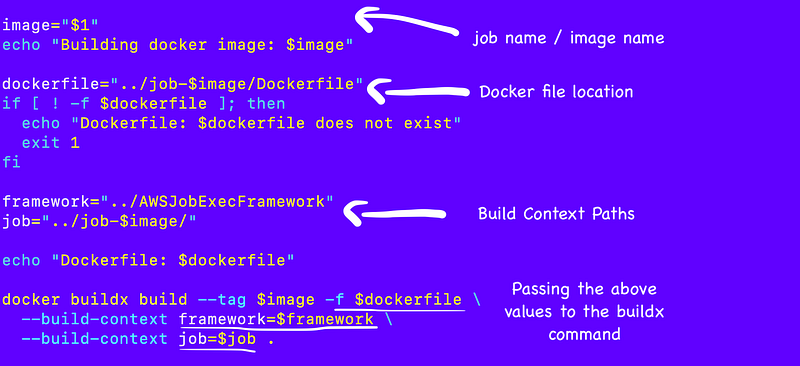
AWSJobExecutionFramework/scripts/build.sh

The build script presumes that you have cloned the job execution framework repo and the job images you want to build to the same folder.

In other words, I have the following in a directory:

/AWSJobExecFramework
/job-awsdeploy
/job-awsorginit

The test file still lives in the root of the AWSJobExecutionFramework and all file paths are relative to that root directory (because bash).

The script now expects an image name (job name) to be passed in as the only argument. Using that name and the expected directories, the script can calculate all the necessary paths.

Since we are using different contexts and the Dockerfile doesn’t live in the current directory, we specify the docker file location with -f.

I also use the build-context directive to define two build contexts — one for the job execution framework and one for the job (container image) directory.
testexecute.sh
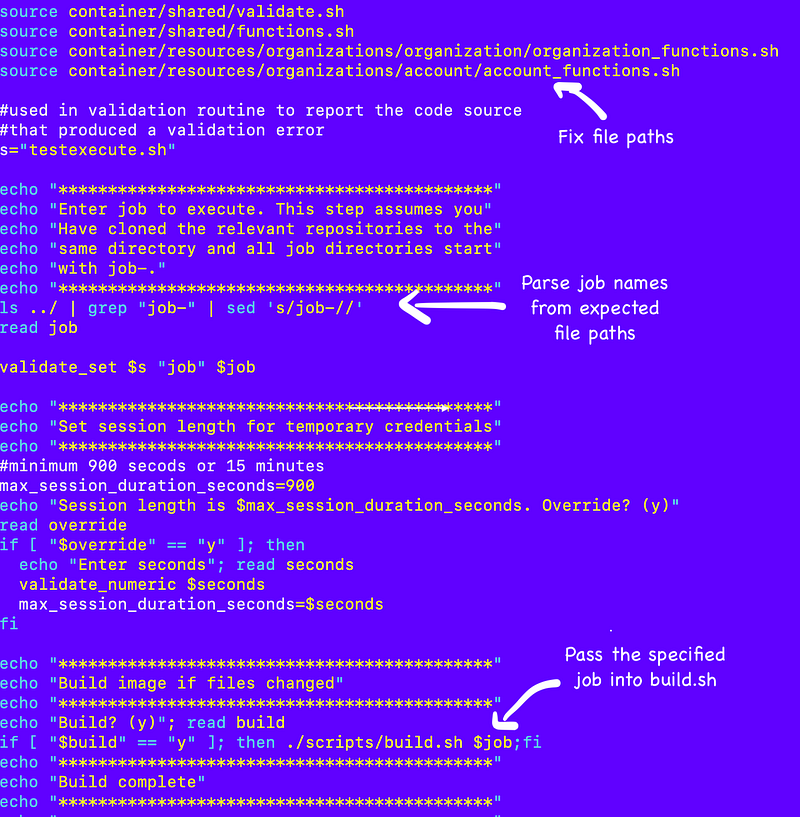
When I run that I get a list of jobs and copy and paste the job name I want to run.

I enter y to build the container:
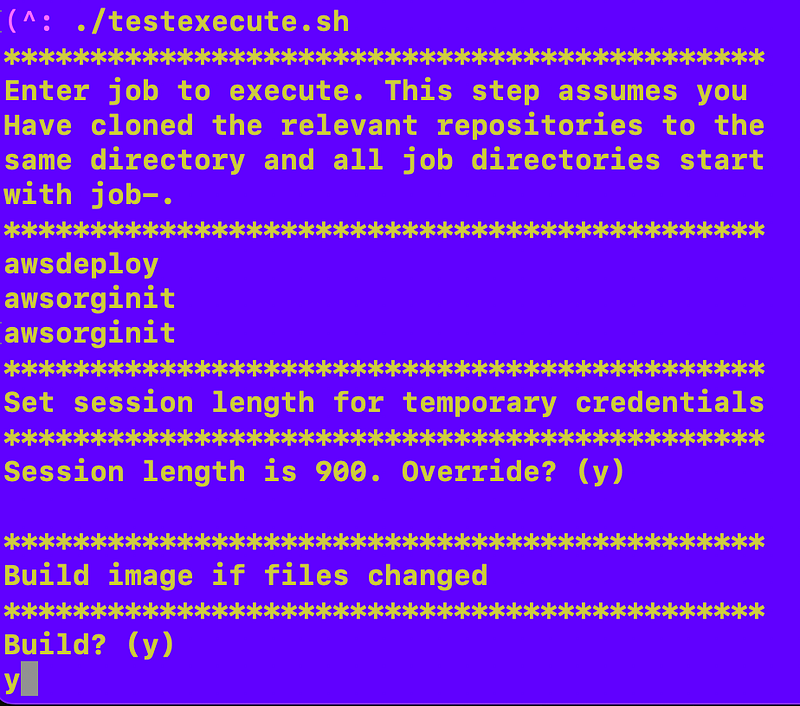
For some reason the container seems to take longer to build but at any rate it works (once I got all the file paths right).

I should note that although it says it copied the files I have not yet verified that and had some issues with CloudShell that I will write about in the next post.

Building the awsdeploy image

I can use the same process to build the awsdeploy container image. I still need to adjust the Dockerfile the same way and I was working on the execute.sh file for that job when I got sidetracked once again with other things to fix. That’s all on the way.

Running jobs

Once I get my job execution framework set up, I can use my testexecute.sh script as is. However, for my initial job I’ll need to handle the credentials a bit differently. Also, I still can’t push and pull a container to and from ECR until I set up ECR. I wrote a while back about this idea of having “environments” and so I’m getting back to that — building out a whole environment to run jobs — because after I do that things should be easier.

The whole environment issue sidetracked me from finalizing my web deployment and the whole environment issue led to an issue with my organization setup so here we are. Hopefully I’ll get all the things done I wanted to do in the first place. I think I’m close.

Follow for updates.

Teri Radichel | © 2nd Sight Lab 2024

About Teri Radichel:
~~~~~~~~~~~~~~~~~~~~
⭐️ Author: Cybersecurity Books
⭐️ Presentations: Presentations by Teri Radichel
⭐️ Recognition: SANS Award, AWS Security Hero, IANS Faculty
⭐️ Certifications: SANS ~ GSE 240
⭐️ Education: BA Business, Master of Software Engineering, Master of Infosec
⭐️ Company: Penetration Tests, Assessments, Phone Consulting ~ 2nd Sight Lab
Need Help With Cybersecurity, Cloud, or Application Security?
~~~~~~~~~~~~~~~~~~~~~~~~~~~~~~~~~~~~~~~~~~~~~~~~~~~~~~~~~~~~~
🔒 Request a penetration test or security assessment
🔒 Schedule a consulting call
🔒 Cybersecurity Speaker for Presentation
Follow for more stories like this:
~~~~~~~~~~~~~~~~~~~~~~~~~~~~~~~~~~~~~~~~~~~~~~~~~~~~~~~~~~~~~ 
❤️ Sign Up my Medium Email List
❤️ Twitter: @teriradichel
❤️ LinkedIn: https://www.linkedin.com/in/teriradichel
❤️ Mastodon: @teriradichel@infosec.exchange
❤️ Facebook: 2nd Sight Lab
❤️ YouTube: @2ndsightlab

Buildx
Container
Context
Paths
Docker
Recommended from ReadMedium