avatarCasey Botticello

Free AI web copilot to create summaries, insights and extended knowledge, download it at here

9540

Abstract

or local searches, you’ll appear in the maps section of the SERP.</p><h1 id="d6c4">How to Use Keywords</h1><figure id="bb32"><img src="https://cdn-images-1.readmedium.com/v2/resize:fit:800/0*4aYzgCqKpveUfmF2"><figcaption>Photo by <a href="https://unsplash.com/@austindistel?utm_source=medium&amp;utm_medium=referral">Austin Distel</a> on <a href="https://unsplash.com?utm_source=medium&amp;utm_medium=referral">Unsplash</a></figcaption></figure><p id="a0a8"><a href="https://bloggingguide.substack.com/p/lsi-keywords-and-their-usefulness">Keywords</a> are one of the most important aspects of SEO. Without a keyword, your readers will never find your content. The trick to keyword optimization is finding and using the right keywords.</p><div id="a1df" class="link-block"> <a href="https://bloggingguide.substack.com/p/lsi-keywords-and-their-usefulness"> <div> <div> <h2>LSI Keywords and Their Usefulness to Bloggers</h2> <div><h3>There are several different type of keywords making up the SEO world. If you are a blogger who has dabbled a bit in…</h3></div> <div><p>bloggingguide.substack.com</p></div> </div> <div> <div style="background-image: url(https://miro.readmedium.com/v2/resize:fit:320/0*kJdCUf-XTXpWEPQz)"></div> </div> </div> </a> </div><p id="a4d7">Keywords should feel natural within your content. They shouldn’t stick out like a sore thumb or be noticeable to readers.</p><p id="1490">Keywords should be placed throughout your content. Use keywords in your introduction and summary, and also include them in your title and in at least one header.</p><p id="67be">You should also use keywords in your meta descriptions, but we’ll talk more about them in a bit.</p><p id="bb7e">Perhaps the biggest challenge when it comes to keywords is selecting them. You’ll need to carry out full and thorough keyword research to find the right ones to use.</p><p id="3787">First of all, try and note down as many words and phrases that are relevant to the content you plan on creating. Look for the types of phrases that people will search for.</p><p id="c9b8">Use a tool such as Google Keyword Planner to help you identify suitable keywords based on the list you’ve created. Type your suggested keywords into the planner tool and have a look at the information that gets provided.</p><p id="af15">You’ll need to use keywords that have a high search volume, but that has a low difficulty score. This means that they are easy to rank for and plenty of people are looking for that search term.</p><p id="a86e">Aim for this type of low-hanging fruit whenever you carry out keyword research for your blog.</p><p id="d450">There are other keyword research tools available, many of which you’ll need to pay for.</p><h1 id="cc83">Optimize Your Content for Voice Search</h1><figure id="2f4a"><img src="https://cdn-images-1.readmedium.com/v2/resize:fit:800/0*5zxregFwunPL1Ec-"><figcaption>Photo by <a href="https://unsplash.com/@jukkaaalho?utm_source=medium&amp;utm_medium=referral">Jukka Aalho</a> on <a href="https://unsplash.com?utm_source=medium&amp;utm_medium=referral">Unsplash</a></figcaption></figure><p id="642e">One of the biggest innovations in the way that we use search engines in recent years has been the advent of voice search.</p><p id="36f6">Using devices such as Amazon’s Echo or Google Home has become very common and you’ll no doubt be used to the in-built AI that responds to your voice commands. The same technology can be found in most modern smartphones.</p><p id="2e08">The shift in the use of voice search has meant that, as bloggers, we need to optimize our content to people using voice. This is because the types of search terms people use are different when using these types of devices.</p><p id="3c33">For example, instead of typing a few brief words, you’ll be more inclined to use a full sentence when you’re using voice search. For this reason, you should try and include long-tail keywords and questions within your keywords.</p><p id="a047">You may want to opt to include an FAQ section on your blog to enhance your chances of ranking on voice searches.</p><h1 id="4321">Writing In-Depth Articles</h1><figure id="cd6a"><img src="https://cdn-images-1.readmedium.com/v2/resize:fit:800/0*vXsoW7hLWwbP0cOK"><figcaption>Photo by <a href="https://unsplash.com/@lukesouthern?utm_source=medium&amp;utm_medium=referral">Luke Southern</a> on <a href="https://unsplash.com?utm_source=medium&amp;utm_medium=referral">Unsplash</a></figcaption></figure><p id="25ae">The length and depth of your articles are important to SEO. The longer your content is, the more likely it’ll be to hold more information.</p><p id="7a81">If Google has the choice of sending users to an article on a given topic that has 500 words in it and sending them to an article with 2,000 words, then it’ll choose the latter option. This is because there is more likely to be meat on the bones of a longer-form blog post.</p><p id="8555">For this reason, you should always look to write long-form, in-depth articles. Be careful about padding these articles out with fluff too. Not only will that be a big turn-off for your readers, but the likes of Google will see through it and will rank you lower as a result.</p><h1 id="605a">Write for Humans</h1><figure id="1382"><img src="https://cdn-images-1.readmedium.com/v2/resize:fit:800/0*kfWvmE06yO7NXCsy"><figcaption>Photo by <a href="https://unsplash.com/@annademy?utm_source=medium&amp;utm_medium=referral">Anna Demianenko</a> on <a href="https://unsplash.com?utm_source=medium&amp;utm_medium=referral">Unsplash</a></figcaption></figure><p id="2071">All this talk of ranking factors and algorithms might be enough to make you forget why you’re creating content in the first place. Don’t forget your readers.</p><p id="b32d">Some bloggers try to manipulate the search results by stuffing keywords into their content in every way they can. This will only serve to make your content dull and repetitive.</p><p id="74e6">Search engines are wise to practices such as keyword stuffing and if you’re just writing to please an algorithm, you will be penalized for it with a lower ranking position.</p><div id="b551" class="link-block"> <a href="https://readmedium.com/optimizing-your-content-to-become-the-featured-snippet-in-google-search-results-d50101754f"> <div> <div> <h2>Optimizing Your Content to Become the “Featured Snippet” in Google Search Results</h2> <div><h3>What is the Google featured snippet and why is it important</h3></div> <div><p>medium.com</p></div> </div> <div> <div style="background-image: url(https://miro.readmedium.com/v2/resize:fit:320/1*73_D_wF3F88UlttrJnQ22A.jpeg)"></div> </div> </div> </a> </div><h1 id="cf39">Include Meta Descriptions</h1><figure id="4802"><img src="https://cdn-images-1.readmedium.com/v2/resize:fit:800/0*ePfP4qd1zvUzJZxs"><figcaption>Photo by <a href="https://unsplash.com/@kobuagency?utm_source=medium&amp;utm_medium=referral">KOBU Agency</a> on <a href="https://unsplash.com?utm_source=medium&amp;utm_medium=referral">Unsplash</a></figcaption></figure><p id="a7db">Meta descriptions are the short snippets of text that you see under your blog’s link in the SERPs. It is vital that you spend a bit of time honing your meta description so that it is readable, features the focus keyword, and adds value to the content it’s sending people to. Learning <a href="https://bloggingguide.com/how-to-write-a-meta-description/"><b>how to write a meta description</b></a><b> </b>is one of the single most valuable SEO skills that anyone can learn.</p><p id="99a1">Remember, the meta description is the first thing people will see in the search results. The decision about whether they’ll visit your site is often made based on how attractive your meta description is.</p><div id="604a" class="link-block"> <a href="https://bloggingguide.com/how-to-write-a-meta-description/"> <div> <div> <h2>How to Write a Meta Description | Blogging Guide</h2> <div><h3>An effective meta description should be short and sweet. Search engine crawlers will focus on the first 155 to 160…</h3></div> <div><p>bloggingguide.com</p></div> </div> <div> <div style="background-image: url(https://miro.readmedium.com/v2/resize:fit:320/0*CbIUAcJX1Dt5AIcQ)"></div> </div> </div> </a> </div><h1 id="6e8b">Use Links</h1><figure id="9ea9"><img src="https://cdn-images-1.readmedium.com/v2/resize:fit:800/0*FTr6Be_XrdsUZ4pM"><figcaption>Photo by <a href="https://unsplash.com/@tamanna_rumee?utm_source=medium&amp;utm_medium=referral">Tamanna Rumee</a> on <a href="https://unsplash.com?utm_source=medium&amp;utm_medium=referral">Unsplash</a></figcaption></figure><p id="182b">Throughout your content, you should include links. There are two types of link:</p><ol><li><b>Internal links</b> — these send users to content <i>within </i>your site</li><li><b>External links</b> — these send users to content <i>outside </i>of your site</li></ol><p id="585f">Internal linking is essential as it helps users and search engines see the relationships within your content. It also signposts

Options

users to things that they might want to read, thus increasing the amount of time spent reading your blog.</p><div id="f2e6" class="link-block"> <a href="https://bloggingguide.substack.com/p/5-essential-tips-to-run-a-successful"> <div> <div> <h2>🔒 5 Essential Tips to Run a Successful Link Building Campaign for Your Blog Posts</h2> <div><h3>To attract more traffic over time, bloggers often turn to various SEO tactics to improve the chances of people finding…</h3></div> <div><p>bloggingguide.substack.com</p></div> </div> <div> <div style="background-image: url(https://miro.readmedium.com/v2/resize:fit:320/0*gnm7h5JKqkNXRYjA)"></div> </div> </div> </a> </div><p id="e6a5">External links help bring authenticity to your page.</p><h1 id="6a2e">Guest Post</h1><figure id="dfb5"><img src="https://cdn-images-1.readmedium.com/v2/resize:fit:800/0*81Es8kuVTiplHyW5"><figcaption>Photo by <a href="https://unsplash.com/@jeshoots?utm_source=medium&amp;utm_medium=referral">JESHOOTS.COM</a> on <a href="https://unsplash.com?utm_source=medium&amp;utm_medium=referral">Unsplash</a></figcaption></figure><p id="218f">While on the subject of linking, it’s important that you develop a strategy for getting your content linked to other blogs and websites. One of the best and easiest ways that you can do this is by crafting guest posts.</p><p id="118f">A guest post is an article written by you that will feature on another person’s blog. Many blogs open their doors to guest bloggers as a way of getting good quality content to bolster their own page. In return, the guest blogger is able to place links to their own content within the post.</p><p id="b8c7">Get in the habit of networking with other bloggers and always be on the lookout for opportunities to generate content for reputable sites.</p><h1 id="e153">Improve Your Page Load Speeds</h1><figure id="1a5d"><img src="https://cdn-images-1.readmedium.com/v2/resize:fit:800/0*aJxTPVBl4aZ8y_ka"><figcaption>Photo by <a href="https://unsplash.com/@rieppi?utm_source=medium&amp;utm_medium=referral">Riccardo Pierri</a> on <a href="https://unsplash.com?utm_source=medium&amp;utm_medium=referral">Unsplash</a></figcaption></figure><p id="8502">Nobody likes to wait around for a website to load up and Google, Bing, and all of the other search engines know this. For this reason, your page loading speeds are a ranking factor that you need to pay attention to.</p><p id="f8b0">You can learn how fast your blog is by running it through Google’s Page Speed Insights. This will let you know how fast (or slow) your blog is, but more importantly, it will tell you what you can do to help improve this.</p><p id="b0fc">Some of the <a href="https://bloggingguide.substack.com/p/how-to-increase-blog-page-speed">ways to speed up your site</a> include making sure you have lazy load images turned on. This will ensure only the images on the user’s screen will load at any given time- instead of the whole site loading up.</p><p id="6fe0">You should also make sure all of your images are compressed. There are plenty of free plugins available that will help you do that.</p><p id="de01">Finally, make sure you uninstall and delete any unused themes or plugins that you have running on your site. This will help to make it less bloated.</p><div id="83c1" class="link-block"> <a href="https://bloggingguide.substack.com/p/how-to-increase-blog-page-speed"> <div> <div> <h2>📝 How to Increase Blog Page Speed</h2> <div><h3>The blog article you wrote is rich in research and captivates the reader. But what if it is taking forever (or more…</h3></div> <div><p>bloggingguide.substack.com</p></div> </div> <div> <div style="background-image: url(https://miro.readmedium.com/v2/resize:fit:320/0*4AxiPJZZw8zs_w7G)"></div> </div> </div> </a> </div><h1 id="527d">Optimize Your Site for Mobile Devices</h1><figure id="4e6e"><img src="https://cdn-images-1.readmedium.com/v2/resize:fit:800/0*uBXnS5anPKKIUzKV"><figcaption>Photo by <a href="https://unsplash.com/@mattyfours?utm_source=medium&amp;utm_medium=referral">Matthew Fournier</a> on <a href="https://unsplash.com?utm_source=medium&amp;utm_medium=referral">Unsplash</a></figcaption></figure><p id="b3bc">We live in the age of the smartphone, and every day 1 million more smartphones come into use each day. With so many people accessing the web through mobile devices, it is imperative that you optimize your site for them.</p><p id="ec0c">You can start off by making sure images load up within the frame of the screen and that text is easily readable.</p><h1 id="ac55">Keep On Optimizing</h1><figure id="b887"><img src="https://cdn-images-1.readmedium.com/v2/resize:fit:800/0*tFiFsBOgBAOjMJfp"><figcaption>Photo by <a href="https://unsplash.com/@sayolo?utm_source=medium&amp;utm_medium=referral">Sayo Garcia</a> on <a href="https://unsplash.com?utm_source=medium&amp;utm_medium=referral">Unsplash</a></figcaption></figure><p id="197c">What is SEO? SEO is an ongoing activity that encompasses many different facets. You’ll need to continuously adapt your content to ensure it meets SEO standards.</p><p id="3bf0">Once you’ve learned the basics, you’ll find that it becomes second nature to consider your keywords, build links, and optimize your site for page speeds and mobile devices.</p><p id="f0e2"><a href="undefined">Casey Botticello</a></p><p id="5ece"><i>Thanks for reading this article! Leave a comment below if you have any questions, and if you want to learn more about blogging, content marketing, and social media strategy, be sure to sign up for the <a href="https://bloggingguide.substack.com"><b>Blogging Guide Newsletter</b></a>!</i></p><div id="6c7e" class="link-block"> <a href="https://bloggingguide.substack.com"> <div> <div> <h2>Blogging Guide</h2> <div><h3>Learn how to make money writing online and navigate the digital publishing landscape! ✔️ Medium ✔️ Substack ✔️ Amazon…</h3></div> <div><p>bloggingguide.substack.com</p></div> </div> <div> <div style="background-image: url(https://miro.readmedium.com/v2/resize:fit:320/0*AAcjK3UII8QUo4u9)"></div> </div> </div> </a> </div><h2 id="f68a">If you liked this article, here are some other articles you may enjoy:</h2><div id="b54f" class="link-block"> <a href="https://bloggingguide.com/seo-for-bloggers/"> <div> <div> <h2>SEO for Bloggers - Blogging Guide</h2> <div><h3>SEO stands for search engine optimization, and refers to making your content easier to find in Google. Read our guide…</h3></div> <div><p>bloggingguide.com</p></div> </div> <div> <div style="background-image: url(https://miro.readmedium.com/v2/resize:fit:320/0*krli1XMga7b1Edf_)"></div> </div> </div> </a> </div><div id="0eb0" class="link-block"> <a href="https://bloggingguide.com/best-free-stock-photo-sites-for-bloggers/"> <div> <div> <h2>Best Free Stock Photo Sites for Bloggers — Blogging Guide</h2> <div><h3>Find the best stock photos using our guide covering the best free stock photo sites.</h3></div> <div><p>bloggingguide.com</p></div> </div> <div> <div style="background-image: url(https://miro.readmedium.com/v2/resize:fit:320/0*WltaPXHu325fu5QB)"></div> </div> </div> </a> </div><figure id="04d0"><img src="https://cdn-images-1.readmedium.com/v2/resize:fit:800/0*jxGUDN_JEbAGoOsa.png"><figcaption></figcaption></figure><p id="1c21"><a href="http://www.caseybotticello.com"><b>Casey Botticello</b></a> is an internet entrepreneur and the founder of <a href="https://bloggingguide.com"><b>Blogging Guide</b></a>, an online community of writers with an<b> <a href="https://bloggingguide.substack.com">award-winning newsletter</a></b>. He is also the creator of the popular <a href="https://gumroad.com/l/medium-course"><b>Medium Writing Course</b></a><b> and the <a href="https://bloggingguide.gumroad.com/l/substack-course">Substack Newsletter Course</a>.</b></p><p id="d6dc">Casey previously worked at several tech startups, a lobbying & strategic communications firm, and has created several businesses of his own. He is a graduate of The University of Pennsylvania, where he received his B.A. in Urban Studies.</p><blockquote id="7edb"><p><i>You can connect with him on <a href="https://www.linkedin.com/in/caseybotticello/"><b>LinkedIn</b></a>, <a href="https://twitter.com/blogging__guide"><b>Twitter</b></a>, <a href="https://www.facebook.com/groups/mediumwriting"><b>Facebook</b></a>, follow his Medium publications, <a href="https://medium.com/digital-marketing-lab"><b>Digital Marketing Lab</b></a><b> </b>and <a href="https://medium.com/blogging-guide"><b>Medium Blogging Guide</b></a><b>, </b>or reach out to him directly on his<b> <a href="http://www.caseybotticello.com">personal website</a>.</b></i></p></blockquote></article></body>

SEO for Bloggers: What Is SEO?

How do I SEO optimize my blog post and why is it important?
Source: Casey Botticello of Blogging Guide

For a more recent look at SEO for bloggers, check out my 2023 article:

The number one spot on any search engine results page (SERP) is highly coveted. This is because 33% of all internet users will click on the first result. The second result gets proportionally fewer viewers and by the time you reach the bottom of the page, the percentage drops to nearly zero.

To get your blog into the top spot on any relevant searches you need to use search engine optimization (SEO).

But what Is SEO? And how can you use SEO in your blog to help it rise up the rankings and generate more traffic?

In this article, we’ll share some digital marketing tips for improving your blog.

What is SEO?

Photo by Merakist on Unsplash

First up, we need to address the question ‘what is SEO?’

SEO stands for Search Engine Optimization, which is the practice of increasing the quantity and quality of traffic to your website through organic search engine results.

SEO is something that you may have heard of, but it may sound like some kind of mystical dark art that only specialist SEO services can help you with. Fortunately, that’s not the case. With the right knowledge and tools, you could use SEO to take your blog marketing to the next level.

There are over 1.7 billion websites online. All of these pages need to be sorted and ranked into some kind of order so that whenever someone makes a search using a search engine such as Google, it returns the most relevant site first.

To achieve this, the likes of Google use several key ranking factors. These include things like your use of keywords within your blog post and whether the page will load quickly on any device.

Powerful algorithms are then used to sort all of these pages into order, and the top result should be a page that will not only answer all of your queries but will work well.

But how do you ensure your blog posts meet the requirements of the ranking factors and the algorithms? This is where search optimization comes in.

SEO helps your posts rank organically in the search results. There are several types of SEO, the main ones that we’ll look at are:

  • On-page SEO
  • Off-page SEO
  • Technical SEO
  • Local SEO

Let’s take a look at these types of SEO in more detail.

What Is On-Page SEO?

Photo by Firmbee.com on Unsplash

On-page SEO relates to anything that you do to influence your ranking position while you’re creating content for your site. This includes choosing and optimizing your focus keywords, optimizing titles and subheadings, and managing your URLs.

Making sure that any images that you use have been optimized is also important to on-page SEO as is placing internal links to other blog posts from your site into your content.

What Is Off-Page SEO?

Photo by Glenn Carstens-Peters on Unsplash

Off-page SEO refers to anything you do away from your site to help with your organic SEO. One of the main types of off-page SEO is link building.

One of the ways that you can boost your position in the rankings is by teaching search engines that your blog is an authority on the particular subject that it talks about. You can raise the profile of your blog in this way by having other sites link to your content.

A popular way of doing this is through guest posting. That means creating content for other, more authoritative blogs that link back to your content. Another way to build back-links is by becoming a guest on a podcast.

What Is Technical SEO?

Photo by Ilya Pavlov on Unsplash

Technical SEO relates to anything that you do on the backend of your site to influence your position in the rankings. One of the changes you can make is to optimize the page load speeds on your blog to make it more responsive.

Technical SEO may sound scary and something that only a web developer should be doing, but there are certain things that a blogger can do quite easily to help optimize their own blog.

If you are using a blogging platform such as Medium to post your content, this process is made much simpler. Medium takes care of issues such as mobile optimization, page loading speed, domain authority. But you still need to properly format your Medium posts to ensure optimal search engine rankings.

What Is Local SEO?
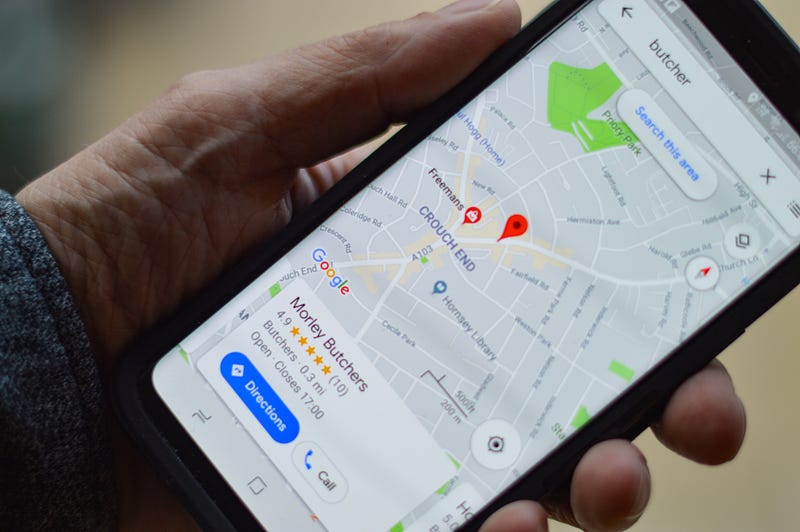
Photo by henry perks on Unsplash

Local SEO relates to how your site shows up on local searches. If you run a local interest blog, this area of SEO may be relevant to you. When you optimize your site for local searches, you’ll appear in the maps section of the SERP.

How to Use Keywords

Photo by Austin Distel on Unsplash

Keywords are one of the most important aspects of SEO. Without a keyword, your readers will never find your content. The trick to keyword optimization is finding and using the right keywords.

Keywords should feel natural within your content. They shouldn’t stick out like a sore thumb or be noticeable to readers.

Keywords should be placed throughout your content. Use keywords in your introduction and summary, and also include them in your title and in at least one header.

You should also use keywords in your meta descriptions, but we’ll talk more about them in a bit.

Perhaps the biggest challenge when it comes to keywords is selecting them. You’ll need to carry out full and thorough keyword research to find the right ones to use.

First of all, try and note down as many words and phrases that are relevant to the content you plan on creating. Look for the types of phrases that people will search for.

Use a tool such as Google Keyword Planner to help you identify suitable keywords based on the list you’ve created. Type your suggested keywords into the planner tool and have a look at the information that gets provided.

You’ll need to use keywords that have a high search volume, but that has a low difficulty score. This means that they are easy to rank for and plenty of people are looking for that search term.

Aim for this type of low-hanging fruit whenever you carry out keyword research for your blog.

There are other keyword research tools available, many of which you’ll need to pay for.

Optimize Your Content for Voice Search

Photo by Jukka Aalho on Unsplash

One of the biggest innovations in the way that we use search engines in recent years has been the advent of voice search.

Using devices such as Amazon’s Echo or Google Home has become very common and you’ll no doubt be used to the in-built AI that responds to your voice commands. The same technology can be found in most modern smartphones.

The shift in the use of voice search has meant that, as bloggers, we need to optimize our content to people using voice. This is because the types of search terms people use are different when using these types of devices.

For example, instead of typing a few brief words, you’ll be more inclined to use a full sentence when you’re using voice search. For this reason, you should try and include long-tail keywords and questions within your keywords.

You may want to opt to include an FAQ section on your blog to enhance your chances of ranking on voice searches.

Writing In-Depth Articles

Photo by Luke Southern on Unsplash

The length and depth of your articles are important to SEO. The longer your content is, the more likely it’ll be to hold more information.

If Google has the choice of sending users to an article on a given topic that has 500 words in it and sending them to an article with 2,000 words, then it’ll choose the latter option. This is because there is more likely to be meat on the bones of a longer-form blog post.

For this reason, you should always look to write long-form, in-depth articles. Be careful about padding these articles out with fluff too. Not only will that be a big turn-off for your readers, but the likes of Google will see through it and will rank you lower as a result.

Write for Humans

Photo by Anna Demianenko on Unsplash

All this talk of ranking factors and algorithms might be enough to make you forget why you’re creating content in the first place. Don’t forget your readers.

Some bloggers try to manipulate the search results by stuffing keywords into their content in every way they can. This will only serve to make your content dull and repetitive.

Search engines are wise to practices such as keyword stuffing and if you’re just writing to please an algorithm, you will be penalized for it with a lower ranking position.

Include Meta Descriptions

Photo by KOBU Agency on Unsplash

Meta descriptions are the short snippets of text that you see under your blog’s link in the SERPs. It is vital that you spend a bit of time honing your meta description so that it is readable, features the focus keyword, and adds value to the content it’s sending people to. Learning how to write a meta description is one of the single most valuable SEO skills that anyone can learn.

Remember, the meta description is the first thing people will see in the search results. The decision about whether they’ll visit your site is often made based on how attractive your meta description is.

Use Links

Photo by Tamanna Rumee on Unsplash

Throughout your content, you should include links. There are two types of link:

  1. Internal links — these send users to content within your site
  2. External links — these send users to content outside of your site

Internal linking is essential as it helps users and search engines see the relationships within your content. It also signposts users to things that they might want to read, thus increasing the amount of time spent reading your blog.

External links help bring authenticity to your page.

Guest Post

Photo by JESHOOTS.COM on Unsplash

While on the subject of linking, it’s important that you develop a strategy for getting your content linked to other blogs and websites. One of the best and easiest ways that you can do this is by crafting guest posts.

A guest post is an article written by you that will feature on another person’s blog. Many blogs open their doors to guest bloggers as a way of getting good quality content to bolster their own page. In return, the guest blogger is able to place links to their own content within the post.

Get in the habit of networking with other bloggers and always be on the lookout for opportunities to generate content for reputable sites.

Improve Your Page Load Speeds

Photo by Riccardo Pierri on Unsplash

Nobody likes to wait around for a website to load up and Google, Bing, and all of the other search engines know this. For this reason, your page loading speeds are a ranking factor that you need to pay attention to.

You can learn how fast your blog is by running it through Google’s Page Speed Insights. This will let you know how fast (or slow) your blog is, but more importantly, it will tell you what you can do to help improve this.

Some of the ways to speed up your site include making sure you have lazy load images turned on. This will ensure only the images on the user’s screen will load at any given time- instead of the whole site loading up.

You should also make sure all of your images are compressed. There are plenty of free plugins available that will help you do that.

Finally, make sure you uninstall and delete any unused themes or plugins that you have running on your site. This will help to make it less bloated.

Optimize Your Site for Mobile Devices

Photo by Matthew Fournier on Unsplash

We live in the age of the smartphone, and every day 1 million more smartphones come into use each day. With so many people accessing the web through mobile devices, it is imperative that you optimize your site for them.

You can start off by making sure images load up within the frame of the screen and that text is easily readable.

Keep On Optimizing

Photo by Sayo Garcia on Unsplash

What is SEO? SEO is an ongoing activity that encompasses many different facets. You’ll need to continuously adapt your content to ensure it meets SEO standards.

Once you’ve learned the basics, you’ll find that it becomes second nature to consider your keywords, build links, and optimize your site for page speeds and mobile devices.

Casey Botticello

Thanks for reading this article! Leave a comment below if you have any questions, and if you want to learn more about blogging, content marketing, and social media strategy, be sure to sign up for the Blogging Guide Newsletter!

If you liked this article, here are some other articles you may enjoy:

Casey Botticello is an internet entrepreneur and the founder of Blogging Guide, an online community of writers with an award-winning newsletter. He is also the creator of the popular Medium Writing Course and the Substack Newsletter Course.

Casey previously worked at several tech startups, a lobbying & strategic communications firm, and has created several businesses of his own. He is a graduate of The University of Pennsylvania, where he received his B.A. in Urban Studies.

You can connect with him on LinkedIn, Twitter, Facebook, follow his Medium publications, Digital Marketing Lab and Medium Blogging Guide, or reach out to him directly on his personal website.

Business
Writing
Entrepreneurship
Productivity
Design
Recommended from ReadMedium