
Passive Income
Selling POD on Redbubble? Two Ways to Perform Keyword Research
Two Unique Research Methods To Score Profits On Redbubble

If you have been following me for a while you know I like to dive deep into passive income strategies, especially creative side hustles such as selling print-on-demand products.
The first platform I joined in late 2019 that allows me to create multiple products is Redbubble. Not only does it offer an easy do-it-yourself uploading and publishing method, it handles the majority of the marketing for you by following the user around the web through the use of cookies, so you can invest more time in the creation and creative process.
A few months ago, I wrote two intensive articles about my experience using Redbubble as well as the exact 8-step process I follow to make consistent sales using the platform. You can view the articles below:
Although Redbubble has a great potential to attract eager customers and bring in these consistent sales, keyword research plays a vital role in the success of your designs. Poor keyword research will result in fewer sales and exposure as your designs will have a hard time getting found by both customers and the search engines.
In the article above, I’ve listed keyword research as step 2 of the 8-step strategies to make passive income on Redbubble. You can see how important it is to correctly perform keyword research early in the process to give our shop a kick-start in the search engines.
One mistake I did in the first three months of my Redbubble journey is simply overlook the keyword research process, thinking that the beauty of my designs was enough to get the sales rolling. Little did I know, it was the exact cause of the failure of my first designs.
But the good news is, it is never too late to correct your keyword research strategy even if you created your designs years ago. Do your keyword research now to help your designs get a lift in the algorithm. After you’ve done so, simply go to the ‘Manage Portfolio’ section in the dashboard and click on the auto edit to type in your keywords and edit your title and description.Click on ‘update’ and you are ready to go.
Here are two ways to perform keyword research that are unique to selling on Redbubble. You can use these methods for selling any product on Redbubble. Method#2 is my favorite as it is easy to implement and almost automates the process.
Method #1 Search Trending Tags
This is an easy method that can generate multiple tags. It can be used mainly for trending tags.
- When working on Redbubble or any other POD site, you want to pay attention to creating trending designs that sell quick but also evergreen designs that can sell all year round.
- I go into further details about my formula for creating evergreen designs on Redbubble here.
- Use this method to generate trending tags and climb on the search engines using the power of trends. Perfect if you are new to selling on the platform as it can help you make your first few sales and climb on the algorithm.
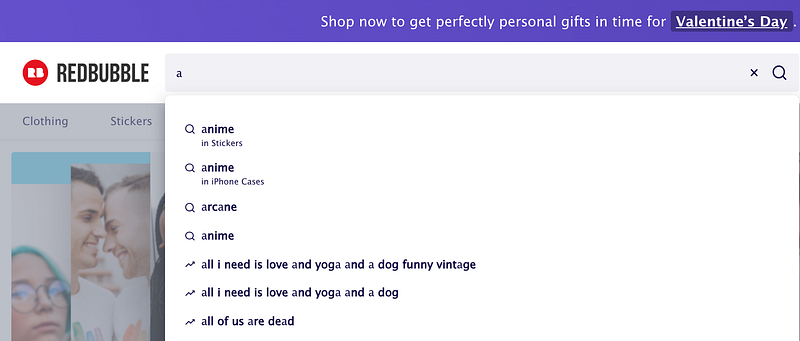
For trending keywords:
In this strategy, using the Redbubble search bar. Start by typing each letter of the alphabet one at a time and a drop down window will appear showing you which keywords and tags. Focus on the ones that have a scaling emoji next to them. This indicates that they are trending keyword (see screenshot below).
In order to save your results and return to them later on, create an excel sheet and copy each of the trending keywords you are interested in. Search them one by one to view individual results.
- Formula= if results less than 300 designs per trending keyword then its a great opportunity to dive in and create designs for that specific keyword.
Make sure to also optimize the title and description to include the trending keyword in a cohesive and clear way. This will greatly help with SEO optimization.
Method #2 Using BubbleTrends
One of my favorite quickest and easiest ways to do keyword research for trending keywords.
BubbleTrends is a great free website that allows you to view trending keywords. It saves you time by including the search results and its updated every 24 hours.
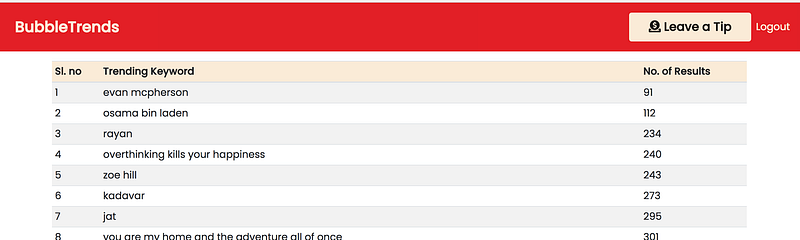
I still like to do a live search for each keyword I choose in order to get the most updated result. Following the same formula above, I select the best keywords and create designs for these.
For evergreen keywords, I increase the formula to 500 results instead of 300 and get creating.
More on Redbubble:
Resources:
- Creative Fabrica : provides you with a commercial license of text and graphic-based designs. The designs are created by creatively talented artists.You can purchase single items, bundles or opt for the monthly subscription to access all the graphics, fonts and classes.
- Canva: my favorite when it comes to designing for Redbubble.
- Tail wind- Get $15 when you sign up on Tailwind using this link.
- Pinterest: my preferred free marketing method.
- Photopea: a free online photoshop alternative.
- Ipiccy: a free in-site graphic editing software that allows the creation of foiled designs.
- Bubble Trends: free keyword research tool for Redbubble.
If You would like to support my journey, then kindly subscribe to my youtube channel where I will be sharing updates as well as step-by-step guides on my passive income journey as well as business strategies and tricks. Subscribe here.
Access unlimited high-quality content on Medium by subscribing here. By using my link, you support me in continuing to write on this platform and provide my strategies and tricks on building a passive online income.
Disclaimer
When you click on some links on this page and make a purchase, I may earn a small commission to support me in continuing to spread tips to you and others.
About The Author
Noor is a second-year business student at Tredu. She is also studying for Diploma of International Smart Industry at Tampere University. She is passionate about marketing and content creation. She recently launched her YouTube channel specializing in holistic healing.