avatarGriffin Leow

Free AI web copilot to create summaries, insights and extended knowledge, download it at here

6024

Abstract

'</span>, <span class="hljs-string">'usercreatedts'</span>, <span class="hljs-string">'tweetcreatedts'</span>, <span class="hljs-string">'retweetcount'</span>, <span class="hljs-string">'text'</span>, <span class="hljs-string">'hashtags'</span>] ) program_start = <span class="hljs-built_in">time</span>.<span class="hljs-built_in">time</span>() <span class="hljs-keyword">for</span> i <span class="hljs-keyword">in</span> range(<span class="hljs-number">0</span>, numRuns): <span class="hljs-comment"># We will time how long it takes to scrape tweets for each run:</span> start_run = <span class="hljs-built_in">time</span>.<span class="hljs-built_in">time</span>()

    <span class="hljs-comment"># Collect tweets using the Cursor object</span>
    <span class="hljs-comment"># .Cursor() returns an object that you can iterate or loop over to access the data collected.</span>
    <span class="hljs-comment"># Each item in the iterator has various attributes that you can access to get information about each tweet</span>
    tweets = tweepy.Cursor(api.search, q=search_words, lang=<span class="hljs-string">"en"</span>, since=date_since, tweet_mode=<span class="hljs-string">'extended'</span>).<span class="hljs-keyword">items</span>(numTweets)</pre></div><div id="10ae"><pre><span class="hljs-comment"># Store these tweets into a python list</span>
    <span class="hljs-attr">tweet_list</span> = [tweet for tweet in tweets]</pre></div><div id="a77c"><pre># Obtain the <span class="hljs-keyword">following</span> <span class="hljs-keyword">info</span> (methods <span class="hljs-keyword">to</span> <span class="hljs-keyword">call</span> them <span class="hljs-keyword">out</span>):
    # <span class="hljs-keyword">user</span>.screen_name - twitter handle
    # <span class="hljs-keyword">user</span>.description - description <span class="hljs-keyword">of</span> account
    # <span class="hljs-keyword">user</span>.<span class="hljs-keyword">location</span> - <span class="hljs-keyword">where</span> <span class="hljs-keyword">is</span> he tweeting <span class="hljs-keyword">from</span>
    # <span class="hljs-keyword">user</span>.friends_count - <span class="hljs-keyword">no</span>. <span class="hljs-keyword">of</span> other users that <span class="hljs-keyword">user</span> <span class="hljs-keyword">is</span> <span class="hljs-keyword">following</span> (<span class="hljs-keyword">following</span>)
    # <span class="hljs-keyword">user</span>.followers_count - <span class="hljs-keyword">no</span>. <span class="hljs-keyword">of</span> other users who are <span class="hljs-keyword">following</span> this <span class="hljs-keyword">user</span> (followers)
    # <span class="hljs-keyword">user</span>.statuses_count - total tweets <span class="hljs-keyword">by</span> <span class="hljs-keyword">user</span>
    # <span class="hljs-keyword">user</span>.created_at - <span class="hljs-keyword">when</span> the <span class="hljs-keyword">user</span> account was created
    # created_at - <span class="hljs-keyword">when</span> the tweet was created
    # retweet_count - <span class="hljs-keyword">no</span>. <span class="hljs-keyword">of</span> retweets
    # (deprecated) <span class="hljs-keyword">user</span>.favourites_count - probably total <span class="hljs-keyword">no</span>. <span class="hljs-keyword">of</span> tweets that <span class="hljs-keyword">is</span> favourited <span class="hljs-keyword">by</span> <span class="hljs-keyword">user</span>
    # retweeted_status.full_text - <span class="hljs-keyword">full</span> <span class="hljs-type">text</span> <span class="hljs-keyword">of</span> the tweet
    # tweet.entities[<span class="hljs-string">'hashtags'</span>] - hashtags <span class="hljs-keyword">in</span> the tweet</pre></div><div id="4883"><pre><span class="hljs-comment"># Begin scraping the tweets individually:</span>
    <span class="hljs-attr">noTweets</span> = <span class="hljs-number">0</span></pre></div><div id="c240"><pre><span class="hljs-attribute">for tweet in tweet_list</span><span class="hljs-punctuation">:</span></pre></div><div id="8368"><pre><span class="hljs-comment"># Pull the values</span>
        <span class="hljs-attr">username</span> = tweet.user.screen_name
        <span class="hljs-attr">acctdesc</span> = tweet.user.description
        <span class="hljs-attr">location</span> = tweet.user.location
        <span class="hljs-attr">following</span> = tweet.user.friends_count
        <span class="hljs-attr">followers</span> = tweet.user.followers_count
        <span class="hljs-attr">totaltweets</span> = tweet.user.statuses_count
        <span class="hljs-attr">usercreatedts</span> = tweet.user.created_at
        <span class="hljs-attr">tweetcreatedts</span> = tweet.created_at
        <span class="hljs-attr">retweetcount</span> = tweet.retweet_count
        <span class="hljs-attr">hashtags</span> = tweet.entities[<span class="hljs-string">'hashtags'</span>]</pre></div><div id="ce51"><pre><span class="hljs-keyword">try</span>:
            <span class="hljs-built_in">text</span> = tweet.retweeted_status.full_text
        except AttributeError:  <span class="hljs-comment"># Not a Retweet</span>
            <span class="hljs-built_in">text</span> = tweet.full_text</pre></div><div id="7d1c"><pre><span class="hljs-comment"># Add the 11 variables to the empty list - ith_tweet:</span>
        <span class="hljs-attr">ith_tweet</span> = [username, acctdesc, location, following, followers, totaltweets,
                     usercreatedts, tweetcreatedts, retweetcount, text, hashtags]</pre></div><div id="05f3"><pre><span class="hljs-comment"># Append to dataframe - db_tweets</span>
        db_tweets.loc[<span class="hljs-built_in">len</span>(db_tweets)] = ith_tweet</pre></div><div id="a72e"><pre><span 

Options

class="hljs-comment"># increase counter - noTweets </span> noTweets += <span class="hljs-number">1</span>

    <span class="hljs-comment"># Run ended:</span>
    end_run = <span class="hljs-built_in">time</span>.<span class="hljs-built_in">time</span>()
    duration_run = <span class="hljs-built_in">round</span>((end_run-start_run)/<span class="hljs-number">60</span>, <span class="hljs-number">2</span>)
    
    print('no. <span class="hljs-keyword">of</span> tweets scraped <span class="hljs-keyword">for</span> <span class="hljs-built_in">run</span> {} <span class="hljs-keyword">is</span> {}'.format(i + <span class="hljs-number">1</span>, noTweets))
    print('<span class="hljs-built_in">time</span> take <span class="hljs-keyword">for</span> {} <span class="hljs-built_in">run</span> <span class="hljs-keyword">to</span> complete <span class="hljs-keyword">is</span> {} mins'.format(i+<span class="hljs-number">1</span>, duration_run))
    
    <span class="hljs-built_in">time</span>.sleep(<span class="hljs-number">920</span>) <span class="hljs-comment">#15 minute sleep time</span></pre></div><div id="0022"><pre><span class="hljs-comment"># Once all runs have completed, save them to a single csv file:</span>
<span class="hljs-keyword">from</span> datetime <span class="hljs-keyword">import</span> datetime

<span class="hljs-comment"># Obtain timestamp in a readable format</span>
to_csv_timestamp = datetime.today().strftime(<span class="hljs-string">'%Y%m%d_%H%M%S'</span>)</pre></div><div id="e4db"><pre><span class="hljs-comment"># Define working path and filename</span>
<span class="hljs-attr">path</span> = os.getcwd()
<span class="hljs-attr">filename</span> = path + <span class="hljs-string">'/data/'</span> + to_csv_timestamp + <span class="hljs-string">'_sahkprotests_tweets.csv'</span></pre></div><div id="6507"><pre># Store dataframe <span class="hljs-keyword">in</span> csv <span class="hljs-keyword">with</span> creation <span class="hljs-type">date</span> <span class="hljs-type">timestamp</span>
db_tweets.to_csv(filename, <span class="hljs-keyword">index</span> = <span class="hljs-keyword">False</span>)

program_end = <span class="hljs-type">time</span>.time()
print(<span class="hljs-string">'Scraping has completed!'</span>)
print(<span class="hljs-string">'Total time taken to scrap is {} minutes.'</span>.format(round(program_end - program_start)/<span class="hljs-number">60</span>, <span class="hljs-number">2</span>))</pre></div><p id="2ade">With this function, I usually performed 6 runs in total, where each run extracted 2,500 tweets. It usually takes approximately 2.5 hours to finish one round of extraction that would yield 15,000 tweets. Not bad.</p><p id="9189">Specific to the protests, I surveyed Twitter and found out the most common hashtags used by users in their tweets. Hence, I used a multitude of these related hashtags as my searching criteria.</p><blockquote id="b947"><p>It is also possible for other hashtags that are not defined in your ‘search_words’ parameter to appear because users might include them in their tweets altogether.</p></blockquote><div id="b24d"><pre><span class="hljs-comment"># Initialise these variables:</span>

search_words = <span class="hljs-string">"<span class="hljs-subst">#hongkong</span> OR <span class="hljs-subst">#hkprotests</span> OR <span class="hljs-subst">#freehongkong</span> OR <span class="hljs-subst">#hongkongprotests</span> OR <span class="hljs-subst">#hkpolicebrutality</span> OR <span class="hljs-subst">#antichinazi</span> OR <span class="hljs-subst">#standwithhongkong</span> OR <span class="hljs-subst">#hkpolicestate</span> OR <span class="hljs-subst">#HKpoliceterrorist</span> OR <span class="hljs-subst">#standwithhk</span> OR <span class="hljs-subst">#hkpoliceterrorism</span>"</span> date_since = <span class="hljs-string">"2019-11-03"</span> numTweets = <span class="hljs-number">2500</span> numRuns = <span class="hljs-number">6</span></pre></div><div id="97e5"><pre><span class="hljs-comment"># Call the function scraptweets</span> <span class="hljs-keyword">scraptweets(search_words, </span>date_since, numTweets, numRuns)</pre></div><p id="a26b">I have been running the above script once daily since 3rd Nov 2019 and have since amassed more than 200k tweets. The following is the first 5 lines of the dataset:</p><figure id="2179"><img src="https://cdn-images-1.readmedium.com/v2/resize:fit:800/1*0lI5wyvxZpUA5wy_C4QXag.png"><figcaption>A sample dataset</figcaption></figure><h2 id="820b">Further Reading</h2><div id="f006" class="link-block"> <a href="https://plainenglish.io/blog/perform-sentiment-analysis-on-tweets-using-python"> <div> <div> <h2>Perform Sentiment Analysis on Tweets Using Python</h2> <div><h3>Sentiment analysis refers to the method of identification and classification of opinions expressed in a body of text…</h3></div> <div><p>plainenglish.io</p></div> </div> <div> <div style="background-image: url(https://miro.readmedium.com/v2/resize:fit:320/0*OeNVIbq8MAkq283_)"></div> </div> </div> </a> </div><p id="e258"><i>More content at <a href="https://plainenglish.io/"><b>PlainEnglish.io</b></a>. Sign up for our <a href="http://newsletter.plainenglish.io/"><b>free weekly newsletter</b></a>. Follow us on <a href="https://twitter.com/inPlainEngHQ"><b>Twitter</b></a></i>, <a href="https://www.linkedin.com/company/inplainenglish/"><b><i>LinkedIn</i></b></a><i>, <a href="https://www.youtube.com/channel/UCtipWUghju290NWcn8jhyAw"><b>YouTube</b></a>, and <a href="https://discord.gg/GtDtUAvyhW"><b>Discord</b></a><b>.</b></i></p><p id="92da"><b><i>Interested in scaling your software startup</i></b><i>? Check out <a href="https://circuit.ooo?utm=publication-post-cta"><b>Circuit</b></a>.</i></p></article></body>

Scraping Tweets with Tweepy Python

This is a step by step guide to scrape Twitter tweets using a Python library called Tweepy.

Case Study: Hong Kong Protest Movement 2019

In this example, we will be extracting tweets related to the Hong Kong Protest Movement 2019, which I have written an analysis on. The codes can be configured to suit your own needs.

The first order of affair was to obtain the tweets. I had considered and tried out tools such as Octoparse, but they either only support Windows (I am using a Macbook), were unreliable, or they only allow you to download a certain number of tweets unless you subscribe to a plan. In the end, I threw these ideas into the bin and decided to do it myself.

Source: https://tenor.com/view/thanos-fine-ill-do-it-myself-gif-11168108

I tried out a few Python libraries and decided to go ahead with Tweepy. Tweepy was the only library that did not throw any errors for my environment, and it was quite easy to get things doing. One downside is that I couldn’t find any documentation that tells you what are the parameter values for pulling certain metadata out of a tweet. I only managed to get most of them that I needed after a few rounds of trial and error.

Prerequisites: Setting up a Twitter Developer Account

Before you start using Tweepy, you would need a Twitter Developer Account in order to call Twitter’s APIs. Just follow the instructions and after some time (only a few hours for me), they would grant you your access.
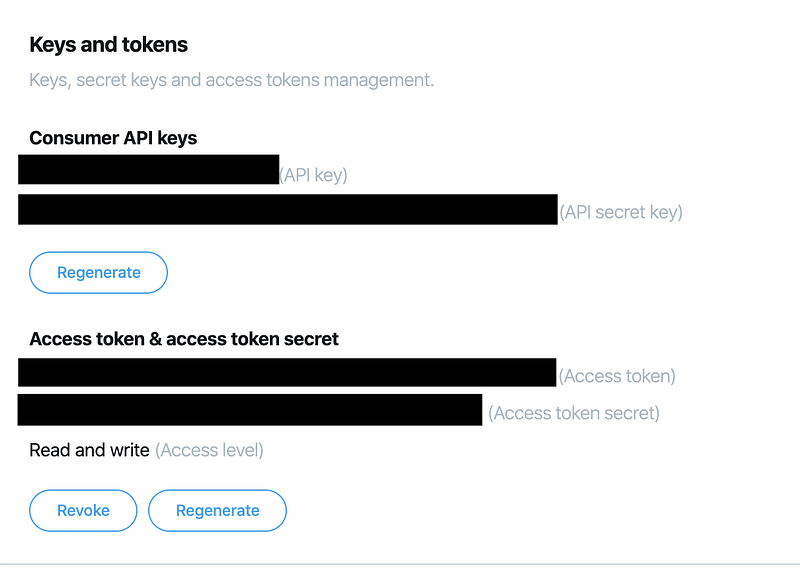
You can view this page after you have been granted access and created an app.

You would need 4 pieces of information ready — API key, API secret key, Access token, Access token secret.

Import Libraries

Switch over to Jupyter Notebook and import the following libraries:

from tweepy import OAuthHandler
from tweepy.streaming import StreamListener
import tweepy
import json
import pandas as pd
import csv
import re
from textblob import TextBlob
import string
import preprocessor as p
import os
import time

Authenticating Twitter API

If you ran into any authentication errors, regenerate your keys and try again.

# Twitter credentials
# Obtain them from your twitter developer account
consumer_key = <your_consumer_key>
consumer_secret = <your_consumer_secret_key>
access_key = <your_access_key>
access_secret = <your_access_secret_key>
# Pass your twitter credentials to tweepy via its OAuthHandler
auth = OAuthHandler(consumer_key, consumer_secret)
auth.set_access_token(access_key, access_secret)
api = tweepy.API(auth)

Batch Scraping

Due to the limited number of API calls one can make using a basic and free developer account, (~900 calls every 15 minutes before your access is denied) I created a function that extract 2,500 tweets per run once every 15 minutes (I tried to extract 3,00 and above but that got me denied after the second batch). In this function you specify the:

  1. search parameter such as key words and hashtags etc.
  2. starting date, after which all tweets would be extracted (you can only extract tweets that are not older than the last 7 days)
  3. number of tweets to pull per run
  4. number of runs that happen once every 15 minutes

I only extracted those metadata that I deemed relevant to my case. You may explore the list of metadata from the tweepy.Cursor object in detail (this is the real messy part).

def scraptweets(search_words, date_since, numTweets, numRuns):
    
    # Define a for-loop to generate tweets at regular intervals
    # We cannot make large API call in one go. Hence, let's try T times
    
    # Define a pandas dataframe to store the date:
    db_tweets = pd.DataFrame(columns = ['username', 'acctdesc', 'location', 'following',
                                        'followers', 'totaltweets', 'usercreatedts', 'tweetcreatedts',
                                        'retweetcount', 'text', 'hashtags']
                                )
    program_start = time.time()
    for i in range(0, numRuns):
        # We will time how long it takes to scrape tweets for each run:
        start_run = time.time()
        
        # Collect tweets using the Cursor object
        # .Cursor() returns an object that you can iterate or loop over to access the data collected.
        # Each item in the iterator has various attributes that you can access to get information about each tweet
        tweets = tweepy.Cursor(api.search, q=search_words, lang="en", since=date_since, tweet_mode='extended').items(numTweets)
# Store these tweets into a python list
        tweet_list = [tweet for tweet in tweets]
# Obtain the following info (methods to call them out):
        # user.screen_name - twitter handle
        # user.description - description of account
        # user.location - where is he tweeting from
        # user.friends_count - no. of other users that user is following (following)
        # user.followers_count - no. of other users who are following this user (followers)
        # user.statuses_count - total tweets by user
        # user.created_at - when the user account was created
        # created_at - when the tweet was created
        # retweet_count - no. of retweets
        # (deprecated) user.favourites_count - probably total no. of tweets that is favourited by user
        # retweeted_status.full_text - full text of the tweet
        # tweet.entities['hashtags'] - hashtags in the tweet
# Begin scraping the tweets individually:
        noTweets = 0
for tweet in tweet_list:
# Pull the values
            username = tweet.user.screen_name
            acctdesc = tweet.user.description
            location = tweet.user.location
            following = tweet.user.friends_count
            followers = tweet.user.followers_count
            totaltweets = tweet.user.statuses_count
            usercreatedts = tweet.user.created_at
            tweetcreatedts = tweet.created_at
            retweetcount = tweet.retweet_count
            hashtags = tweet.entities['hashtags']
try:
                text = tweet.retweeted_status.full_text
            except AttributeError:  # Not a Retweet
                text = tweet.full_text
# Add the 11 variables to the empty list - ith_tweet:
            ith_tweet = [username, acctdesc, location, following, followers, totaltweets,
                         usercreatedts, tweetcreatedts, retweetcount, text, hashtags]
# Append to dataframe - db_tweets
            db_tweets.loc[len(db_tweets)] = ith_tweet
# increase counter - noTweets  
            noTweets += 1
        
        # Run ended:
        end_run = time.time()
        duration_run = round((end_run-start_run)/60, 2)
        
        print('no. of tweets scraped for run {} is {}'.format(i + 1, noTweets))
        print('time take for {} run to complete is {} mins'.format(i+1, duration_run))
        
        time.sleep(920) #15 minute sleep time
# Once all runs have completed, save them to a single csv file:
    from datetime import datetime
    
    # Obtain timestamp in a readable format
    to_csv_timestamp = datetime.today().strftime('%Y%m%d_%H%M%S')
# Define working path and filename
    path = os.getcwd()
    filename = path + '/data/' + to_csv_timestamp + '_sahkprotests_tweets.csv'
# Store dataframe in csv with creation date timestamp
    db_tweets.to_csv(filename, index = False)
    
    program_end = time.time()
    print('Scraping has completed!')
    print('Total time taken to scrap is {} minutes.'.format(round(program_end - program_start)/60, 2))

With this function, I usually performed 6 runs in total, where each run extracted 2,500 tweets. It usually takes approximately 2.5 hours to finish one round of extraction that would yield 15,000 tweets. Not bad.

Specific to the protests, I surveyed Twitter and found out the most common hashtags used by users in their tweets. Hence, I used a multitude of these related hashtags as my searching criteria.

It is also possible for other hashtags that are not defined in your ‘search_words’ parameter to appear because users might include them in their tweets altogether.

# Initialise these variables:
search_words = "#hongkong OR #hkprotests OR #freehongkong OR #hongkongprotests OR #hkpolicebrutality OR #antichinazi OR #standwithhongkong OR #hkpolicestate OR #HKpoliceterrorist OR #standwithhk OR #hkpoliceterrorism"
date_since = "2019-11-03"
numTweets = 2500
numRuns = 6
# Call the function scraptweets
scraptweets(search_words, date_since, numTweets, numRuns)

I have been running the above script once daily since 3rd Nov 2019 and have since amassed more than 200k tweets. The following is the first 5 lines of the dataset:

A sample dataset

Further Reading

More content at PlainEnglish.io. Sign up for our free weekly newsletter. Follow us on Twitter, LinkedIn, YouTube, and Discord.

Interested in scaling your software startup? Check out Circuit.

Python
Data Mining
Twitter
Scraping
Data
Recommended from ReadMedium