avatarTeri Radichel

Free AI web copilot to create summaries, insights and extended knowledge, download it at here

5713

Abstract

          </div>
          <div>
            <div style="background-image: url(https://miro.readmedium.com/v2/resize:fit:320/1*PTJZogALr41ieCvMb_zZqA.png)"></div>
          </div>
        </div>
      </a>
    </div><p id="ab69">Now before adding more actions, I’m going to re-read this announcement for a minute because the AWS IAM documentation does not clearly document the deprecated actions as I explained in the last post.</p><div id="6e71" class="link-block">
      <a href="https://aws.amazon.com/blogs/aws-cloud-financial-management/changes-to-aws-billing-cost-management-and-account-consoles-permissions/">
        <div>
          <div>
            <h2>Changes to AWS Billing, Cost Management, and Account Consoles Permissions | Amazon Web Services</h2>
            <div><h3>AWS will be retiring AWS Identity and Access Management (IAM) actions for the Billing, Cost Management, and Account…</h3></div>
            <div><p>aws.amazon.com</p></div>
          </div>
          <div>
            <div style="background-image: url(https://miro.readmedium.com/v2/resize:fit:320/0*SmYU4BXumfrYADtl)"></div>
          </div>
        </div>
      </a>
    </div><figure id="78b1"><img src="https://cdn-images-1.readmedium.com/v2/resize:fit:800/1*3guRappXsP73T2RyIY0I7A.png"><figcaption></figcaption></figure><p id="b08b">The above blog post could be clearer.</p><p id="9227">I mean, just list the deprecate actions like this:</p><div id="e135"><pre><span class="hljs-section">aws-portal:*</span>

<span class="hljs-section">purchase-orders: ViewPurchaseOrders</span> <span class="hljs-section">purchase-orders: ModifyPurchaseOrders</span></pre></div><p id="ed5b">Is that a correct interpretation? Reading on…</p><figure id="15a1"><img src="https://cdn-images-1.readmedium.com/v2/resize:fit:800/1*u5FOgUPTCKDmuj_zuBd_mA.png"><figcaption></figcaption></figure><p id="c987">I think so.</p><p id="fe8f">It would be nice if the new actions were highlighted clearly in the documentation, but as far as I can tell, I don’t think they are removing any additional actions. I presume that all the actions in the documentation other than those I listed above are going to remain.</p><p id="9a09">So what happens if I add <b>billing:</b>? Does that solve my permissions problem?</p><p id="8e59">No. And I still don’t see any events in CloudTrail related to payments or billing.</p><p id="0180">Well, since none of this is working, I’m just going to add back in <b>aws-portal:</b>.</p><p id="8638">That works. Per my reading of the above this will be deprecated and it seems to be required in this case, or I don’t know what else I need to add to make this work. If some other billing related action is required it is unclear after looking at the announcement and documentation. Maybe I’m missing it or it will be added soon.</p><p id="d1bb">Seems like AWS is still working out the kinks with their new billing actions and how they work with CloudTrail and SCPs. Hopefully they will be performing a lot more testing and simplifying the documentation.</p><p id="a8b5">I would really like it if they would add a “<b>billing</b>” as a prefix for all the IAM billing-related actions because this is entirely too confusing.</p><p id="ec31">Without <b>CloudTrail logs</b> it is impossible to troubleshoot.</p><p id="a6f2">A <b>prefix in CloudTrail</b> that does not match the <b>prefix used in the IAM policy</b> is confusing! Please make them match.</p><p id="f78d">Since this involves payments to AWS I hope that have some <b><i>very good QA people working on this change! </i></b>When I worked on systems involving payments, taxes, money and investments, I loved my QA team. They are so important for ensuring no mistakes exist in the programming logic that causes people or companies to lose money. When you work on financial systems — you need the best QA people possible working on testing those changes.</p><p id="ae8b">Next, I edited the billing information and saved it again using the root user in the child account. I wondered if that would trigger something. I don’t know what. After doing that, I got a new error message about a pin when I tried to remove the user from the organization using the OrgRoot user in the parent account.</p><p id="c06d">I wrote about that message and what the pin is here:</p><div id="e1ec" class="link-block"> <a href="https://readmedium.com/close-an-aws-account-in-an-organization-1052b33876f2"> <div> <div> <h2>Close an AWS Account in an Organization</h2> <div><h3>ACM.168 Challenges and risks related to removing AWS accounts, OUs, and organizations</h3></div> <div><p>medium.com</p></div> </div> <div> <div style="background-image: url(https://miro.readmedium.com/v2/resize:fit:320/1*_tDHsH157sYT0uUULCfYeA.png)"></div> </div> </div> </a> </div><h2 id="1a5e">Excessive permissions required to remove an account</h2><p id="9da4">Next problem. The pin verification option requires me to give the person who in this scenario is a new account owner potentially that is entering their billing information to take over the account the permission to enter the pin verification on the AWS Organizations page.</p><figure id="ee84"><img src="https://cdn-images-1.readmedium.com/v2/resize:fit:800/1*Df3kH8zfK8vgKukUekX7WA.png"><figcaption></figcaption></figure><p id="5a9b">That is not ideal. Can the OrgRoot user do this from the AWS Organizations page? Let’s see.</p><p id="638d">Well I don’t see any actions specific to a pin on this page

Options

:</p><div id="a3b2" class="link-block"> <a href="https://docs.aws.amazon.com/service-authorization/latest/reference/list_awsorganizations.html"> <div> <div> <h2>Actions, resources, and condition keys for AWS Organizations</h2> <div><h3>undefined</h3></div> <div><p>undefined</p></div> </div> <div> <div style="background-image: url(https://miro.readmedium.com/v2/resize:fit:320/)"></div> </div> </div> </a> </div><p id="f910">I also don’t see the associated pin option in the parent account.</p><p id="c197">It seems like that pin verification option should be linked to adding the credit card, not AWS Organizations.</p><p id="709b">I wonder if this action would allow the root user in the child account to leave the organization without exposing any other information about the organization.</p><div id="27c5"><pre><span class="hljs-symbol">organizations:</span>LeaveOrganization</pre></div><p id="20f5">This is not ideal because I would like the Billing Administrator to have the final say and perform the action to remove the account, but I don’t see any other option that will work at this point. At least the account had to be moved to the Suspended OU first by the Governance Administrator.</p><p id="109a">Let’s try it.</p><p id="cfb9">No that does not work. My other option is to give the user permission to describe the organization. That seems like way too much access if we are trying to allow someone to take over an account.</p><p id="c204">I’ve spent entirely too much time on this problem. So I’m going to try adding it and see what happens.</p><p id="595a">Well I don’t like that this option exposes the management account email and organization ID. But now I can see the leave organization option.</p><p id="ad79">When I click that option I get sent to a billing page to enter a pin. I wonder where else that pin option exists in the portal? I looked around in the billing options but I don’t see it. As far as I know the only option is to go through that Leave Organization button which reveals too much information, in my opinion.</p><p id="74d9">I went ahead and added the pin. Now I know from my last post that will allow this user to remove the account from the Organization. But just out of curiosity, I removed the account from the organization using the OrgRoot user and that worked too.</p><p id="751e">What is curious is that the action to remove the account from the organization does not appear in the child account’s logs, only the parent account.</p><h2 id="9400">In Summary — Two-Person process for closing or removing an AWS Account</h2><p id="4c27">Although not ideal, we have an SCP that at least somewhat limits permissions for our Suspended OU. An account cannot be closed by the root user of an account if it exists in the Governance OU or the DenyAll OU.</p><p id="60b6">Here’s what the final SCP looks like, though we still need to perform further testing on the permissions granted to the billing administrator for suspended accounts.</p><figure id="572a"><img src="https://cdn-images-1.readmedium.com/v2/resize:fit:800/1*34JJx2t_Z3nF_9tRHAYNUA.png"><figcaption></figcaption></figure><p id="7c24">However, if we have a scenario where we need to let someone else take over an account, we have a means for doing that using a process that should take at least two people — presuming your Governance Administrators do not have access to the emails that can reset the password for the root user on one of the AWS accounts in your organization.</p><p id="0d34">You will probably still want to have a process for creating administrative credentials and adding MFA to the root user on all the accounts in your organization.</p><p id="a913">The information in my last three posts was supposed to be one quick short post before moving on to other topics. Turned out not to be the case. Looks like AWS is still working on a few things related to their upcoming billing changes due in July.</p><p id="7700">Follow for updates.</p><p id="4a3a">Teri Radichel | <i>© <a href="https://2ndsightlab.com/?source=post_page---------------------------">2nd Sight Lab</a> 2023</i></p><div id="8b5f"><pre><span class="hljs-section">About Teri Radichel:

⭐️ Author: Cybersecurity Books
⭐️ Presentations: Presentations by Teri Radichel
⭐️ Recognition: SANS Award, AWS Security Hero, IANS Faculty
⭐️ Certifications: SANS ~ GSE 240
⭐️ Education: BA Business, Master of Software Engineering, Master of Infosec
⭐️ Company: Penetration Tests, Assessments, Phone Consulting ~ 2nd Sight Lab</pre></div><div id="caae"><pre><span class="hljs-section">Need Help With Cybersecurity, Cloud, or Application Security?
~~~~~~~~~~~~~~~~~~~~~~~~~~~~~~~~~~~~~~~~~~~~~~~~~~~~~~~~~~~~~</span>
🔒 Request a penetration test or security assessment
🔒 Schedule a consulting call
🔒 Cybersecurity Speaker for Presentation</pre></div><div id="5a42"><pre>Follow <span class="hljs-keyword">for</span> more stories like <span class="hljs-keyword">this</span>:

❤️ Sign Up my Medium Email List ❤️ Twitter: <span class="hljs-meta">@teriradichel</span> ❤️ LinkedIn: https:<span class="hljs-comment">//www.linkedin.com/in/teriradichel</span> ❤️ Mastodon: <span class="hljs-meta">@teriradichel</span><span class="hljs-meta">@infosec</span>.exchange ❤️ Facebook: 2nd Sight Lab ❤️ YouTube: @2ndsightlab</pre></div><figure id="faf5"><img src="https://cdn-images-1.readmedium.com/v2/resize:fit:800/0*H9Ew1KCl-29nZiPR.jpeg"><figcaption></figcaption></figure></article></body>

SCP to Allow Closing and Removing AWS Accounts — Part 3

ACM.183b Trying out the new AWS billing actions in our SCP

Part of my series on Automating Cybersecurity Metrics. The Code.

Free Content on Jobs in Cybersecurity | Sign up for the Email List

In my last post, I spent far too long messing around with deprecated AWS IAM billing actions.

AWS updated billing options for IAM Policies

In this post we’re going to modify our SCP to use the updated AWS IAM payment actions.

First let’s take a look at our options.
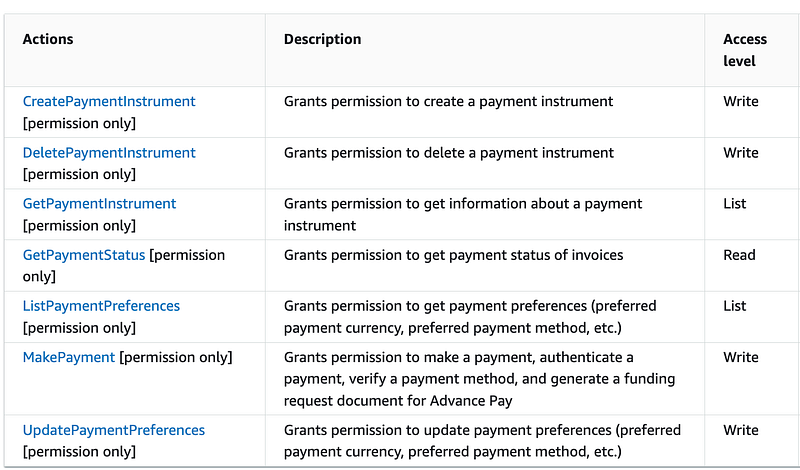
I’m going to try to all add the actions in the above documentation to our SCP from the page above except the following:

  • GetPaymentStatus
  • MakePayment

Let’s say we are transferring a child account in our organization to a new owner and the root user in the other account is updating the account with their payment method, we don’t want any more payments to occur until the transfer of ownership is complete so the new owner will be charged for any additional expenses.

We’ll deal with the other scenarios I presented as part of this series later (like closing an unneeded account within an organization) perhaps or you can test them out on your own. I’m going to try to complete the transfer scenario in this post.

Updated SCP to use new AWS IAM Payments actions

Well, these payments actions from the list above:
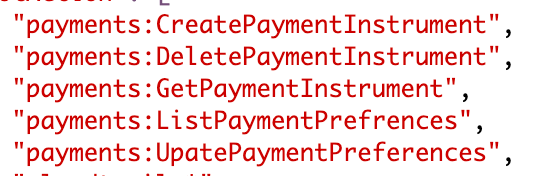
Are not enough to manage the payment methods for an account:

Well, now we have another problem. There are no CloudTrail logs for the above actions, apparently.

I know that because after refreshing the above page a few times, I should see duplicate errors in the logs for that action.

After doing that, I entered an incorrect value in the search box for read-only events and I got this error:

I should see billing or payment events and errors prior to my search error. I don’t see any.

Without CloudTrail events related to the error, we cannot troubleshoot the above problem other than by trial and error and guessing.

Note: First of all, I’m sure AWS will add these logs if they don’t currently exist. Secondly, I started thinking about this later and wondering if somehow I was in the wrong region again somehow. It is hard to imagine there are really no logs for this activity. I don’t believe I was in the wrong region but anyway, worth another look. For this post, however, I ended up solving the problem by brute force. This is the problem when I am distracted by other things and cannot focus on research. The posts are written hastily at the moment. Hopefully that will change soon.

Well, now we’re in hacker mode. Let’s see what happens when we enter payments.* for an action.

Nope.

Let’s see what happens when we add some of the other billing actions I wrote about here:

Now before adding more actions, I’m going to re-read this announcement for a minute because the AWS IAM documentation does not clearly document the deprecated actions as I explained in the last post.

The above blog post could be clearer.

I mean, just list the deprecate actions like this:

aws-portal:*
purchase-orders: ViewPurchaseOrders
purchase-orders: ModifyPurchaseOrders

Is that a correct interpretation? Reading on…

I think so.

It would be nice if the new actions were highlighted clearly in the documentation, but as far as I can tell, I don’t think they are removing any additional actions. I presume that all the actions in the documentation other than those I listed above are going to remain.

So what happens if I add billing:*? Does that solve my permissions problem?

No. And I still don’t see any events in CloudTrail related to payments or billing.

Well, since none of this is working, I’m just going to add back in aws-portal:*.

That works. Per my reading of the above this will be deprecated and it seems to be required in this case, or I don’t know what else I need to add to make this work. If some other billing related action is required it is unclear after looking at the announcement and documentation. Maybe I’m missing it or it will be added soon.

Seems like AWS is still working out the kinks with their new billing actions and how they work with CloudTrail and SCPs. Hopefully they will be performing a lot more testing and simplifying the documentation.

I would really like it if they would add a “billing” as a prefix for all the IAM billing-related actions because this is entirely too confusing.

Without CloudTrail logs it is impossible to troubleshoot.

A prefix in CloudTrail that does not match the prefix used in the IAM policy is confusing! Please make them match.

Since this involves payments to AWS I hope that have some very good QA people working on this change! When I worked on systems involving payments, taxes, money and investments, I loved my QA team. They are so important for ensuring no mistakes exist in the programming logic that causes people or companies to lose money. When you work on financial systems — you need the best QA people possible working on testing those changes.

Next, I edited the billing information and saved it again using the root user in the child account. I wondered if that would trigger something. I don’t know what. After doing that, I got a new error message about a pin when I tried to remove the user from the organization using the OrgRoot user in the parent account.

I wrote about that message and what the pin is here:

Excessive permissions required to remove an account

Next problem. The pin verification option requires me to give the person who in this scenario is a new account owner potentially that is entering their billing information to take over the account the permission to enter the pin verification on the AWS Organizations page.
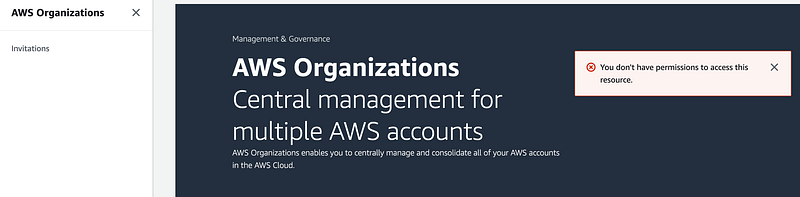
That is not ideal. Can the OrgRoot user do this from the AWS Organizations page? Let’s see.

Well I don’t see any actions specific to a pin on this page:

I also don’t see the associated pin option in the parent account.

It seems like that pin verification option should be linked to adding the credit card, not AWS Organizations.

I wonder if this action would allow the root user in the child account to leave the organization without exposing any other information about the organization.

organizations:LeaveOrganization

This is not ideal because I would like the Billing Administrator to have the final say and perform the action to remove the account, but I don’t see any other option that will work at this point. At least the account had to be moved to the Suspended OU first by the Governance Administrator.

Let’s try it.

No that does not work. My other option is to give the user permission to describe the organization. That seems like way too much access if we are trying to allow someone to take over an account.

I’ve spent entirely too much time on this problem. So I’m going to try adding it and see what happens.

Well I don’t like that this option exposes the management account email and organization ID. But now I can see the leave organization option.

When I click that option I get sent to a billing page to enter a pin. I wonder where else that pin option exists in the portal? I looked around in the billing options but I don’t see it. As far as I know the only option is to go through that Leave Organization button which reveals too much information, in my opinion.

I went ahead and added the pin. Now I know from my last post that will allow this user to remove the account from the Organization. But just out of curiosity, I removed the account from the organization using the OrgRoot user and that worked too.

What is curious is that the action to remove the account from the organization does not appear in the child account’s logs, only the parent account.

In Summary — Two-Person process for closing or removing an AWS Account

Although not ideal, we have an SCP that at least somewhat limits permissions for our Suspended OU. An account cannot be closed by the root user of an account if it exists in the Governance OU or the DenyAll OU.

Here’s what the final SCP looks like, though we still need to perform further testing on the permissions granted to the billing administrator for suspended accounts.
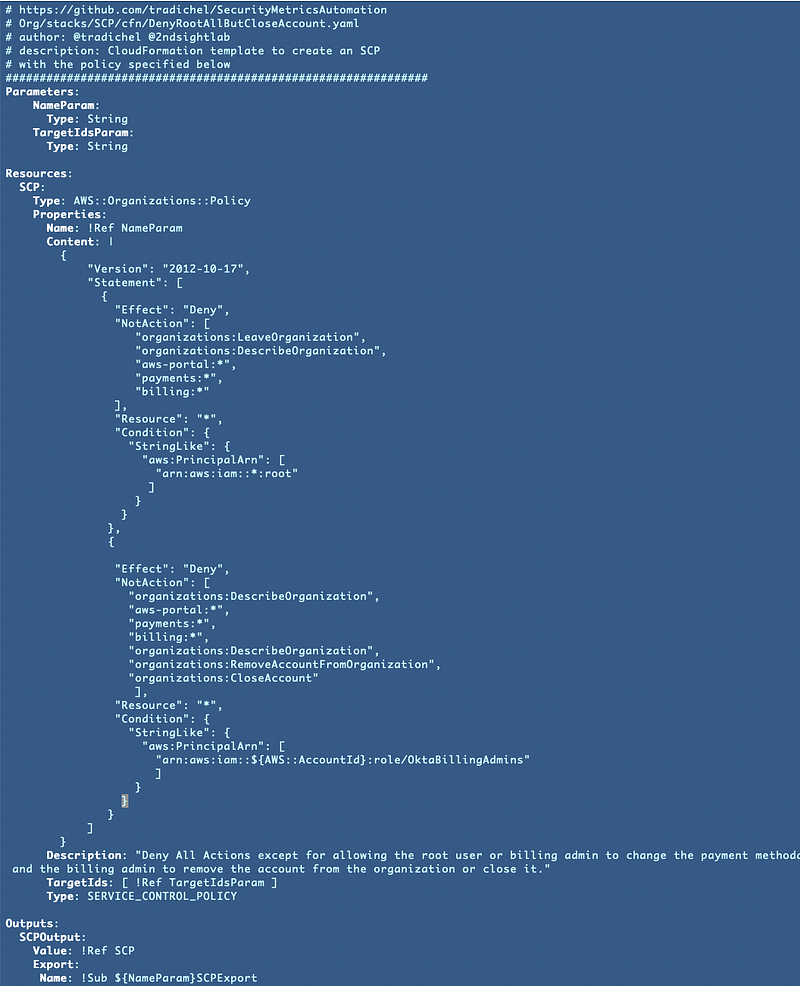
However, if we have a scenario where we need to let someone else take over an account, we have a means for doing that using a process that should take at least two people — presuming your Governance Administrators do not have access to the emails that can reset the password for the root user on one of the AWS accounts in your organization.

You will probably still want to have a process for creating administrative credentials and adding MFA to the root user on all the accounts in your organization.

The information in my last three posts was supposed to be one quick short post before moving on to other topics. Turned out not to be the case. Looks like AWS is still working on a few things related to their upcoming billing changes due in July.

Follow for updates.

Teri Radichel | © 2nd Sight Lab 2023

About Teri Radichel:
~~~~~~~~~~~~~~~~~~~~
⭐️ Author: Cybersecurity Books
⭐️ Presentations: Presentations by Teri Radichel
⭐️ Recognition: SANS Award, AWS Security Hero, IANS Faculty
⭐️ Certifications: SANS ~ GSE 240
⭐️ Education: BA Business, Master of Software Engineering, Master of Infosec
⭐️ Company: Penetration Tests, Assessments, Phone Consulting ~ 2nd Sight Lab
Need Help With Cybersecurity, Cloud, or Application Security?
~~~~~~~~~~~~~~~~~~~~~~~~~~~~~~~~~~~~~~~~~~~~~~~~~~~~~~~~~~~~~
🔒 Request a penetration test or security assessment
🔒 Schedule a consulting call
🔒 Cybersecurity Speaker for Presentation
Follow for more stories like this:
~~~~~~~~~~~~~~~~~~~~~~~~~~~~~~~~~~~~~~~~~~~~~~~~~~~~~~~~~~~~~ 
❤️ Sign Up my Medium Email List
❤️ Twitter: @teriradichel
❤️ LinkedIn: https://www.linkedin.com/in/teriradichel
❤️ Mastodon: @teriradichel@infosec.exchange
❤️ Facebook: 2nd Sight Lab
❤️ YouTube: @2ndsightlab

AWS
Remove Account
Organizations
Cloudsecurity
Governance
Recommended from ReadMedium
avatarMunidimple Muchalli
AWS GuardDuty

AWS Guard Duty

4 min read