avatarMartin van Soest

Free AI web copilot to create summaries, insights and extended knowledge, download it at here

2141

Abstract

<p id="ee4f">If you have ever scheduled a story, you’ll know that Medium slides down a message telling you when you have scheduled the story. This ‘butter bar’ disappears after a while, leaving you with little time to read the message. Also, it never appears again. Even when you come back to edit the story later.</p><p id="0c19">This extension shows a butter-like bar, just like Medium. And it doesn’t disappear. As long as the story is scheduled, you’ll know.</p><p id="5ebc">And that’s it. That’s all folks!</p><p id="8847">I developed this teeny weeny extension to develop my skills in developing chrome extensions. I picked up a couple of new skills while creating this. I did remove a lot of the things I experimented with. I wanted the functionality to be nice and clean.</p><p id="7eba">Most likely, the audience for this extension is very small. It doesn’t make sense to extend it even further.</p><p id="99a7">Earlier I created a <a href="https://greasyfork.org/en/scripts/426319-medium-com-check-for-scheduled-publication">tampermonkey-scrip</a>t that does about the same thing. It got a whopping 6 downloads! That hardly compares to my <a href="https://muffinimal.medium.com/distribution-extension-update-2-1-4b02bac767a6">other extension</a> which is slowly growing towards 200 weekly users.</p><p id="73e8">Having said that, it is unlikely to receive any updates. It may, however, makes its way into a bundled collection of Medium enhancements I want to develop.</p><h1 id="b99b">Downloading and Installing</h1><p id="6b0b">You can download the extension at the Chrome Webstore. Just click on the ‘install’-button to add it to Chrome.</p><div id="37ff" class="link-block"> <a href="https://chrome.google.com/webstore/detail/medium-scheduled-stories/nacoknicpdcjapjpndphhhjmogcpoled"> <div> <div> <h2>Medium Scheduled Stories</h2> <div><h3>Shows whether your story is scheduled for publication</h3></div> <div><p>chrome.google.com</p></div> </div> <div> <div style="background-image: url(https://mir # Options o.readmedium.com/v2/resize:fit:320/0*O7F3Lb7W-o2OL-kR)"></div> </div> </div> </a> </div><p id="0879">Prefer tampermonkey? I got you covered! Download it here:</p><div id="ac4a" class="link-block"> <a href="https://readmedium.com/a-tool-to-check-if-your-story-is-scheduled-for-publication-e7676ce159e2"> <div> <div> <h2>Is your story scheduled for publication? Check with this tool</h2> <div><h3>Tired of waiting? Want to check the status of your story? This tool disperses the fog of uncertainty. Somewhat.</h3></div> <div><p>medium.com</p></div> </div> <div> <div style="background-image: url(https://miro.readmedium.com/v2/resize:fit:320/1*lg5dAN1jgXMKOuH7qICxQQ.jpeg)"></div> </div> </div> </a> </div><h1 id="0590">Want to see something cool? This extension shows which stories are Distributed!</h1><p id="91ea">Want to see if a story (not just your stories, all of them!) is Chosen for Further Distribution (formerly known as Curated)? Check with this extension:</p><div id="d7c3" class="link-block"> <a href="https://readmedium.com/distribution-info-release-2-3-bea80e02a7f5"> <div> <div> <h2>Distribution Info Extension Got Better</h2> <div><h3>Version 2.3 — Chocolate Bar</h3></div> <div><p>medium.com</p></div> </div> <div> <div style="background-image: url(https://miro.readmedium.com/v2/resize:fit:320/1*zfMnOPOdXKnik52CqpVPQg.jpeg)"></div> </div> </div> </a> </div><p id="7f21">A more complete overview of its features can be found <a href="https://muffinimal.medium.com/medium-distributed-in-stats-manual-a1278202a159">here</a>.</p><p id="5ada">Enjoy the wait while your story gets published! In the meantime, why don't you write another masterpiece? I’m sure you have a great shot at further distribution. Happy writing!</p></article></body>

Tools

When Will The Publication Publish my Story? It’s Easy to Check

Making your life on Medium a little bit easier

All that waiting. All that lost productivity. Photo by Junior Moran on Unsplash

Did you ever submit that great article to that awesome publication? After submitting you dream about all the views, the comments, the ego-boost, and all the great things that this new story will bring. Except… The publication does not publish your masterpiece. What’s going on?

There are publications out there that schedule stories to be published later. This little extension shows you whether that’s going on with your article. It also happens to tell you if you have delayed publishing yourself.

What Does This Extension Do For Me?

Let’s first start with what Medium tells you:
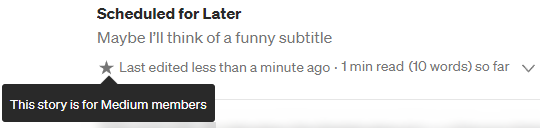
This is what you see on the stories page. Screenshot by me.

As I usually meter my stories, the little star at the story tells me I have submitted a story. This could be either to a publication, where it is pending for review. Or it could be one I have scheduled to publish later.

In the first case, if I have submitted to a publication, I might get tired of waiting? Have they already processed it and scheduled it for the upcoming batch? Or is it still left untouched? This is where the extension kicks in. Shall we click on the story?
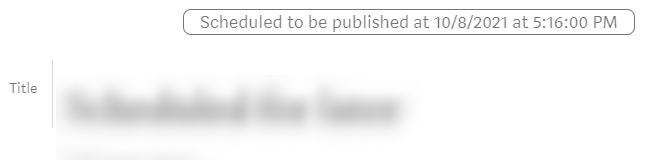
Editing a story that is scheduled for publication. Screencap by me.

If you have ever scheduled a story, you’ll know that Medium slides down a message telling you when you have scheduled the story. This ‘butter bar’ disappears after a while, leaving you with little time to read the message. Also, it never appears again. Even when you come back to edit the story later.

This extension shows a butter-like bar, just like Medium. And it doesn’t disappear. As long as the story is scheduled, you’ll know.

And that’s it. That’s all folks!

I developed this teeny weeny extension to develop my skills in developing chrome extensions. I picked up a couple of new skills while creating this. I did remove a lot of the things I experimented with. I wanted the functionality to be nice and clean.

Most likely, the audience for this extension is very small. It doesn’t make sense to extend it even further.

Earlier I created a tampermonkey-script that does about the same thing. It got a whopping 6 downloads! That hardly compares to my other extension which is slowly growing towards 200 weekly users.

Having said that, it is unlikely to receive any updates. It may, however, makes its way into a bundled collection of Medium enhancements I want to develop.

Downloading and Installing

You can download the extension at the Chrome Webstore. Just click on the ‘install’-button to add it to Chrome.

Prefer tampermonkey? I got you covered! Download it here:

Want to see something cool? This extension shows which stories are Distributed!

Want to see if a story (not just your stories, all of them!) is Chosen for Further Distribution (formerly known as Curated)? Check with this extension:

A more complete overview of its features can be found here.

Enjoy the wait while your story gets published! In the meantime, why don't you write another masterpiece? I’m sure you have a great shot at further distribution. Happy writing!

Tools
Chrome Extension
Productivity
UX
Scheduling
Recommended from ReadMedium