Is your story scheduled for publication? Check with this tool
After discovering you can check whether your article is scheduled for publication, I wrote a user script. The script notifies you of its Scheduled-status.

Why do you need this?
Not every publication is fast when it comes to reviewing, accepting, and publishing a story. Stories can wait for quite some time in my Draft-list. And I have no idea what the status is. I am somewhat impatient, so I might start contemplating publishing the story to another publication. But what if it is already reviewed and accepted? This little script will notify you of just that.
Sara Barnes’ article explains that Medium hides this information in the page-source. Go read her stories!
Update: the same features are now available as a Chrome Extension:
So, what does it do?
You click on a scheduled story in your Drafts list. Then, when the edit page of your story has loaded, a popup will notify you if the story is scheduled for publication.
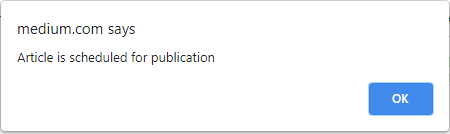
Nothing happens if it isn’t scheduled. Ah, well. Maybe wait a bit longer?
That’s all there is to it. No need to wait for some more popup-magic. It doesn’t update automatically. No easter eggs. This is it.
While the popup is shown, you can’t interact with the page. Click OK to remove the popup. In Chrome, the popup will also disappear if you happen to switch tabs.
How do I install the script?
To be able to run the script, your browser needs to be supported and if you don’t have one already, you need to install a user script manager.
Please note that most mobile browsers don’t support extensions. And by extension, you can’t install the script without an extension. So, on mobile you’re safe from this popup.
Follow the instructions below to satisfy your popup needs. Don’t be overwhelmed by the three steps. It’ll take you about five minutes.
Step 1 — install a script manager
Most browsers are capable of running these scripts. To find out what you need to do, head over to greasyfork.org.
At this page, look for your browser and pick one of the available extensions. Go ahead and install it. Have one already? Congrats! Leap towards step 2.
If your browser isn’t supported, I suppose there is nothing you can do about it. You’re out of luck, unless you are willing to switch browsers.
All went well? Congratulations! You just installed an extension!
Step 2 — install the script
After you have successfully completed step 1, it’s time to install the script. Click on this link:
On this page, click on the dark green ‘Install this script’-button. You will be taken to a new tab.
At this tab you can review the script; if you’re satisfied with the safety of the script, click on the grey ‘install’-button.
Step 3 — Stop procrastinating and get back to writing
That’s it. You’re done!
If you are really eager to see the script in action, browse through your submitted drafts. If you’re desperate, I guess you can probably schedule a story yourself.
Got feedback?
Thanks for reading and have fun with the script. If you have any suggestions, please comment. Do try and read the answers to possible questions below first.
Questions that have not been asked before
I really wanted to have Frequently Asked Questions in here. Since no one asked anything yet, I am going to provide you with some answers in a Q&A style.
Does this violate Medium’s terms and conditions? Is this safe to use?
The information about the story’s status is already available. You can look at the source code and find the information yourself. This script saves you a right-click and a search. As the info is already there, Medium won’t mind.
You will be safe from Medium’s wrath. I got in touch with our friends and their response was very friendly: “That’s a cool idea, and it is fine to share that script.”
There you go. Happy scripting!
I don’t want to open a story first. Can you mark scheduled stories in my Draft list?
I think this should be possible, but I won’t be adding that. I’m a poor coder. Secondly, this will generate traffic for Medium, so it might not be allowed. And lastly, how often do you want to see whether a story is scheduled anyway?
Can you modify the popup to show when the story is published?
Yes. Maybe. Probably not. I think it is in the page. As I looked into the source, I came across some technobabble-code thingy. I guess some number stated the scheduled date. It was after midnight when I looked. I couldn’t figure it out. I don’t need it. You probably don’t either.
Can I alter, modify or re-use the script?
Sure, go ahead! No copyright. Feel free to use. Attribution is nice, but I won’t demand that of you. Let’s make the world and Medium a better place by sharing.
Which user script extension should I use?
I am no expert on all browsers and extensions out there. You’re on your own here. Pick the one you like the best. My guess is that this scripts works on all user script extensions.
For those curious, I am using Chrome and Tampermonkey.
Why doesn’t it work?
I’m sorry to hear that. I don’t know. There are a few possible causes.
- Medium can make changes that break the script in the future
- You didn’t install it correctly
- Or most likely: It works on my machine. And… I am a poor coder.
Leave me a message and I’ll look into it, maybe I can figure something out.
Future development
Currently, I have no plans to develop the script further. The little tool already works to my satisfaction. Actually, I am really happy with it. It surprised me once or twice already. Knowing your story is about to be released is a thrill.
After installing the script, the only thing for both you and me is to start reading or writing about personal, meaningful journeys from all the lovely people on Medium. Have fun!


