
How to Run LLaMA3.1 and Gemma2 with Ollama Locally or on Google Colab
Explore step-by-step instructions to set up and use advanced LLM models with Ollama, either on your local machine or through Google Colab for flexible, cloud-based execution.
👨🏾💻 GitHub ⭐️ | 👔LinkedIn |📝 Medium
Artificial intelligence is advancing rapidly, and the availability of powerful language models is changing the way we approach natural language processing (NLP) tasks. Today, I’ll show you how to load two cutting-edge models, LLaMA3.1 and Gemma2, using the Ollama library — all within a Google Colab environment.
What is Ollama?
Ollama is a powerful library that enables you to run advanced language models easily. It abstracts the complexity of managing large language models and provides a simple API to load and invoke them. In this blog, we’ll focus on using Ollama to load two models: LLaMA3.1 and Gemma2.
Why Use Google Colab?
Google Colab is a free, cloud-based Jupyter notebook environment that lets you write and execute Python code on GPUs and TPUs. It’s ideal for experimenting with large language models without needing high-end local hardware. We’ll use Colab to install necessary packages and run our code seamlessly.
Setting Up the Environment in Google Colab
Let’s dive into the steps to set up Ollama, load the models, and generate responses.
Step 1: Install Necessary Packages
The first step is to install the required packages, including Langchain, Langchain-Community, and Ollama. Langchain helps orchestrate the loading and invoking of language models, while Ollama provides access to the LLaMA3.1 and Gemma2 models.
!pip install langchain
!pip install -U langchain-community
!pip install langchain_ollama
Step 2: Install and Load Colab-XTerm
Colab-XTerm is a handy package that enables terminal access within a Colab notebook. This can be useful for running shell commands directly within the notebook environment. To install it, run the following command:
!pip install colab-xterm
%load_ext colabxterm
Step 3: Installing Ollama
You can then open a terminal session by running:
%xterm
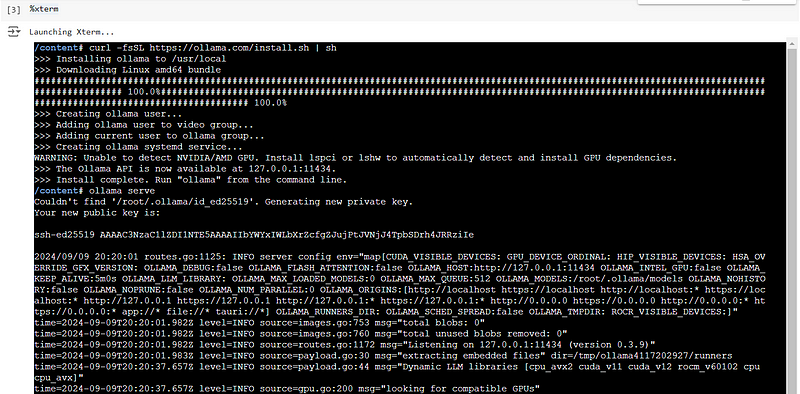
In the terminal, run the following command to install Ollama:
curl -fsSL https://ollama.com/install.sh | sh
ollama serve
Step 4: Pulling the Models
Once Ollama is installed, you can pull the models you need. Ollama provides several LLMs, including Llama 3.1 and Gemma 2. Here’s how to pull them:
ollama pull llama3.1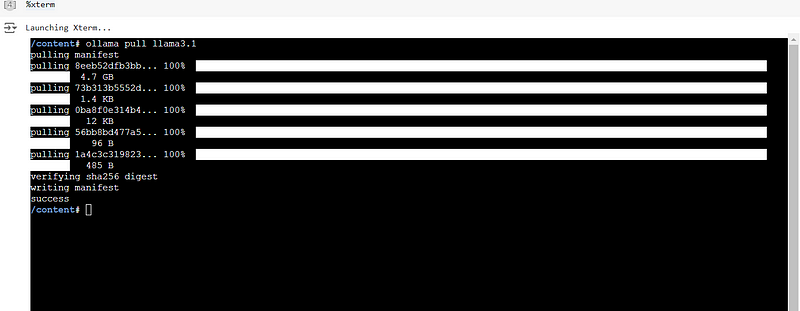
The above commands will download and prepare the models for use in your Colab environment.
Alternatively, Pull any LLM model that is available in Ollama. All LLM model lists and details are available: https://ollama.com/library
Step 5: Integrating with Langchain
To use the models programmatically, you’ll need to integrate Ollama with the Langchain package. Here’s how you can initialize and use both Llama 3.1 and Gemma 2:
from langchain_community.llms import Ollama

# Initialize an instance of the Llama 3.1 model
llm_llama = Ollama(model="llama3.1")

# Invoke the model to generate a response
response = llm_llama.invoke("Tell me a joke")
print(response)
Output:
Here's one:

What do you call a fake noodle?

(an answer is required, but I'll give it away if you ask!)
If you have already pulled the gemm2 model in the terminal then you can load the model: Similarly, you can also use Gemma 2:
# Initialize an instance of the Gemma 2 model
llm_gemma = Ollama(model="gemma2")

# Invoke the model to generate a response
response = llm_gemma.invoke("Tell me a joke")
print(response)
Output:
Why don't scientists trust atoms?

Because they make up everything! 😄
Step 6: Exploring the Ollama Model Library
Ollama offers several other models that you can explore. You can find the complete list of models in their library. Depending on your needs, you can pull any of the available models and use them in your Colab environment similarly to how we used Llama 3.1 and Gemma 2.
Get GitHub code: click here
Conclusion
Running powerful LLMs like Llama 3.1 and Gemma 2 in Google Colab opens up a world of possibilities for NLP applications. Thanks to Ollama, integrating and using these models has become incredibly straightforward. Whether you’re working on a personal project or an advanced research task, the combination of Colab, Ollama, and Langchain provides a flexible and scalable platform for your AI needs.
Feel free to explore other models in the Ollama library and experiment with different tasks. The possibilities are endless!
Happy coding! 🎉
👨🏾💻 GitHub ⭐️ | 👔LinkedIn |📝 Medium
Thank you for your time in reading this post!
Make sure to leave your feedback and comments. See you in the next blog, stay tuned 📢
Enjoyed this article? Check out more of my work:
- Unlock the Future of Document Retrieval: Dive deeper into the cutting-edge approach of Hypothetical Document Embedding (HyDE) combined with Retrieval-Augmented Generation (RAG) to revolutionize how queries and documents interact. Read more here.
- Build Your Own AI Assistant: Learn how to create an AI chatbot from scratch using GPT4All and Langchain, with a detailed comparison of response times between Mixtral and Llama3. Discover the step-by-step guide.
- Supercharge Text-to-Speech with Piper TTS: Find out how to achieve 10x faster, real-time, offline voice synthesis with human-like accuracy in this hands-on Google Colab tutorial. Transform your text into lifelike speech here.

