
Resource handler returned message: “Invalid request provided: AWS::CloudFront::Distribution: The S3 bucket that you specified for CloudFront logs does not enable ACL access”
Confusing AWS implementation and messaging and questions about the implementation…
~~~~~~~~~~~~~~~~~~~~~~~~~~~~~~~~~~~~~~~~~~~~~~~~~~~~~~~
⚙️ Check out my series on Automating Cybersecurity Metrics | Code.
🔒 Related Stories: Bugs | AWS Security | Secure Code
💻 Free Content on Jobs in Cybersecurity | ✉️ Sign up for the Email List
~~~~~~~~~~~~~~~~~~~~~~~~~~~~~~~~~~~~~~~~~~~~~~~~~~~~~~~
While trying to create a CloudFront distribution I got this error:
Resource handler returned message: “Invalid request provided: AWS::CloudFront::Distribution: The S3 bucket that you specified for CloudFront logs does not enable ACL access”
In general, you should never use ACLs to secure an S3 bucket. You should use a bucket policy.
So why is this error message from AWS suggesting that ACL access need to be enabled. Is that required by CloudFront? Let’s take a look.
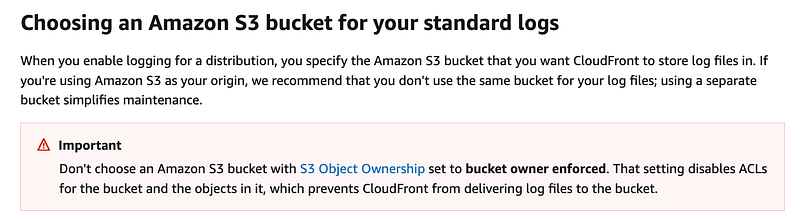
By default this is what you get for an S3 bucket under permissions:
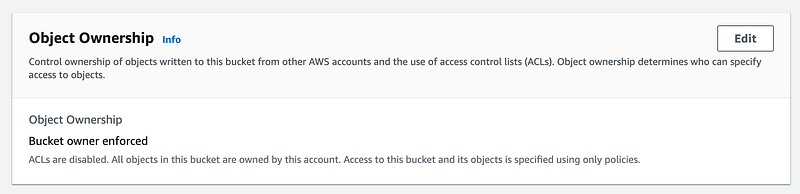
I wrote about this change to S3 bucket ownership here:
When you turn this on for CloudFront you get all kinds of warnings:
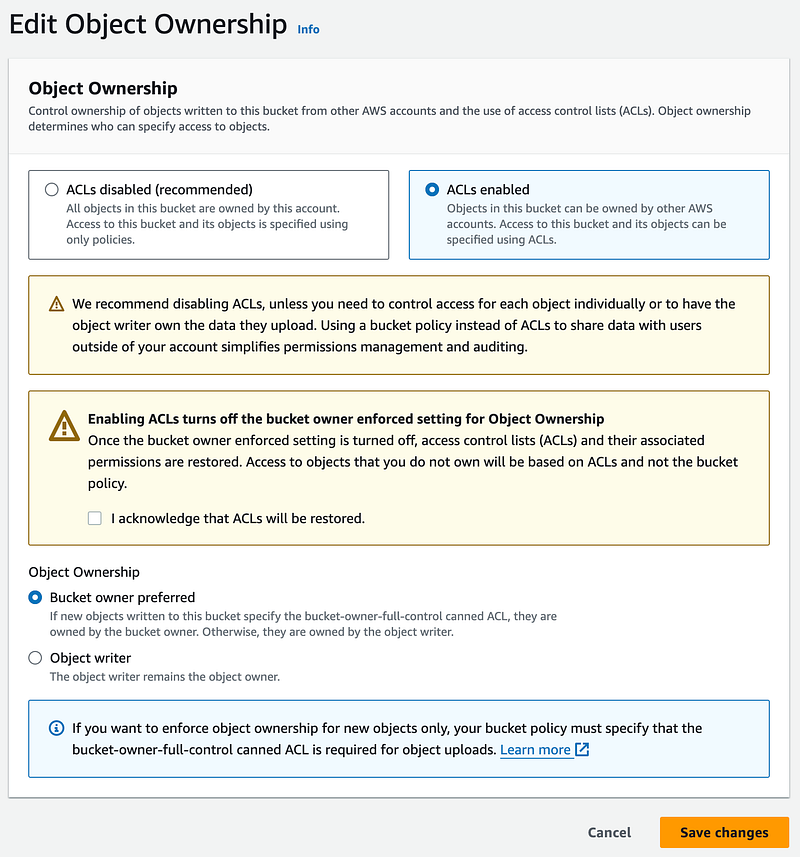
This is really all quite confusing and AWS should probably fix CloudFront logging to work with a proper bucket policy and no ACLs.
Apparently this confusing behavior started in April 2023.
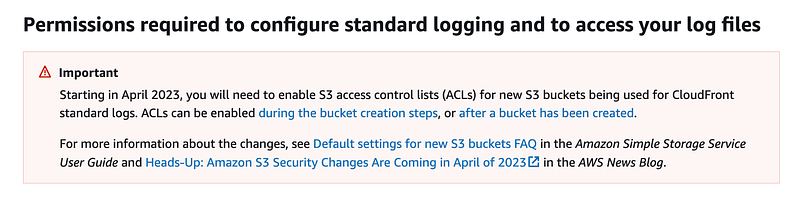
When you create or update a distribution and enable logging, CloudFront uses these permissions to update the ACL for the bucket to give the
awslogsdeliveryaccountFULL_CONTROLpermission. Theawslogsdeliveryaccount writes log files to the bucket. If your account doesn't have the required permissions to update the ACL, creating or updating the distribution will fail.
Full control? Like the ability to delete or alter the logs after writing them?
Not good. I suggest you replicate the logs to a bucket or location where the logging service cannot permanently delete your logs, if I understand this correctly.
Then over on this other page, AWS recommends not using ACLS. So why do you have to enable them if you’re not supposed to use them? More confusion:
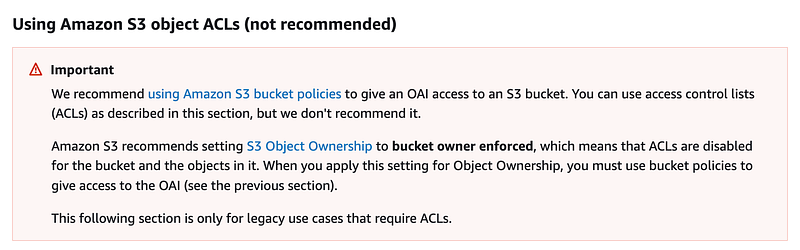
I also hope that AWS fixes this sooner than later to use a proper bucket policy in which you can give the service write once only access to log files. Even if you turn on versioning, the logging service has full access to the bucket so it could delete the versions. If you move the logs to an alternate location like archive them to glacier or something then you will have a backup in case something goes awry.
Follow for updates.
Teri Radichel | © 2nd Sight Lab 2023
About Teri Radichel:
~~~~~~~~~~~~~~~~~~~~
⭐️ Author: Cybersecurity Books
⭐️ Presentations: Presentations by Teri Radichel
⭐️ Recognition: SANS Award, AWS Security Hero, IANS Faculty
⭐️ Certifications: SANS ~ GSE 240
⭐️ Education: BA Business, Master of Software Engineering, Master of Infosec
⭐️ Company: Penetration Tests, Assessments, Phone Consulting ~ 2nd Sight Lab
Need Help With Cybersecurity, Cloud, or Application Security?
~~~~~~~~~~~~~~~~~~~~~~~~~~~~~~~~~~~~~~~~~~~~~~~~~~~~~~~~~~~~~
🔒 Request a penetration test or security assessment
🔒 Schedule a consulting call
🔒 Cybersecurity Speaker for PresentationFollow for more stories like this:
~~~~~~~~~~~~~~~~~~~~~~~~~~~~~~~~~~~~~~~~~~~~~~~~~~~~~~~~~~~~~
❤️ Sign Up my Medium Email List
❤️ Twitter: @teriradichel
❤️ LinkedIn: https://www.linkedin.com/in/teriradichel
❤️ Mastodon: @teriradichel@infosec.exchange
❤️ Facebook: 2nd Sight Lab
❤️ YouTube: @2ndsightlab


