avatarRichard Taujenis

Free AI web copilot to create summaries, insights and extended knowledge, download it at here

3188

Abstract

z2ROAHwhKpWU7TWp3YfLRA.jpeg"><figcaption></figcaption></figure><h1 id="84f0">Connect and receive files from Google Drive</h1><p id="7d2b">There are few packages that has to be used here.</p><p id="71cf">In my main project <a href="https://github.com/Mozes721/IG_Tk_Gdrive">IG_Tk_drive</a> I focus on downloading pictures and then after post it on IG.</p> <figure id="3204"> <div> <div>

            <iframe class="gist-iframe" src="/gist/Mozes721/edc093917ec0a92fc99c9e932a71f1d7.js" allowfullscreen="" frameborder="0" height="undefined" width="undefined">
          </div>
        </div>
    </figure></iframe></div></div></figure><p id="b467">Make sure your working directory has at least <b>storage.json</b> or <b>client_secret.json </b>file.</p><p id="a305">NOTE:</p><blockquote id="a31a"><p>One can work without the other, we started off with creds variable accessing storage.json if it doesn’t work then it would access it with client_secret.json and overwrite creds variable</p></blockquote><p id="1285">So get passed the OAuth 2.0 credentials with creds variable that has the access .json file</p><p id="c449">Thereafter with the DRIVE variable we will use <b>googleapiclient.discovery </b>method<b> </b>version 3 ‘v3’ in the drive and http will be authorized with creds that used either storage or client_secret json file.</p>
    <figure id="4773">
        <div>
          <div>
            
            <iframe class="gist-iframe" src="/gist/Mozes721/e36e058ac4f1ed8462de4a6d29dca966.js" allowfullscreen="" frameborder="0" height="undefined" width="undefined">
          </div>
        </div>
    </figure></iframe></div></div></figure><p id="bf1c">We start by by creating get_file function that instantly goes to <i>img_file()</i> function there create a variable that accesses the DRIVE files that are stored the “mimeType” chooses what type of file we are looking for.in the fields every time get the nextPageToken with corresponding files(id, name) and execute the search.</p><p id="855e">Get the files and iterate through them and make a return statement of the items listed in that directory.</p><figure id="d72c"><img src="https://cdn-images-1.readmedium.com/v2/resize:fit:800/1*xNAp-7BpNKwnO-dP95VSMA.jpeg"><figcaption></figcaption></figure><p id="164a">And now we are back at get_file to continue on our journey.</p><p id="69f0">So we prompt a user to choose an image based on the ones that where spitted out(oops printed i mean) from img_files function then append it in the image_input(it’s like that so my main project would work otherwise no need to create image_input variable).</p><p id="d750">So the files are being looped again if choose_img found as the file[‘name’] then create id and name variable that has the right file[‘id’],[‘name’].</p><p id="3f82">Now it will go to the last function call that is download_file and alongside it in the parameters we add the attributes.</p>
    <figure id="5029">
        <div>
          <div>
            
            <iframe class="gist-iframe" src="/gist/Mozes721/5400f0a6e5435b1d3a1e56cec59d0e59.j

Options

s" allowfullscreen="" frameborder="0" height="undefined" width="undefined"> </div> </div> </figure></iframe></div></div></figure><p id="0516">So the ‘id’ and ‘name’ attributes are passed in the download_file parenthesis.</p><p id="e231">Create a request variable use DRIVE that will use files() method to get the file by id name.</p><p id="c037">The fh variable is being created we use io packages FileIO method to manage file related input and output operations(‘wb’ indicates that file is opened for writing in binary mode).</p><p id="2214">We pass in the download variable that uses MediaIo… and pass in fh and request</p><p id="aa7e">In while loop pass in status and done when downloaded change the done to True.</p><h1 id="675f">Conclusion</h1><p id="b021">Congratulations! You have now enabled the Google Drive API and as well downloaded picture image from your choosing. It doesn’t have to stop there you can as well insert images in your Gdrive and few other operations. There are other Google APIs provided like Google Calendar, YouTube Data API, Google Analytics etc. You can create a project of your choosing with such fast opportunities I know I will!</p><h1 id="5404">Related Stories</h1><div id="c505" class="link-block"> <a href="https://readmedium.com/instagram-choose-img-from-gdrive-or-local-storage-629fa836dd4f"> <div> <div> <h2>Instagram: Choose image from GDrive or local storage</h2> <div><h3>This project is divided in three sections:Google API, directory search, Instabot/Tkinter</h3></div> <div><p>medium.com</p></div> </div> <div> <div style="background-image: url(https://miro.readmedium.com/v2/resize:fit:320/0*3l2bTkaLiIS4TEQB)"></div> </div> </div> </a> </div><div id="bd8a" class="link-block"> <a href="https://readmedium.com/find-files-folders-in-your-directory-with-python-2ff11081e373"> <div> <div> <h2>Find files, folders in your directory with Python</h2> <div><h3>Summary</h3></div> <div><p>medium.com</p></div> </div> <div> <div style="background-image: url(https://miro.readmedium.com/v2/resize:fit:320/1*_xbWr22OyNp8D4k7mV9j6g.jpeg)"></div> </div> </div> </a> </div><div id="de3d" class="link-block"> <a href="https://python.plainenglish.io/dynamic-e-mail-automation-from-excel-file-103d35bd9225"> <div> <div> <h2>Dynamic E-mail automation from Excel file</h2> <div><h3>With Python send emails to the whole Excel list or send individually with an option to translate text!</h3></div> <div><p>python.plainenglish.io</p></div> </div> <div> <div style="background-image: url(https://miro.readmedium.com/v2/resize:fit:320/1*jd5Hk-q3U6pX845txe5lBw.png)"></div> </div> </div> </a> </div></article></body>

Request/GET files from Google API with Python
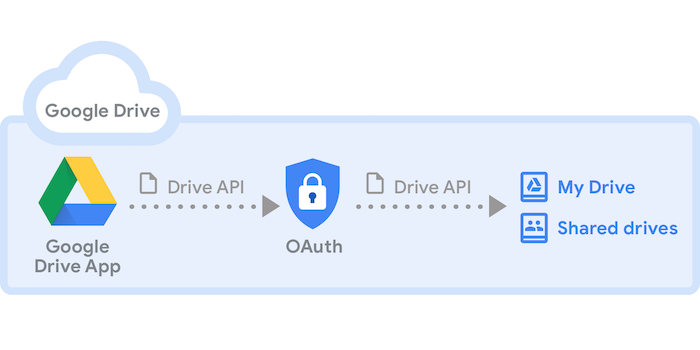
This article presents how to first and foremost setup your Google Drive API and then create a python script to download the file.

There are different kind of API Libraries provided in Google Cloud Platform.

But the one we are interested is Google Drive API.

Creating your project

To start it off you should start with creating a project in Google Developers Console.

https://accounts.google.com/o/oauth2/v2/auth

Then as follows:

Click on Enable APIS and Services

When you enable it there are different requests(push,post,get) you can make with the API and you can check them on this link.

When all set and done it goes as follows:

Create credentials

It may be overwhelming to choose credentials that you require luckily Google has done a great job of creating something you can easily follow ❤
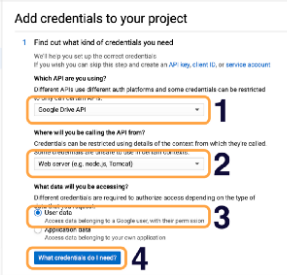
Then after Google will recommend you OAuth client ID and before you can set this up, you need to set up OAuth consent screen.

What comes next after setting up Creditentials is to determine the scope what you would like your application to do either see, download, create, edit, delete in your personal Google Drive.
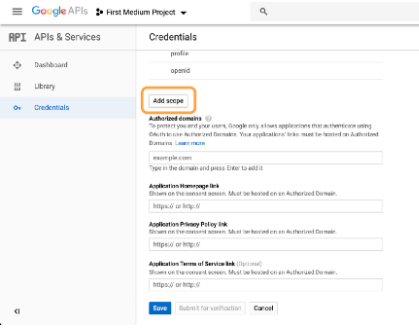
There are few more steps to follow but the rest should be easier to follow ones its all done you will going to have your Client Secret, which you can download so your application can use it to authenticate itself. Go on and click on the Download, which is the down arrow icon.

Your client secret is a JSON file. Rename it to client_secret.json.
Connect and receive files from Google Drive

There are few packages that has to be used here.

In my main project IG_Tk_drive I focus on downloading pictures and then after post it on IG.

Make sure your working directory has at least storage.json or client_secret.json file.

NOTE:

One can work without the other, we started off with creds variable accessing storage.json if it doesn’t work then it would access it with client_secret.json and overwrite creds variable

So get passed the OAuth 2.0 credentials with creds variable that has the access .json file

Thereafter with the DRIVE variable we will use googleapiclient.discovery method version 3 ‘v3’ in the drive and http will be authorized with creds that used either storage or client_secret json file.

We start by by creating get_file function that instantly goes to img_file() function there create a variable that accesses the DRIVE files that are stored the “mimeType” chooses what type of file we are looking for.in the fields every time get the nextPageToken with corresponding files(id, name) and execute the search.

Get the files and iterate through them and make a return statement of the items listed in that directory.

And now we are back at get_file to continue on our journey.

So we prompt a user to choose an image based on the ones that where spitted out(oops printed i mean) from img_files function then append it in the image_input(it’s like that so my main project would work otherwise no need to create image_input variable).

So the files are being looped again if choose_img found as the file[‘name’] then create id and name variable that has the right file[‘id’],[‘name’].

Now it will go to the last function call that is download_file and alongside it in the parameters we add the attributes.

So the ‘id’ and ‘name’ attributes are passed in the download_file parenthesis.

Create a request variable use DRIVE that will use files() method to get the file by id name.

The fh variable is being created we use io packages FileIO method to manage file related input and output operations(‘wb’ indicates that file is opened for writing in binary mode).

We pass in the download variable that uses MediaIo… and pass in fh and request

In while loop pass in status and done when downloaded change the done to True.

Conclusion

Congratulations! You have now enabled the Google Drive API and as well downloaded picture image from your choosing. It doesn’t have to stop there you can as well insert images in your Gdrive and few other operations. There are other Google APIs provided like Google Calendar, YouTube Data API, Google Analytics etc. You can create a project of your choosing with such fast opportunities I know I will!

Related Stories

API
Python
Google
Pull Request
Programming
Recommended from ReadMedium