avatarAdam Skali

Free AI web copilot to create summaries, insights and extended knowledge, download it at here

3531

Abstract

         </div>
        </div>
      </a>
    </div><p id="ca6b">Now, let’s go into how to actually manage it.</p><h1 id="479a">Use Quora’s Ads Manager to find Questions</h1><p id="b489">A not so little known trick is that you can make use of Quora’s Ads manager to get an understanding of which are the questions that are getting the most traffics every single week.</p><p id="b7a1">Start by clicking on the icon with your name and there you will see the Ads manager. Click on it and then you can go to the next step.</p><figure id="9977"><img src="https://cdn-images-1.readmedium.com/v2/resize:fit:800/1*1JcwTvgP6C34UFS1TCLreg.png"><figcaption></figcaption></figure><p id="e906">Once there, go to create new campaign</p><figure id="1f79"><img src="https://cdn-images-1.readmedium.com/v2/resize:fit:800/1*L-4a7cjHYsP7xK2GOf5lbQ.png"><figcaption></figcaption></figure><p id="0b63">Once there, you fill in the different information they ask. You can write pretty much anything, since we won’t really use any of it later.</p><figure id="d77d"><img src="https://cdn-images-1.readmedium.com/v2/resize:fit:800/1*TDWccZY4BeJJPNhPkLGA0w.png"><figcaption></figcaption></figure><p id="2383">On the next screen, click on Questions and next on Bulk Add</p><figure id="8999"><img src="https://cdn-images-1.readmedium.com/v2/resize:fit:800/1*fG6oJqNveKGyCgoM9aGQrw.png"><figcaption></figcaption></figure><figure id="6ae2"><img src="https://cdn-images-1.readmedium.com/v2/resize:fit:800/1*NVTktC38ZsY4OD-2bQmjbw.png"><figcaption></figcaption></figure><p id="1b6f">Write the topic for your niche and hit search</p><figure id="d980"><img src="https://cdn-images-1.readmedium.com/v2/resize:fit:800/1*wXQh-MZMP-ShKapKhiOELQ.png"><figcaption></figcaption></figure><figure id="f27d"><img src="https://cdn-images-1.readmedium.com/v2/resize:fit:800/1*k9dKxxdq8JDHKCxeOp4E2g.png"><figcaption></figcaption></figure><p id="367c">Now you know which are the questions that are getting the most views and as such, which are the questions you should focus on. Search for as many keywords as you can think of and find out how many views each one of them gets and once you do, make a list of questions to answer each day. Quora gives you more visibility if you answer consistently so try to do it for as long as you can.</p><p id="9d2a">With this you know which are the answer that you should focus on, and the next step is to go into how to make the most of these answers.</p><h1 id="82fc">Use Quora for Lead Gen</h1><p id="f080">Use Quora as a platform to repurpose your content. Use fragments of your articles and put them in Quora and link to the original.</p><p id="e4a2">Or even put together shorter articles you wrote to create a longer more thorought answer. By adding together parts of different articles you made you can create a comletly new one and use to expand the number of questions you can answer and as such the visibility you get.</p><p id="379c">So long as the answer is helpful, you might get some people who move towards your blog in order to know more, and this is a stream of people really interested in the topic you are writing about.</p><p id="7117">Before I said that Quora bans people when they use too many links, and to try to keep a ratio of 4:1, where you add links every five articles. But lately whenever I don’t put the source of the answer it gets collapsed so be careful and whenever repourpusing add the source.</p><p id="bc20">So whenever possible add the article’s source and when it’s actually original co

Options

ntent you can use the Wiki Strategy, where you link it to other answers that do take to your blog. Regarding how to create a Wiki strategy I really recommend <a href="undefined">Nat Eliason</a>’s <a href="https://readmedium.com/the-wiki-strategy-how-to-grow-your-blog-to-100k-monthly-visitors-723824ff50a7?source=search_post---------0">article </a>on how to grow your blog using a wiki strategy.</p><p id="3854">Here is an example of how I put together the content from 6 articles to create a huge answer and tried to see how it would fare even when I posted it in a question that was already saturated. And the results were great</p><figure id="c1b3"><img src="https://cdn-images-1.readmedium.com/v2/resize:fit:800/1*lZ1V-b4UjSTyAxg7IOML6A.png"><figcaption></figcaption></figure><p id="9224">Repurposing my content meant getting 6.1k views for an answer where the original posts didn’t even achieve 1000 views. And while not all of those people clicked on the link, and this isn’t the only reason of course, I have still managed to grow the publication from 14 people at the start of the month to 37</p><figure id="d8c6"><img src="https://cdn-images-1.readmedium.com/v2/resize:fit:800/1*M2iaBXJaPc3aJIxwHMoMow.png"><figcaption></figcaption></figure><p id="74b3">Make sure to always use an attractive image to make the answer as appealing as possible. For example for this article, I made sure to use an image with a message that could appeal to people looking for an answer</p><figure id="5332"><img src="https://cdn-images-1.readmedium.com/v2/resize:fit:800/0*XGJFmhWWiF5GxPnS"><figcaption>Image edited with Canva</figcaption></figure><p id="1490">To add the text to the image you just need to use a tool like Canva (it makes it easier to choose fonts that look great) or even with Powerpoint. Just use any kind of editing software that you are comfortable with and add a few words to the image to make it more attractive.</p><p id="417a">With this you will make sure that your answer can be differentiated and this way it will attract more attention, which is something you need if you want to drive brand awareness. Unsplash has a great number of pictures to choose from but there are many more, so make sure to find the picture that fits best and gives you a chance to create an answer for the people who will read it</p><div id="1a65" class="link-block"> <a href="https://readmedium.com/picture-porn-36a8c7aae8a"> <div> <div> <h2>Picture Porn</h2> <div><h3>Make your articles look great with these sites</h3></div> <div><p>medium.com</p></div> </div> <div> <div style="background-image: url(https://miro.readmedium.com/v2/resize:fit:320/0*OcgBSj8Fl2UJfqV3)"></div> </div> </div> </a> </div><p id="68f6">Some more examples (although not as popular)</p><figure id="b6d5"><img src="https://cdn-images-1.readmedium.com/v2/resize:fit:800/0*VCbIUJ6cxzkNMIuG.png"><figcaption>Image edited with Canva</figcaption></figure><figure id="699f"><img src="https://cdn-images-1.readmedium.com/v2/resize:fit:800/1*aOWf73DbDRJoj05qDn6Y_A.png"><figcaption>Image from Quora</figcaption></figure><p id="eb10">By following these tips you should be able to give a second chance to all your content. And be sure to find new ways to merge concepts from different articles, don’t forget about them, because they can give you an incredible boost if used well.</p></article></body>

Repurpose your Content to Drive Brand Visibility

How to use Quora to give a push to your online presence

Image from rawpixel

Have you had articles that you thought would do great and yet received almost no views? Do you struggle getting more visibility when writing only on Medium or your blog? Would you like to get more views in way less time?

If you answer yes to any of the above then repurposing your content is the way to go. While it might not have done as well as you wanted it to at first, maybe if you give it a second chance it could do well beyond your wildest expectations.

My Story

I have been writing an article a day in my publication since last month as a challenge to show myself that I can do it and as a way to test all the advice relating to how important it is to appear every single day.

And it worked, I managed to get from 60 views in december to 2000 last month and about to hit 4200 this month. But I still wanted to try if I could get more visibility across platforms, because the truth is that most of my articles are well below 50 views each
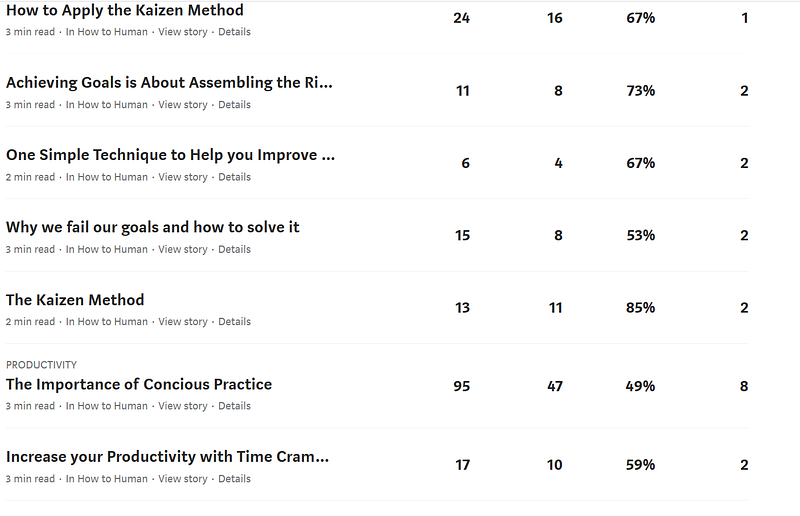
So I decided to test ways to give more life to these articles and I decided to do it using Quora. And here is the result
But before going into how to get there, for those not familiar with the platform, let’s see a short overview of what it is.

What is Quora?

Quora is basically a Q&A website where you can find questions that others ask and answer them or create your own questions. As you start answering questions, you get upvotes, which, in turn, mean more exposure for your work.

At some point, you also start getting questions for you, where they just ask you to create an answer to an already existing question or where they ask you specifically.

By finding answers from your sector or where you want to grow, you can start getting a name there. And if you have already identified your niche then Quora can be the best place to reshare your articles.

For more basic tips on how to use Quora take a look at this article (shameless sefl-promotion)

Now, let’s go into how to actually manage it.

Use Quora’s Ads Manager to find Questions

A not so little known trick is that you can make use of Quora’s Ads manager to get an understanding of which are the questions that are getting the most traffics every single week.

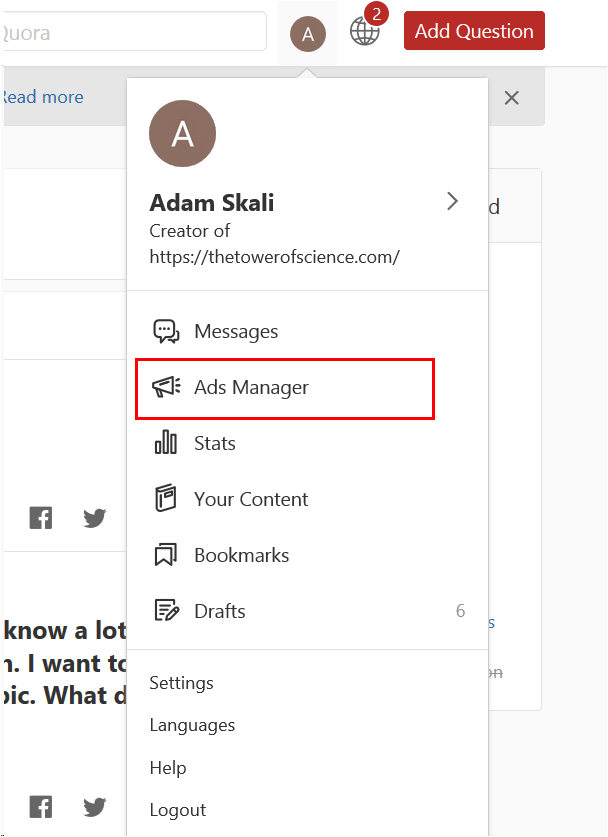
Start by clicking on the icon with your name and there you will see the Ads manager. Click on it and then you can go to the next step.
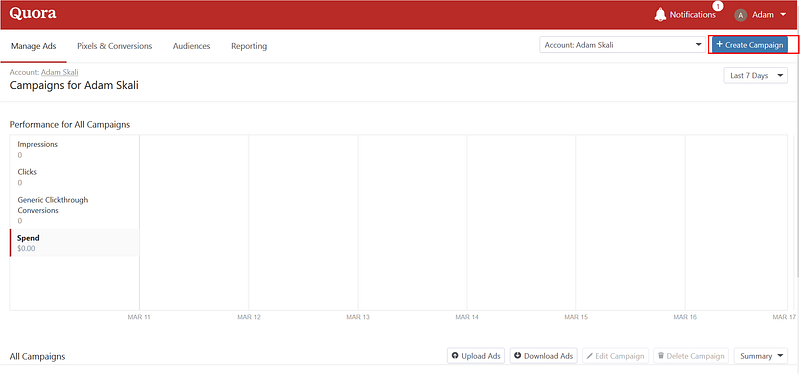
Once there, go to create new campaign
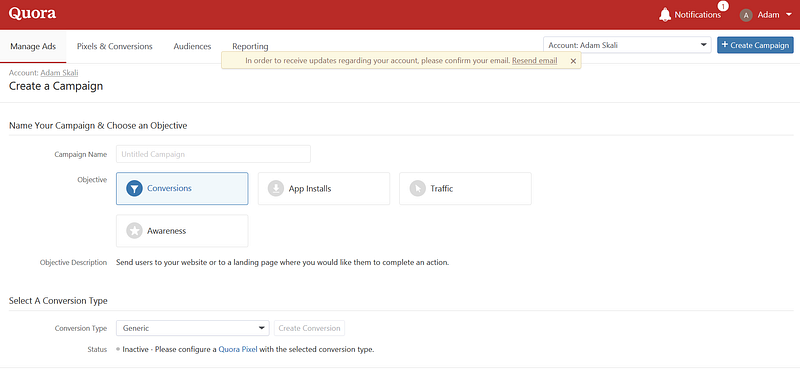
Once there, you fill in the different information they ask. You can write pretty much anything, since we won’t really use any of it later.
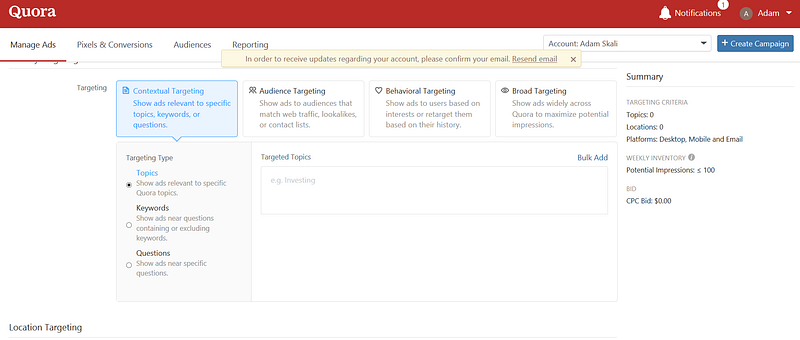
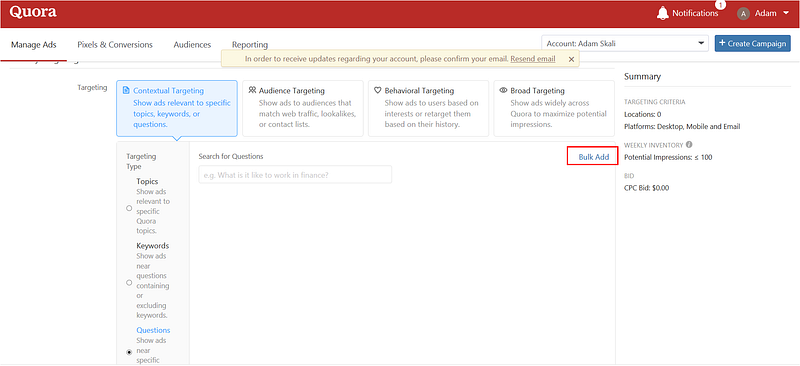
On the next screen, click on Questions and next on Bulk Add
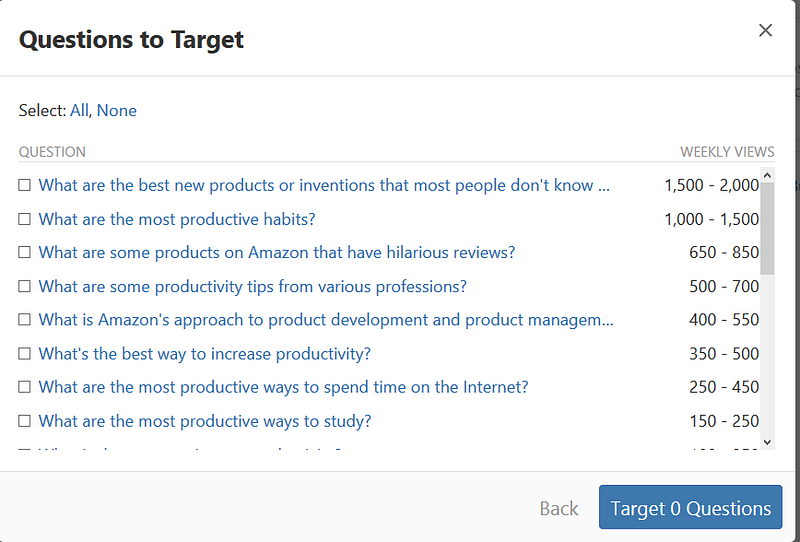
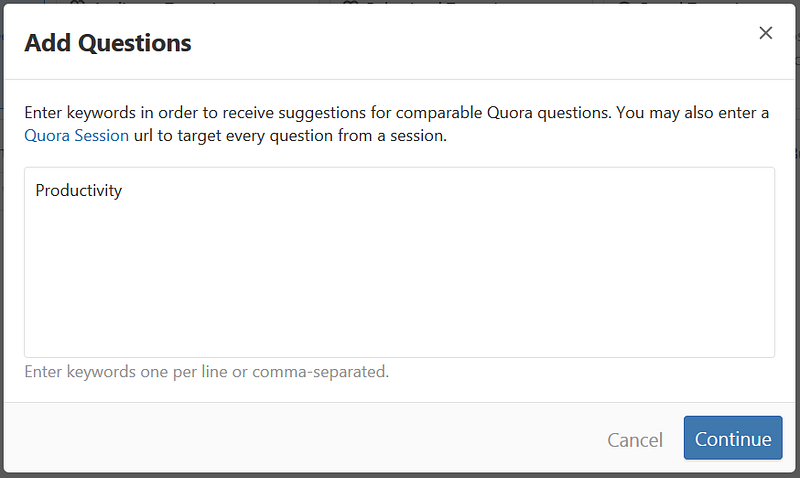
Write the topic for your niche and hit search
Now you know which are the questions that are getting the most views and as such, which are the questions you should focus on. Search for as many keywords as you can think of and find out how many views each one of them gets and once you do, make a list of questions to answer each day. Quora gives you more visibility if you answer consistently so try to do it for as long as you can.

With this you know which are the answer that you should focus on, and the next step is to go into how to make the most of these answers.

Use Quora for Lead Gen

Use Quora as a platform to repurpose your content. Use fragments of your articles and put them in Quora and link to the original.

Or even put together shorter articles you wrote to create a longer more thorought answer. By adding together parts of different articles you made you can create a comletly new one and use to expand the number of questions you can answer and as such the visibility you get.

So long as the answer is helpful, you might get some people who move towards your blog in order to know more, and this is a stream of people really interested in the topic you are writing about.

Before I said that Quora bans people when they use too many links, and to try to keep a ratio of 4:1, where you add links every five articles. But lately whenever I don’t put the source of the answer it gets collapsed so be careful and whenever repourpusing add the source.

So whenever possible add the article’s source and when it’s actually original content you can use the Wiki Strategy, where you link it to other answers that do take to your blog. Regarding how to create a Wiki strategy I really recommend Nat Eliason’s article on how to grow your blog using a wiki strategy.

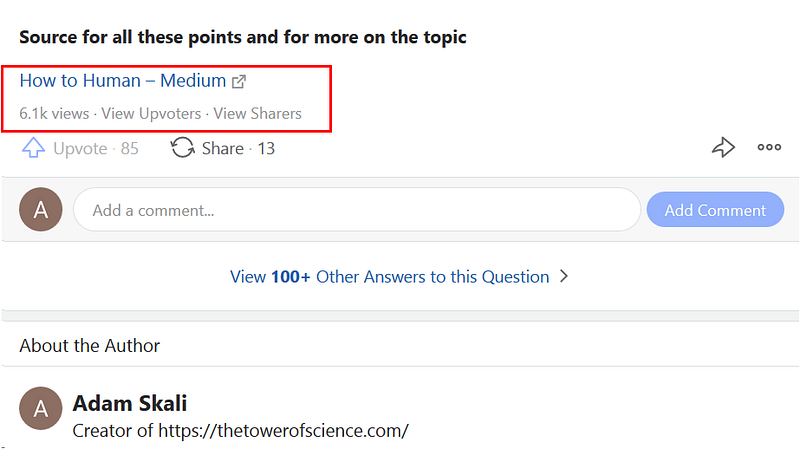
Here is an example of how I put together the content from 6 articles to create a huge answer and tried to see how it would fare even when I posted it in a question that was already saturated. And the results were great

Repurposing my content meant getting 6.1k views for an answer where the original posts didn’t even achieve 1000 views. And while not all of those people clicked on the link, and this isn’t the only reason of course, I have still managed to grow the publication from 14 people at the start of the month to 37

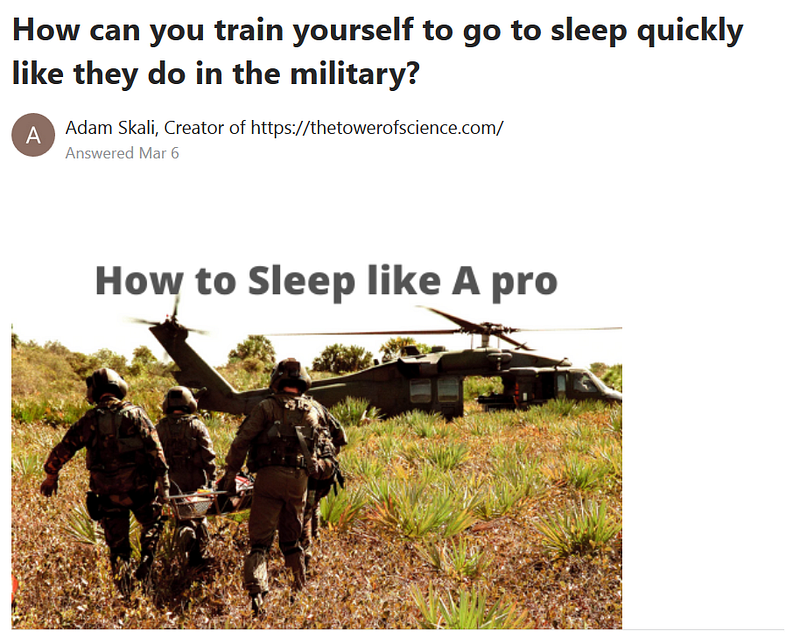
Make sure to always use an attractive image to make the answer as appealing as possible. For example for this article, I made sure to use an image with a message that could appeal to people looking for an answer

Image edited with Canva

To add the text to the image you just need to use a tool like Canva (it makes it easier to choose fonts that look great) or even with Powerpoint. Just use any kind of editing software that you are comfortable with and add a few words to the image to make it more attractive.

With this you will make sure that your answer can be differentiated and this way it will attract more attention, which is something you need if you want to drive brand awareness. Unsplash has a great number of pictures to choose from but there are many more, so make sure to find the picture that fits best and gives you a chance to create an answer for the people who will read it

Some more examples (although not as popular)
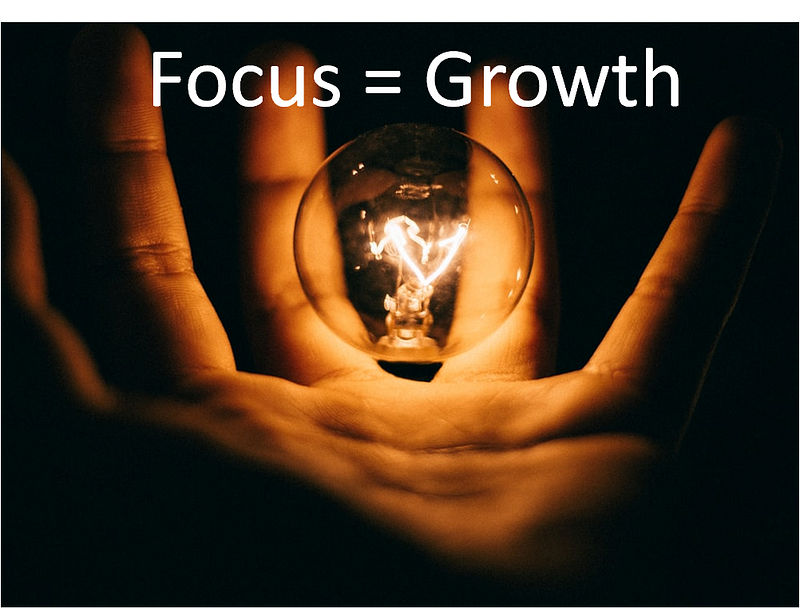
Image edited with Canva
Image from Quora

By following these tips you should be able to give a second chance to all your content. And be sure to find new ways to merge concepts from different articles, don’t forget about them, because they can give you an incredible boost if used well.

Marketing
Social Media
Marketing Strategies
Digital Marketing
Personal Branding
Recommended from ReadMedium