
Repository Accounts and Administrators
ACM.391 Thinking about software development environments, permissions, complexity, and naming conventions
~~~~~~~~~~~~~~~~~~~~~~~~~~~~~~~~~~~~~~~~~~~~~~~~~~~~~~~
⚙️ Check out my series on Automating Cybersecurity Metrics | Code.
🔒 Related Stories: AWS Organizations | AWS Security | Secure Code
💻 Free Content on Jobs in Cybersecurity | ✉️ Sign up for the Email List
~~~~~~~~~~~~~~~~~~~~~~~~~~~~~~~~~~~~~~~~~~~~~~~~~~~~~~~
In the last post I explained why I’m removing dynamic references from some of my CloudFormation templates in favor of scripting parameters, retrieving parameters via scripts, and passing the values in as CloudFormation parameters. I also described my wishlist for better protection of secrets in CloudFormation parameters.
In this post, I’m going to describe something I’ve been thinking about — environments and where you store your repositories like Elastic Container Registry and AWS CodeCommit. I’ve been using those to store source control and containers.
Let’s say you have an account where you test setting up websites. Then you have an account where you deploy your production websites. Do you want both of those accounts to get code from the same code repository?
You could create one single repository and use a branching and merging strategy as a lot of people do with GitHub. I find that approach complex, time consuming, and error prone. It’s also harder to maintain permissions where a certain team only has permission to change a particular branch. Maybe it’s just me but I’ve had to sort out problems merging branches in GitHub and I found it to be somewhat painful.
A different way to manage code
At one company, I used a product called AccuRev. This product was my favorite source control system in terms of merging code at time of deployment. I’m not saying I recommend it because I haven’t reviewed the security lately. I was just trying to look at the documentation and there’s no TLS certificate or there’s something wrong with it. I didn’t look. I think it also only runs on Windows.
But I liked the way it created a visual of who was changing which files. You could rearrange the streams, which are similar to git branches, in different positions to show which files were going to deploy together. You could have a number of teams working on different streams (sets of files checked out and altered) that would deploy together.
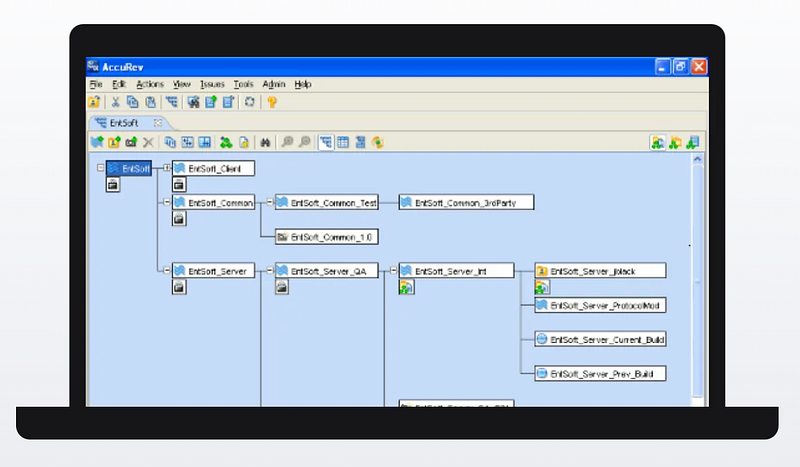
If we had any conflicting files we could create a parent stream first and merge those file changes before pushing the stream to production. In other words, create a new one of those boxes above and insert it between the top root box and the three boxes behind it that are going to deploy together. Push the three streams to the intermediary stream so you have only one stream going to production. Resolve any conflicts. Then push the intermediary to the root (production) node on deployment night and push out the code.
Development, QA, and Production repositories
To achieve the simplified effect of only ever having a single input to the production stream with GitHub, I asked my DevOps team to make three repositories — dev, QA, and prod. Developers could make all the changes they wanted, check in and resolve conflicts in their own repository. Once the team lead felt a particular set of code at the root was ready to push to QA it got copied to the QA repository by a Jenkins job.
The code in the QA repository was never changed by multiple people. Code was only pushed to it from the root of the dev stream.. It only had one input from the dev repository. The production repository only ever had one input which was a tested QA repository. This eliminates a lot of issues with only slightly more complexity. It would be easy for me, as the architect, to look at any individual repository and see what is deployed in my corresponding Dev, QA, and Prod accounts.
What I wanted was a clear way to see what is under development, what is being tested, and what is in production. I also wanted to easily create separate permissions for dev, QA and production repositories. How do you set permissions on branches in GitHub? I don’t see a way to designate those permissions when I create a user. There’s something called protected branches but that’s not really the functionality I’m talking about. I’m sure it’s possible, but it just feels like a misconfiguration waiting to happen and it’s not simple to see who’s doing what in layers of checked in code sometimes.
Team repositories
The other thing I did was give different teams different repositories. Teams could see each other’s code or do a pull request to ask for changes, but they couldn’t change some other team’s code. A team might have access to multiple of their own repositories.
Separate repositories as backups
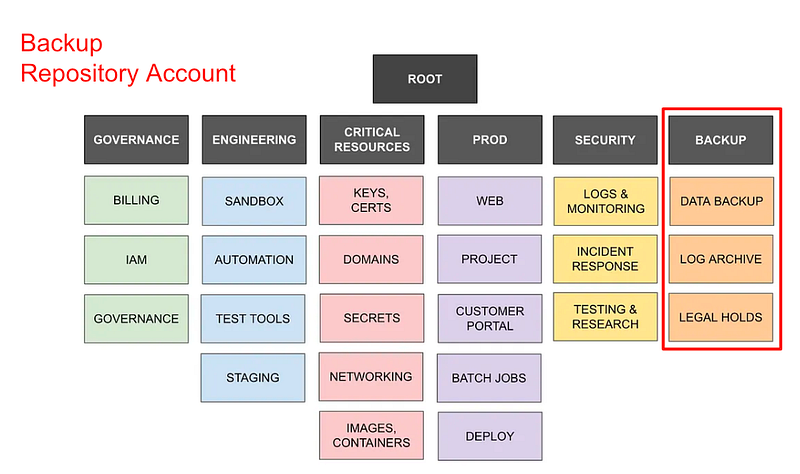
Later, I had source control repositories on two different cloud platforms. I demonstrated that with GitHub and CodeCommit in an earlier post. This made segregation of duties even easier and gave me a backup of code. The people helping me develop the ode had access to GitHub. The code got deployed to BitBucket in a separate repository for each class.
Yes, I understand that git is distributed source control. But how secure are all those developer machines and what state are they in? How do you know some distributed backup didn’t have injected code somewhere as was the case with SolarWinds? I’m not actually sure if the code was injected in the source control system or the executable produced when the code got deployed was altered. Either way we need integrity checking along the way, something I hope to get to later.
Limiting the blast radius
Multiple repositories also helps you limit how much an attacker can access should they breach a set of credentials.
If you have a single administrator managing a single repository one set of credentials grants access to all your code.
If you limit developers to particular repositories, a single set of compromised credentials can only impact a subset of code.
If your administrator that pushes code from one environment to another can only read from one, push to the other, and you verify the code matches in both after the process is complete, code injection will be more difficult. (presuming you have performed careful QA on the source code you are pushing to the upstream repository.)
What is an environment?
So I have been thinking about this question: What is an environment?
Initially I was thinking an environment was something like the sandbox and sandbox accounts where you access the Sandbox ECR and Code Commit repositories. In my sandbox environment I have a web account and an account where I have my repositories.
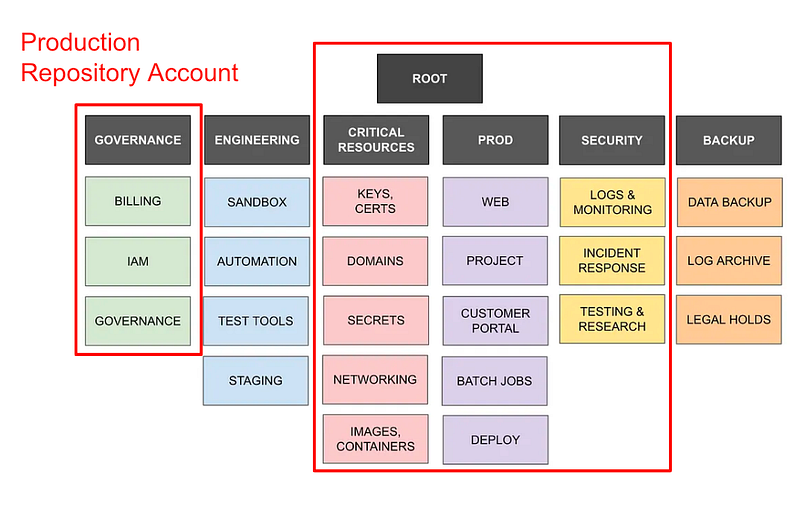
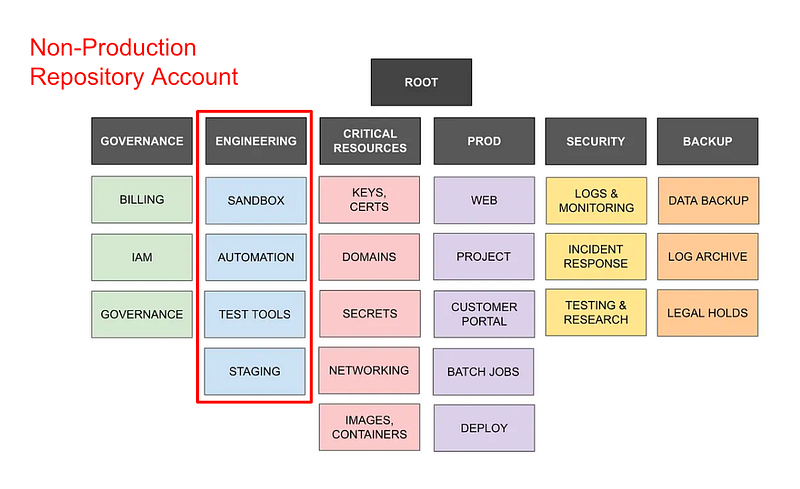
Initially I was thinking I would create a separate repository account for every single environment but that’s going to get a bit unwieldy for me. You may have a different setup in your organization but for my purposes I am going to create a prod and a nonprod repository account.
I am going to have a deploy admin with specific credentials to move code between repository accounts or to and from external sources.
So what is an environment? I’m defining it as a set of accounts that have access to a particular repository account and set of repositories.
So let’s say I have the following accounts as in the diagram below. I might break it down so the following accounts have access to a production or non-production repository account. I might also have a separate backup repository account.
My website example
Let’s take the website I’ve been working with an example — dev.rainierrhododendrons.com.
In the non-production repository account I create a source code repository for that site — dev.rainierrhododendrons.com.
I finish that code and I want to push it to production. I copy the code to the repository in the production account: rainierrhododendrons.com.
Deployment Image
What about all the infrastructure? I’m developing this awsdeploy container. Where does that go? Well, I could create an ECR repository for that in my non-production repository account. This ECR repository has containers that can be used across an environment. In the examples I’ve been working with I have a sandbox environment. Everything in the sandbox environment has access to containers in that repository.
What I can do is pull code from multiple repositories and sources to create my deployment container. So maybe I have an awsdeploy-iam repository and an awsdepoy-kms repository and an awsdeploy-web repository.
If the container needs code from multiple repositories it can pull it in when needed and create an image using the specific code for whatever job it needs to run.
When testing the container it’s getting pushed to the development repository. When I’m ready to deploy it I copy it to the production repository and perform proper integrity checks to make sure it hasn’t changed.
Naming convention and parameters
Now I was going to create parameters in every account to describe which environment it is in, but I got to thinking: What if I can just put the parameters in the name of the account and parse it out from there? One of the benefits of that approach is that I don’t have a scenario where someone can change a parameter and now the environment is out of sync and they somehow direct a deployment to the wrong place or gain unauthorized access to something.
Here’s an example of what a name might look like.
prod-goverance-iam
I am having a flashback of writing about this before but I don’t remember. Anyway I want to try to do something like the above to name my resources to indicate whether they are prod or non-prod and which group owns the repository.
The combination of repository account plus owner defines the environment in my case.
The environment defines where the code will be deployed, who can read it, and who can change it. I can add restrictions in policies based on environment names.
That’s what I’m thinking at the moment — subject to change if I think of something better while testing it out. 😊
Follow for updates.
Teri Radichel | © 2nd Sight Lab 2023
About Teri Radichel:
~~~~~~~~~~~~~~~~~~~~
⭐️ Author: Cybersecurity Books
⭐️ Presentations: Presentations by Teri Radichel
⭐️ Recognition: SANS Award, AWS Security Hero, IANS Faculty
⭐️ Certifications: SANS ~ GSE 240
⭐️ Education: BA Business, Master of Software Engineering, Master of Infosec
⭐️ Company: Penetration Tests, Assessments, Phone Consulting ~ 2nd Sight Lab
Need Help With Cybersecurity, Cloud, or Application Security?
~~~~~~~~~~~~~~~~~~~~~~~~~~~~~~~~~~~~~~~~~~~~~~~~~~~~~~~~~~~~~
🔒 Request a penetration test or security assessment
🔒 Schedule a consulting call
🔒 Cybersecurity Speaker for PresentationFollow for more stories like this:
~~~~~~~~~~~~~~~~~~~~~~~~~~~~~~~~~~~~~~~~~~~~~~~~~~~~~~~~~~~~~
❤️ Sign Up my Medium Email List
❤️ Twitter: @teriradichel
❤️ LinkedIn: https://www.linkedin.com/in/teriradichel
❤️ Mastodon: @teriradichel@infosec.exchange
❤️ Facebook: 2nd Sight Lab
❤️ YouTube: @2ndsightlab