
Why I am not using Dynamic AWS SSM Parameter Store Resolution in CloudFormation
ACM.390 A feature request for CloudFormation when using secrets and parameters to better protect customer data
~~~~~~~~~~~~~~~~~~~~~~~~~~~~~~~~~~~~~~~~~~~~~~~~~~~~~~~
⚙️ Check out my series on Automating Cybersecurity Metrics | Code.
🔒 Related Stories: AWS Security | Secure Code
💻 Free Content on Jobs in Cybersecurity | ✉️ Sign up for the Email List
~~~~~~~~~~~~~~~~~~~~~~~~~~~~~~~~~~~~~~~~~~~~~~~~~~~~~~~
In the last post I explained the basic changes I need to make to every script in my prior code base for this series to work in my new directory structure inside a container.
This is another post derived from starting off doing something else and then getting blocked or sidetracked by another issue.
I’m going to reiterate some of the issues I have with SSM Parameters and secret values in AWS CloudFormation templates that I hope AWS will fix.
In general, I think AWS Systems Manager could be very useful but it has some security risks. I mentioned C2 channels that can easily be created with access to documents and deploying scripts to your EC2 instances and cloud resources.
Sure go ahead and run any command you want on an instance using this nifty SSM document…Anyone who works in pentesting or attackers that get ahold of that will thank you profusely. Read up on Living Off The Land and set up a C2 channel using Pacu — an AWS penetration testing tool.
But that’s not my immediate problem. Right now I’m having issues with dynamic resolution of parameters in templates and handling of secrets in general when using CloudFormation parameters or dynamic resolution.
My first reoccurring problem is that AWS CloudFormation does not support creating SSM Secure String (encrypted) parameters. AWS Claims to encrypt everything. Does that include SSM Parameters by default?
That does not appear to be the case from the FAQs and other documentation I’m reading at the time of this writing:

I check back periodically but still see that SecureString (encrypted) parameter values are not supported in CloudFormation templates that deploy SSM Parameters.
Not only that, I manually created a secure string SSM parameter and tried to reference it with a dynamic reference in CloudFormation and it failed. The error message said that secure string is not supported by AWS Organizations. In CloudFormation I guess? Why would this vary by service? Isn’t there a general implementation for this type of thing across services?
I was trying to retrieve a parameter I created manually using AWS SSM Parameters store with a standard parameter and the secure string data type. The name of my parameter is org. I couldn’t do this in CloudFormation. Hopefully, I don’t have a typo there but I don’t see it.
{{resolve:ssm-secure:org}}I changed it to non-secure string and it worked:
{{resolve:ssm:org}}Beyond that, there’s another issue. I already had this debate with someone on Twitter who wanted to use dynamic parameters for everything in CloudFormation.
Ugh. No. What a pain for troubleshooting and values are not immutable. Maybe you have versions but how do you know which version was used? And do you really want to dig through that when you’re troubleshooting an issue like this?

You can’t see what was passed into the parameter when looking at the template to verify why it’s failing. You can go over to look at SSM Parameter Store — presuming no one has changed the parameter value in the meantime. It’s not immutable. Perhaps you have versioning or logging of some kind but yeah right. A security person or someone troubleshooting a stack wants a quick answer. Not this — with no idea what value got passed in.
Alternatively, if I use CloudFormation parameters, any values used by parameters are visible in the console. That’s good and bad — only because of a lacking security control by AWS CloudFormation. I designed a system with an issue like this and we need some masking here.
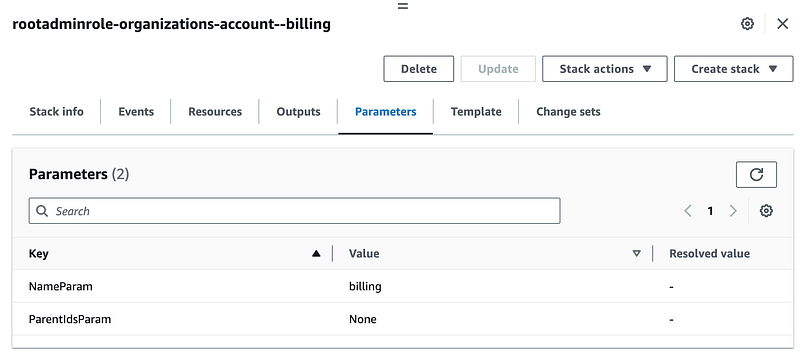
Here’s how to solve part of the problem of secret values passed in as CloudFormation templates and issues with dynamic parameter immutability and ease of troubleshooting.
Whether using Secrets Manager or Parameter Store I want to be able to create an encrypted value — encrypted with my own customer managed KMS key.
If someone is using dynamic parameters to resolve template values, add a tab here to view the parameter and value.
If a value is encrypted with a KMS key, don’t show it anywhere in the console or logs. Make sure it is not visible to anyone managing the AWS Systems on the back end. In the console, please mask the value and put a button or link next to it that allows people with permission to use the KMS key and access the value to view the data.
#awswishlist !
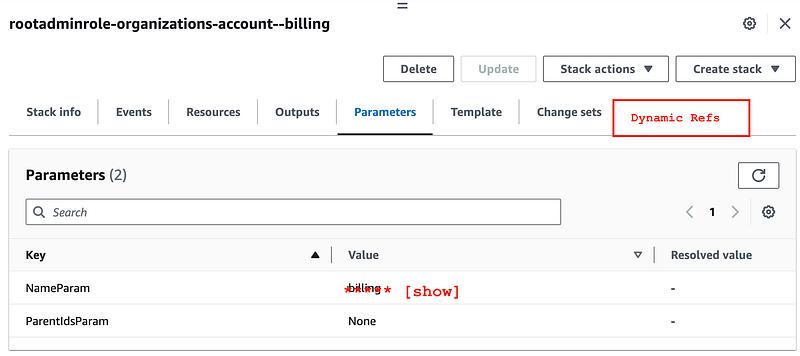
Do the above masking for Secrets Manager and Parameter Store values.
Obviously the values need to be masked in API responses and logs as well unless the person has permission to view the data.
To make it easier for users, do this masking and unmasking automatically based on user permissions. And please don’t just return a generic “you don’t have permission” message without explaining why.
Lack of tracking the immutable value at time of use is like tracking the price of an order on an e-commerce site from the product table that stores the price of the item. The person checks out and the price of the item is $5. They get charged $5. Someone at the company changes the price of the product to $10. The person reviews their order and freaks out because now the receipt which references the product table says the cost was $10. That’s why you have to make a copy of the price the person paid and save it to the orders table.
And that’s why any parameter values used at the time of deploying a CloudFormation template should be tracked somewhere in the deployment records and visible in the UI — with masking for sensitive data.
Due to limitations above, I’m going to create and retrieve SSM Parameters for creation of organization resources using scripts, not CloudFormation, and that is unfortunate. I can’t even use the AWS default encryption if I’m understanding the AWS documentation correctly. I’m going to retrieve those values using scripts, and then I’m going to pass them to CloudFormation as parameters.
The other issue is not an issue with AWS Parameter Store. It has to do with my default naming convention and retrieving IDs or ARNs from templates like I wrote about before.
I want to set the output with the ID Or ARN from the NameParam every time.
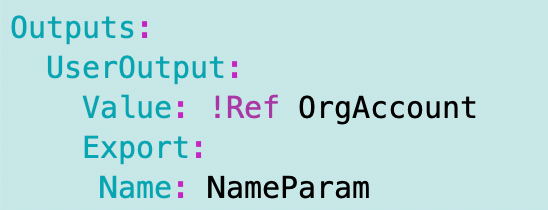
In my account template I was concatenating a bunch of values to get the account name.
If I use that approach my template is going to end up trying to deploy two outputs with the same name which is not allowed if I use the same base account name in different environments.
Let’s say I have an account named “web” where I deploy production websites. Now I want to create a test environment. Let’s say I want to create a sandbox-web and production-web. If I’m just passing in “web” as the account name and concatenating the organization and other prefixes I’ll end up with a conflict. I also won’t be able to consistently look up the account id with the full name of the account.
So I am still using SSM parameters, but I am creating them externally to the template and retrieving and passing them in when I run the template. The SSM parameter can change all it wants. I still have a record of the value that was used to deploy the template. I can also encrypt values at rest and they are retrieved when a process runs, pulls the value, and uses it inside my EC2 instance in my final design (explained in a prior post).
The only remaining problem is that the values are output to CloudFormation as shown above and anyone who has access to read information about CloudFormation stacks can read the value.
A workaround for that is to use different accounts for different resources and only granting the people who should have access to the plaintext value access to the account. That doesn’t necessarily restrict all possible cases of abuse by AWS employees if they have access to the account for support or some back end system if they can see data encrypted with the default AWS key. But I think it’s the best we can do until if and when AWS masks parameters in CloudFormation output and adds the ability to deploy encrypted SSM Parameters.
There is yet another security issue even if AWS fixes the CloudFormation UI to mask sensitive data, viewable only by the appropriate people. It is up to an organization managing their deployments to understand everywhere that parameter is logged, in memory, or otherwise accessible to a system or human outside of the above process. But that’s something you have control over, unlike the other issues mentioned above.
For my use case, I can retrieve the values on an EC2 instance, use them, and terminate the instance without giving anyone access to log into the instance or access any logs that may have sensitive data. That means if I ship logs off the instance for troubleshooting purposes, I need to make sure there’s not sensitive data in those logs, or encrypt the logs and limit it to people who are allowed to view that data.
So at the moment, I’m removing dynamic parameters from templates and using my parameter_functions.sh file in the /resources/ssm/parameter/ file to create and retrieve parameters, either encrypted with the default AWS key or my own KMS CMKs.
Follow for updates.
Teri Radichel | © 2nd Sight Lab 2023
About Teri Radichel:
~~~~~~~~~~~~~~~~~~~~
⭐️ Author: Cybersecurity Books
⭐️ Presentations: Presentations by Teri Radichel
⭐️ Recognition: SANS Award, AWS Security Hero, IANS Faculty
⭐️ Certifications: SANS ~ GSE 240
⭐️ Education: BA Business, Master of Software Engineering, Master of Infosec
⭐️ Company: Penetration Tests, Assessments, Phone Consulting ~ 2nd Sight Lab
Need Help With Cybersecurity, Cloud, or Application Security?
~~~~~~~~~~~~~~~~~~~~~~~~~~~~~~~~~~~~~~~~~~~~~~~~~~~~~~~~~~~~~
🔒 Request a penetration test or security assessment
🔒 Schedule a consulting call
🔒 Cybersecurity Speaker for PresentationFollow for more stories like this:
~~~~~~~~~~~~~~~~~~~~~~~~~~~~~~~~~~~~~~~~~~~~~~~~~~~~~~~~~~~~~
❤️ Sign Up my Medium Email List
❤️ Twitter: @teriradichel
❤️ LinkedIn: https://www.linkedin.com/in/teriradichel
❤️ Mastodon: @teriradichel@infosec.exchange
❤️ Facebook: 2nd Sight Lab
❤️ YouTube: @2ndsightlab