
Rename a CloudFormation Stack — #awswishlist [Updated]
Sometimes you you want to fix a typo in a stack without re-deploying everything
~~~~~~~~~~~~~~~~~~~~~~~~~~~~~~~~~~~~~~~~~~~~~~~~~~~~~~~
⚙️ Check out my series on Automating Cybersecurity Metrics | Code.
🔒 Related Stories: Bugs | AWS Security | Secure Code
💻 Free Content on Jobs in Cybersecurity | ✉️ Sign up for the Email List
~~~~~~~~~~~~~~~~~~~~~~~~~~~~~~~~~~~~~~~~~~~~~~~~~~~~~~~
I haven’t thought through all the implications of this wish but sometimes I just want to rename a CloudFormation stack without redeploying all the resources in it.
A major example of this is when I’m creating AWS accounts and trying to establish a naming convention for stacks, AWS account names, and AWS Organizations roles.
If I make a mistake on any of those points and I want to delete and recreate the account I’m stuck because deleting accounts is complicated. I can close the account but it’s stuck in suspended status in my account for 90 days. I’m also going to hit limits if I keep deleting and recreating accounts. I could try to delete the stack and recreate it and import the resource as I did with my AWS Organizations script that’s extra time I don’t need to spend.
Wouldn’t it be nice if I could simply rename the stack if I got everything else right but all I wanted to do was fix a typo in the stack name?
I’m not sure why this is not possible. Perhaps because then it would be difficult to track down in CloudFormation logs? Not sure but at the moment it’s making my life difficult — and for this reason I’m leaving a stack in a state with an incorrect name. Too many other things to worry about but it’s bugging me.
~~
I just spoke to someone at AWS and this is complicated because there are resources behind the scenes that are aligned with that name. Renaming all those resources will be complex. For things a customer does not see, that is up to AWS to decide and testing all that will be pretty complex. Also, ensuring whatever tools AWS security uses to evaluate resources and policies is a consideration.
From the customer side, the problem from a security perspective is that renaming the resource may impact existing policies.
In that case, I recommended that CloudFormation should never change the policy, but rather give the customer a very clear warning that the resource is reference in a policy and the policy needs to be updated to remove the resource before renaming it or at least make the customer approve the change first. But I can see all kinds of potential inadvertant and malicious changes impacting customers at that point.
That’s the missing piece I reference in my original post — there must be some reason why customers can’t rename stacks. That’s why.
From a security and usability perspective, I have had a lot of issues with the fact that AWS updates trust policies and KMS key policies when users are deleted. In some cases I practically lost access to resources. In other cases things stoppped working and it took me a long time to figure out why due to cryptic error messages.
AWS should never change policies, but rather clearly explain the exact policy and in which account it is located that is preventing the change to a resource or a huge warning before allowing a customer to change it and possibly also an alert on that policy in the IAM console if that happens — like you are referencing a non-existent resource.
As for aliasing a stack and having the alias continue to be used in a policy while the name is different, consider this scenario.
The top post on my blog right now has to do with AWS naming conventions. I name roles so they only have access to stacks that start with the same name as the role.
In other words I create a role named IAM the IAM role can modify any stack that begins with IAM.
Let’s say I inadvertently create a stack named IIM. I want to change the name so the role can access the stack. If I rename it to IAM does the policy now reference the alias or the new name? I’m trying to rename the stack to align with my policy.
It could be the converse also causes a problem. Someone inadvertently or maliciously gives a stack a name starting with IAM and then renames it to something else. Is the fact that the access now granted by an alias confusing or hidden from security in any way?
Are security tools written to list stacks by name and unaware of this alias name? Will all those security tools and guardrails need to be changed to include analysis of the alias as well as the stack name now?
In reality every resource on AWS should have a consistent ID that uniquely identifies that resource — an ARN. And really I should be using ARNs in my policies not reliying on the name alone now that I think about it.
So this got me thinking about ARNs. I’m looking at a stack right now. The stack has an ARN:
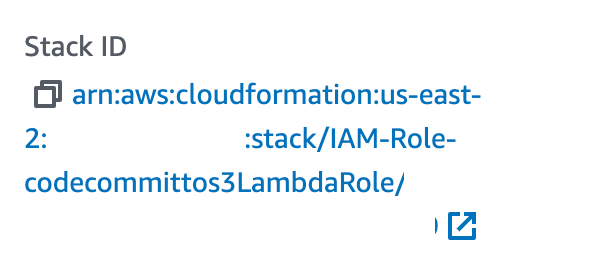
If the name of the stack changes the ARN should change as well. I also don’t like it when AWS tacks random nubmers onto the end of ARNs so they no longer match the name of the resource. That makes policies much harder to implement.
The policies I’m using currently are based on the stack name as has been demonstrated in various AWS documentation.
Perhaps it would be better to be basing these policies not on names but on ARNS and perhaps those ARNs should never change like an account ID in an database.
If that were a true analogy, then technically the name of the resource could change but the ARN would remain the same. But the whole point of my renaming above was to fix the name so it aligns with my naming conventions that enforce my policies.
So perhaps the root issue is that I should use the full ARN and not just the stack name in policies and then it would be easy to change the stack name but that doesn’t solve my reason for wanting to change the stack name in the first place. I wanted it to align with my resource name and my policies.
When you get down to it — the real problem I had — was that you can’t delete an AWS account for 30 days if you try to delete it incorrectly so it was hard to delete and re-add that stack — but I provided a work around in a post to get around that problem.
The other issue is the fact that you can’t delete KMS keys for 7 days minimum. But you can delete a stack and leave the KMS key and create a new stack with a new key.
The other thing is there’s a possibility to import resources into stacks which I wasn’t using at the time of this post. So what I could do now is delete the stack and redeploy it and import the resource. It’s a bit cumbersome but that would work.
Bottom line is — if you rename the CloudFormation stack I would prefer no aliases due to the policy issue and I would like to see the ARN name change to match. If there are any policies that use this ARN, the change should be blocked until the policies are adjusted.
But now I see the problem and I think renaming stack is probably not a good idea to be honest. I knew there was probably a reason.
If this is simply too complicated for AWS — fix the issue with deleting AWS Organizations accounts because that is the underlying problem that drove this post. It is pretty much the only time I’ve really needed to rename a stack.
As for moving things around between stacks — use Microtemplates and you won’t have that issue.
Follow for updates.
Teri Radichel | © 2nd Sight Lab 2023
About Teri Radichel:
~~~~~~~~~~~~~~~~~~~~
⭐️ Author: Cybersecurity Books
⭐️ Presentations: Presentations by Teri Radichel
⭐️ Recognition: SANS Award, AWS Security Hero, IANS Faculty
⭐️ Certifications: SANS ~ GSE 240
⭐️ Education: BA Business, Master of Software Engineering, Master of Infosec
⭐️ Company: Penetration Tests, Assessments, Phone Consulting ~ 2nd Sight Lab
Need Help With Cybersecurity, Cloud, or Application Security?
~~~~~~~~~~~~~~~~~~~~~~~~~~~~~~~~~~~~~~~~~~~~~~~~~~~~~~~~~~~~~
🔒 Request a penetration test or security assessment
🔒 Schedule a consulting call
🔒 Cybersecurity Speaker for PresentationFollow for more stories like this:
~~~~~~~~~~~~~~~~~~~~~~~~~~~~~~~~~~~~~~~~~~~~~~~~~~~~~~~~~~~~~
❤️ Sign Up my Medium Email List
❤️ Twitter: @teriradichel
❤️ LinkedIn: https://www.linkedin.com/in/teriradichel
❤️ Mastodon: @teriradichel@infosec.exchange
❤️ Facebook: 2nd Sight Lab
❤️ YouTube: @2ndsightlab


