
Refactoring Existing Code to Use IAM Naming Conventions: Part 2
ACM.43 Simplifying User and Group creation with reusable templates and functions
~~~~~~~~~~~~~~~~~~~~~~~~~~~~~~~~~~~~~~~~~~~~~~~~~~~~~~~~~~~
⚙️ Check out my series on Automating Cybersecurity Metrics. The Code.
🔒 Related Stories: IAM | AWS Security | Application Security
💻 Free Content on Jobs in Cybersecurity | ✉️ Sign up for the Email List
~~~~~~~~~~~~~~~~~~~~~~~~~~~~~~~~~~~~~~~~~~~~~~~~~~~~~~~~~~~
In the last post we looked at how a naming convention could simplify and streamline our code:
A common function to deploy CloudFormation stacks
In the last post I showed you how to use a common function for repetitive code. You can create a common function to deploy a CloudFormation stack to make it easier to deploy a stack and enforce a common naming standard.
That function can be used throughout our code, but I’m going to start with our iam folder. I created a folder called “stacks” and move the file with the common function into the stacks folder:
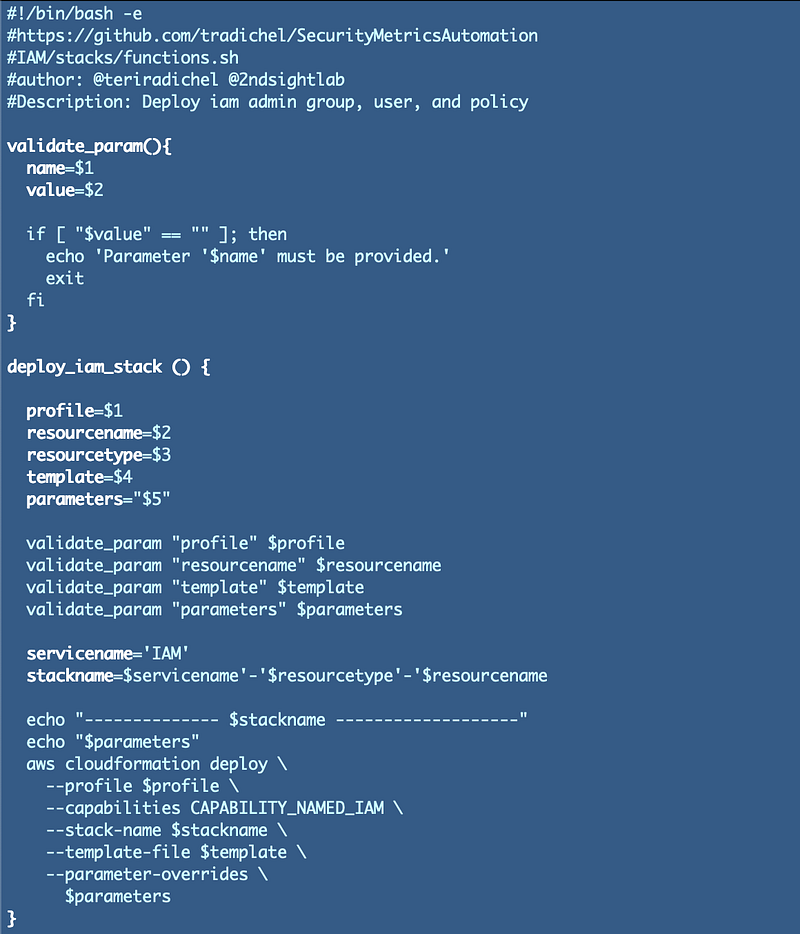
In order to use this common function in another template in the same directory you would include this line of code in your bash file:
source "stack_functions.sh"Then you can call the function in that file:
deploy_iam_stack $profile $username $rtype $template $parametersCommon templates for users and groups
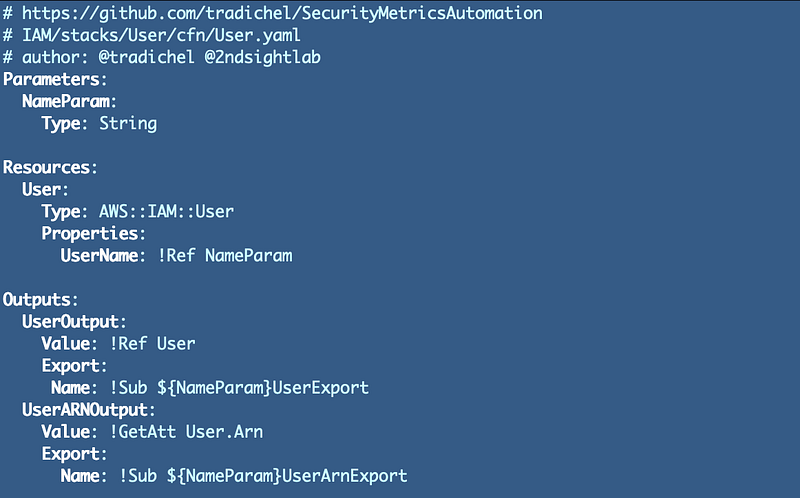
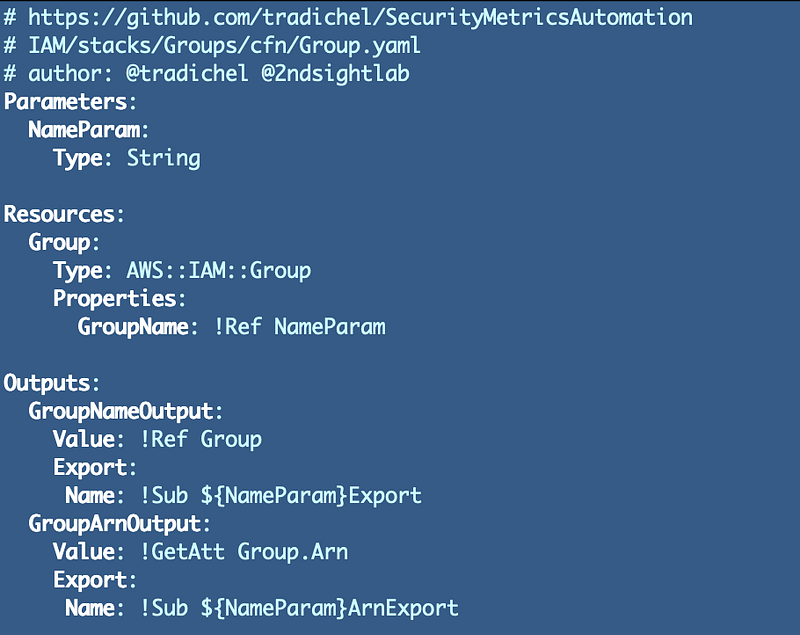
One of the things I also realized was repetitive while looking at my code was the creation of users and groups which both use very simple templates that don’t really vary. All I need to do is pass in a name.
I did have to remove the assignment of a group to make this work but it makes more sense to assign users to group separately anyway. You might want to change a group assignment without redeploying a user or a group. There’s a CloudFormation construct we can use to associate users and groups:
Here’s our user generic user template:
Our group template:
Add users to a group:
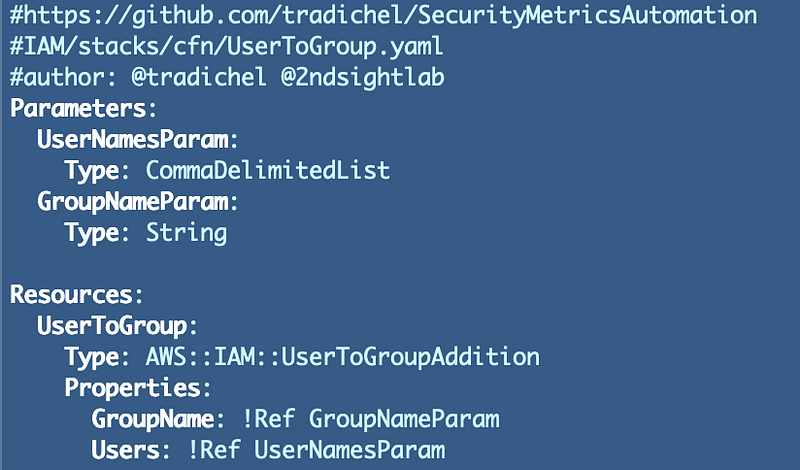
Note that I initially tested the above template adding one user and I have yet to test out the template with a list of users but I will before I check in the above code to the directory.
Limitations when using CloudFormation to deploy users
Whether I’m creating an IAM administrator, KMS administrator, or developer I can use the same User template. This works or me because I have a small organization. If you have a very large organization be aware of stack limits in CloudFormation:
You can increase the stack limit but I have also noticed that CloudFormation tends to slow down when you have a lot of stacks. I’m not sure if that problem still exists because I haven’t pushed the limits lately.
Also, if you move your user creation to an account that is only used to create users you’ll have more available stacks. You might also have a separate user creation account for each line of business. Those are just ideas. As an architect you need to think about how to solve problems with the capacity available to you regardless of what type of technology you use.
A common function to deploy our user template
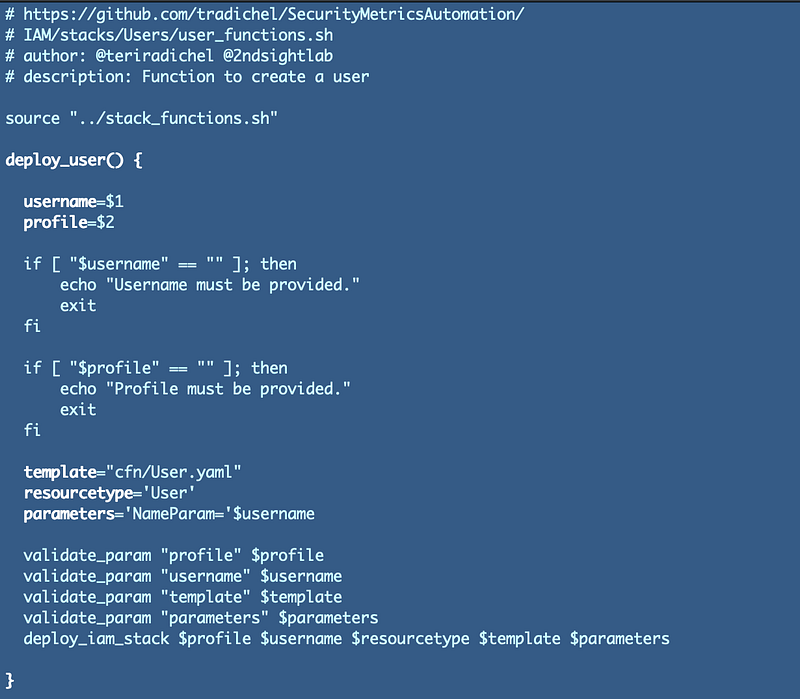
Next I can create a common function to deploy the user template. We only need the user name and a CLI profile. See prior posts for information about using CLI profiles.
Notice below that I am including the line of code I explained above using the source command that allows me to call the function in the stack_functions.sh file. Since that file is one directory up I add “../” in front of the file name to create a relative path to the file. I’m calling the validate_param and the deploy_iam_stack functions from the stack_functions.sh file.
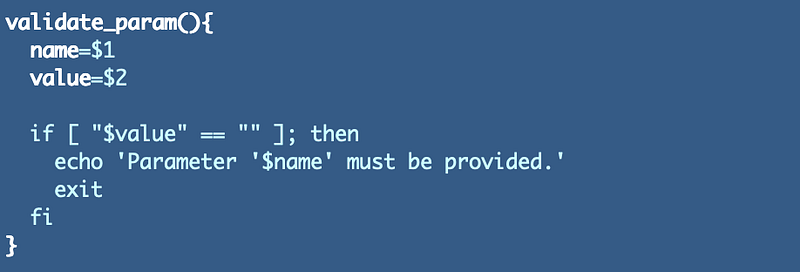
Notice I am calling the validate_param function I added to the stack_functions.sh so I don’t have to write this code block over and over.
Next I can alter my deployment script to create any number of users:
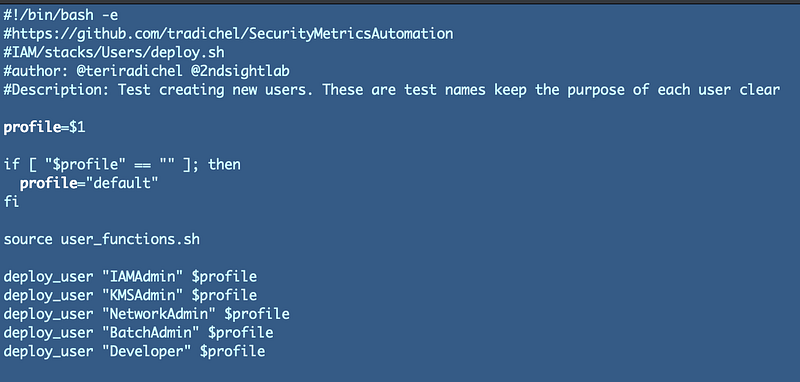
Normally in an organization your users would be names like: tradichel, mjordan, wgretzky, sbird, or whatever your naming conventions are for individuals. I’m just using names like IAMAdmin or KMSAdmin to make it easier to follow along with what I’m doing.
Create similar functions for groups and adding users to groups
You can follow the same process as above to create functions to deploy groups and users of groups. When you have a unique template name that is specific to a stack such as an IAM Policy, you can call the generic function in stack_functions.sh to deploy a specific unique template.
The end result is commonly named resources and it should be easier to find your code.
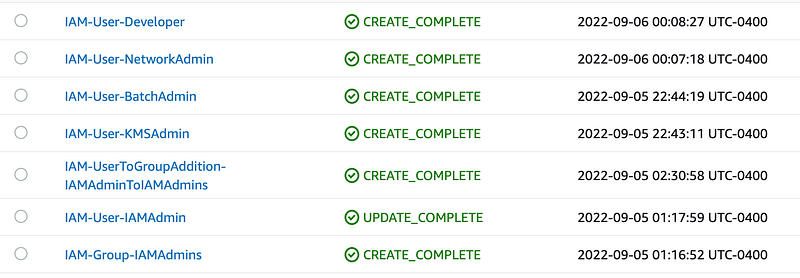
If you add the repository and template to the top of your CloudFormation files you will be able to click on a stack, then Template, and easily find the stack that deployed the code. If you are counting on the information below to be correct, make sure you add it to the checklist of things your QA team checks before code gets deployed to production.
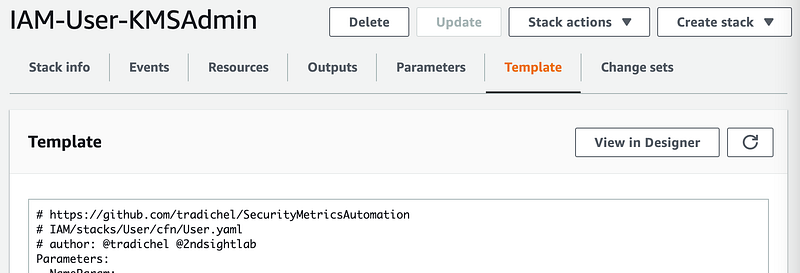
Once you know what code deployed a stack you can check for drift — when something in production or any other environment doesn’t match what is in source control because someone made a change outside your normal deployment process.
Note that I’m not sure I’m done making changes to this code so follow along as I clean up a bit more and get back to what I was doing — creating the rest of my batch job process. Eventually, I might end up moving all of this into batch jobs but it’s easiest to start with CLI commands. I can potentially translate my functions and into batch jobs. Follow along to see how it turns out.
Follow for updates.
Teri Radichel | © 2nd Sight Lab 2022
About Teri Radichel:
~~~~~~~~~~~~~~~~~~~~
⭐️ Author: Cybersecurity Books
⭐️ Presentations: Presentations by Teri Radichel
⭐️ Recognition: SANS Award, AWS Security Hero, IANS Faculty
⭐️ Certifications: SANS ~ GSE 240
⭐️ Education: BA Business, Master of Software Engineering, Master of Infosec
⭐️ Company: Penetration Tests, Assessments, Phone Consulting ~ 2nd Sight Lab
Need Help With Cybersecurity, Cloud, or Application Security?
~~~~~~~~~~~~~~~~~~~~~~~~~~~~~~~~~~~~~~~~~~~~~~~~~~~~~~~~~~~~~
🔒 Request a penetration test or security assessment
🔒 Schedule a consulting call
🔒 Cybersecurity Speaker for PresentationFollow for more stories like this:
~~~~~~~~~~~~~~~~~~~~~~~~~~~~~~~~~~~~~~~~~~~~~~~~~~~~~~~~~~~~~
❤️ Sign Up my Medium Email List
❤️ Twitter: @teriradichel
❤️ LinkedIn: https://www.linkedin.com/in/teriradichel
❤️ Mastodon: @teriradichel@infosec.exchange
❤️ Facebook: 2nd Sight Lab
❤️ YouTube: @2ndsightlab


