g user interface. It shows the initial state <code>0</code>. Each click of the <code>Increase</code> button will increase the count by one, and each click of the <code>Decrease</code> button will decrease count by one.</p><figure id="be4f"><img src="https://cdn-images-1.readmedium.com/v2/resize:fit:800/1*i1-RniYENVqHeA3xme8V5w.png"><figcaption></figcaption></figure><p id="2066">We can use <code>useState</code> to achieve this in <code>src/App.js</code>:</p>
<figure id="1f57">
<div>
<div>
<iframe class="gist-iframe" src="/gist/JenniferFuBook/460fa177edd5fc238f9de7fa07bc4f94.js" allowfullscreen="" frameborder="0" height="undefined" width="undefined">
</div>
</div>
</figure></iframe></div></div></figure><p id="86be">Now we use Recoil’s atom to do the same user interface. The atom, <code>countState</code>, is defined on lines 5-8. It is used by line 11. That’s it.</p>
<figure id="056e">
<div>
<div>
<iframe class="gist-iframe" src="/gist/JenniferFuBook/8782b60d3c43c5e53a55bbc4eeb0847b.js" allowfullscreen="" frameborder="0" height="undefined" width="undefined">
</div>
</div>
</figure></iframe></div></div></figure><p id="2378">What is an atom?</p><p id="656b">It is a shared, writable, Recoil state that includes a piece of data that it manages. Components can subscribe to atoms and will then be re-rendered when related atoms change.</p><p id="f2e7">An atom has two props:</p><ul><li><code>key</code>: A string used to identify the atom internally. This string should be unique with respect to other atoms and selectors in the entire application.</li><li><code>default</code>: The initial value of an atom.</li></ul><p id="a83f">The following are hooks that interact with atoms:</p><ul><li><a href="https://recoiljs.org/docs/api-reference/core/useRecoilState"><code>useRecoilStat</code>e()</a>: This hook is used to read and write to an atom. It subscribes the calling components to the atom.</li><li><a href="https://recoiljs.org/docs/api-reference/core/useRecoilValue"><code>useRecoilValu</code>e()</a>: This hook is used to read an atom. It subscribes the calling components to the atom.</li><li><a href="https://recoiljs.org/docs/api-reference/core/useSetRecoilState"><code>useSetRecoilStat</code>e()</a>: This hook is used to write to an atom.</li><li><a href="https://recoiljs.org/docs/api-reference/core/useResetRecoilState"><code>useResetRecoilStat</code>e()</a>: This hook is used to reset an atom to its default value.</li><li><a href="https://recoiljs.org/docs/api-reference/core/useRecoilCallback"><code>useRecoilCallbac</code>k()</a>: This hook is used to construct a callback that can read an atom and asynchronously update it.</li></ul><h1 id="b2bf">Selectors</h1><p id="3a79">Atoms work well to store states. Selectors are pure functions used to calculate derived states. Selectors avoid redundant states, usually obviating the need for reducers to keep states in sync and valid.</p><p id="8bbf">The proper design is to use atoms to store a minimal set of states, while everything else is efficiently computed as a function of atoms. Components can subscribe to selectors just like atoms and will then be re-rendered when selector-derived states change.</p><p id="1bc5">What is a selector? According to the <a href="https://recoiljs.org/docs/introduction/core-concepts/">official documentation</a>:</p><blockquote id="5437"><p>“A selector is a pure function that accepts atoms or other selectors as input. When these upstream atoms or selectors are updated, the selector function will be re-evaluated.”</p></blockquote><p id="4cf9">A selector has these props:</p><ul><li><code>key</code>: A string used to identify the atom internally. This string should be unique with respect to other atoms and selectors in the entire application.</li><li><code>get</code>: A function that is passed as an object, <code>{ get }</code>, where <code>get</code> is a function to retrieve values from other atoms or selectors. All atoms or selectors passed to this function will be implicitly added to a list of dependencies for the selector.</li><li><code>set?</code>: An optional function that returns a new writeable state. It is passed as an object, <code>{ get, set }</code>, and a new value. <code>get</code> is a function to retrieve values from other atoms or selectors. <code>set</code> is a function to set an atom value, where the first parameter is the atom name and the second parameter is the new value.</li></ul><p id="5223">We add a selector to generate derived state in <code>src/App.js</code>:</p>
<figure id="f8a9">
<div>
<div>
<iframe class="gist-iframe" src="/gist/JenniferFuBook/91610571bc80e4ffd7f89e5192e7d468.js" allowfullscreen="" frameborder="0" height="undefined" width="undefined">
</div>
</div>
</figure></iframe></div></div></figure><p id="74ea">The selector on lines 10-13 defines the derived <code>doubleCountState</code>, which is used by line 17. This value is displayed as double count value on line 23.</p><p id="f358">Optionally, selectors can set atom values. We add an input field in the user interface. It reflects the <code>doubleCountState</code> selector state. When it gets a user input, this new value is set to the <code
Options
countState</code> atom state.</p><figure id="3801"><img src="https://cdn-images-1.readmedium.com/v2/resize:fit:800/1*k4xvGYGwmxcx-smwnf18rw.png"><figcaption></figcaption></figure><p id="198c">Here is an example in <code>src/App.js</code>:</p>
<figure id="bc3a">
<div>
<div>
<iframe class="gist-iframe" src="/gist/JenniferFuBook/46e74d1116a7cc2db567de1fd0e50c7f.js" allowfullscreen="" frameborder="0" height="undefined" width="undefined">
</div>
</div>
</figure></iframe></div></div></figure><p id="560b">The selector on lines 15-19 defines the derived <code>inputState</code>, which is used by line 24. Its value is the same as the selector’s: <code>doubleCountState</code> (defined on line 17).</p><p id="0484">When a user changes the input value, <code>onChange</code> (line 29) will invoke <code>setInput</code> (line 24) and then set the <code>countState</code> atom (line 18). The atom change will cause the re-rendering of every related value.</p><h1 id="c090">Asynchronous Selectors</h1><p id="1580">Recoil provides a way to map states (atoms) and derived states (selectors) to React components via a data-flow graph. What if the <code>get</code> functions in selectors are asynchronous? It works the same way as the synchronous data flow. Simply make the <code>get</code> function return a promise to a value.</p><p id="9a0b">Here is the revised <code>src/App.js</code>:</p>
<figure id="1776">
<div>
<div>
<iframe class="gist-iframe" src="/gist/JenniferFuBook/b9db3582ee46945c1e221a9459a3791a.js" allowfullscreen="" frameborder="0" height="undefined" width="undefined">
</div>
</div>
</figure></iframe></div></div></figure><p id="1e5a">On lines 12-18, we rewrite the <code>get</code> function to return a promise. Everything else remains the same.</p><p id="f3be">In fact, if you replace lines 12-18 with the following snippet to wait for the promise, it works too:</p>
<figure id="d21f">
<div>
<div>
<iframe class="gist-iframe" src="/gist/JenniferFuBook/09cd0dfa172e375ebd3691bffa672181.js" allowfullscreen="" frameborder="0" height="undefined" width="undefined">
</div>
</div>
</figure></iframe></div></div></figure><p id="3188">Wait a minute. Run <code>npm start</code>, and we encounter this error:</p><figure id="7da5"><img src="https://cdn-images-1.readmedium.com/v2/resize:fit:800/1*MUEC0JP-bC-UKpSmm8oKRA.png"><figcaption></figcaption></figure><p id="419d"><code>RecoilRoot</code> requires a fallback user interface for asynchronous selectors. We add it to <code>src/index.js</code> on lines 12 and 14:</p>
<figure id="d032">
<div>
<div>
<iframe class="gist-iframe" src="/gist/JenniferFuBook/b96d6ba1825b5c2e6c5b3d137965e537.js" allowfullscreen="" frameborder="0" height="undefined" width="undefined">
</div>
</div>
</figure></iframe></div></div></figure><p id="a528">Now, it works!</p><p id="b021">It is always a good idea to have an <code>ErrorBoundary</code> (lines 11 and 15) when things go dynamic. How to create an error boundary is detailed in <a href="https://readmedium.com/dynamic-import-code-splitting-lazy-loading-and-error-boundaries-fff57e63f6c4">a previous article</a>.</p><h1 id="a418">Recoil ESLint</h1><p id="3475">Are you using <a href="https://www.npmjs.com/package/eslint-plugin-react-hooks">eslint-plugin-react-hooks</a> in your project? If yes, it is recommended to add <code>useRecoilCallback</code> to the list of <code>additionalHooks</code> (line 9).</p>
<figure id="ad91">
<div>
<div>
<iframe class="gist-iframe" src="/gist/JenniferFuBook/0e9be45ffe4aef364bfcda8ada48b6b2.js" allowfullscreen="" frameborder="0" height="undefined" width="undefined">
</div>
</div>
</figure></iframe></div></div></figure><h1 id="c063">Conclusion</h1><p id="09c6">Recoil is the latest state management library provided by Facebook. Although it is still experimental, it shows a lot of promising features to replace Context API for state management.</p><p id="41a5">We have been using Recoil for a while. It is easy to use, and allows us to share states across multiple components/files, using syntax as simple as <code>useState</code>. <a href="https://jenniferfubook.github.io/react-components/?path=/story/introduction--page">This storybook</a> includes a few examples using Recoil.</p><p id="448e">The states of atoms and selectors can be defined or undefined, primitives values, or object values. The values of selectors are automatically derived from atoms or other selectors.</p><p id="3105">There are also various ways to structure atoms and selectors. They can be grouped into one file, or classified into a few files, depending on the programming logic. Recoil provides freedom from existing technical constraints.</p><p id="dcad">Happy coding!</p><p id="e82d">Thanks for reading. I hope this was helpful. You can see my other Medium publications <a href="https://readmedium.com/jennifer-fus-web-development-publications-1a887e4454af">here</a>.</p><p id="fb1a"><i>Note: Jonathan Ma contributed to part of this article.</i></p></article></body>
Recoil: A New State Management Library Moving Beyond Redux and the Context API
A full introduction to Recoil, an experimental state management library for React applications
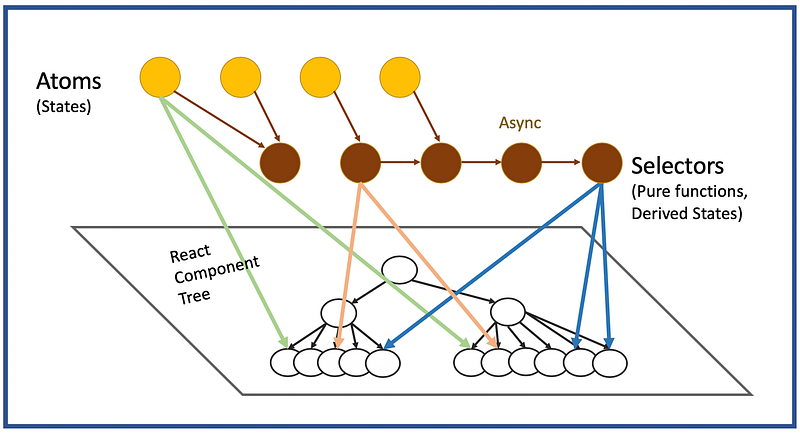
Recoil data-flow graph for state management — Photo by the author.
Available since May 2015, Redux is a predictable state container for JavaScript applications. It is a single source of truth, its state is read-only, and changes are made with pure functions. Redux has a nice browser debugging extension for easy debugging. The drawback is the complex boilerplate to start with. It may not be compatible with React’s upcoming concurrent mode.
Context API was introduced by React 16.3 in May 2018. Along with React Hooks (useContext), it provides a way to pass data through the React component tree without having to pass props down manually at every level. It is designed to share global data, such as the current authenticated user, theme, or preferred language. Context API and React Hooks provide a new approach to state management. Debugging is hard and there are performance issues when rendering multiple dynamic items.
So should you go with Redux or Context API?
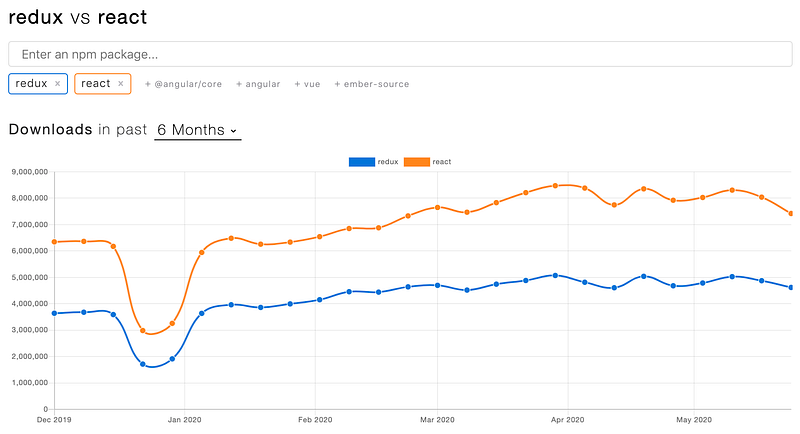
After a couple of years of battle, with many articles announcing Redux is dead, not dead yet, etc., both are alive and adopted by many applications. There is no clear winner yet.
The following is an NPM trend comparison. Both of them are still in heavy use:
Now we have a newcomer.
Recoil is a brand new experimental JavaScript state management library developed by Facebook. It has been available since May 2020.
Problem Addressed
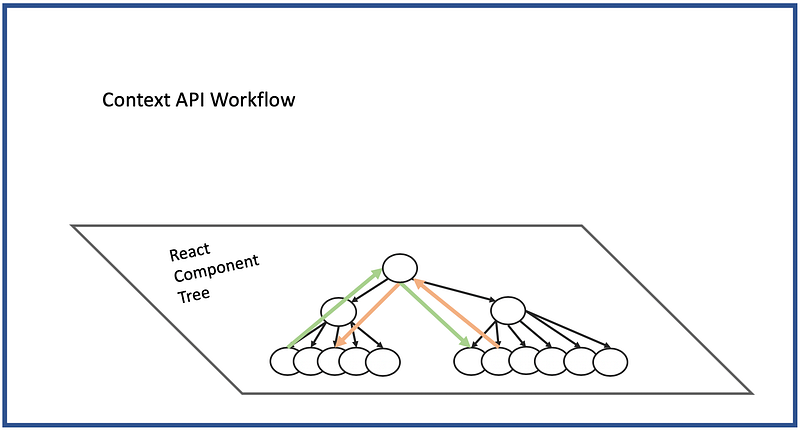
Recoil addresses many of the problems larger applications encounter when using the existing Context API:
The component state can only be shared by pushing it up to the common ancestor, but this might include a huge tree that then needs to re-render.
Context can only store a single value — not an indefinite set of values, each with its own consumers.
Both of these make it challenging to code-split the top of the tree (where the state has to live) from the leaves of the tree (where the state is used).
Recoil defines a directed graph orthogonal, but it is also intrinsic and attached to the React component tree (see the Recoil data-flow graph at the top). In this data-flow graph, state changes flow from the roots of the graph (atoms) through pure functions for derived states (selectors) and into components.
With this architecture design, Recoil uses a React-style solution to resolve Context API issues. This solution is easy to use, with the possibility of compatibility with concurrent mode and other new React features as they become available. In addition, more advanced debugger options are on the way, such as time-traveling, undo capability, persistent data, etc.
Recoil Setup
Let’s see how Recoil works in Create React App (npx create-react-app my-app). First, install Recoil with the command npm i recoil. Then the package becomes part of dependencies in package.json:
"dependencies":{"recoil":"0.1.2"}
Change src/App.css to this for minimal styling:
Components that use Recoil hooks must be wrapped with <RecoilRoot>. In the following src/index.js, add RecoilRoot on lines 10 and 12:
Now we are ready to see Recoil examples.
Atoms
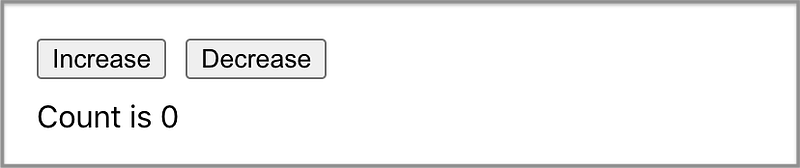
We want to create the following user interface. It shows the initial state 0. Each click of the Increase button will increase the count by one, and each click of the Decrease button will decrease count by one.
We can use useState to achieve this in src/App.js:
Now we use Recoil’s atom to do the same user interface. The atom, countState, is defined on lines 5-8. It is used by line 11. That’s it.
What is an atom?
It is a shared, writable, Recoil state that includes a piece of data that it manages. Components can subscribe to atoms and will then be re-rendered when related atoms change.
An atom has two props:
key: A string used to identify the atom internally. This string should be unique with respect to other atoms and selectors in the entire application.
default: The initial value of an atom.
The following are hooks that interact with atoms:
useRecoilState(): This hook is used to read and write to an atom. It subscribes the calling components to the atom.
useRecoilValue(): This hook is used to read an atom. It subscribes the calling components to the atom.
useRecoilCallback(): This hook is used to construct a callback that can read an atom and asynchronously update it.
Selectors
Atoms work well to store states. Selectors are pure functions used to calculate derived states. Selectors avoid redundant states, usually obviating the need for reducers to keep states in sync and valid.
The proper design is to use atoms to store a minimal set of states, while everything else is efficiently computed as a function of atoms. Components can subscribe to selectors just like atoms and will then be re-rendered when selector-derived states change.
“A selector is a pure function that accepts atoms or other selectors as input. When these upstream atoms or selectors are updated, the selector function will be re-evaluated.”
A selector has these props:
key: A string used to identify the atom internally. This string should be unique with respect to other atoms and selectors in the entire application.
get: A function that is passed as an object, { get }, where get is a function to retrieve values from other atoms or selectors. All atoms or selectors passed to this function will be implicitly added to a list of dependencies for the selector.
set?: An optional function that returns a new writeable state. It is passed as an object, { get, set }, and a new value. get is a function to retrieve values from other atoms or selectors. set is a function to set an atom value, where the first parameter is the atom name and the second parameter is the new value.
We add a selector to generate derived state in src/App.js:
The selector on lines 10-13 defines the derived doubleCountState, which is used by line 17. This value is displayed as double count value on line 23.
Optionally, selectors can set atom values. We add an input field in the user interface. It reflects the doubleCountState selector state. When it gets a user input, this new value is set to the countState atom state.
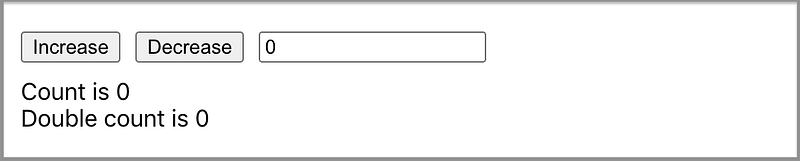
Here is an example in src/App.js:
The selector on lines 15-19 defines the derived inputState, which is used by line 24. Its value is the same as the selector’s: doubleCountState (defined on line 17).
When a user changes the input value, onChange (line 29) will invoke setInput (line 24) and then set the countState atom (line 18). The atom change will cause the re-rendering of every related value.
Asynchronous Selectors
Recoil provides a way to map states (atoms) and derived states (selectors) to React components via a data-flow graph. What if the get functions in selectors are asynchronous? It works the same way as the synchronous data flow. Simply make the get function return a promise to a value.
Here is the revised src/App.js:
On lines 12-18, we rewrite the get function to return a promise. Everything else remains the same.
In fact, if you replace lines 12-18 with the following snippet to wait for the promise, it works too:
Wait a minute. Run npm start, and we encounter this error:
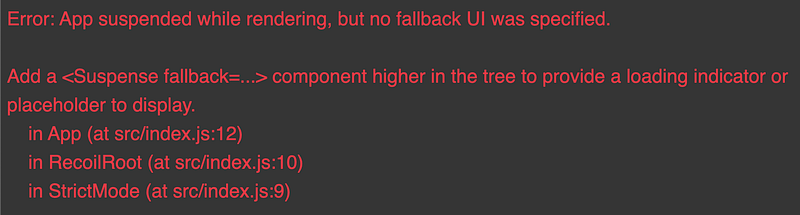
RecoilRoot requires a fallback user interface for asynchronous selectors. We add it to src/index.js on lines 12 and 14:
Now, it works!
It is always a good idea to have an ErrorBoundary (lines 11 and 15) when things go dynamic. How to create an error boundary is detailed in a previous article.
Recoil ESLint
Are you using eslint-plugin-react-hooks in your project? If yes, it is recommended to add useRecoilCallback to the list of additionalHooks (line 9).
Conclusion
Recoil is the latest state management library provided by Facebook. Although it is still experimental, it shows a lot of promising features to replace Context API for state management.
We have been using Recoil for a while. It is easy to use, and allows us to share states across multiple components/files, using syntax as simple as useState. This storybook includes a few examples using Recoil.
The states of atoms and selectors can be defined or undefined, primitives values, or object values. The values of selectors are automatically derived from atoms or other selectors.
There are also various ways to structure atoms and selectors. They can be grouped into one file, or classified into a few files, depending on the programming logic. Recoil provides freedom from existing technical constraints.
Happy coding!
Thanks for reading. I hope this was helpful. You can see my other Medium publications here.
Note: Jonathan Ma contributed to part of this article.