
Serverless User management system for React.
Complete React User Mgmt System with AWS Cognito
Dead simple, ready out of the box, User management system, including UI pages and components for React!

Pre-requisite:
- You just need an AWS Cognito User Pool, but don’t worry if you don’t have one yet; it literally takes less than a minute to create one, you can follow the guide I’ve written to help you out:
Let’s get to it!
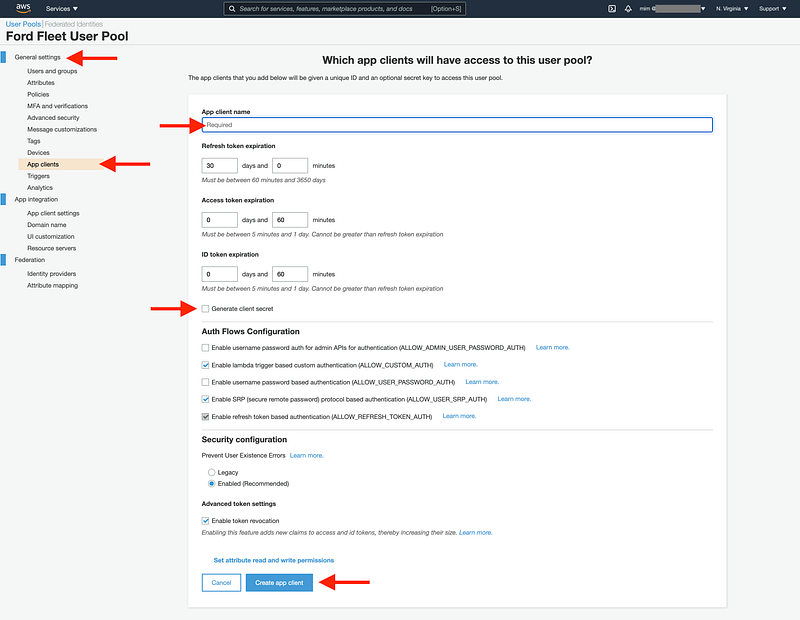
- If you haven’t done yet, go to your Cognito User Pool and create a new App Client by selecting your user pool and then select the
App Clientson the menu on the left panel. just enter a name and make sure you un-check the checkbox that readsGenerate client secret( you’d need this if you want to authenticate the calls yourself, server-side ), click on create! in the next window, please take note of yourApp Client IDas you’ll need it soon. You also need theuserPoolIdwhich you can find by clicking on theGeneral settingstab on the left panel as well. Take a note of that value too.
- Create a React App to start ( in your terminal run:
npx create-react-app best-app-eva) - CD to your newly created project (
cd best-app-eva) and install these dependencies:npm i -P aws-amplify @aws-amplify/ui-react, don’t be intimidated by theamplifyin the dependency name! We are not going to use any fancy features of it ( I’m not a huge fan of them myself! ), we are just going to take advantage of its User-Management UI components, which are awesomely available and ready to be used out of the box, saving you a lot of time and adding a lot of great features for free! Amplify in its entirety can also be pretty awesome for certain projects, but here we will not use most of its core functionalities. - Open the file
./src/App.jsin your IDE and make the following changes (added lines are highlighted) or you can simply replace the content of this file with the provided code, here we are using a HOC to easily add all the necessary dialogues (there are other ways to do this too); you also see that we are using AmplifySignOut component to let the users sign-out once they are logged in, you can change the layout and styling of all the component as you wish:
import logo from './logo.svg';
import './App.css';
import React from 'react';
import { withAuthenticator, AmplifySignOut } from '@aws-amplify/ui-react';
import Amplify from "aws-amplify";

Amplify.configure({
  Auth: {
    mandatorySignIn: true,
    region: 'us-east-1',
    userPoolId: 'CHANGE ME 2 THE VALUE FROM STEP 1!',
    userPoolWebClientId: 'CHANGE ME 2 THE VALUE FROM STEP 1!'
  }
})

function App() {
  return (
    <div className="App">
      <AmplifySignOut/>
      <header className="App-header">
        <img src={logo} className="App-logo" alt="logo" />
        <p>
          Edit <code>src/App.js</code> and save to reload.
        </p>
        <a
          className="App-link"
          href="https://reactjs.org"
          target="_blank"
          rel="noopener noreferrer"
        >
          Learn React
        </a>
      </header>
    </div>
  );
}

export default withAuthenticator(App);
And that’s it!
For real! run the project ( npm start ) and create a user and login and test everything! You have all the needed user-management components and mechanisms added to your app, as easy as that!
Plus, from now on, all your API calls can easily carry the authentication tokens and cookies that you can use to authenticate the user and protect your APIs ( we can cover those in a separate article, let me know if you are interested! ).
Of course, you can continue to add more; for instance, if you want to have access to the user and authentication states ( like user-name, email, etc.) in your Front-End app, you can easily do that too ( Interested to learn more? lmk! )

Get in touch!
I’m always happy to connect with others interested in new technologies like myself, so please don’t hesitate to get in touch and start a conversation! Connect with me on LinkedIn. Follow me on Twitter.
Take care, - mim

Join FAUN: Website 💻|Podcast 🎙️|Twitter 🐦|Facebook 👥|Instagram 📷|Facebook Group 🗣️|Linkedin Group 💬| Slack 📱|Cloud Native News 📰|More.
If this post was helpful, please click the clap 👏 button below a few times to show your support for the author 👇